Customer Applet
Purpose and Overview
Who Benefits from This Applet?
Sales Teams:
- Access complete customer profiles quickly
- View customer credit status before sales
- Identify customer categories for targeted selling
Credit Controllers:
- Manage customer credit terms and limits
- Monitor credit utilization across customers
- Configure credit policies by customer segment
Account Managers:
- Maintain accurate customer information
- Track customer relationships and history
- Manage conglomerate holdings and subsidiaries
Operations Teams:
- Import customer data in bulk
- Export customer lists for analysis
- Merge duplicate customer records
Finance Teams:
- Set up billing and payment terms
- Monitor customer creditworthiness
- Generate customer financial reports
What Problems Does This Solve?
Traditional Customer Management Challenges:
- Scattered customer data across systems
- Inconsistent credit term management
- Duplicate customer records
- Manual data entry for bulk customers
The Customer Applet Solution:
- Centralized customer database - Single source of truth
- Credit management - Terms and limits in one place
- Conglomerate tracking - Link related companies together
- Bulk import/export - Efficient data management
- Entity merging - Clean up duplicates systematically
Key Features Overview
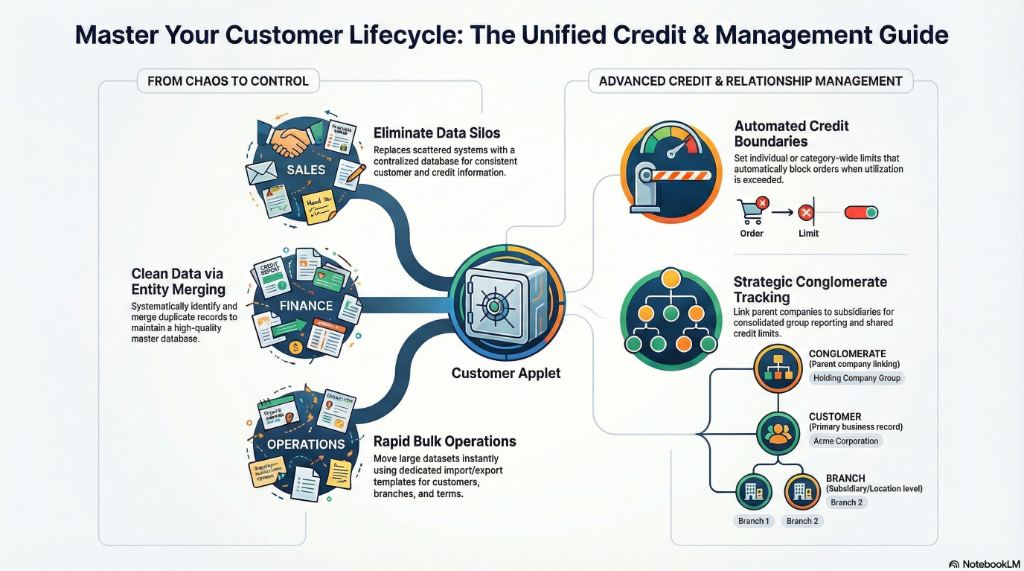
Key Concepts
Customer Data Structure
| Concept | Description | Example |
|---|---|---|
| Customer | Individual or company record | Acme Corporation |
| Category | Classification grouping | Retail, Wholesale, VIP |
| Conglomerate | Parent company linking | Holding Company Group |
| Credit Term | Payment period rules | Net 30, Net 60 |
| Credit Limit | Maximum credit allowed | RM 50,000 |
Customer Hierarchy
Conglomerate (Parent)
├── Customer Company A
│   ├── Branch 1
│   └── Branch 2
├── Customer Company B
└── Customer Company C
Quick Start Guide
For Sales: Find Customer Information
Goal: Quickly access customer profile and credit status
- Navigate: Go to Customer Listing from the sidebar
- Search: Enter customer name, code, or phone
- View Profile: Click to see full customer details
- Check Credit: View credit term and limit information
For Credit Controller: Set Up Credit Terms
Goal: Configure customer payment terms
- Navigate: Go to Credit Term Listing
- Create New: Click "+" to add credit term
- Configure:
- Set Term Name (e.g., “Net 30”)
- Define Days for payment due
- Add Description
- Save: Apply to customers as needed
For Operations: Import Customers in Bulk
Goal: Add multiple customers from a file
- Navigate: Go to File Listing (File Import)
- Download Template: Get the customer import template
- Prepare Data: Fill in customer details
- Upload: Import the completed file
- Validate: Review detected records
- Process: Confirm and create all customers
Customer Listing
Managing Customer Profiles
The main customer listing provides:
- Search & Filter - Find customers quickly
- Create Customer - Add new customer records
- Edit Customer - Update existing information
- View Details - Full profile with related data
Key Customer Fields
| Field | Description | Required |
|---|---|---|
| Customer Code | Unique identifier | Yes |
| Customer Name | Display name | Yes |
| Category | Customer classification | No |
| Credit Term | Default payment terms | No |
| Credit Limit | Maximum credit | No |
| Contact Info | Phone, email, address | No |
| Tax ID | Business registration | No |
Customer Categories
Organizing Customers
Group customers for:
- Pricing - Different price lists by category
- Reporting - Segment-based analysis
- Marketing - Targeted campaigns
- Policies - Category-specific rules
Category Examples
- Retail Customers
- Wholesale Distributors
- Government Agencies
- VIP/Premium Customers
- New Customers
Credit Terms
Payment Term Configuration
Define when payment is due:
- Net 30 - Due within 30 days
- Net 60 - Due within 60 days
- COD - Cash on delivery
- Prepaid - Payment before delivery
Credit Term Fields
| Field | Description |
|---|---|
| Term Code | Unique identifier |
| Term Name | Display name |
| Days Due | Number of days |
| Description | Additional details |
Credit Limits
Managing Credit Boundaries
Set maximum credit exposure:
- Per Customer - Individual limits
- Per Category - Category-wide defaults
- By Currency - Multi-currency limits
Limit Monitoring
- View current utilization
- Alert on approaching limits
- Block orders exceeding limits
Conglomerates
Linking Related Companies
Track corporate relationships:
- Parent Company - Holding company
- Subsidiaries - Child companies
- Combined Credit - Group-level limits
- Consolidated Reporting - Group analytics
File Import/Export
Bulk Data Operations
Import files for:
- Customers - Main customer records
- Customer Branches - Branch locations
- Customer Companies - Company profiles
- Customer Employees - Contact persons
- Customer Categories - Category definitions
- Credit Terms - Payment terms
- Credit Limits - Credit boundaries
Export Capabilities
- Export customer data to Excel/CSV
- Filtered exports based on criteria
- Scheduled export options
Entity Merging
Cleaning Duplicate Records
Merge duplicate customers:
- Identify Duplicates - Find matching records
- Select Master - Choose record to keep
- Merge Data - Combine information
- Process - Execute the merge
Entity Merge Processing
Track and process pending merges in bulk.
Configuration & Settings
Default Settings
Configure default values for new customers.
Field Configuration
Customize visible fields and mandatory inputs.
Business Nature
Define types of business for customer classification.
Printable Format Settings
Customize document printouts for customers.
Entity Branch Group
Configure branch grouping rules.
Webhook Configuration
Integrate with external systems for customer updates.
Feature Visibility
Control which features appear for users.
Permissions
Control access levels:
- View - Read customer data
- Create - Add new customers
- Edit - Modify existing records
- Delete - Remove customers
- Admin - Full configuration access
Personalization
Personal Default Settings
Save your preferred filters and view defaults.
Sidebar Customization
Arrange menu items to match your workflow.
FAQ
Q: How do I prevent duplicate customers? A: Use Entity Merging to find and merge duplicates. The system can also warn on similar names during creation.
Q: Can I import customers from another system? A: Yes, use the File Import feature with the provided template format.
Q: How do credit limits work with conglomerates? A: Credit can be set at individual or group level. Group limits apply across all subsidiaries.
Q: What happens when I merge customers? A: All transactions from the merged customer transfer to the master record. The duplicate is deactivated.
Q: Can I have different credit terms per branch? A: Yes, each branch can have its own credit term configuration.
Q: How do I export customer data for reporting? A: Use the File Export feature to download customer data in Excel format.