Delivery Installation applet
Turn what is due for delivery into driver jobs and trips. Lines from sales orders, invoices and delivery orders reach this desk only when someone presses Send To Queue on the document; finalising the document creates no queue row by itself, and a shipment keyed in or imported can stand in for a document. Drivers do not work here; they update the same jobs from the Driver applet. And a line reads Fully Delivered once all of it is on jobs and those jobs are put on a trip, before anything has actually arrived.
Your job, and the screen for it
| The job | Screen or tab | Read |
|---|---|---|
| Bring a document’s lines to the delivery desk — Send To Queue on the sales order, invoice or delivery order; finalising creates no queue row | Job Sales Order, Job Sales Invoice, Job Delivery Order | Before you can use it; Which queue am I looking at? |
| Deliver goods no document describes | Import Shipment, Shipment | What the Shipment listing will not show you |
| Turn shipments into driver jobs | Shipment › Create Jobs (Normal Mode or Path Optimization Mode) | Create Jobs |
| Put jobs on a trip for a driver and a vehicle | Delivery Job › Add to Trip; Trips; Trip Calendar | Screens and menus; What a job save actually writes |
| Confirm a delivery arrived — Fully Delivered on a line means it is on jobs, not that it arrived | Trips › the trip › Jobs tab › the job (Job Event, Job Items) | Checking that a delivery arrived |
| Set up drivers, vehicles and regions | Driver Listing, Vehicle Listing, Delivery Region Listing | Before you can use it |
Overview
The Delivery Installation applet is the back-office dispatch console of BigLedger’s delivery module. It takes the lines that are due for delivery from Sales Orders, Sales Invoices and Delivery Orders (through the pick-pack queue — rows that a user sends from the document’s Delivery Details panel with Send To Queue; FINAL alone creates none), or from Shipments that were keyed in or imported from a file, and turns them into delivery Jobs with Create Delivery Job. The same button, doing the same thing, also sits on the Pick Pack Queue screens of the Sales Order, Sales Invoice and Delivery Order applets, so a job can be created without opening this applet. A pick-pack row that was instead sent on to the warehouse picking queue (Send To Warehouse Picking Queue, Sales Order applet → Warehouse Management applet) is deleted from the pick-pack queue and never reaches this applet. A dispatcher groups Jobs onto a Trip with a driver, a vehicle and a delivery region, then follows the trip through Delivery Arranged → Ready To Ship → Out For Delivery → Complete (or Cancelled). Every status change is written as a job event. The source document’s delivery-tracking status is also rewritten at every step, but what it shows is coarser than progress: from Add to Trip a document-sourced line reads Fully Delivered once none of it is left in the pick-pack queue (Partially while some is), and completing the job does not change it (see Lifecycle and effects).
Drivers do not work in this applet: they update their jobs in the Delivery And Installation Driver applet (and its mobile build), which drives the same job and trip status changes from the driver’s side.
Where it fits
| Direction | Applet / object | Relationship |
|---|---|---|
| Upstream | Sales Order (Internal), Sales Invoice (Internal), Delivery Order (Internal) | Lines reach the pick-pack queue when a user presses Send To Queue on the document’s Delivery Details panel; cancelling a job puts its quantity back there, and sending a row on to the warehouse picking queue removes it. FINAL itself creates no queue row. The Job Sales Order / Job Sales Invoice / Job Delivery Order screens create jobs from that queue and consume the balance quantity. |
| Upstream | Shipment (this applet) — keyed in, imported from a file, or pushed by an external warehouse integration | Create Jobs on the Shipment listing turns a shipment into a job. |
| Master data | Organisation (company, branch, location), Employee | Trips and shipments are keyed by branch/location; drivers are separate delivery-module records, optionally linked to a login by e-mail. |
| Downstream | Delivery And Installation Driver | Drivers see the trips created here and start/complete/return jobs; those updates appear as job events in this applet. |
| Downstream | Source document delivery-tracking status and shipment delivery status | Add to Trip, every Ready / Start / Complete and Cancel rewrite the delivery-tracking status on the Sales Order / Sales Invoice / Delivery Order line and header, and the shipment header’s delivery status. The value is Partially Delivered whenever a pick-pack queue row exists for the line and Fully Delivered when none does. |
| Downstream — what Fully Delivered means here | Source document delivery-tracking status | Creating a job deletes the queue row once its balance reaches 0, so a line whose whole queued quantity is on jobs reads Fully Delivered from Add to Trip onwards — before anything is delivered. The header reads Fully Delivered only when every line does. It means “all of it is on delivery jobs”, not “it has arrived”: for arrival, read the job’s status (Complete) and its Job Event tab. |
| Alternative | Driver Delivery Order Applet | The lightweight alternative for businesses that only need one driver field on the Delivery Order, without trips and jobs. |
Screens and menus
Left menu (in the order the applet shows them):
| Menu item | What it is |
|---|---|
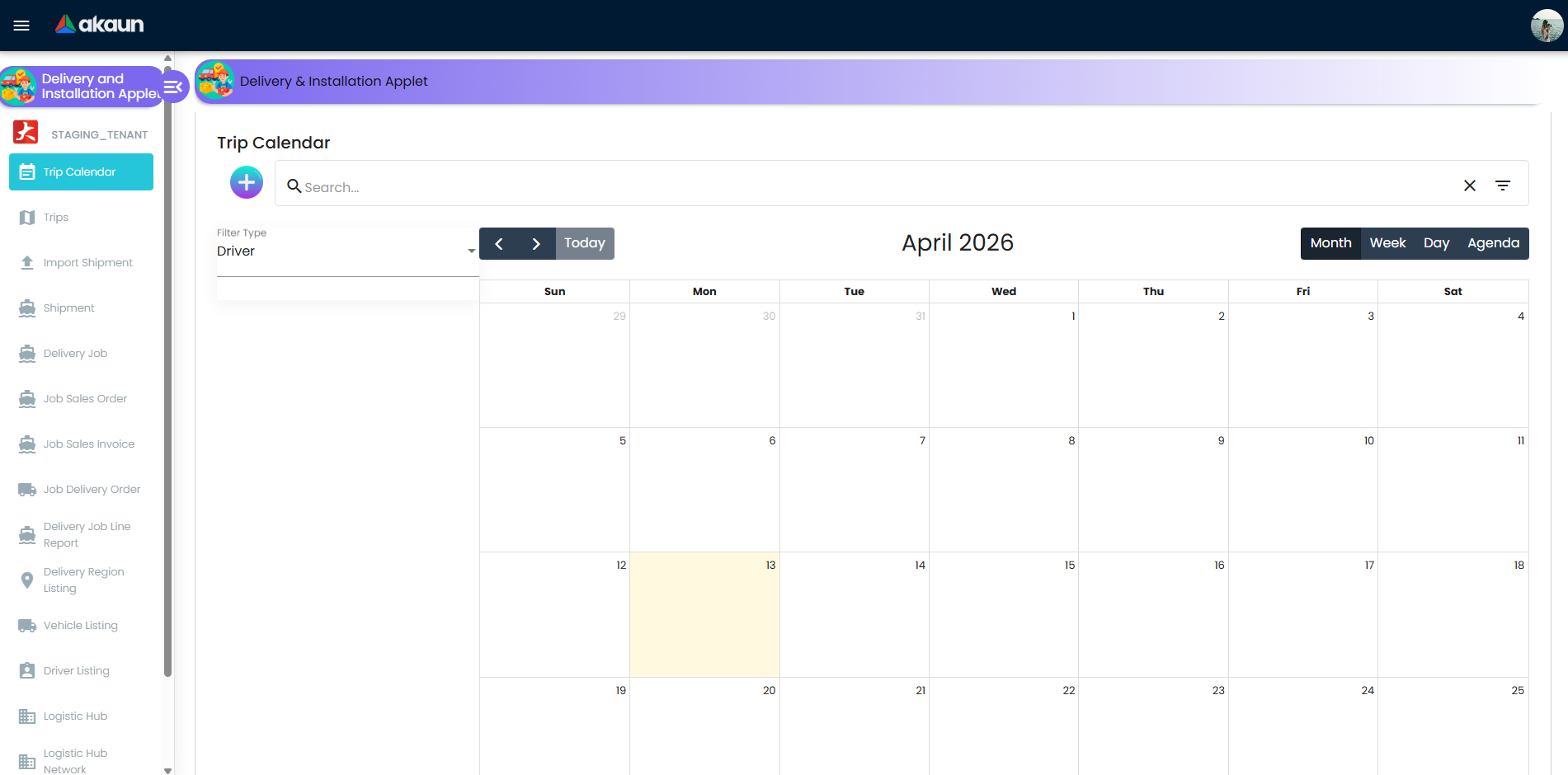
| Trip Calendar | Month / week / day / agenda view of trips, filterable by driver, vehicle or region. New trips can be started from the + button. |
| Trips | The trip run sheet. Batch functions: Printing (Batch Print, Trip Report), trip status (Start Trip, Complete Trip, Cancel Trip, Re-arrange Trip) with a Trip Status Date the dispatcher can back-date. Opening a trip shows the Details, Jobs and Helpers tabs; the Jobs tab is where jobs are created from Sales Order, Sales Invoice, Delivery Order or Shipment sources. |
| Import Shipment | Upload a shipment file; rows are validated into an import helper listing (Item Desc, Qty, CBM, Total Weight, Customer Marking, Process Status, error messages) before shipments are created. |
| Shipment | Shipment headers with Bal Qty, Allocate Job Qty and CBM. Create Jobs (Normal Mode or Path Optimization Mode with a logistic-hub network) and Delete Jobs. |
| Delivery Job | The Delivery Job Shipment Listing — every job regardless of source. Batch functions: Add to Trip, Printing, Job Status, Bulk Remarks, Add Logistic Hub, Custom Status, Bulk Date Edit. Opening a job shows Details, Job Items and Job Event tabs. |
| Job Sales Order / Job Sales Invoice / Job Delivery Order | Jobs grouped by their source document type, with the same Add to Trip and Job Status functions. |
| Delivery Job Line Report | Item-level report (item, quantity, trip, vehicle, driver, job, start/end delivery, source document, customer) for a date range, printable with a Jasper format. |
| Delivery Region Listing, Vehicle Listing, Driver Listing | Master data of the delivery module. A driver record can be linked to a BigLedger login by verifying the e-mail, or an invitation can be sent. |
| Logistic Hub, Logistic Hub Network | Transfer points and the from/to links between them, used by Add Logistic Hub on jobs and by Path Optimization Mode. |
| Settings | Application Settings, Field Settings, Default Selection, Custom Status Settings, Return Reasons Settings, Printable Format Settings, Menu Containers, plus the shared server-side permission screens, Release Notes and Audit Trail. |
| Personalization | Personal Default Selection. |
Configuration
Before you can use it
Source documents sent to the queue. The Job Sales Order / Job Sales Invoice / Job Delivery Order screens read the pick-pack queue, so a Sales Order, Sales Invoice or Delivery Order must have had its lines sent with Send To Queue (Delivery Details panel; lines with Require Delivery = YES and a Qty To Deliver) before it can become a job — and not yet sent on to the warehouse picking queue (Send To Warehouse Picking Queue on the Sales Order applet’s Pick Pack Queue screen), which removes the row.
FINAL on its own creates no queue row. Cancelling a document-sourced job adds the line quantity back to that queue; cancelling a shipment-sourced job adds it back to the shipment’s open balance.
Branch and location in Organisation: shipments carry from/to branch and location, and jobs and trips are searched by them.
Drivers, vehicles and delivery regions in this applet’s own listings — a trip needs a driver (or a free-text third-party driver name), a vehicle and its capacity. Drivers who will use the driver applet need an e-mail that matches an existing login (Verify Email) or an invitation sent from the driver record.
Return reasons are stored in one configuration record for the applet. The Return Reasons Settings screen appends to that record; it does not create it. If it does not exist for your tenant, the screen cannot save (see Troubleshooting).
Printable formats are Jasper JRXML files uploaded under Printable Format Settings; the upload looks up the printable format list with code
Jasper JRXML, which must exist.Server-side permissions. Creating, reading and updating jobs, trips, drivers, vehicles and regions is gated by the
API_TNT_DM_DEL_*permission families (JOBS, TRIP, DRIVER, VEHICLE, DELIVERY_REGION, JOB_ATTACHMENT, JOB_CHECKLIST_LINE, DRIVER_VEHICLE_LINK, DRIVER_REGION_LINK, …), assigned through the Permission Set / User Permission / Role Permission screens under Settings. Start, complete, ready to ship, the trip actions (complete, cancel, start, re-arrange) and custom status requireAPI_TNT_DM_DEL_JOBS_UPDATEor an admin permission.Two job actions check a different set: Cancel Job on the Job Sales Order / Job Sales Invoice / Job Delivery Order listings and Create Delivery Job from a document’s pick-pack queue accept the jobs owner, admin or create permission instead. So a dispatcher who can create jobs can also cancel them from the document listings even without the update permission — grant create with that in mind.
Applet settings
Settings live in applet-local screens (there is no shared field-configuration section for this applet and no inline gear). The Application Settings and Menu Containers screens save as the applet’s tenant-wide master settings; nothing here is per-branch or per-user. Every toggle starts with no value, so the default for every key is off: nothing hidden, every status button shown. The settings are grouped below by the screen and tab that hold them, in the order the screens list them.
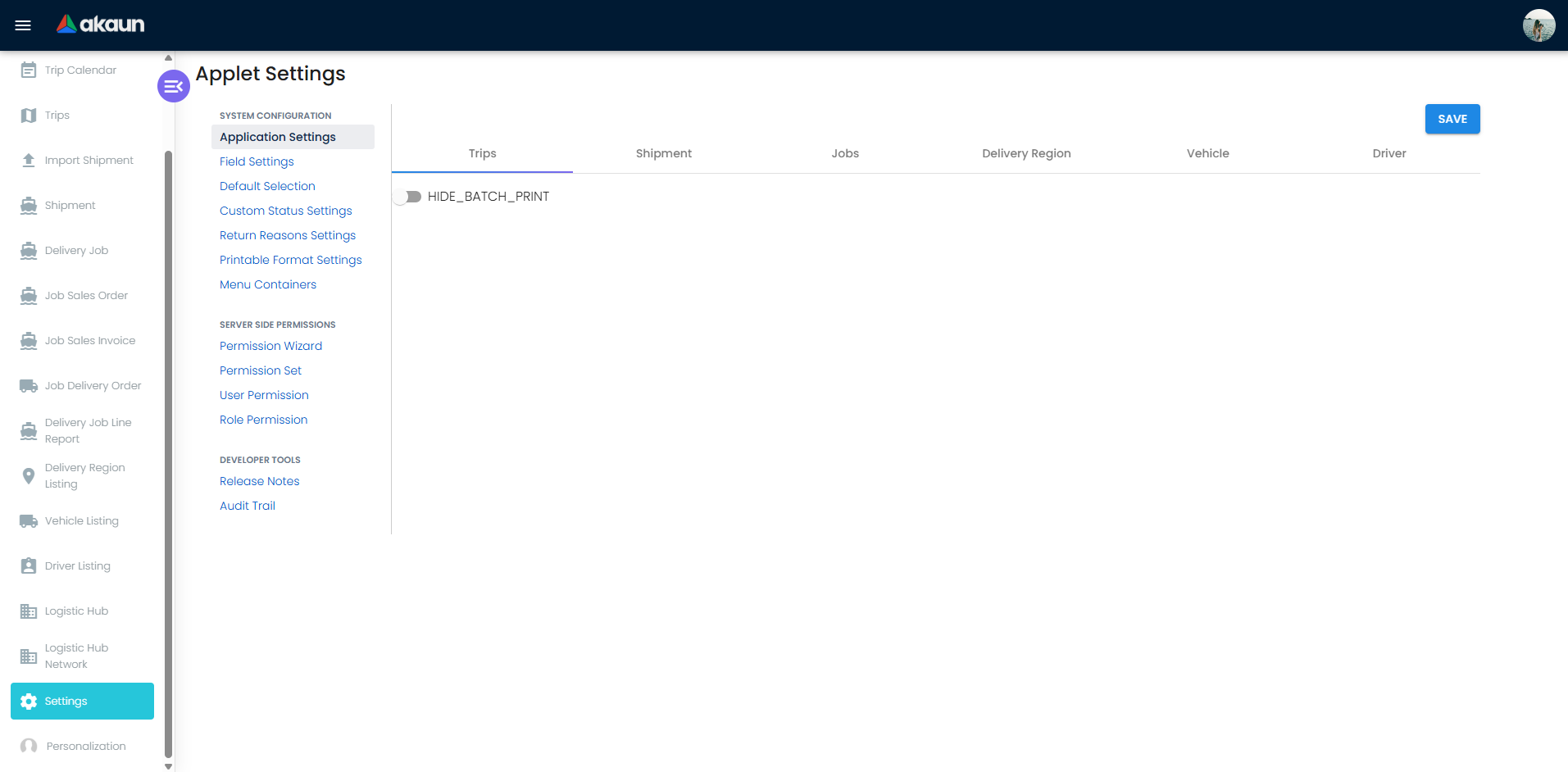
Application Settings — Trips tab
| Setting | What it controls | Default | Effect when changed |
|---|---|---|---|
HIDE_BATCH_PRINT | The Batch Print button in the Trips listing printing bar. | off | On: dispatchers can still pick a printable format and print a Trip Report, but not batch-print several trips. |
Application Settings — Shipment tab
Fifteen HIDE_* toggles, each named after a column of the
Shipment listing, all default off, tenant-wide. Most of them hide a different column from the one they
name.
The toggles pick a column by its position in the grid, and the grid has since gained Arrival,
Departure and Remarks columns, so only the first six — Shipment No, Date, From Location, Sender, Sender
Address, Logistics Ref No — hide what their label says. From there on each one lands earlier in the grid:
HIDE_TRACKING_ID hides Arrival, HIDE_RECIPIENT hides Departure, HIDE_RECIPIENT_ADDRESS hides Tracking ID,
HIDE_QTY hides Remarks, HIDE_BAL_QTY hides Recipient, HIDE_ALLOCATE_JOB_QTY hides Recipient Address,
HIDE_AVE_UNIT_CBM hides Qty, HIDE_CBM hides Bal Qty, and HIDE_PROCESS_STATUS hides Allocate Job Qty.
No toggle hides Ave Unit CBM, CBM or Process Status.
The row that matters is the Bal Qty one: Bal
Qty is the number that decides whether Create Jobs does anything at all (see What the Shipment
listing will not show you below), and it is hidden by HIDE_CBM, not by HIDE_BAL_QTY. If Bal Qty is
missing, look at HIDE_CBM first. A user’s own saved column layout is re-applied a moment after the
listing opens and wins over all of these toggles. The Enable checkbox and the Process Status – Process
Name Select dropdown above the toggles save nothing.
Application Settings — Jobs tab
| Setting | What it controls | Default | Effect when changed |
|---|---|---|---|
JS_HIDE_JOB_STATUS · SO_HIDE_JOB_STATUS · SI_HIDE_JOB_STATUS (the Job-Shipment, Job-Sales Order and Job-Invoice sub-tabs; the first is labelled Hide Start Job and Complete Job) | Which entries the status dropdown offers on the Delivery Job listing, the Job Sales Order listing, the Job Delivery Order listing and the Job Sales Invoice listing. | off — Ready To Ship, Start Job, Complete Job, Cancel Job | On: only Ready To Ship and Cancel Job remain on those four listings — see the first caution under this table. |
JS_HIDE_JOB_STATUS · SO_HIDE_JOB_STATUS · SI_HIDE_JOB_STATUS — four sub-tabs, three keys | — | — | The four sub-tabs are not four settings: there is no Delivery Order key, and the Job Delivery Order listing follows the Sales Order one, so switching off Job-Sales Order silently switches off Job Delivery Order too, and its own sub-tab is empty. |
JS_HIDE_JOB_ID, JS_HIDE_JOB_TYPE, JS_HIDE_START_DATE, JS_HIDE_END_DATE, JS_HIDE_TRIP, JS_HIDE_VEHICLE, JS_HIDE_DRIVER, JS_HIDE_JOB_FROM_LOCATION, JS_HIDE_JOB_SENDER, JS_HIDE_JOB_SENDER_ADDRESS, JS_HIDE_JOB_LOGISTICS_REF_NO, JS_HIDE_JOB_TRACKING_ID, JS_HIDE_JOB_RECIPIENT, JS_HIDE_JOB_RECIPIENT_ADDRESS, JS_HIDE_JOB_DELIVERY_QTY, JS_HIDE_JOB_AVE_UNIT_CBM, JS_HIDE_JOB_CBM, JS_HIDE_JOB_PROCESS_STATUS, JS_HIDE_JOB_PROCESS_RESOLUTION | Named after the columns of the Delivery Job listing. | off | Only JS_HIDE_JOB_ID and JS_HIDE_JOB_TYPE hide the column they name — see the second caution under this table. |
JS_SHOW_CUSTOM_DELIVERY_DATE_FIELD | The Printing bar of the Delivery Job listing. | off — Batch Print uses the job dates | On: a Delivery Date picker appears and the button becomes a custom-date batch print. |
JS_FORM_HIDE_EXT_AMOUNT_FEE, JS_FORM_HIDE_EXT_SHIPMENT_WEIGHT, JS_FORM_HIDE_EXT_SHIPMENT_HEIGHT, JS_FORM_HIDE_EXT_SHIPMENT_LENGTH, JS_FORM_HIDE_EXT_SHIPMENT_WIDTH | The Ext Amount Fee / Ext Shipment Weight / Height / Length / Width fields on the Edit Job Shipment form. | off | Hides the field. |
- Hiding the job statuses tidies the listings; it does not stop a job being completed. The setting does not reach the other two places a job can be completed: the job editor on a trip’s Jobs tab always offers all four actions, and the Trips listing always offers Complete Trip, which completes every job on the trip. So it does not by itself stop the back office completing a job the driver has not done — that still rests on who is given this applet.
- The Delivery Job column toggles mostly hide some other column. As on the Shipment tab, the toggles pick
columns by position and the grid has gained columns since, so apart from
JS_HIDE_JOB_IDandJS_HIDE_JOB_TYPEthe other seventeen each hide some other column —JS_HIDE_START_DATEhides Shipment ID,JS_HIDE_TRIPhides Departure,JS_HIDE_JOB_PROCESS_RESOLUTIONhides Delivery Status. Trip, Vehicle, Driver and Qty are hidden only by other keys (JS_HIDE_JOB_SENDER_ADDRESS,JS_HIDE_JOB_LOGISTICS_REF_NO,JS_HIDE_JOB_TRACKING_ID,JS_HIDE_JOB_CBM), and CBM, Custom Status and Process Resolution by none. Switch one on, then look at the listing to see which column went. A user’s own saved column layout is re-applied after the listing loads and overrides all of them.
Menu Containers
Despite its name this screen does not configure the left menu. It holds the Advance Search field toggles for two listings; the Advance Search tab of Application Settings that used to hold them has been retired.
Twenty-four keys, all default off: the same twelve advanced-search fields — Delivery Region, Supplier,
Customer, Vehicle, Trip, Branch, Branch From, Branch To, Location, Location From, Location To and
Company — with a JS_ prefix for the Delivery Job listing and an SO_ prefix for the Job Sales Order
listing. Only those two listings honour them: the Job Sales Invoice and Job Delivery Order searches
ignore both prefixes and always show every field. That is the trap here — a search field you have
switched off on two screens is still there on the other two, and there is no key that would switch
it off.
Other settings screens
| Screen | What it stores | Notes |
|---|---|---|
| Custom Status Settings | Custom job statuses (code, name, description, optional image). | A custom status is applied to selected jobs with the Custom Status batch function and a date; BigLedger records it as a job event. There is no limit of five statuses — the ENABLE_CUSTOM_STATUS_LINE_1..5 / NAME_CUSTOM_STATUS_LINE_1..5 keys are a different mechanism (see the runtime-only list below). |
| Return Reasons Settings | Return reasons (code and name), appended to the applet’s configuration record. | Duplicate codes are refused client-side with Reason Code already exists. Reasons are offered in the job line’s Reason for Return field. |
| Printable Format Settings | Printable formats for trips, shipment-sourced jobs, sales-order-sourced jobs and sales-invoice-sourced jobs. | One tab per document type; each upload is a Jasper JRXML with a format code and name. |
Keys read at runtime without a control
ENABLE_CUSTOM_STATUS_LINE_1…_5andNAME_CUSTOM_STATUS_LINE_1…_5: the job-item grids on the trip’s Jobs tab (Sales Order, Sales Invoice, Delivery Order sources) and the Job Sales Invoice listing build an extra column from them, but every one of those grids is drawn from its fixed column list, so no column is ever added, whatever the keys hold. No settings screen writes these keys either.DEFAULT_VEHICLEis not a setting: it is the name under which the driver form stores a driver’s default vehicle.
On the screen and doing nothing
Switching these changes nothing, and knowing that is the whole answer — the alternative is a dispatcher toggling them and concluding the screen is broken.
| Control | What it looks like | What actually happens |
|---|---|---|
| JS_HIDE_SHIPMENT_NO toggle, Jobs tab | A slide toggle that saves and reloads | The key it writes (a job-shipment-number hide) is misnamed against the label, and nothing reads it — in this applet or anywhere else (checked 2026-09-18; see sources:). There is no Shipment No column on the Delivery Job listing for it to hide. |
| JS_HIDE_JOB_SUB_PROCESS_STATUS | Nothing — the toggle has been removed from the settings screen | The column it used to hide is gone too, so the key is dead at both ends. A tenant that set it before the toggle disappeared is not stuck with a hidden column: nothing reads the value. |
| Enable checkbox and Process Status – Process Name Select, Shipment tab | A checkbox and a dropdown above the column toggles | Not connected to anything; Save ignores them. |
| Field Settings screen | Unit Discount, SST/VAT/GST, WHT, Blanket Order, Segment, G/L Dimension, Profit Center, Project toggles and a Save button | A placeholder inherited from the document applets. Nothing is connected and Save does nothing. |
| Default Selection, and Personalization › Default Selection | Branch and location pickers that look like every other applet’s | The screen is not wired to save, and even if it saved, no screen in this applet reads a default branch or location — see the read-path check in sources:. Choose branch and location on each form. |
The Sub Process Status row above corrects what this page said until 2026-09-18 — that the key was “still declared and read”. It is not read.
Document behaviour settings
- Status flow is fixed in the backend (see Lifecycle); the applet only decides which buttons are visible (
*_HIDE_JOB_STATUS,HIDE_BATCH_PRINT). - Event time. Job status buttons stamp the event with the current time formatted
dd MMM, HH:mm. Trip status buttons and Custom Status let the dispatcher enter a Trip Status Date / custom date instead, so a completion reported late can be back-dated. The stored description has no year. - Printables. Trip Report and Batch Print on Trips; Batch Print (optionally with a custom delivery date) on Delivery Job; Generate Delivery Job Line Report on the report screen. All need a printable format of the matching document type.
- No e-Invoice, workflow or approval toggles exist in this applet.
Who can change what
- Client-side permissions: none are defined for this applet, and the applet’s own code checks none; hiding is done only through the master settings above.
- Server-side permissions: the
API_TNT_DM_DEL_*families listed under Before you can use it. The Feature Visibility, Webhook and permission screens under Settings are the shared components every applet carries.
Fields
The forms are ordinary and you are looking at them, so this section names every field once and then tables only the ones that behave in a way the screen cannot show.
Trip — Create / Details tab. Trip Name; Driver Name, or instead of it Third Party Driver Name; Start Date with Delivery Start Time and End Date with End Delivery Time; Delivery Region; Vehicle Number and Vehicle Capacity. The Details tab adds read-only Delivery Status, Process Status and the created/modified stamps. Trip Name, both dates and Vehicle Capacity are required; everything else is not. Vehicle Capacity is read-only and filled only by picking a vehicle, so the vehicle is required in practice even though its own field has no required mark.
Shipment — Main tab. Shipment No, Tracking ID, Logistics Ref No; Shipment Delivery Date; Item Name, Item description, Item Type, Qty, Weight, CBM; From and To Branch, From and To Location; External Running No. and Additional Remarks, both of which are copied onto jobs created from the shipment. The Recipient and Sender tabs each pick an entity and one of its addresses. Nothing on this form is mandatory — including Qty, which has a consequence of its own (below).
Delivery Job — Details tab (Edit Job Shipment). Job Id, system-generated and read-only; Delivery Region, Job Type, Status; Arrival Date,
Departure Date, Start Date, End Date, Duration (in minutes) — Arrival and Departure can also be set
for many jobs at once with Bulk Date Edit; Ext Amount Fee and Ext Shipment Weight / Height /
Length / Width, each hideable by its JS_FORM_HIDE_EXT_* setting; External Running No., Additional
Remarks and Remarks, the last of which Bulk Remarks writes for many jobs at once.
Job line (Job Items tab). Recipient Name, Recipient IC, Recipient Contact, Remarks and Reason for Return (offered from the Return Reasons list), plus signature and photo attachments — the same fields the driver fills in on the driver applet.
Driver. Driver Name, Identity Number,
License Number, Mobile, Joined Date, Status (ACTIVE by default, or INACTIVE), Emergency Name,
Emergency Mobile and Relationship are all required. Email, and the Address 1–5 / City / Postal
Code / State / Country block, are not.
Vehicle, Delivery Region, Logistic Hub and the settings forms. Vehicle: Vehicle Number, Vehicle Brand, Vehicle Model, Engine Capacity, Vehicle Capacity, Purchased Date, Status — all required. Delivery Region: Region Code, Delivery Region, Country, State, Google Location Name, Google Location URL, Radius — all required. Logistic Hub: Code and Name required, Phone, Status and Description optional, plus an Address tab; hubs are linked from and to each other on the edit screen. Custom Status: Code, Name and Description required, image optional. Return Reason: Reason Code and Reason Name. Printable Format: Format Code, Format Name and one uploaded file.
The fields that behave
| Field | What the screen does not tell you |
|---|---|
| Trip › Vehicle Capacity | Copied out of the vehicle record the instant you pick the vehicle and stored on the trip, as text, beside copies of the driver’s name and the registration plate. It is required, so a vehicle saved without a capacity blocks every trip that uses it. |
| Trip › Vehicle Capacity — no overload check | And nothing ever compares it with anything: it is used only in listing filters and keyword search, never in a check. A trip will not warn you that you have overloaded the van — capacity is a searchable note, not a constraint, and no screen totals the CBM or weight of the jobs on a trip. Re-opening the trip re-reads the figure from the vehicle master, so editing a vehicle changes what an old trip shows. |
| Trip › Driver Name vs Third Party Driver Name | Two fields, and only one of them reaches a person. A driver chosen from the listing sees the trip in the driver applet; a third-party name typed as free text notifies nobody and has no login behind it, so the trip is a paper run sheet and every status change has to be keyed by the back office. |
| Delivery Job › Duration (in minutes) | Not an independent value. Typing a duration rewrites End Date from Start Date, and changing either date rewrites the duration. Whichever you touched last wins, and a duration you typed can be silently replaced by re-picking a date. |
| Delivery Job › Status | The dropdown offers the delivery statuses, but saving the form does not move the job. The value is written into a job extension record that only gets updated if it already exists — and nothing in this applet, in the three sibling job-edit forms, or in the backend ever creates it. The control is also never populated from the job you opened, so it always opens blank. Move jobs with the Job Status batch function, not with this field. |
| Driver › Email | Not a contact detail. Verify Email matches it against a BigLedger login whose username is that e-mail, to bind the driver record to the login. Get it wrong and the driver’s trips never appear in the driver applet, and this screen says nothing. |
| Driver › Emergency Name / Mobile / Relationship | Required. A driver record cannot be saved without next-of-kin details — the usual surprise when a driver list is migrated from a spreadsheet that has none. |
| Delivery Region › Radius | Required, and stored in the region’s description field. There is no separate radius field. Anyone reading a region’s description through the API or a report is reading a radius, and a region description keyed anywhere else will be read as one. |
| Delivery Region › Google Location Name / URL | Stored as typed and carried into the trip and driver listings. Nothing in this applet computes from them — the path optimisation below works from logistic-hub postal addresses, not from these — so treat them as a link your dispatcher opens, not as geocoding. |
Lifecycle and effects
This applet posts nothing to the General Ledger and moves no stock: there is no journal posting and no stock movement for trips or jobs. Its effects are delivery statuses, job events and pick-pack-queue balances.
Which queue am I looking at?
Four different queues in BigLedger are called “the queue”, and this applet touches three of them. The complete index — what each one is, who writes it and where you see it — is on the Warehouse Management applet page and is not repeated here. What that index leaves to this page is the delivery module’s own two:
- The shipment open balance holds the balance of a shipment — how much of it has not yet been turned into jobs. It is created when the shipment is created, reduced by Create Jobs, and increased again when a shipment-sourced job is cancelled.
- The delivery jobs themselves, which are their own queue.
The one to keep straight is the finance-side pick-pack queue, which is not this applet’s and which this applet nevertheless writes to: creating a document-sourced job consumes from it, and cancelling one puts the quantity back.
What a job save actually writes
Nothing about this is on the screen, and it is the difference between a delivery record you can defend and one you cannot.
There is no partial update. Saving a job sends the whole job record back, and the backend replaces every field from what it receives — a field absent from the request becomes empty, not “leave it alone”. The applet is therefore expected to send back the record it loaded, and it does: Save re-fetches the job and overlays the form on top of it.
The overlay is written for a form that only one of the two job editors actually has. There are two places to edit a job — Delivery Job listing → open a job (Edit Job Shipment) and Trips → open a trip → Jobs tab → open a job — and they carry different fields. The shared overlay assigns from both sets, so each editor blanks the fields only the other one has:
| Save from | Fields it has no control for | What the record gets |
|---|---|---|
| Edit Job Shipment (Delivery Job listing) | Recipient Name, Recipient IC, Recipient Contact, Recipient Remarks, Signature | The proof-of-receipt name, identity number, phone and remarks are written back as empty. The proof of delivery the driver captured is erased, under the toast The Job has been updated. |
| Edit job on a trip’s Jobs tab | Arrival Date, Departure Date, External Running No., Additional Remarks and the four Ext Shipment dimensions | The four dimension fields are preserved from the existing record and survive; Arrival Date, Departure Date, External Running No. and Additional Remarks are not, and are blanked. |
Two more things every job save does, from either editor:
- The job’s external-delivery record is overwritten with just the signature, taken from a signature control that is blank unless you re-drew the signature in that session. That record is where the delivery module’s third-party carrier integrations park their last response — consignment creation and cancellation, airway-bill tracking, last shipment status — so a back-office edit discards the carrier’s reply. The carrier consignment number and carrier status beside it are not touched and survive, which is why the loss is easy to miss.
- Every job extension’s created date is reset to now. A job extension’s Created Date is the date of the last save, not the date it was created.
Proof of delivery: where it lives, who can see it, what destroys it
The driver applet and the driver mobile app capture proof of receipt — recipient name, identity number, phone, remarks, a signature, and the cash collected — and write it onto the job. Two consequences a dispatcher will not guess:
- In the back office it is visible in exactly one place — open a trip, Jobs tab, open the job. It is on no listing, no report column and no batch function; the Delivery Job listing’s own edit form does not show it and wipes it on Save, as above.
- Cash collected on delivery never appears in the back office at all. The collected amount is written by the driver and is available through the jobs API and to a Jasper printable — but no screen in this applet shows it. If you take cash on delivery, the reconciliation has to come out of the API or a printable, not out of a screen.
What the Shipment listing will not show you
The Shipment listing is not a listing of shipments. It fetches a page from the API and then, in the browser, drops every row whose Qty is null or zero and every row whose Bal Qty is zero. So:
- A shipment that has been fully turned into jobs disappears from the screen. It is not archived and not filtered by a control you can clear; it is simply not rendered. The job it produced is the only trace left in the UI.
- A shipment imported or pushed in with no quantity never appears at all, which is the quiet answer to “the import said success and I cannot find it”.
- Bal Qty is not the shipment’s quantity. It is read from the shipment’s open balance and shows 0 if that balance record is missing; Allocate Job Qty starts equal to it and is capped at it when edited. Qty on the shipment record is what you keyed and never changes.
- The grid is told that the whole result set is only as long as the rows that survived the filter on the block it just fetched, so the listing does not page past the first block and the row count it reports is that block’s survivors.
Create Jobs, and what Path Optimization Mode does differently
Create Jobs on the Shipment listing fires one request per selected shipment, and only for rows whose Bal Qty is greater than zero; a row at zero is skipped in the browser with no message at all. That is the whole of “Create Jobs did nothing”.
Normal Mode creates one job per shipment and subtracts the allocated quantity from the open
balance once, refusing with NEGATIVE BALANCE QUANTITY if that would go below zero.
Path Optimization Mode is a different shape of thing and the screen gives no hint of it. Given a logistic-hub network, the backend resolves a route and then creates one job per leg — origin to the first hub, a job for every hub-to-hub transit, and the last hub to the destination. Each leg carries the same quantity. Two things follow that are worth knowing before you use it:
- The open balance is reduced once per leg, not once per shipment, while the guard that would catch a negative balance is applied once, against the original balance. A three-leg route therefore takes three times the allocated quantity out of the shipment’s balance, and the guard cannot see it.
- Through the API the request accepts a list of shipments but persists only the first. The applet never sends more than one, so this reaches you only through the API.
The tracking lookup is not public
The shipment tracking lookup (look up shipment headers by tracking ID) is not open to the internet, despite being named as a public lookup: it requires a valid BigLedger login for the tenant, exactly like every other shipment request. You cannot hand this URL to your customers as a parcel-tracking page, and a page that says you can — as this one did until 2026-09-18 — sends an integrator down a dead end.
Delivery statuses: DELIVERY_ARRANGED, READY_TO_SHIP, OUT_FOR_DELIVERY, COMPLETE, CANCELLED, plus DELIVERY_REARRANGED / JOB_RE_ARRANGED for the re-arrange actions and the roll-up values PARTIALLY DELIVERED / FULLY DELIVERED that are written only to source documents and shipment headers.
| Action (button) | What BigLedger does |
|---|---|
| Add to Trip | Links the selected jobs to the trip and sets the trip, the jobs and their document/shipment links to DELIVERY_ARRANGED, writing a job event. This is the only place the initial status comes from; a trip with no jobs has no delivery status. It also rolls the status up to every document line on the job: FULLY DELIVERED where the job took the line’s whole queued quantity (the queue row was deleted at zero), PARTIALLY DELIVERED where some is still queued. |
| Add to Trip — the permission it needs | The trip is fetched with your trip-read permission first; if that returns nothing (you hold no trip read, owner or admin permission), no job is linked at all — yet the screen still shows Added Jobs to Trip. If the jobs are not on the trip afterwards, check the trip permissions of whoever pressed the button. |
| Ready To Ship (job) / Ready To Ship (trip) | Sets the job, its document links and its shipment links to READY_TO_SHIP, and writes a job event. |
| Start Job / Start Trip | Same, with OUT_FOR_DELIVERY. Starting a trip applies the status to every job on the trip. |
| Complete Job / Complete Trip | Same, with COMPLETE; then the source document and shipment status are rewritten. The rule is any pick-pack queue row for the line → PARTIALLY DELIVERED, none → FULLY DELIVERED. It reads queue coverage, not the job’s outcome, so completing a job does not change a value Add to Trip already wrote. A job or trip that is already CANCELLED is rejected as not existing or cancelled. |
| Cancel Job — Job Sales Order / Job Sales Invoice / Job Delivery Order listings | Writes Cancelled to the job and its document links, adds each line’s quantity to deliver back to the pick-pack queue balance so the document can be re-planned, writes a cancellation event, and rolls the status up. A job that is already Cancelled is not skipped: it is refused with Job Container does not Exist or has been Cancel, the same message as a missing job — and because the whole selection is one transaction, one already-cancelled job in the selection means nothing in it is cancelled. Deselect the cancelled rows and run it again. |
| Cancel Job — Delivery Job listing | For shipment-sourced jobs only: deletes the job and its shipment link, adds the linked quantity back to the shipment’s open balance (creating the balance record if needed) and re-derives the shipment’s delivery status. A job with no shipment link is rejected with SHIPMENT LINK TABLE NOT FOUND, so document-sourced jobs must be cancelled from their own listing. |
| Cancel Trip | Sets the trip to CANCELLED and cancels every job on it (queue quantities restored, shipment links set to CANCELLED). Rejects an already-cancelled trip. |
| Re-arrange Trip | Sets the trip and all its jobs to DELIVERY_REARRANGED with an event, using the same cancelled-trip guard. |
| Job re-arrangement (drag order on the trip’s Jobs tab) | Updates the job’s sequence in the trip only; no status change and no event. |
| Custom Status | Writes a job event referencing the custom status with the chosen date; no delivery status change. |
| Delivery Arranged | Re-applies DELIVERY_ARRANGED to a trip and its jobs. Exists in the backend but no screen in this applet calls it. |
Two things the product does not do: no action validates the order of transitions (a job can go from DELIVERY_ARRANGED straight to COMPLETE), and the cancelled-job guard looks for the upper-case CANCELLED while Cancel Job stores the title-case Cancelled, so only jobs cancelled through Cancel Trip (which writes CANCELLED) are actually blocked from completion. There is no VOID: a job is cancelled from its listing, deleted from the trip’s Jobs tab, or (shipment-sourced) removed by Cancel Job on the Delivery Job listing.
The delivery screens side by side
Several screens across BigLedger touch a delivery; this applet is one of them. The stock and the journal come from the sales invoice, whichever of these you use: its FINAL queues a primary job processor that fans out to the stock, journal and e-invoice jobs (what each sales document writes). A delivery document carries a quantity sign of zero, fixed by the server on every line, so its FINAL writes nothing to stock. A job and a trip are not documents at all: they have no finalise and no processor takes them.
| Screen | Whose screen | Stock | The sales document | The delivery job | What will not happen |
|---|---|---|---|---|---|
| Delivery Installation | The dispatcher at a desk | Nothing | Reads lines that someone sent with Send To Queue on the order, invoice or delivery order; from Add to Trip the line reads Partially or Fully Delivered | Creates jobs from the queue or from keyed and imported shipments, puts them on a trip with a driver and a vehicle, writes every status change as a job event | FINAL on the document creates no job. Fully Delivered is not arrival |
| Delivery And Installation Driver | The driver, on a phone; an Android app calls the same endpoints | Nothing | Nothing new: the status was already written at Add to Trip | Start, complete with a proof of delivery (name, IC, quantities, cash collected, photos, signature), cancel; a cancel puts the line’s quantity back in the queue | A driver neither starts nor completes a trip. Today the web calendar does not list trips |
| Driver Delivery Order | A driver named on a delivery order | Nothing | Vehicle number, delivery date and a time slot on delivery orders raised elsewhere | None: no jobs, no trips, no proof of delivery | It creates and finalises nothing. The only screen that names a driver on a delivery order is the supplier portal’s picker; the internal delivery order has no control for it, so its listing stays empty unless that picker was used |
| Delivery Order (Internal) | The office raising the paper for the warehouse and the driver | Nothing: its open lines count as committed stock and against the customer’s available credit | Knocks off the order; Send To Queue on its Delivery Details is what puts its lines in front of dispatch | None until someone sends its lines to the queue and creates a job | Stock leaves on the invoice, in the invoice’s month |
| Goods Delivery Note (Internal) | Whoever hands goods over against an order, a jobsheet or a delivery order | Nothing | Knocks off the upstream open lines, for the pairs in the company’s Knock Off Configuration | None, and it has no Send To Queue, so it never reaches dispatch | Expect a journal error in the job log for every FINAL; it is not a missing entry |
| Warehouse Management | Warehouse staff picking many orders in one walk | Nothing itself; its packing list builds a DRAFT delivery order or stock transfer | Takes sales-order lines sent on to the warehouse picking queue, which removes them from the pick-pack queue | None. A line sent to the warehouse becomes a job only if somebody sends it to the queue again | A picking list reserves nothing |
| Supplier Delivery Order | A supplier’s login raising the same outbound delivery order for you | Nothing | The document stays DRAFT until you finalise it in the internal applet; its Delivery Driver picker is the one control that sets a driver | None | The supplier cannot finalise, void, print or e-mail it from there |
There is no installer’s screen, and the customer’s screen is a storefront widget or nothing. An installation crew runs the same job as a delivery crew — the applet keeps no survey, checklist, technician or handover record (Installation Scheduling Workflow), and its one installation field, Installation Duration (minutes) on a job line, is a column on the trip’s job-items listing that no form in either applet fills in. A CP Commerce storefront can carry a goods tracker widget: the customer types a tracking number and sees the shipment’s jobs and their statuses as a timeline. It looks the number up as a job’s own tracking id or sender reference, and as the tracking id or sender reference of the shipment a job came from, so it answers only for a job that carries the number you gave the customer; the storefront calls BigLedger with its own tenant credentials. Both tracking lookups need a tenant login, exactly like every other shipment call, so outside that widget there is no URL you can hand to a customer: whoever answers the phone reads the job’s status and events.
Choosing a delivery screen
| You want to | Use | Rather than |
|---|---|---|
| A van with several stops and a driver who confirms each one on a phone | Delivery Installation for the trip, the driver applet for the stops | Driver Delivery Order, which has no stops, no proof of delivery and lists nothing until a document names a driver |
| One invoice in two drops, or a failed stop re-planned without touching the invoice | A job per drop: a line sent for six can go out as a job for four today and two on Monday, and a cancelled job hands its quantity back to the queue | Voiding or re-raising the invoice: the sale was right, only the drop failed |
| Goods that are not a BigLedger document, or a consignment that arrives as a file | Shipment, keyed or imported, then Create Jobs | Raising a delivery order only to have something to dispatch |
| Hand goods over at the counter against an order and keep the order’s balance right | A Goods Delivery Note, or the invoice itself where the sale is billed at the same time | A delivery order you never finalise |
| A warehouse that picks many orders in one walk and packs at a station | Warehouse Management, then finalise the DRAFT delivery order it builds, then invoice | Sending the same lines to both the warehouse picking queue and dispatch: a row goes one way or the other |
| A date and a van on the delivery order, with no dispatch desk | The Delivery Details panel on the document: Require Delivery, delivery branch and location, requested date, tracking id. They are saved with the document and read by people; nothing downstream consumes them | A trip for one van, which costs you a driver record, a vehicle, a vehicle capacity and a Send To Queue per document |
| An installation crew | The same jobs and trips. A Custom Status with a date writes a job event without changing the delivery status, so Surveyed, Mounted and Tested can be stamped on the job as milestones | A second system for the appointment and a phone call to find out whether the display is on the wall |
The path the guides teach — order, Send To Queue, job, trip, driver — is the right one for a branch with a dispatch desk, and it costs a driver record, a vehicle and a Send To Queue per document. Before you build a day around it, check whether the branch needs more than the invoice and the Delivery Details panel.
The delivery figures, and what makes each
| Figure | Where you see it | How it is made |
|---|---|---|
| Partially Delivered / Fully Delivered | The Delivery Status box on the document’s Delivery Details; the header and line in listings | Stored on the document. Written when a job is added to a trip and again at every status change and cancel, from queue coverage: Partially while a pick-pack queue row remains for the line, Fully when none does; the header reads Fully only when every line does. A job that takes a line’s whole sent quantity deletes the queue row, so the line reads Fully Delivered at Add to Trip. It measures how much of what was sent is on jobs, which is dispatch’s number; arrival is the job’s |
| Job status (Delivery Arranged … Complete) | The job on any listing; the driver’s job card | Stored on the job: the last status action from either applet. Nothing checks the order, so a job can go from Delivery Arranged straight to Complete, and the only refusal is on a job the trip cancellation marked CANCELLED |
| The time on a job event | The Job Event tab | Text. The dispatcher’s screen stamps dd MMM, HH:mm with no year; a driver’s action is stamped by the server at the moment of the call. Read the event’s created-date column for the full timestamp |
| Bal Qty on a shipment | The Shipment listing | The shipment’s open-balance record, not its Qty; 0 when the record is missing. Rows at 0 are dropped from the listing in the browser, which is why a fully allocated shipment vanishes |
| Quantity delivered per line | The job’s Job Items tab | What the driver typed, between 0 and the quantity to deliver; the range is checked on the driver’s screen only |
| Cash collected | Nowhere in the back office | A job column written by the driver’s Complete Job. No screen in the dispatcher’s applet shows it; it is read through the jobs API or a printable format |
| Vehicle Capacity on a trip | The trip form | Copied from the vehicle as text when the vehicle is picked and re-read from the vehicle master when the trip is opened. Compared with nothing |
A Saturday at GS-KV-01
Three stops like those in
Delivery Trips: Run the Trip, Record the Proof and Close the Day,
which walks a trip end to end: a 75-inch display that needs wall-mounting, a split-unit air conditioner and six
laptops for a school office, all on invoices finalised on Thursday, so the stock left GS-KV-01’s location and the
sale reached the ledger then. Seen from this applet, three things in that Saturday surprise a dispatcher.
Once Friday’s jobs are added to Saturday’s trip, all three invoices read Fully Delivered, and the van is still in the yard (The delivery figures, and what makes each). At the second stop the customer is out. The driver cancels the job: the air conditioner’s quantity goes back to the pick-pack queue, the invoice line no longer reads Fully Delivered, and Monday’s trip picks it up with no change to the invoice, the stock or the ledger. And the cashier counts the RM 450 the laptop customer paid the driver in cash against a printable format or the jobs API, because it is written on the job (What the delivery screens will not do).
Checking that a delivery arrived
Open Delivery Installation › Trips › the trip › Jobs tab › the job. Its status reads Complete, the Job Event tab lists each status change with its time, and the Job Items tab carries the recipient’s name and IC number the driver keyed. That is thirty seconds, and it is the only screen in the back office that shows the proof. Do not read the invoice’s Delivery Status for it. For the stock, the check is the invoice’s, not the job’s: how you know a document moved stock.
What the delivery screens will not do, and who does it instead
- Move stock or post a journal. The invoice does both; the accountant lists delivery orders dated in the period with no invoice before the close (what the sales documents will not do).
- Stop an overloaded van. Vehicle Capacity is a searchable note. Before Add to Trip the dispatcher adds up the CBM column of the jobs on the Delivery Job listing against the vehicle, by eye.
- Enforce the order of statuses, or stop the office completing a job the driver has not done. Hide Start Job and Complete Job trims four listings; the trip’s job editor and Complete Trip still complete jobs. The supervisor reads the Job Event tab for the chain, and who is given the dispatcher’s applet is the control.
- Show the customer where the parcel is, outside a storefront. The goods tracker is a CP Commerce widget and answers only for a job that carries the tracking number; both tracking lookups need a tenant login. For everyone else the office answers from the job’s status and events, or from the carrier’s own tracking id on the job.
- Show the office a picture. Photos and the signature taken on the web driver applet are stored as text. Treat the name, IC and quantities as the proof of delivery; where a picture matters, take the signature on the dispatcher’s job screen or keep a signed paper note.
- Reconcile cash on delivery on a screen. The cashier counts the driver’s cash against a printable format that prints the amounts, or a list from the jobs API, per trip, the same day.
- Keep installation records. Survey, checklist and handover live outside BigLedger; custom statuses with dates mark the milestones on the job.
Prerequisites, blast radius and siblings
- Must exist first: a driver record whose e-mail is verified against the driver’s login, a vehicle with a capacity (required on every trip), and on the document, lines with Require Delivery set and sent with Send To Queue. Missing, in that order, they look like Failed to retrive trips, a trip that will not save, and an empty Job Sales Order screen.
- Downstream: job events, the document’s delivery status, the trip and job printables. Nothing in finance or stock.
- Siblings, and when to choose which: Choosing a delivery screen above. The shortest version: trips and jobs when a driver confirms stops; the Delivery Details panel when a date on the document is enough; Goods Delivery Note when goods are handed over against an order; Warehouse Management when picking is a walk through a warehouse.
- Blast radius: a Save from the Delivery Job listing wipes the proof of delivery and the carrier’s last reply; Cancel Trip cancels every job on it and returns every quantity to the queue; a voided invoice’s queue rows are still offered for a job; a job added by someone without trip read permission is not added at all.
- Used together: Sales Invoice, Send To Queue, Delivery Installation and the driver app; Import Shipment and Create Jobs; Sales Order, Warehouse Management, the DRAFT delivery order and then the invoice.
Related applets
- Delivery And Installation Driver — the driver-facing half; consumes the trips planned here and drives the same start/complete/cancel actions from the driver’s side.
- Driver Delivery Order Applet — the lightweight alternative when a single driver field on the Delivery Order is enough.
- Sales Order (Internal), Sales Invoice (Internal), Delivery Order (Internal) — the documents whose pick-pack queue rows become jobs and whose delivery-tracking status this applet updates.
- Organisation — branches and locations referenced by shipments, jobs and searches.
- Employee — drivers are separate delivery-module records, but the Job Created By and login links resolve to platform users.
Troubleshooting
This applet’s own symptoms are grouped by where you meet them: starting, completing and cancelling jobs, trips, shipments and jobs, details that went missing and printing, settings and screens.
Troubleshooting: starting, completing and cancelling jobs
| Symptom | Cause | Fix |
|---|---|---|
| Start Job and Complete Job are missing from the status dropdown; only Ready To Ship and Cancel Job show. | JS_HIDE_JOB_STATUS (Delivery Job listing), SO_HIDE_JOB_STATUS (Job Sales Order and Job Delivery Order listings) or SI_HIDE_JOB_STATUS is on. | Settings › Application Settings › Jobs, switch the toggle off and Save. |
| Complete Job fails because the job does not exist or is cancelled. | The job was cancelled through Cancel Trip (status CANCELLED) or deleted. | Create a new job from the source document (its quantity was returned to the pick-pack queue). |
| A cancelled job could still be completed. | The job was cancelled with Cancel Job, which stores Cancelled; the guard checks CANCELLED. | Treat the job event history as the record; report as a product defect if it matters for reporting. |
Cancel Job on the Delivery Job listing fails with SHIPMENT LINK TABLE NOT FOUND. | The selected job came from a Sales Order, Sales Invoice or Delivery Order, not a shipment; this button only handles shipment-sourced jobs. | Cancel it from the Job Sales Order / Job Sales Invoice / Job Delivery Order listing instead. |
| Cancelling one trip cancelled jobs the dispatcher wanted to keep. | Cancel Trip cancels every job on the trip and restores their queue quantities. | Move jobs to another trip (Add to Trip) before cancelling, then re-create jobs from the queue if needed. |
| Cancel Job on a document listing fails with Job Container does not Exist or has been Cancel and nothing was cancelled. | At least one selected job is already cancelled (or no longer exists); the whole selection is refused together. | Deselect the cancelled jobs and cancel the rest again. |
| The Status dropdown on a job edit form has no effect. | It writes into a job extension record that nothing in this applet or in the backend creates. | Use the Job Status batch function on a listing, or the driver applet. |
Troubleshooting: trips, shipments and jobs
| Symptom | Cause | Fix |
|---|---|---|
| Create Jobs on a shipment does nothing — no toast, no error. | The browser skips any selected row whose Bal Qty is not greater than zero and says nothing. | Show the Bal Qty column and check it. If it is missing, the toggle that hides it is HIDE_CBM, not HIDE_BAL_QTY (see Application Settings — Shipment tab). A shipment that is fully allocated has already dropped off the listing entirely. |
| Added Jobs to Trip appeared but the jobs are not on the trip. | The user’s trip permissions returned no trip, so no job was linked; the success message shows regardless. | Grant the trip read (or owner / admin) permission, then add the jobs again. |
| A shipment you created is missing from the Shipment listing. | The listing drops rows with Qty null or zero and rows with Bal Qty zero, in the browser, after fetching. A fully allocated shipment and a shipment imported with no quantity are both invisible. | Find it through its jobs on the Delivery Job listing, or through the API. |
| A shipment’s Bal Qty fell by more than the quantity allocated. | Create Jobs in Path Optimization Mode creates one job per leg of the route and subtracts the quantity once per leg. | Expect legs × quantity. Use Normal Mode where a route through hubs is not wanted. |
| Duplicate shipments after an external warehouse push. | Identical requests arriving in the same millisecond pass the duplicate check on logistics ref / sender ref before either is committed; a unique constraint on that pair was proposed. | Deduplicate by logistics reference number; ask for the constraint if the integration retries. |
Troubleshooting: details that went missing
| Symptom | Cause | Fix |
|---|---|---|
| Job event descriptions show the day and month but no year. | The applet stamps events as dd MMM, HH:mm and the backend stores the text as given. | Known limitation; use the event’s created date column for the year. |
| The driver captured a signature and recipient details, and they are gone. | Somebody opened the job from the Delivery Job listing and pressed Save. That form has no proof-of-delivery controls, and the save blanks the recipient name, identity number, phone and remarks and overwrites the external-delivery record. | Edit jobs from Trips → the trip → Jobs tab → the job, which carries those fields and preserves them. The job event history still shows the status changes; the proof itself is not recoverable from the UI. |
| Arrival Date, Departure Date, External Running No. or Additional Remarks emptied themselves. | The mirror of the row above: the job editor inside a trip has no controls for those four, and its save blanks them. | Re-key them from the Delivery Job listing’s edit form, which is where they belong. |
Troubleshooting: printing, settings and screens
| Symptom | Cause | Fix |
|---|---|---|
| Batch Print button is missing on Trips. | HIDE_BATCH_PRINT is on. | Application Settings › Trips. |
| The Delivery Job Batch Print button asks for a Delivery Date. | JS_SHOW_CUSTOM_DELIVERY_DATE_FIELD is on; the button becomes a custom-date batch print. | Pick a date, or switch the setting off. |
| Return Reasons Settings cannot save; the browser console shows an error. | The tenant has no return-reasons configuration record for this applet yet; the screen only appends to an existing one. | Ask support to seed the record before adding reasons. |
| Reason Code already exists when adding a return reason. | Client-side duplicate check on the code. | Use a new code or edit the existing reason. |
| Default Selection (applet or personal) does nothing, or errors when a branch is picked. | The screen is not wired to save, and no screen in this applet reads a default branch or location (see Configuration). | Not configurable at this commit; choose branch and location on each form. |
| Switching on a column toggle hid a different column. | The HIDE_* and JS_HIDE_* toggles pick columns by position, and the grids have gained columns since they were written. | Use the mapping under Application Settings; for the Delivery Job listing, switch one on and see which column goes. |
| Vehicle listing showed only the first 100 vehicles. | An older build called the listing once with a fixed limit of 100. | Fixed: the listing now pages by the grid’s row range. |
| Verify Email on a driver reports that no user exists. | The e-mail does not match a BigLedger login whose username is that e-mail. | Use Send Invite from the driver record, or ask the driver to register with that e-mail first. |
| Advanced-search fields are missing on the Delivery Job or Job Sales Order screen. | A JS_HIDE_*_FIELD / SO_HIDE_*_FIELD toggle is on under Settings › Menu Containers. | Switch it off there — not under Application Settings. |
Delivery symptoms across the screens
The tables above are this applet’s own, including three that also span the screens: Create Jobs doing nothing, Added Jobs to Trip with no jobs linked, and proof of delivery wiped by a save. These are the other symptoms that span the delivery screens, from the dispatch desk to the invoice.
| What you see | Why | What to do |
|---|---|---|
| The invoice says Fully Delivered and the customer has nothing | The status was written at Add to Trip from queue coverage; it means planned onto jobs | Open the trip, Jobs tab, the job: read its status and Job Event tab |
| The delivery order is FINAL and the stock balance has not moved | Its quantity sign is 0 | The invoice moves it; raise or finalise the invoice, in the month the goods left (delivery order before or after the invoice) |
| The Job Sales Order screen is empty although the order is FINAL | FINAL writes no queue row | Open the order’s Delivery Details, set Require Delivery on the lines, press Send To Queue |
| The driver sees an empty calendar or Failed to retrive trips | No driver record linked to that login, no trip assigned to it — or the web calendar, which today misreads the list of trips it is given | Verify Email on the driver record and assign a trip; the Android driver app has its own calendar |
| The Driver Delivery Order listing is empty for a driver who has deliveries | No document names that login as its delivery driver; the internal delivery order has no control for it | Set the driver through the Supplier Delivery Order’s picker, or run the deliveries as trips instead |
| A job for a voided invoice is offered on the Job Sales Invoice screen | A void clears the queue rows of a sales order only, and only where the clean-up job is switched on; an invoice’s or delivery order’s rows stay | Check the document’s posting status before Create Delivery Job; cancel any job raised on a voided document |
Related documentation
- Installation Scheduling Workflow and Partial Delivery Workflow — the sales-side guides whose orders feed this applet.
- Inventory module — outbound movements and delivery orders.
- Delivery And Installation Driver — the driver applet reference.