My E-invoice Portal Applet
Purpose and Overview
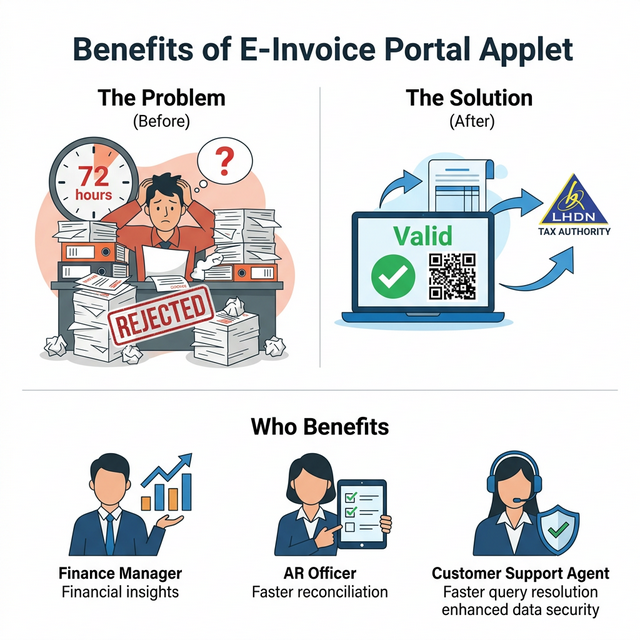
The My E-invoice Portal Applet is the mission control center for businesses operating within the Malaysian LHDN (Lembaga Hasil Dalam Negeri) MyInvois framework. It serves as a unified orchestration layer that monitors every e-invoice transaction, bridging the gap between internal document generation (like Sales or Purchase Invoices) and the official tax authority gateway.
Key Features Overview
Who Benefits from This Applet?
Finance Managers & Controllers:
- Compliance Oversight: Monitor real-time validation success rates across all business branches.
- 72-Hour Window Tracking: Visually track the remaining time for legal document cancellation.
- Audit Preparedness: Maintain an immutable archive of LHDN-validated documents for tax audits.
Accounts Receivable (AR) Officers:
- Transmission Management: Trigger and monitor bulk submissions to LHDN in seconds.
- Detailed Error Resolution: View exact LHDN feedback to identify missing TINs, invalid MSIC codes, or incorrect address formats.
- Verification Hub: Access and share QR codes and validation URLs with customers instantly.
Buyer/Customer Support Teams:
- Rejection Orchestration: Centralized hub to receive and manage buyer-initiated rejection requests.
- Smart Processing Logic: Automatically selects the correct reversal method (
RegeneratevsCredit Note) based on the regulatory 72-hour timeline.
System Administrators:
- Webhook Integration: Configure automated pings to keep external ERP or CRM systems in sync with LHDN statuses.
- Portal Access Control: Manage invitations for buyers to access their specific tax records.
What Problems Does This Solve?
The “Submission Blindness” Problem: In many systems, users “send and pray,” never knowing if a document truly passed LHDN’s rigorous validation.
- The Solution: Real-time status tracking (
Accepted,Valid,Failed) with direct feedback loops from the LHDN MyInvois API.
The 72-Hour Compliance Risk: LHDN regulations only allow for direct e-invoice cancellation within 72 hours. Missing this window creates major accounting headaches.
- The Solution: A built-in “Remained Hours” countdown and automated logic switching that shifts from
RegeneratetoReversal Documentonce the window expires.
The Master Data Verification Bottleneck: Incorrect TIN or Registration numbers lead to repeated submission failures.
- The Solution: Detailed Buyer & Supplier Info views that display the exact data sent to LHDN, helping staff pinpoint which master data record needs correction.
Key Features Overview
Key Concepts
Understanding the E-Invoice Submission Hierarchy
E-invoicing follows a structured flow from creation to official validation. Understanding the hierarchy helps in troubleshooting submission failures.
Organization (Tax Entity)
│
├── Submission Queue (The "Waiting Room")
│   │
│   └── Submission Key ──→ Tracking ID for the BATCH
│       │
│       └── Internal Doc (Invoice) ──→ The SOURCE record
│           │
│           └── Document Key ──→ Cryptographic ID for the UNIQUE record
│
└── LHDN Feedback ──→ Valid / Failed / Rejected Status
The “Regulatory Trinity” of LHDN Compliance
To effectively manage the system, it is crucial to understand these three pillars:
| Component | Analogy | Definition | Example |
|---|---|---|---|
| Validation Status | The “Pulse” | The current health of the document in the eyes of LHDN. | Valid, Failed, Accepted |
| Document Key | The “Fingerprint” | A unique cryptographic hash provided by LHDN for every valid doc. | EIV-12345-X... |
| Rejection Window | The “Timer” | The strict 72-hour period where a document can be cancelled. | 68.5 Hours Remaining |
Quick Start Guide
For Finance/AR: Monitor and Submit Your First Batch
Goal: Successfully validate a batch of generated invoices.
- Switch Entity: Use the top-right picker to select the correct business branch.
- Navigate: Go to Requested E-Invoice listing.
- Filter for Failures: Filter by
Failedstatus to find errors. - Inspect Error: Click a failed record → Details → Read the specific LHDN error code.
- Re-Submit: Select multiple records and click Submit to LHDN.
- Verify: Click on a
Validdocument to see the active QR Code.
For Customer Support: Processing a Rejection
Goal: Process a dispute and correct a tax document.
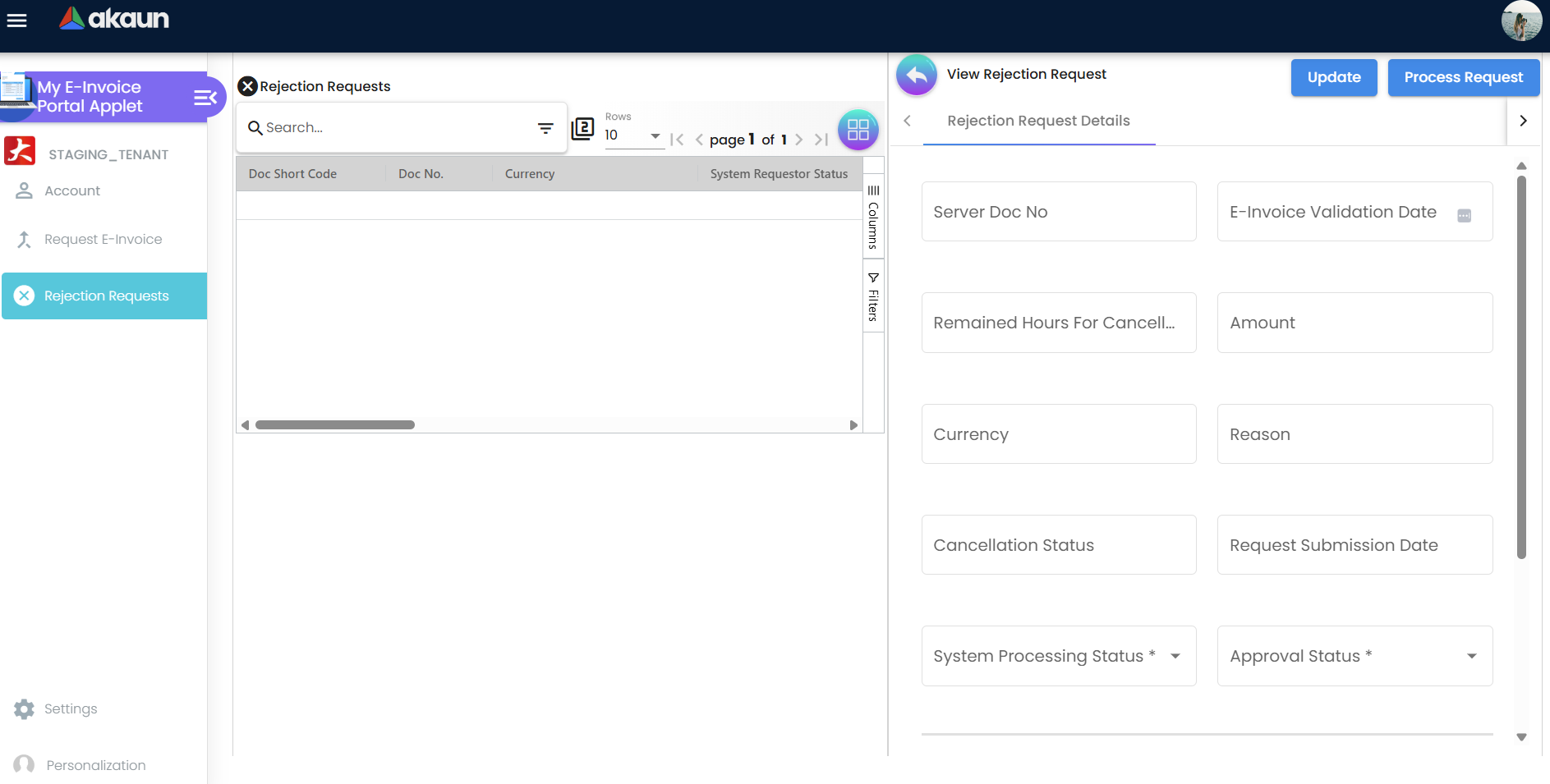
- Check Feed: Navigate to Rejection Requests.
- Review Detail: Look at the Reason field (e.g., “Buyer claims incorrect billing address”).
- Check Logic: The system will auto-default to
REGEN_NEW_EINVOICEif within the 72-hour window. - Process: Click Process Request.
- Notify: The system automatically triggers the Notification Queue to inform the customer.
For Buyers: Self-Service Invoice Retrieval
Goal: Empower end-customers to independently fetch their official tax invoices.
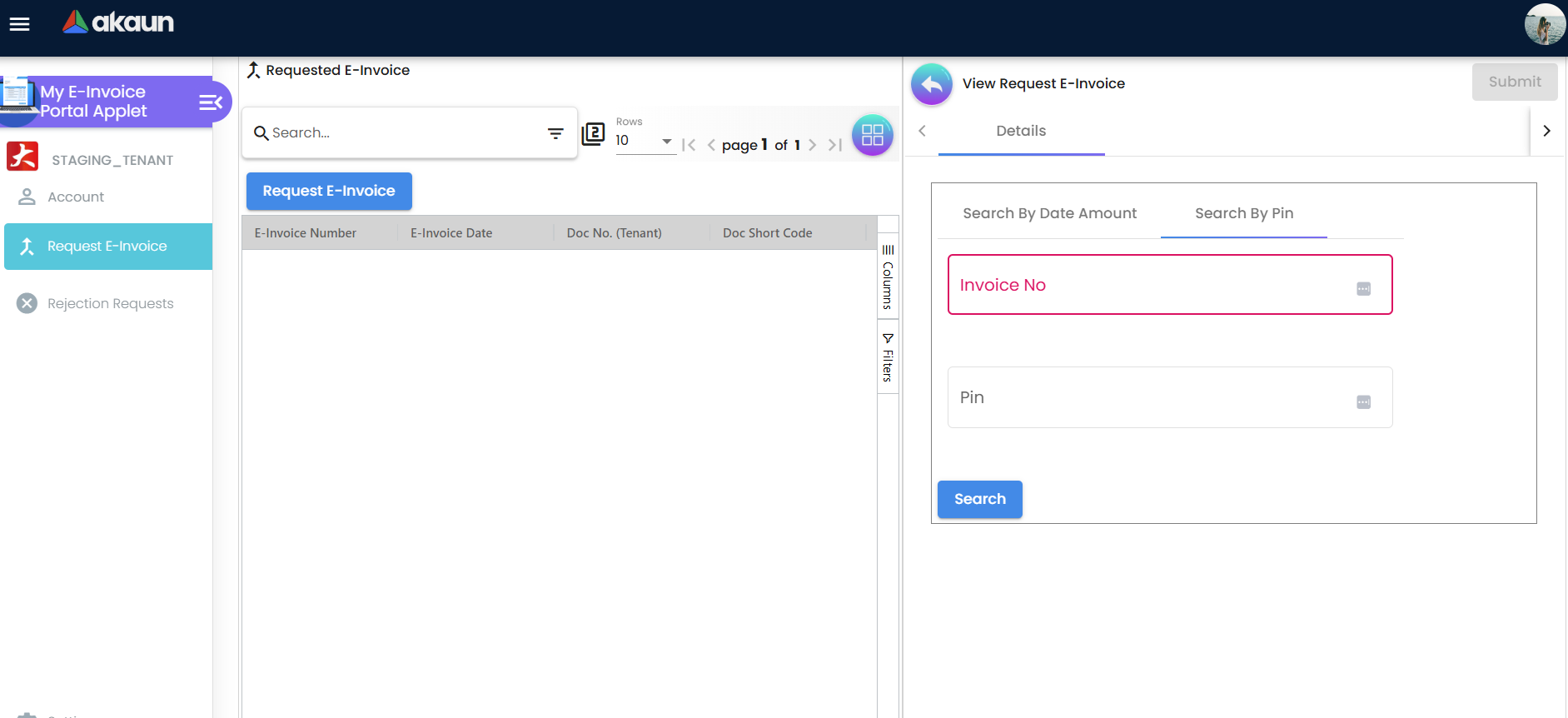
- Access Portal: Customers navigate to the provided self-service portal link.
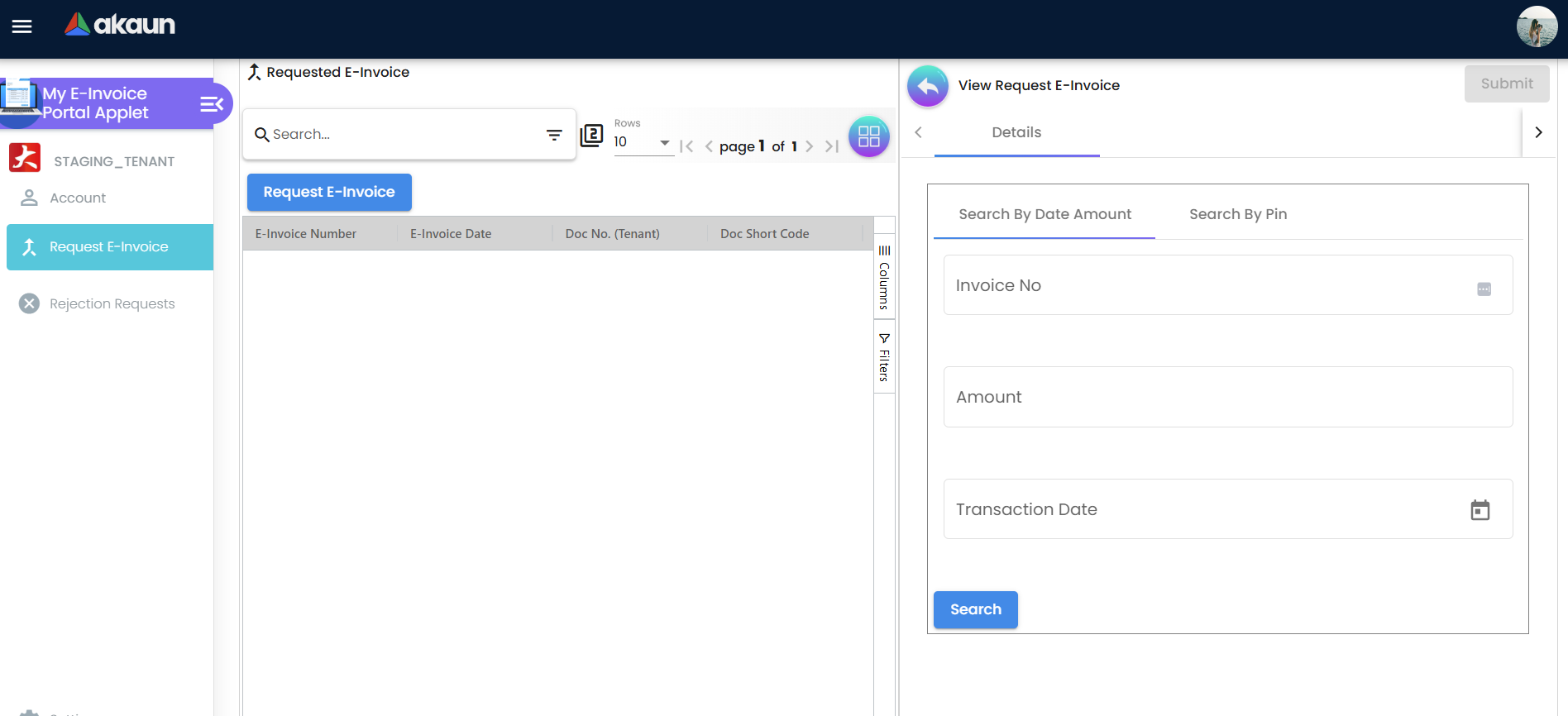
- Enter Search Criteria: Customers can find their invoice by searching with their specific transaction details or by using a unique PIN printed on their sales receipt.
- Retrieve & Download: The system authenticates the request and allows the buyer to instantly download the LHDN-validated PDF document containing the official QR code.
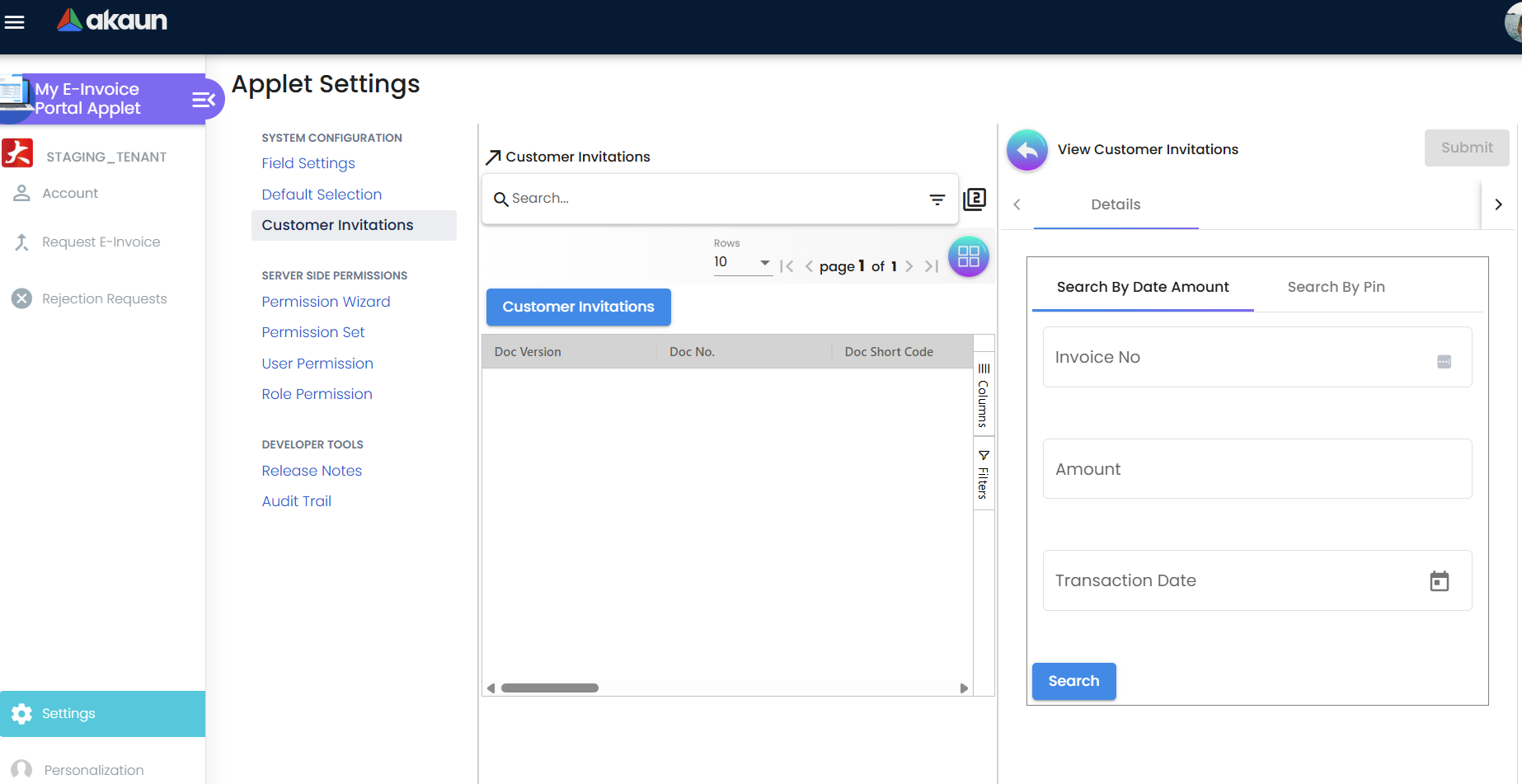
For Administrators: Portal Foundation Setup
Goal: Configure the system to match your organization’s compliance needs.
- Webhook Setup: Go to
Settings > Webhook. Register your endpoint to automate external data sync. - Field Governance: Go to
Settings > Field Settings. Toggle fields like “Supply Type” to be mandatory for your industry. - Batch Cycles: Configure how often the system polls LHDN for updates (Standard: every 15 mins).
- Customer Invite: Trigger emails to B2B customers to grant them portal access.
Configuration & Settings
System-Wide Governance
| Setting | Analogy | Practical Application |
|---|---|---|
| Field Settings | The “Checklist” | Ensure staff don’t forget the “Buyer TIN” during data entry. |
| Webhook Integration | The “Messenger” | Alert your mobile banking app that an invoice is now legally valid. |
| Processing Logic | The “Guardrail” | Prevents illegal cancellations after the 72-hour window. |
FAQ
Q1: What happens if an invoice is stuck in ‘Accepted’ status?
A: Accepted means LHDN has received it but hasn’t finished the full validation. The system will auto-poll LHDN every 15-20 minutes until it moves to Valid or Failed.
Q2: How do I handle a customer who doesn’t have a TIN number?
A: Use the “General TIN” code (EI00000000020) as per LHDN guidelines. The portal will flag this as a “Non-Individual” submission automatically.
Q3: Can I withdraw a submission after clicking ‘Submit to LHDN’?
A: No. Once the request hits the LHDN gateway, it must complete the validation cycle. If there is an error, wait for it to return as Failed or use the Rejection module if it returns as Valid.
Q4: Do I need to manually upload QR codes? A: No. The system automatically fetches the validation URL from LHDN and renders the QR code dynamically in the Details tab.
Q5: What is a ‘Consolidated’ E-Invoice vs an ‘Individual’ one?
A: Individual is for B2B (usually high value). Consolidated groups multiple small retail/POS transactions into a single LHDN submission at the end of the month or day.
Summary
The My E-invoice Portal Applet is the bridge between internal operations and national tax compliance. By centralizing statuses, enforcing 72-hour regulatory windows, and providing deep audit trails, it ensures your organization remains compliant while minimizing manual administrative work.