MY E-Invoice Portal Applet
Watch these as presentations — 4 on this page, slides with narration.
Your customers’ window into your e-invoices: a buyer with portal access looks up a receipt and supplies their TIN to get an individual LHDN e-invoice, sees the e-invoices already issued to them, and asks to reject one within the 72-hour window. An e-invoice request is processed the moment it is submitted; a rejection waits for your approval in My E-Invoice Admin.
Your job, and the screen for it
| The job | Screen or tab | Read |
|---|---|---|
| Request an individual e-invoice for a receipt — receipts dated this month only, and Submit replaces the account’s whole address book | Request E-Invoice › Request E-Invoice, on the Search By Date Amount tab (the Search By Pin tab does not send the PIN) | Fields; Lifecycle and effects |
| See an account’s e-invoices and export a validated one as PDF | Account › Select User, then the Request E-Invoice listing › Export | Screens and menus |
Ask to reject a validated e-invoice — within 72 hours of validation; it waits for the seller’s approval, and on a consolidated one the seller sets CANCEL_EINVOICE, not REGEN_NEW_EINVOICE | Request E-Invoice listing › Request for Rejection; follow it on Rejection Requests | Lifecycle and effects; Troubleshooting |
| Request on a buyer’s behalf — only for an account your login is linked to; it rewrites that account as Submit does | Settings › Customer Invitations | Lifecycle and effects |
Check that a request worked — SUCCESS means built and queued, not that LHDN has it | My E-Invoice Admin’s Portal Request, then To IRB E-Invoice; then this applet’s Request E-Invoice listing | How you know a request worked |
| Give buyers access — logins linked to their customer accounts, receipts still waiting in the Batch Pool | Customer master and user administration; My E-Invoice Admin’s Batch Pool | Before you can use it |
Overview
The MY E-Invoice Portal Applet is the buyer’s window into the e-invoice pipeline that the My E-Invoice Admin Applet runs. A customer who has been given portal access signs in, picks the customer account they act for, and can do three things: look up a receipt dated from the first of this month (by invoice number plus date and amount; the PIN printed on it is not used) and supply their TIN and details so that an individual e-invoice is issued for it; see the e-invoices already issued to that account; and raise a rejection request against a validated e-invoice while LHDN’s 72-hour cancellation window is still open. An e-invoice request is processed the moment the buyer submits it — by the same processor a storefront request runs, with no approval step — and every request is logged in the admin applet under Internal Submission → Portal Request. A rejection request is different: it waits in the admin applet’s Rejection Requests until the seller approves it. The portal never calls LHDN to submit a document itself; the e-invoice a request builds goes out on the seller’s ordinary submission run.
myEInvoiceForCustomerAndSupplierApplet). It is a separate applet, not this one under an older name. Its menu is the seller’s operator console: Posting Queue, the pools, Internal Submission, External Reception, Reconciliation, Cancellation and Monthly Report, the same groups as My E-Invoice Admin. This Portal has Account, Request E-Invoice and Rejection Requests. Give your buyers this Portal. For the operator’s screens, see My E-Invoice Admin.Which route for which buyer. At GadgetSphere, the purchasing officer of a corporate customer of GadgetSphere Distribution has a portal login linked to that company’s customer account, and uses this applet. A walk-in buyer who paid for an ultraportable laptop at GS-KV-01 and comes back for an e-invoice in his employer’s name has no such login. Send him to the Request E-Invoice widget on your website, which runs the same search and form for a guest (Storefront E-Invoice Request), or complete his details on the receipt’s Batch Pool row in My E-Invoice Admin and use Save and Resubmit. Your own staff acting for a linked account use Settings → Customer Invitations here. The portal, Customer Invitations and the website widget all end in the same request processor and the same Portal Request log; Save and Resubmit is the operator’s own route.
Why your buyer has an applet of their own. A shop does not make a walk-in customer open an account to buy a charger. The sale goes to a cash customer and is finalised, and the sales and point-of-sale screens do not let you change a finalised document’s customer afterwards. Then, a few days later, the buyer asks for an e-invoice in their company’s name. The Portal exists for that buyer: it lets them complete the e-invoice buyer details, which are kept separately from the account the sale was billed to. The cash bill’s journal and stock are untouched; only its e-invoice fields change. The idea worth taking from this: the till does not have to collect tax numbers. A cashier who lets the queue move and sends the buyer to the Portal afterwards has handed that data entry to the one person who knows the details. The receipt only has to still be waiting when the buyer arrives. The Portal finds receipts dated from the first of the current month only. A receipt from last month is your staff’s job, in My E-Invoice Admin, before the month’s consolidation run takes it. Once a receipt is inside a submitted consolidated e-invoice, it cannot be lifted out for one buyer.
Every request accepted for processing is logged on My E-Invoice Admin → Portal Request, as SUCCESS or FAILED; a request refused at the door (a login not linked to the account, a receipt already requested or already consolidated) leaves no row. For a walk-in with no account and no website form, your staff complete the buyer on its Batch Pool row in My E-Invoice Admin and use Save and Resubmit.
Where it fits
| Upstream | This applet | Downstream |
|---|---|---|
| Sales invoices and cash bills finalised in Sales Invoice or POS and still waiting in the admin applet’s Batch Pool, dated in the current calendar month | Buyer finds the pool row, completes the buyer identity, and the request is processed at once | E-invoice built and queued → the seller’s submission run → LHDN; the request logged on admin applet → Internal Submission → Portal Request |
| Validated to-IRB headers for the buyer’s entity | Buyer views them and can request a rejection | Admin applet → Cancellation → Rejection Requests → Cancellation Queue → LHDN |
| Customer master (Customer Applet) linked to a login through the entity-subject login link | The Account menu lists the entities the login may act for | — |
Paying a bill happens on a different screen
This applet takes no payment and lists no unpaid bills. A customer who pays a bill online does it on the My Invoice screen of a Customer Portal website built with Cross Platform Commerce — a similar name for a different product. There, the receipt voucher exists before the customer pays: the website raises it, the payment gateway’s callback activates it and sets it against the invoice, and a failed payment deletes it, with no background job involved. A storefront checkout is different again: it makes no receipt voucher at all, and the cart becomes a FINAL sales order with the payment written on it as a settlement line (how the three payment routes differ). How that order’s payment later meets the invoice raised from it is an open question (Q-1341), and so is how the gateway’s fee should be booked (Q-1335). For the e-invoice none of this matters here: the search below looks for the sales document by number, amount and date, and ignores how it was paid.
Screens and menus
| Menu | Route | What it shows | Actions |
|---|---|---|---|
| Account → Select User | (toggle in the menu) | The customer accounts (entities) linked to the signed-in login; the selected one scopes every other screen (SessionActions.setSelectedSessionEntity) | Switch account |
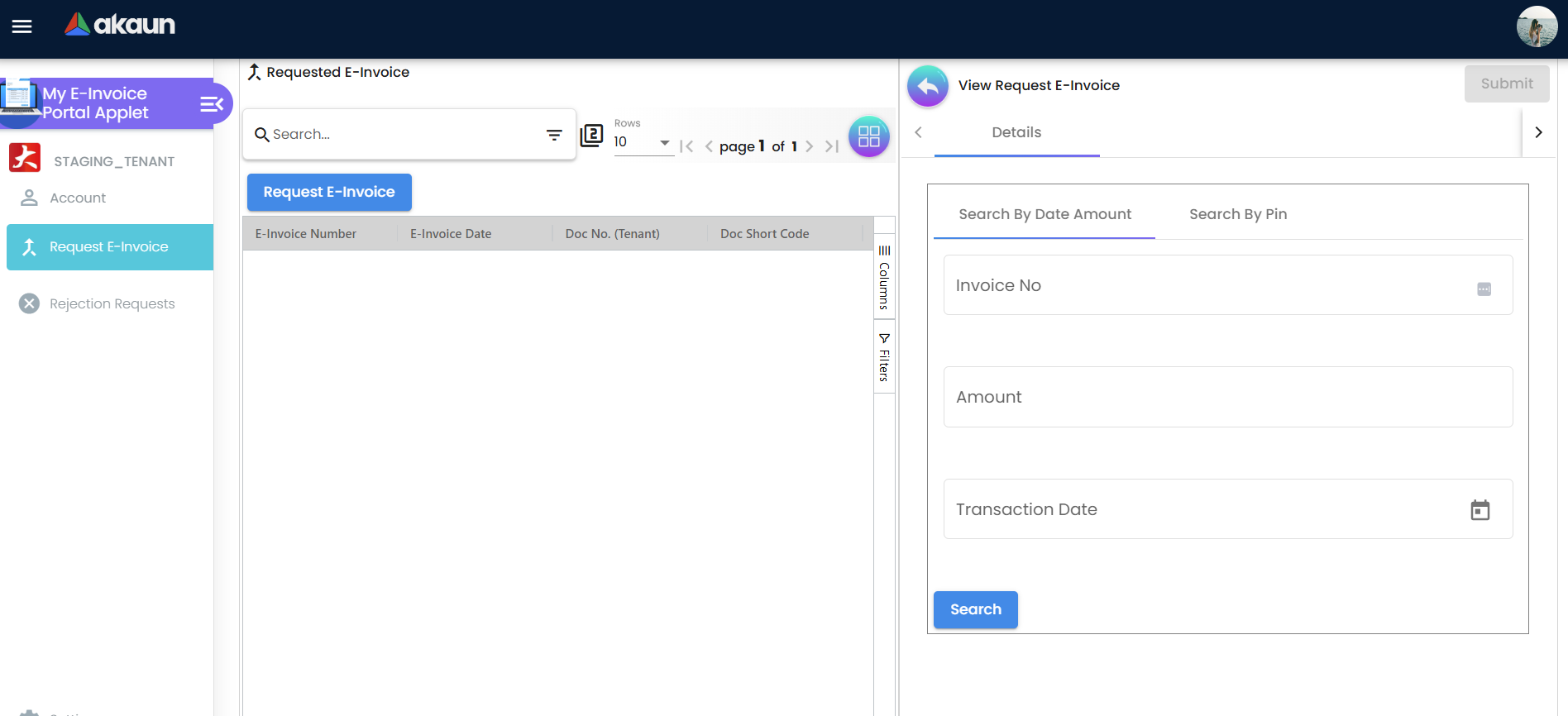
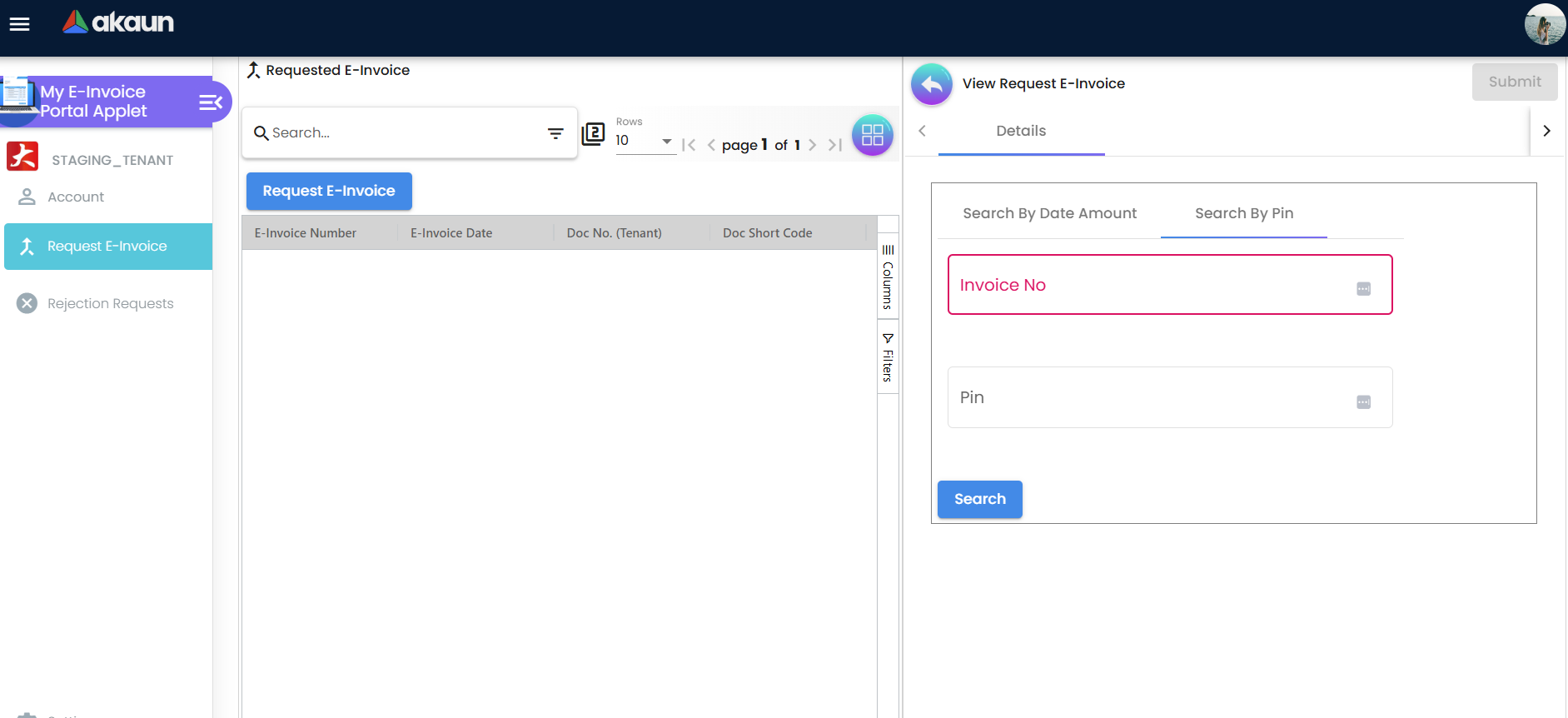
| Request E-Invoice | internal-submission-to-irb | Listing of the to-IRB headers for the selected account (e-invoice number, e-invoice date, document number, short code, status); the Request E-Invoice button opens the request form | Request E-Invoice; per row: Export (PDF), Request for Rejection, Submit (save details) |
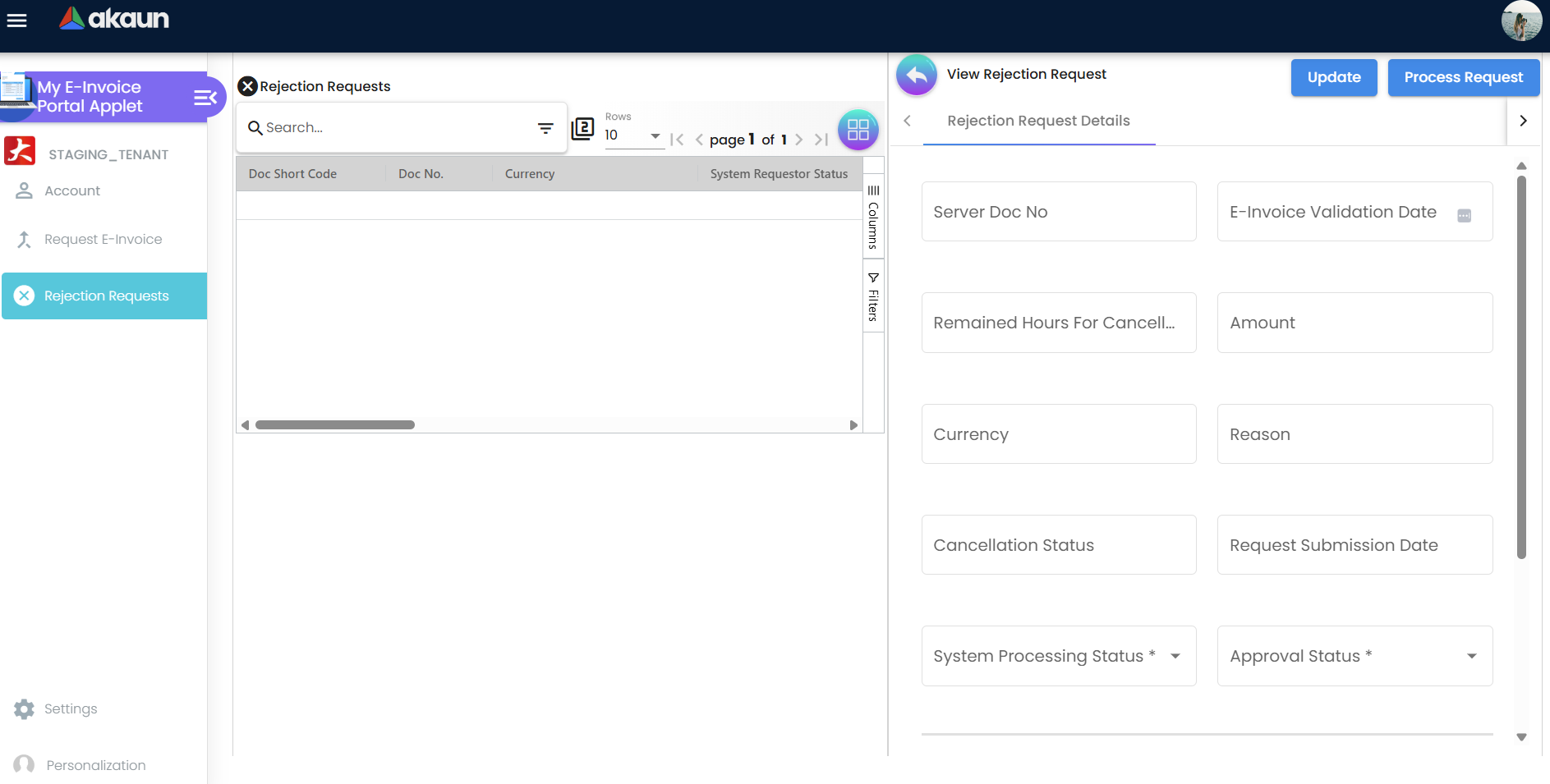
| Rejection Requests | rejection-request | The account’s rejection requests with requestor / processing / approval status | Update; Process Request |
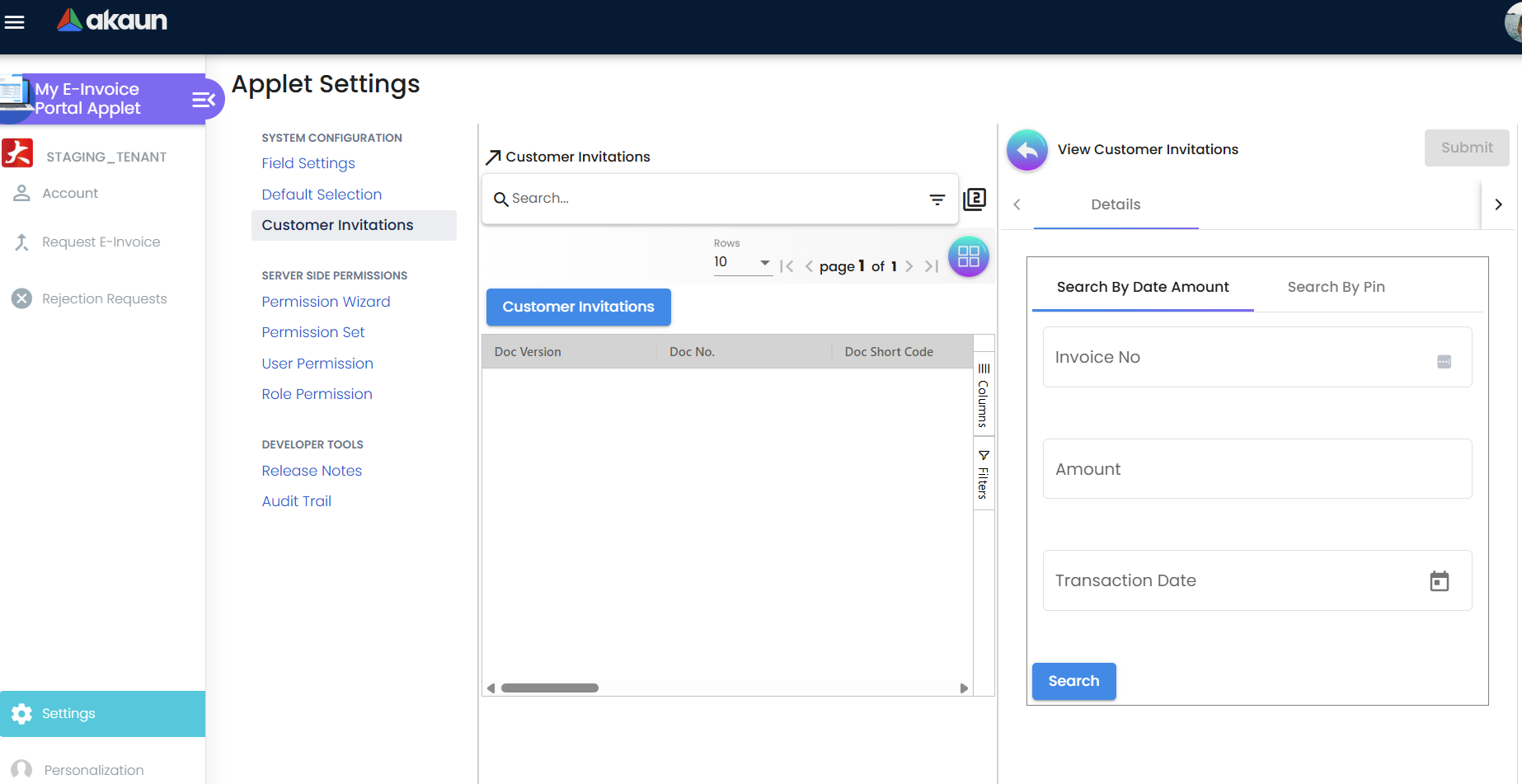
| Settings | settings/… | Field Settings, Default Selection, Customer Invitations, Webhook, Feature Visibility, Permission Set / User / Team / Role | See Configuration |
Configuration
Before you can use it
| Prerequisite | Where | Why |
|---|---|---|
| Customer logins linked to their entity records | Customer / entity master and the tenant’s user administration (entity-subject login link) | The Account menu is built from getEntitySubjectLoginLinkWithEntity; a login with no linked entity sees nothing. |
| Documents waiting in the Batch Pool | Sales / POS applet, admin applet → Batch Pool | The search looks only in the Batch Pool, and only at receipts dated from the first of the current month. A receipt the seller has moved to the Individual or Single General pool has left the Batch Pool and is not found here, and neither is one that was skipped; a request for one whose consolidated e-invoice has already been sent is refused. |
| E-invoice enabled on the seller company and the admin applet pipeline running | Organisation Applet; see the admin applet page | The request builds and queues the e-invoice; the seller’s submission run sends it. |
| Seller staff read the outcome and approve rejection requests | Admin applet → Internal Submission → Portal Request; Cancellation → Rejection Requests | An e-invoice request needs no approval, so nobody is waiting on it — but a FAILED request on Portal Request needs somebody, and a rejection request does nothing until the seller approves it. Nothing in the portal submits to LHDN. |
Applet settings
The applet has its own Field Settings screen whose eight toggles (Unit Discount, SST/VAT/GST, WHT, Blanket Order, Segment, G/L Dimension, Profit Center, Project) are never saved. Default Selection renders branch and location pickers, but its SAVE saves nothing. No applet setting is read anywhere in the portal. Webhook and Feature Visibility are the shared screens.
Document behaviour settings
Not applicable — the portal has no documents of its own. The one behavioural constant is the rejection Processing Logic list offered to the buyer: REGEN_NEW_EINVOICE, VOID_ORIGINAL_DOC, NEW_REVERSAL_DOC. CANCEL_FOR_EDIT_AND_RESUBMIT — the only logic that works for a consolidated e-invoice — is not offered here; it is available in the admin applet.
Feature visibility / permissions
The applet has no client-side permissions and checks none. What a buyer login can read and write is scoped to the customer account it has selected; the seller-side Customer Invitations screen is scoped the same way.
Fields
Request E-Invoice form (Document Details)
The form has two parts. The search part (two tabs, both starting with Invoice No) finds the receipt; once one is found it shows the receipt’s Invoice Number, Transaction Date, Amount and Currency read-only, and the Profile Info part below it opens, already filled from the selected account’s own record — name, ID, Tax ID, SST number, e-mail, phone and the address marked as its e-invoice address. Until every required profile box is filled the form says Update profile to proceed to request E-Invoice. and Submit stays greyed out.
| Field | Meaning | Required | Notes |
|---|---|---|---|
| Invoice No | The receipt’s number | Yes | Matched whole and exactly against every number the receipt carries — its document number and any reference number the till or sales screen wrote — so a partial number finds nothing. If two receipts match, the form takes the first. |
| Amount, Transaction Date | Second and third search keys | Yes on Search By Date Amount | Must equal the receipt’s amount (to the cent) and date. The search also looks only at receipts dated from the first of the current month, so on 1 October a September receipt is no longer found (read in the source, not run: search one of last month’s receipts once to confirm). A buyer holding last month’s receipt has to ask you; your staff handle it in the admin applet before the month’s consolidation takes it. |
| Pin | PIN printed on the receipt | — | The PIN is not sent. Search on either tab sends the invoice number, amount and date only, so the Search By Pin tab cannot find a receipt by its PIN (read in the source, not run: try one receipt on each tab). Tell buyers to use Search By Date Amount. |
| Name, ID Type, ID No, Tax ID, SST Reg No, Email, Contact No | Buyer identity to put on the e-invoice | All except SST Reg No | Verify TIN checks the Tax ID + ID pair with LHDN; Submit does not wait for it, so press it before Submit and read the hint under Tax ID. |
| Address Line 1–5, Country, State, City, Postcode | Buyer address | Line 1, Country, State, City, Postcode | State is picked from the chosen country’s list. Submit replaces the account’s whole address book with this one address — any other billing, shipping or main address saved on that customer is gone afterwards (read in the source, not run: on a test customer with a shipping address, submit once and look at the customer record). Whoever maintains customer records re-enters a lost delivery address from the last sales document that used it. |
Rejection Request
| Field | Meaning | Required | Notes |
|---|---|---|---|
| Reason | Why the buyer rejects the e-invoice | Yes | Sent to LHDN as the cancellation reason. |
| Remained Hours For Cancellation | 72 minus the hours since the e-invoice was validated | Read-only | Computed in the browser. |
| Processing Logic | What the seller should do after the cancel | Yes for processing | When the window has closed the list is reduced to NEW_REVERSAL_DOC only. |
| System Processing Status, Approval Status | IN-PROGRESS / COMPLETED; APPROVED / REJECTED / ON-HOLD | — | Normally set by the seller in the admin applet. |
Where the figures on these screens come from
- The receipt’s number, date, amount and currency after a search are the Batch Pool row’s own copy of the document, read from the pool table, not from the sales document itself. “From the first of this month” is worked out from the date on the buyer’s own device.
- The Profile Info boxes are the selected customer account as it stands when the form opens — its name, identity, tax numbers and the billing address marked as its e-invoice address. They are not what any earlier e-invoice carried.
- Every column of the Request E-Invoice listing — e-invoice number and date, status, buyer, LHDN document — is a value stored on the e-invoice record. The status is what BigLedger last heard from LHDN through its own submission run and status checks (how the three status columns move), not a live lookup at LHDN when the buyer opens the screen.
- Remained Hours For Cancellation is recomputed in the browser each time the panel opens: 72 minus the hours between the record’s validation time and the device’s clock. It does not tick while the panel stays open, and a device whose clock is wrong shows the wrong figure; the backend applies its own clock when the request is processed (item 6 below). The validation date beside it is shown without the time.
Lifecycle and effects
Search. The portal looks for the receipt only among the seller’s documents in the Batch Pool and dated this month — not in the other pools and not among e-invoices already submitted. It shows the receipt’s invoice number, date, amount and currency; the reason a receipt is still waiting is not shown to the buyer.
Submit. Two things happen, in this order.
- First the browser saves the buyer’s identity and address onto the selected customer account, the address replacing every address saved there.
- Then the browser asks for the request to be processed, and only now is the request checked. It is refused when the receipt’s pool row has already succeeded — a request was already made for it, from this portal, Customer Invitations or your website, or it is already inside an e-invoice — unless that e-invoice is a consolidated one that has not been sent yet. A refused request has still rewritten the customer account. An accepted request runs at once in the same queue processor a storefront request runs, with no approval step; the Posted to Process message means it was accepted, not that it built.
After an accepted request:
- The processor copies the account’s details, as they now stand, into the sales document’s own e-invoice buyer block and marks the document Individual. The customer the document was billed to is left as it was — a cash bill to your walk-in customer account stays one; the buyer on an e-invoice is allowed to differ from the account you billed.
- The individual e-invoice is built from
that copy and queued;
SUCCESSmeans built and queued, not that LHDN has it. Every request, success or failure, is logged on the admin applet’s Internal Submission → Portal Request. - If the build
fails, the sale is stranded: the Batch Pool row is left
PROCESSED / FAILEDwith the document already Individual, so the monthly consolidation passes it by and it is in neither the consolidated nor an individual e-invoice until someone acts. The buyer can correct the details and submit again, because a row that did not succeed is accepted again, or the seller fixes it on the row (admin applet §3). - A receipt that a consolidation has already taken, while its consolidated e-invoice still waits to be sent, is lifted out of it: the consolidated e-invoice is rebuilt without the receipt, which becomes an individual one.
- A receipt in the Single General or Individual Pool is never found by the portal’s search, so it never reaches this step. Websites can offer the same step publicly, protected by reCAPTCHA.
View. The listing shows the buyer’s submitted e-invoices; a validated one carries the LHDN UUID and QR link and can be exported as PDF. If LHDN rejects it, the listing shows
Invalid.- Fix it on the e-invoice record’s Account tab in the admin applet and use Save and Resubmit (admin applet §5): the record sends the buyer copy it holds, so correcting the customer account changes nothing on it, and a second portal request for the receipt is refused.
- Do it before the consolidation run for that month: since 13 October 2026 the run also takes a rejected record under RM 10,000 into the month’s consolidated e-invoice under the General Public buyer, and the buyer who asked for their own e-invoice then has none (admin applet §3). Whether the run should take an e-invoice a buyer asked for is an open question (Q-1343).
Request for Rejection. Available only within 72 hours of the e-invoice’s validation, as counted in the browser. If a request already exists for the e-invoice, the applet shows request already exists instead. A new request starts as requested and in progress, and appears in the admin applet’s Cancellation → Rejection Requests.
A rejection raised on the LHDN portal instead of here brings back only its date. The buyer-side rejection this applet creates lands in the seller’s Cancellation → Rejection Requests and follows the normal manual approval path. A rejection the same buyer makes directly on the MyInvois portal does not: no request is created and no queue changes. The next time BigLedger fetches that e-invoice’s details from LHDN it writes the rejection date, without the time, into the e-invoice’s IRB Reject Request Date on the admin applet’s To IRB E-Invoice screen, and tells nobody. If a buyer says they have rejected one of your e-invoices, check the LHDN portal yourself and act on it here.
Process Request (portal listing) is only selectable for requests that are already
APPROVED,IN-PROGRESSand have a processing logic — that is, after the seller has approved them. The backend checks again before calling LHDN: the e-invoice must beValid, must carry an LHDN document UUID, and must be less than 72 hours past validation. The countdown on screen is a convenience; the backend check is the rule.Customer Invitations (Settings) is the seller-side twin of the request form: staff find a document, update the customer’s record on their behalf, and the Batch Pool receipt is then sent through the same request processor at once, exactly as in item 2. It works only for a customer account your own login is linked to, and only on a Batch Pool row. For a walk-in buyer with no linked account, complete the buyer on the pool row in the admin applet and use Save and Resubmit instead.
The portal writes the buyer’s customer account, the sales document’s e-invoice buyer block and submission type, the pool row it processes, one request record per accepted request, and rejection-request headers. It never creates documents or journals, and the e-invoice record it may produce goes through the same submission and validation processors as any other.
What your e-invoice clerk still does
The portal moves the request; it decides nothing for you. Five parts of the job stay with a person.
- Read Portal Request every working day. When a build fails, no e-invoice record is built and nothing tells the buyer why. Your clerk opens Internal Submission → Portal Request, fixes the reason on each
FAILEDrow’s pool row, and tells the buyer. Until somebody does, the sale is in no e-invoice at all, and the month’s consolidation run passes it by (item 2). - Decide every rejection request. It waits until somebody approves it. Read the buyer’s reason against the sale, check whether the e-invoice is a consolidated one before approving (Troubleshooting, last two rows), and process inside 72 hours of validation by the backend’s clock. Approval is a sound place to split duties: the person who approves a cancellation need not be the one who issued the sale.
- Tell buyers at the counter about the window. At GS-KV-01, a buyer who wants an e-invoice should request it in the month of the sale; after that the portal’s search no longer finds the receipt, and your staff handle it in the admin applet instead.
- Restore the addresses a request wiped. After any portal request the customer account holds one address. Whoever maintains customer records checks the account and re-enters the delivery address from the last sales document that used it.
- Watch for rejections made on the MyInvois portal. BigLedger only learns their date (item 5), so when a buyer says they rejected an e-invoice, your clerk checks the LHDN portal and acts here.
How you know a request worked
Run this once after your first buyer request, and again whenever a buyer says nothing arrived.
- Admin applet → Internal Submission → Portal Request: the newest row for the receipt reads
SUCCESS.FAILEDmeans no e-invoice was built — see Troubleshooting. - Admin applet → To IRB E-Invoice: the receipt’s record shows the buyer name and tax number the buyer typed and submission type Individual. After your submission run it moves on to
Validand carries the LHDN document identifier. - This applet → Request E-Invoice, with the buyer: the e-invoice is listed with the same status, and Export gives the PDF.
- The customer account: one billing address, marked as the e-invoice address. Re-enter any delivery address it lost.
Related applets
- My E-Invoice Admin Applet — where every portal action is completed: pools, Save and Resubmit, Rejection Requests, Cancellation Queue.
- Customer Applet — the account whose identity and address the portal overwrites on Submit. The e-invoice takes a copy at that moment, so a later correction of the customer changes the next e-invoice, not this one; this one is corrected on the record in My E-Invoice Admin.
- Sales Invoice (Internal), POS General — where the receipts and their PINs originate.
- Organisation Applet — company e-invoice status and identity used when the seller resubmits.
Troubleshooting
| Symptom | Cause | Fix |
|---|---|---|
| Search finds nothing although the receipt exists | The receipt is not in the Batch Pool: it was skipped, is still in the posting queue, or was moved to the Individual or Single General pool; it is dated before the first of this month; the search was run from the PIN tab, which does not send the PIN; or the number, amount or date do not match exactly. | Search again on Search By Date Amount with the full invoice number. If it still finds nothing, the seller confirms where the receipt is in the admin applet and, if it is still waiting, completes the buyer on its pool row and uses Save and Resubmit. |
| Submit shows an error, and no new row appears on Portal Request | The request was refused: a request for this receipt already succeeded, or the receipt is already inside an e-invoice — individual, or consolidated and sent. The customer account was rewritten all the same. | Seller: find the earlier request on Portal Request and the record it made. A document already inside a submitted consolidated e-invoice cannot be re-issued individually, and BigLedger cannot lift one receipt out of it: a cancellation cancels the whole consolidated e-invoice, and its receipts are not returned to the Batch Pool (admin applet §6). Do not cancel it for one buyer; hand the buyer’s question to whoever handles your tax. |
| Verify TIN fails | TIN and ID type/value do not match LHDN’s record; foreign buyers must use PASSPORT; NRIC must be 12 digits without hyphens; the General Public TIN EI00000000010 is accepted only with a real NRIC. | Correct the pair and verify again; a General Public TIN with a BRN or passport is rejected by LHDN (CF324, CF358). |
| Request submitted but no e-invoice appears | The request is processed at once, so either it failed to build — Portal Request shows it FAILED, and the Batch Pool row is PROCESSED / FAILED with the reason (address, phone 8–20 characters) in Validation Error — or it succeeded and the e-invoice is built and queued, waiting for the seller’s submission run. | Seller: find the request on admin applet → Internal Submission → Portal Request. For a FAILED one, fix the reason on the pool row and follow the admin applet’s PROCESSED / FAILED troubleshooting row, or have the buyer correct the details and submit again — until then the sale is in no e-invoice. |
| Request for Rejection button disabled | More than 72 hours since validation, the e-invoice is not Valid, or a request already exists. | Ask the seller for a credit note e-invoice; check Rejection Requests for the existing request. |
Rejection request stays IN-PROGRESS | Nothing advances it until the seller sets Approval Status = APPROVED and a processing logic, then processes it. | Seller: admin applet → Cancellation → Rejection Requests. |
| Buyer says they rejected an e-invoice, but nothing changed in BigLedger | The rejection was raised on the LHDN portal, not here. No rejection request is created: BigLedger only writes the date into IRB Reject Request Date the next time it fetches the e-invoice’s details, and tells nobody. | Check the e-invoice on the MyInvois portal, then act on it in the admin applet (cancel inside 72 hours, credit note after). Ask buyers to use this portal so the request reaches you. |
| Request processed but LHDN cancel fails with “Passed 72 hours from validation date time” | The backend clock runs from the header’s validation_datetime; the portal countdown is client-side and can be later than the real cutoff. | Credit-note path. |
| Request for a consolidated e-invoice fails with “Can not void the generic document” | VOID_ORIGINAL_DOC chosen; a consolidated e-invoice has no single source document, and this is the only logic that produces that message. LHDN was never called. | Seller re-processes with CANCEL_EINVOICE in the admin applet (not offered in the portal). |
| A consolidated e-invoice reads Cancelled at LHDN with no replacement, after a buyer’s portal request | REGEN_NEW_EINVOICE chosen — the portal offers it, and on a consolidated e-invoice it cancels at LHDN first and only then fails to rebuild. Every receipt inside it is now unreported. | Seller: before approving a portal request, check whether the e-invoice is consolidated and set the logic to CANCEL_EINVOICE yourself. If it has already happened, raise a support request the same day. |