Internal RMA Applet
Purpose and Overview
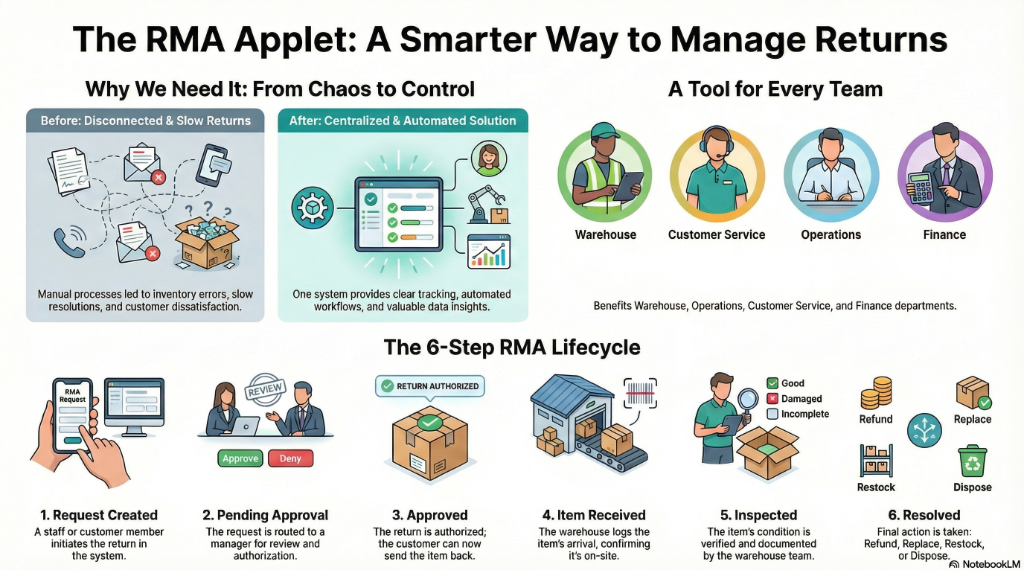
Who Benefits from This Applet?
Warehouse Staff:
- Process incoming returns efficiently
- Track return status and location
- Manage restock or disposal workflows
Operations Managers:
- Monitor return volumes and trends
- Identify product quality issues
- Optimize reverse logistics processes
Customer Service Teams:
- Create RMA requests on behalf of customers
- Track return status for customer inquiries
- Coordinate with warehouse for pickups
Finance Teams:
- Track credits and refunds from returns
- Monitor return-related costs
- Reconcile inventory adjustments
What Problems Does This Solve?
Traditional Return Challenges:
- Untracked returns leading to inventory discrepancies
- Slow processing causing customer dissatisfaction
- No visibility into return reasons for quality improvement
- Manual coordination between departments
The Internal RMA Solution:
- Centralized RMA tracking - All returns in one system
- Automated workflows - Route returns to correct handlers
- Reason tracking - Capture return reasons for analysis
- Inventory integration - Automatic stock adjustments
Key Features Overview
Key Concepts
RMA Lifecycle
Request Created → Pending Approval → Approved → Item Received → Inspected → Resolved
        │               │              │            │           │           │
        │               │              │            │           │           └── Refund/Replace/Restock
        │               │              │            │           └── Quality check
        │               │              │            └── Item at warehouse
        │               │              └── Authorized for return
        │               └── Awaiting manager review
        └── Customer/Staff initiates
Key Terms
| Term | Definition | Example |
|---|---|---|
| RMA Number | Unique identifier for return request | RMA-2024-00123 |
| Return Reason | Why item is being returned | Defective, Wrong item, Changed mind |
| Disposition | What happens after return | Refund, Replace, Restock, Dispose |
| Credit Note | Financial document for refund | CN-2024-00456 |
Quick Start Guide
For Warehouse: Process a Return
Goal: Receive and process an incoming RMA item
- Navigate: Go to RMA Listing from the sidebar
- Find RMA: Search by RMA number or customer name
- Receive Item:
- Click on the RMA record
- Click “Receive” to mark item arrived
- Verify item condition matches description
- Inspect: Add inspection notes and photos if needed
- Resolve: Select disposition (Refund, Replace, Restock)
For Operations: Create an RMA Request
Goal: Initiate a return authorization
- Navigate: Go to RMA Listing
- Create New: Click "+" to create RMA
- Enter Details:
- Select Customer/Source
- Add Item(s) being returned
- Select Return Reason
- Add Notes for context
- Submit: Send for approval if required
RMA Creation
Create RMA requests with:
- Customer/source selection
- Item details and quantities
- Return reason categorization
- Expected condition notes
- Requested resolution type
Return Tracking
Track returns through every stage:
- Pending - Awaiting action
- In Transit - Item being shipped back
- Received - Arrived at warehouse
- Inspecting - Under quality review
- Completed - Resolution applied
Approval Workflow
Configure approval requirements based on:
- Return value thresholds
- Return reason categories
- Customer type or segment
- Item categories
Stock Transfer Integration
RMA integrates with stock transfer for:
- Moving items between locations
- Returning items to vendor
- Transferring to disposal/recycle
Reports & Analytics
Analyze return patterns:
- Return Rate - Percentage of sales returned
- Top Return Reasons - Most common issues
- Processing Time - Average resolution time
- Cost Analysis - Shipping and restocking costs
Configuration & Settings
RMA Policies
- Auto-approval thresholds
- Required fields for RMA creation
- Default disposition rules
Reason Codes
- Define return reason categories
- Map reasons to resolution types
Approval Settings
- Set approval hierarchies
- Configure value-based routing
FAQ
Q: Can I bulk process multiple RMAs? A: Yes, select multiple RMAs from the listing and apply batch actions.
Q: How do I track partial returns? A: Create line items for each product being returned—you can receive them individually.
Q: Can customers initiate their own RMA requests? A: If integrated with a customer portal, yes. Otherwise, staff creates on their behalf.
Q: How are refunds processed? A: After RMA resolution, a credit note is generated for finance to process the refund.