Chart of Account
Watch these as presentations — 4 on this page, slides with narration.
Every journal in BigLedger posts into the GL codes defined here. Map the company’s Default GL Codes before anyone finalises a document: an invoice cannot post to the General Ledger until they are mapped, and nothing can be dated into a fiscal period you have locked.
Overview
The Chart of Account applet defines the structure every journal in BigLedger posts into: GL Sections (Assets, Liabilities, Equity, Revenue, Expenses), GL Categories within them, and the GL Codes that transactions actually hit. It also holds, per Company, the ledgers, the Default GL Codes that tell sales, purchase, stock, forex and consignment documents which accounts to post to automatically, the Sets of Books, the Fiscal Years whose periods can be locked, and the month-end Closing Stock Balance values the Profit and Loss report uses.
It is opened by the finance administrator during implementation and by the accountant at month-end. It sits before every posting document: an invoice cannot post to the General Ledger until the company’s default GL codes are mapped (FINAL still goes through; the posting job behind it is what fails). Its date is checked too: it cannot be finalised with a date in a period locked for transactions.
    flowchart TD
  COA["Chart of Account"] --> SEC["GL Section<br/>Assets, Liabilities, Equity, Revenue, Expenses"]
  SEC --> CAT["GL Category<br/>Current Assets, Fixed Assets, Trade Debtors, ..."]
  CAT --> CODE["GL Code<br/>the account a transaction posts to"]
  CO["Company<br/>assigned a chart in Organisation"] --> COA
  CO --> LED["Ledger<br/>PRIMARY / SECONDARY / CONSOLIDATED"]
  CO --> FY["Fiscal Year"]
  CO --> DEF["Default GL Codes<br/>which account each document type posts to"]
  DEF --> CODE
  LED --> SUB["Sub-ledger<br/>created when a default GL code is saved;<br/>journals and opening balances land here"]
  FY --> PER["Fiscal Period<br/>OPEN / LOCK_GL / LOCK_TXN / LOCK_ALL"]
  SOB["Set of Books<br/>what financial reports run against"] --> LED
Where it fits
| Direction | Applet / document | Why |
|---|---|---|
| Upstream | Organisation | Companies are created there and assigned a chart of accounts. Every ACTIVE company is listed under Companies here whether or not it has a chart; the chart gates only the Default GL Codes tab |
| Downstream | Ledger and Journal | Manual journals post to GL codes and are blocked by LOCK_GL / LOCK_ALL periods |
| Downstream | Financial Report | Trial balance, P&L and balance sheet roll GL codes up through categories and sections; the P&L reads the company’s Inventory cost base on and the month-end Closing Stock Balance values maintained here |
| Downstream | Cashbook | Each cashbook is tied to a bank / cash GL code |
| Downstream | Sales, purchase, stock, consignment and forex documents | Post through the company’s Default GL Codes; blocked by LOCK_TXN / LOCK_ALL periods (stock transfers excepted, see Lifecycle) |
| Downstream | Doc Item Maintenance | Account Code items and the GL Code Create Item tool link items to GL codes |
| Downstream | Customer Maintenance, Supplier | Entity-level receivable / payable GL codes |
| Downstream | Tax Configuration | Tax lines on documents post to the INPUT_TAX / OUTPUT_TAX defaults mapped here |
Modules: Core, Financial Accounting.
Screens and menus
| Menu item | Description |
|---|---|
| Chart of Account | The hierarchical tree. Tabs: Details, GL Code Link, GL Code, Segment Tree, Dimension Tree, Profit Center Tree, Project Tree |
| GL Section | Top-level reporting sections (Assets, Liabilities, …) |
| GL Category | Groups of accounts within a section. Tabs: Details, GL Code, GL Section |
| Import GL Category | CSV upload of categories |
| GL Code | All GL codes with search, create and edit |
| Import GL Code | CSV upload of GL codes |
| Companies | Legal entities. Tabs: Main, Ledgers, Fiscal Year, Default GL Codes (the last tab appears only once the company has a chart of accounts assigned) |
| Set Of Books | Books that group ledgers. Tabs: Details, Ledgers |
| Fiscal Year | Financial years and their periods. Tabs: Main, Fiscal Period |
| GL Code Merge | Move one GL code’s history into another |
| GL Code Create Item | Generate saleable items from GL codes |
| Audit Trail | Change history |
Gear (Settings) menu, group System Configuration: General Settings, Field Settings, Default Selection, plus the shared Webhook, Feature Visibility, permission and Release Notes screens. Personalisation menu: Default Selection (per user).
Chart of Account (tree view)
Screenshot withdrawn; a recapture from a demo tenant is on the list.
Drill from Section to Category to Code, search, create a new chart, or delete one (with confirmation). A tenant normally has one chart; several are possible when companies keep different structures.
New does more than save a header. It seeds 18 report sections, their categories and 200 GL codes with numeric account numbers from the built-in default (the Organisation applet’s + next to Chart of Account does the same) — every section, category and code is listed under The built-in template. A new chart is therefore never empty; rename or deactivate what you do not need rather than expecting a blank tree.
Besides Details, GL Code Link and GL Code, the chart carries four tree tabs — Segment, Dimension, Profit Center and Project.
They are not four names for the same thing, and you do not have to choose between them. All four are separate tags on the journal line and on the document line, and journal posting copies every one of them from the document onto the line it writes. Branch is a fifth tag again, independent of all four. So one sale can be tagged Retail and Klang Valley and the Q4 campaign and the refit project at once, and be cut four different ways afterwards.
That is why a chart should not grow a code per branch or per business line. Twenty-two branches by
forty product lines is 880 GL codes maintained forever, recreated every time a shop opens — and you would
still have no way to cut revenue by business line, because you would have spent the dimension on the branch
you already had for free. Keep one SALES-SMARTPHONE and let the tag carry the cut. The exception is cash
and bank: CASH-PRI-KV01 is a separately reconciled balance, not a slice of one, and earns its own code.
What it will not do: the chart does not require a tag. A document applet can — the Sales Invoice applet’s Field Settings can make each of the four compulsory on the line — but where none is required and a profit centre is left blank on both the document line and its header, the journal line is written with it blank too, and the figure lands in the unallocated remainder of every profit-centre report from then on. It is not repaired retrospectively — the tag is copied at posting time, not looked up at report time.
Tab order is configurable (CHART_OF_ACCOUNT_DETAILS_TAB_ORDER, see Configuration).
Screenshot withdrawn; a recapture from a demo tenant is on the list.
Segments, dimensions, profit centres and projects share one shape: a Code (immutable), a Name, an optional Description, an optional Parent (select No Parent for the top level), a Status, and Ref 1 – Ref 5 (code, name, description) for extra tagging. Use them instead of duplicating GL codes per branch: keep one EXPENSE-RENTAL and tag the profit centre.
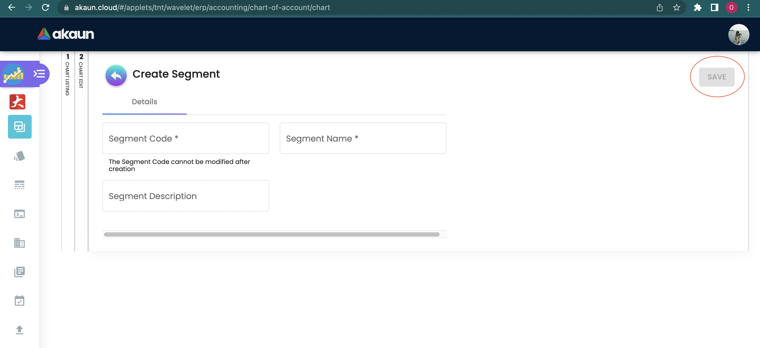
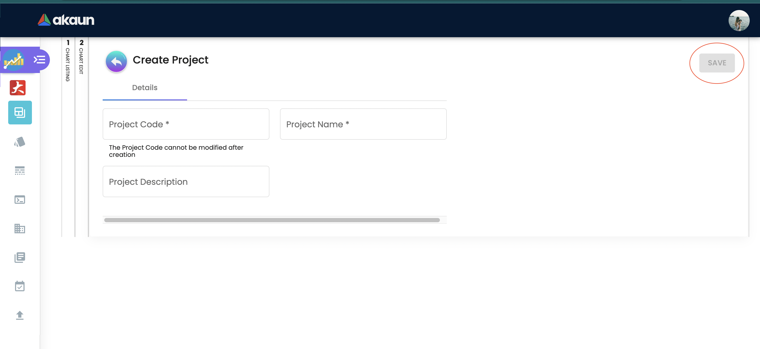
Where a journal line’s tag comes from, and what the profit report does with it
- The document line first, then the header. When a document posts, each goods, tax and charge line of the journal takes the segment, dimension, profit centre and project on its document line, and where the line is blank, the header’s. The customer or supplier line, and a foreign-exchange gain or loss line, always take the header’s. On a sales invoice line, the Department tab’s Copy from Hdr tick fills the line from the header while you enter it. Leave it unticked and the line blank, and the journal still carries the header’s tag.
- Cost of sales does not fall back. The Financial Report applet’s Profit Loss Report takes revenue and expenses from journal lines, which carry that fallback. It computes cost of goods sold from the sales document lines themselves, which do not. Suppose GadgetSphere Distribution invoices 40 laptops at RM 3,200 with the project set on the header only. Grouped by project, that column shows RM 128,000 of sales and no cost, where the stock cost RM 108,000. The column’s margin reads 100%, and the RM 108,000 is missing from the report’s total cost too. Nothing on the screen tells you a cost was left out.
- One tag at a time. The report groups by branch, GL dimension, segment, profit centre or project, and shows the picker for that one only. You cannot ask for one project within one segment.
- Every company at once. Grouped by anything but branch, the report has no company filter. If GadgetSphere and GadgetSphere Distribution tag the same project, the column adds both companies' journals. That is what you want for a group-wide project, and not what you want for one company’s figures.
- The tree does not add up. The Parent field arranges the tree tab, but the report counts a line only under the value it was tagged with. Ticking a parent in the report does not bring its children’s lines in.
GL Section, GL Category, GL Code
| Level | Component | Purpose | Example |
|---|---|---|---|
| 1 | GL Section | Financial-statement heading | Assets, Liabilities, Equity, Revenue, Expenses |
| 2 | GL Category | Sub-total grouping within a section | Current Assets, Fixed Assets, Trade Debtors |
| 3 | GL Code | The account a transaction posts to | CASH-PRI-KV01, DEBTOR-TRADE-RETAIL, SALES-SMARTPHONE |
GL Sections come pre-populated when the chart is created (see Chart of Account (tree view)). You can rename them (Name, Account No.) and add more, but the section codes are a fixed vocabulary that the financial statements key on: eleven P&L codes (SalesRevenue, SalesExpenses, CostOfGoodsSold, CostOfGoodsSold-Gains, CostOfGoodsSold-Expenses, GeneralExpenses, OtherRevenues, OtherExpenses, TaxExpenses, Dividend, ProfitLoss) are closed to profit and loss at month-end; every other section code is carried forward as balance sheet. The template seeds ten of the eleven — Dividend is not created; a section with exactly that code is closed to profit and loss if you add one. The applet’s own opening-balance report keys on CurrentAssets, FixedAssets, CurrentLiabilities, LongTermLiabilities, ShareCapital, RetainedEarnings and the P&L codes.
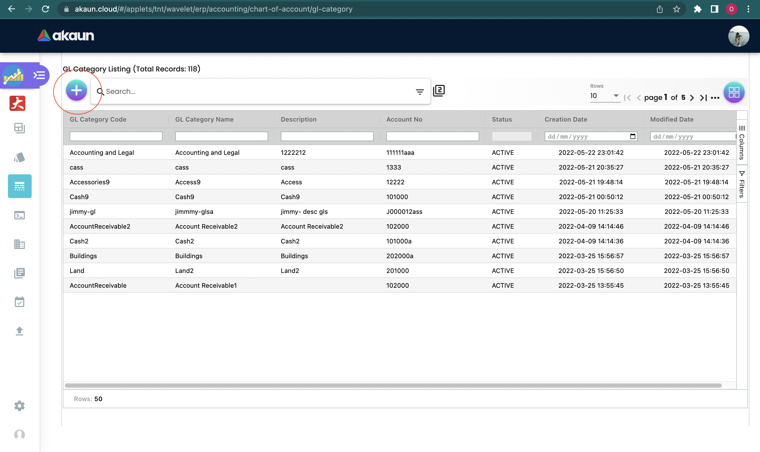
A GL Category has a Details tab (code — read-only after creation — name, description, account no., Include for MITRS, and on Edit only a parent category; there is no chart of account, because a category belongs to none), a GL Code tab where codes can be created with the category pre-selected, and a GL Section tab that links the category to its section. On screen a category is created first and linked to a section on the GL Section tab; the CSV import links each row to its section in the same pass by SECTION_CODE (see Import GL Category / Import GL Code).
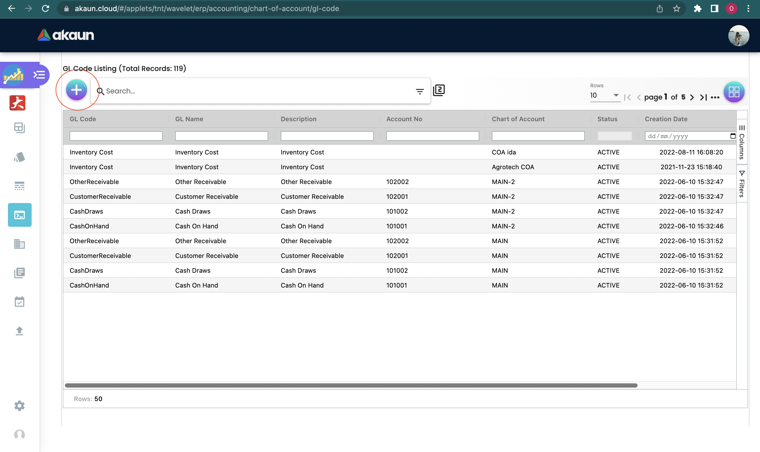
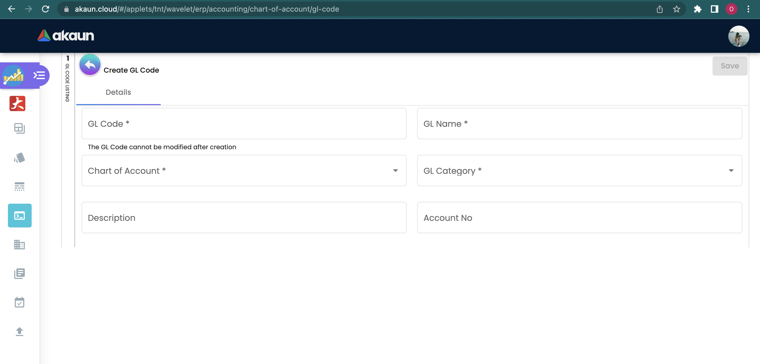
A GL Code has a Details tab and a Chart of Account Link tab (one code can belong to more than one chart).
The built-in template
Every new chart (the applet’s New, and the Organisation applet’s +) is seeded from one built-in template of 200 rows, each naming a section, a category and a GL code, which writes 18 GL Sections, 53 GL Categories and 200 GL Codes. What lands where:
| Level | Written as | Reuse rule |
|---|---|---|
| GL Section | Code and Name from the template, plus the account number | A section whose code already exists in the tenant is reused, not duplicated — the sections are shared by every chart |
| GL Category | Code, Name, Description = name, plus the account number, linked to its section | A category whose code already exists is reused; so is an existing section link |
| GL Code | GL Code = template GL Code, GL Code 3 = the account number, Name and Description = template GL Name, status ACTIVE | Always created — a GL code only has to be unique within a chart, so a second chart gets its own 200 codes under the same shared sections and categories |
The template is product seed data, transcribed below exactly as the source spells it (names, capitalisation and spelling included) so that what you read here matches what the GL Section, GL Category and GL Code screens show on a fresh tenant. Sections are listed in account-number order. Codes marked Fixed are the ones the reports key on by code: the eleven P&L codes (ten of them are seeded — Dividend is recognised but not created by the template) and RetainedEarnings, which retained-earnings processing and the opening-balance report both read by code. The remaining balance-sheet codes are also in that layout; rename any section’s Name, never its Code.
| Section code | Seeded name | Account no. | Categories | GL codes | Classification the reports apply |
|---|---|---|---|---|---|
CurrentAssets | CurrentAssets | 110000 | 4 | 9 | Balance sheet (carried forward; keyed on by the opening-balance report) |
FixedAssets | FixedAssets | 120000 | 1 | 18 | Balance sheet (carried forward; keyed on by the opening-balance report) |
FixedAssets-AccumulatedDepreciation | FixedAssets-AccumulatedDepreciation | 130000 | 1 | 10 | Balance sheet (carried forward; keyed on by the opening-balance report) |
OtherAssets | OtherAssets | 140000 | 1 | 1 | Balance sheet (carried forward; keyed on by the opening-balance report) |
CurrentLiabilities | CurrentLiabilities | 210000 | 6 | 9 | Balance sheet (carried forward; keyed on by the opening-balance report) |
LongTermLiabilities | LongTermLiabilities | 220000 | 1 | 2 | Balance sheet (carried forward; keyed on by the opening-balance report) |
SalesRevenue | SalesRevenue | 310000 | 3 | 3 | Fixed — P&L (closed to profit and loss at month-end) |
SalesExpenses | SalesExpenses | 320000 | 1 | 3 | Fixed — P&L (closed to profit and loss at month-end) |
OtherRevenues | OtherRevenues | 330000 | 1 | 5 | Fixed — P&L (closed to profit and loss at month-end) |
CostOfGoodsSold | CostOfGoodsSold | 410000 | 2 | 2 | Fixed — P&L (closed to profit and loss at month-end) |
CostOfGoodsSold-Expenses | CostOfGoodsSold-Expenses | 420000 | 4 | 4 | Fixed — P&L (closed to profit and loss at month-end) |
CostOfGoodsSold-Gains | CostOfGoodsSold-Gains | 430000 | 1 | 1 | Fixed — P&L (closed to profit and loss at month-end) |
GeneralExpenses | GeneralExpenses | 440000 | 21 | 126 | Fixed — P&L (closed to profit and loss at month-end) |
OtherExpenses | OtherExpenses | 450000 | 1 | 1 | Fixed — P&L (closed to profit and loss at month-end) |
TaxExpenses | TaxExpenses | 460000 | 1 | 1 | Fixed — P&L (closed to profit and loss at month-end) |
RetainedEarnings | RetainedEarnings | 510000 | 1 | 1 | Fixed — balance sheet (target of retained-earnings processing and the opening-balance report) |
ShareCapital | ShareCapital | 520000 | 2 | 3 | Balance sheet (carried forward; keyed on by the opening-balance report) |
ProfitLoss | ProfitLoss | 530000 | 1 | 1 | Fixed — P&L (closed to profit and loss at month-end) |
| Total | 53 | 200 |
CurrentAssets — CurrentAssets (110000): 4 categories, 9 GL codes
| Category code | Category name | Account no. |
|---|---|---|
Cash | Cash | 110100 |
CreditCardReceivable | Credit Card Receivable | 110200 |
Inventory | Inventory | 110300 |
Receivables | Receivables | 110400 |
| Category | GL Code | Name | Account no. (GL Code 3) |
|---|---|---|---|
Cash | cashDraws | Cash Drawers | 110101 |
Cash | cashOnHand | Cash On Hand | 110102 |
Cash | chequingBankAcc | Chequing Bank Account | 110103 |
Cash | payrollBankAcc | Payroll Bank Account | 110104 |
Cash | savingBankAcc | Saving Bank Account | 110105 |
CreditCardReceivable | receivableVisa | Visa Cards Receivable | 110201 |
Inventory | inventory | Inventory | 110301 |
Receivables | accReceivable | Account Receivable | 110401 |
Receivables | otherReceivable | Other Receivable | 110402 |
FixedAssets — FixedAssets (120000): 1 category, 18 GL codes
| Category code | Category name | Account no. |
|---|---|---|
FixedAssets | FIXED ASSETS | 120100 |
| Category | GL Code | Name | Account no. (GL Code 3) |
|---|---|---|---|
FixedAssets | AIR-CONDITIONING | AIR CONDITIONING | 120101 |
FixedAssets | ALARM-_-CCTV-EQUIPMENT | ALARM & CCTV EQUIPMENT | 120102 |
FixedAssets | building | Building and other properties | 120103 |
FixedAssets | buildingDeprAmort | Building Depreciation and Amortization | 120104 |
FixedAssets | COMPUTER-PERIPHERAL | COMPUTER PERIPHERAL | 120105 |
FixedAssets | COMPUTER SOFTWARE | COMPUTER SOFTWARE | 120106 |
FixedAssets | equipment | OFFICE EQUIPMENT | 120107 |
FixedAssets | equipmentDeprAmort | Equipment Depreciation and Amortization | 120108 |
FixedAssets | furniture | FURNITURE AND FITTINGS | 120109 |
FixedAssets | furnitureDeprAmort | Furniture Depreciation and Amortization | 120110 |
FixedAssets | land | Land | 120111 |
FixedAssets | leaseholdImprovements | Leasehold Improvements | 120112 |
FixedAssets | MOTOR-VEHICLES | MOTOR VEHICLES | 120113 |
FixedAssets | officeRenovationDeprAmort | ACCUM DEPN - RENOVATION | 120114 |
FixedAssets | PLANT-AND-MACHINERIES | PLANTS AND MACHINERIES | 120115 |
FixedAssets | RENOVATION | RENOVATION | 120116 |
FixedAssets | SIGN BOARD | SIGNBOARD | 120117 |
FixedAssets | TELEPHONE EQUIPMENT | TELECOMMUNICATION EQUIPMENT | 120118 |
FixedAssets-AccumulatedDepreciation — FixedAssets-AccumulatedDepreciation (130000): 1 category, 10 GL codes
| Category code | Category name | Account no. |
|---|---|---|
FixedAssets-AccumulatedDepreciation | FixedAssets-AccumulatedDepreciation | 130100 |
| Category | GL Code | Name | Account no. (GL Code 3) |
|---|---|---|---|
FixedAssets-AccumulatedDepreciation | ACCUM. DEP - AIR CONDITIONING | ACCUM. DEP - AIR CONDITIONING | 130101 |
FixedAssets-AccumulatedDepreciation | ACCUM. DEP - ALARM AND CCTV EQUIPMENT | ACCUM. DEP - ALARM AND CCTV EQUIPMENT | 130102 |
FixedAssets-AccumulatedDepreciation | ACCUM. DEP - COMPUTER PERIPHERAL | ACCUM. DEP - COMPUTER PERIPHERAL | 130103 |
FixedAssets-AccumulatedDepreciation | ACCUM. DEP - FURNITURE AND FITTING | ACCUM. DEP - FURNITURE AND FITTING | 130104 |
FixedAssets-AccumulatedDepreciation | ACCUM. DEP - MOTOR-VEHICLES | ACCUM. DEP - MOTOR VEHICLES | 130105 |
FixedAssets-AccumulatedDepreciation | ACCUM. DEP - COMPUTER SOFTWARE | ACCUM. DEP - COMPUTER SOFTWARE | 130106 |
FixedAssets-AccumulatedDepreciation | ACCUM. DEP - OFFICE EQUIPMENT | ACCUM. DEP - OFFICE EQUIPMENT | 130107 |
FixedAssets-AccumulatedDepreciation | ACCUM. DEP - PLANT-AND-MACHINERIES | ACCUM. DEP - PLANT & MACHINERIES | 130108 |
FixedAssets-AccumulatedDepreciation | ACCUM. DEP - SIGNBOARD | ACCUM. DEP - SIGNBOARD | 130109 |
FixedAssets-AccumulatedDepreciation | ACCUM. DEP - TELECOMMUNICATION EQUIPMENT | ACCUM. DEP - TELECOMMUNICATION EQUIPMENT | 130110 |
OtherAssets — OtherAssets (140000): 1 category, 1 GL code
| Category code | Category name | Account no. |
|---|---|---|
OtherAssets | Other Assets | 140100 |
| Category | GL Code | Name | Account no. (GL Code 3) |
|---|---|---|---|
OtherAssets | OtherAssets | Other Assets | 140101 |
CurrentLiabilities — CurrentLiabilities (210000): 6 categories, 9 GL codes
| Category code | Category name | Account no. |
|---|---|---|
Payable | Payable | 210100 |
Accruals | Accruals | 210200 |
CreditCardPayable | Credit Card Payable | 210300 |
GstPayable | GST Payable | 210300 |
ImportDuty | Import Duty | 210300 |
ShortTermDebt | Short Term Debt | 210400 |
| Category | GL Code | Name | Account no. (GL Code 3) |
|---|---|---|---|
Payable | accPayable | Account Payable | 210101 |
Payable | accPayableTransit | ACCOUNT PAYABLE IN TRANSIT | 210102 |
Payable | otherPayable | Other Payable | 210103 |
Accruals | accruals | Accruals | 210201 |
CreditCardPayable | creditCardPayable | Credit Card Payable | 210301 |
GstPayable | gstPayable | GST Payable | 210302 |
ImportDuty | importDuty | Import Duty Payable | 210303 |
ShortTermDebt | bankAdvances | Bank Advances | 210401 |
ShortTermDebt | bankLoans | Bank Loans | 210402 |
LongTermLiabilities — LongTermLiabilities (220000): 1 category, 2 GL codes
| Category code | Category name | Account no. |
|---|---|---|
ShareholderLoans | Loans from shareholders | 220100 |
| Category | GL Code | Name | Account no. (GL Code 3) |
|---|---|---|---|
ShareholderLoans | mortgagePayable | Mortgage Payable | 220101 |
ShareholderLoans | shareHolderLoans | Loans from Shareholders | 220102 |
SalesRevenue — SalesRevenue (310000): 3 categories, 3 GL codes
| Category code | Category name | Account no. |
|---|---|---|
Sales | Sales | 310100 |
SalesReturns | Sales Returns | 310200 |
ServiceCharge | Service Charges | 310300 |
| Category | GL Code | Name | Account no. (GL Code 3) |
|---|---|---|---|
Sales | generalSales | SALES | 310101 |
SalesReturns | generalSalesReturn | RETURN INWARDS | 310201 |
ServiceCharge | installationCharges | Installation Charges | 310301 |
SalesExpenses — SalesExpenses (320000): 1 category, 3 GL codes
| Category code | Category name | Account no. |
|---|---|---|
SalesDiscounts | Sales Discounts | 320100 |
| Category | GL Code | Name | Account no. (GL Code 3) |
|---|---|---|---|
SalesDiscounts | cashDiscount | Cash Discount | 320101 |
SalesDiscounts | crvExpense | CRV Expense | 320102 |
SalesDiscounts | generalSalesDiscount | DISCOUNT ALLOWED | 320103 |
OtherRevenues — OtherRevenues (330000): 1 category, 5 GL codes
| Category code | Category name | Account no. |
|---|---|---|
MiscRevenue | Miscellaneous Revenue | 330100 |
| Category | GL Code | Name | Account no. (GL Code 3) |
|---|---|---|---|
MiscRevenue | discountReceived | DISCOUNT RECEIVED | 330101 |
MiscRevenue | forexGainLoss | GAIN ON FOREIGN EXCHANGE | 330102 |
MiscRevenue | freightRevenue | Freight Revenue | 330103 |
MiscRevenue | interestRevenue | Interest Revenue | 330104 |
MiscRevenue | miscRevenue | Miscellaneous Revenue | 330105 |
CostOfGoodsSold — CostOfGoodsSold (410000): 2 categories, 2 GL codes
| Category code | Category name | Account no. |
|---|---|---|
InventoryCost | Inventory Cost | 410100 |
Purchases | Purchases | 410200 |
| Category | GL Code | Name | Account no. (GL Code 3) |
|---|---|---|---|
InventoryCost | inventoryCost | Inventory Cost | 410101 |
Purchases | purchases | PURCHASES | 410201 |
CostOfGoodsSold-Expenses — CostOfGoodsSold-Expenses (420000): 4 categories, 4 GL codes
| Category code | Category name | Account no. |
|---|---|---|
InventoryVariance | Inventory Variance | 420100 |
ItemAssemblyCost | Item Assemby Costs | 420200 |
Fuel | Fuel | 420300 |
TransferCosts | Transfer Costs | 420400 |
| Category | GL Code | Name | Account no. (GL Code 3) |
|---|---|---|---|
InventoryVariance | inventoryVariance | Inventory Variance | 420101 |
ItemAssemblyCost | itemAssembly | Item Assembly | 420201 |
Fuel | fuel | Fuel | 420301 |
TransferCosts | transferCost | Transfer Cost | 420401 |
CostOfGoodsSold-Gains — CostOfGoodsSold-Gains (430000): 1 category, 1 GL code
| Category code | Category name | Account no. |
|---|---|---|
PurchasesReturns | Purchases Returns | 430100 |
| Category | GL Code | Name | Account no. (GL Code 3) |
|---|---|---|---|
PurchasesReturns | purchaseReturns | PURCHASE RETURN | 430101 |
GeneralExpenses — GeneralExpenses (440000): 21 categories, 126 GL codes
| Category code | Category name | Account no. |
|---|---|---|
AdminAndGeneralExpenses | ADMINISTRATIVE AND GENERAL EXPENSES | 440100 |
GstExpenses | GST EXPENSES | 440200 |
Insurances | INSURANCES | 440300 |
LicenseFee | LICENSE FEE | 440400 |
OfficeShopMaintenance | OFFICE AND SHOP MAINTENANCE | 440500 |
PrinitngAndStationery | PRINTING AND STATIONERY | 440600 |
SecurityCharges | SECURITY CHARGES | 440700 |
TransportationExpenses | TRANSPORTATION EXPENSES | 440800 |
TravellingExpenses | TRAVELLING EXPENSES | 440900 |
UtilitiesCharges | UTILITIES CHARGES | 441100 |
FinanceCharges | FINANCE CHARGES | 441200 |
MarketingAndPromotionalExpernses | MARKETING AND PROMOTIONAL EXPENSES | 441300 |
DirectorsRemuneration | DIRECTORS’ REMUNERATION | 441400 |
EPFContribution | E.P.F CONTRIBUTION | 441500 |
SocsoContribution | SOCSO CONTRIBUTION | 441600 |
SalariesAndAllowances | SALARIES AND ALLOWANCES | 441700 |
ProfessionalExpenses | PROFESSIONAL EXPENSES | 441800 |
NonOperatingExpenses | NON OPERATING EXPENSES | 441900 |
CashShortOver | Cash Short Over | 442000 |
PropertyTaxes | Property Taxes | 442100 |
WagesSalary | Wages and Salary | 442200 |
| Category | GL Code | Name | Account no. (GL Code 3) |
|---|---|---|---|
AdminAndGeneralExpenses | accessoryCost | Accessory Cost | 440101 |
AdminAndGeneralExpenses | ACCOMODATION | ACCOMODATION | 440102 |
AdminAndGeneralExpenses | ADVERTISING-FEES | ADVERTISING FEES | 440103 |
AdminAndGeneralExpenses | badDebt | Bad Debt | 440104 |
AdminAndGeneralExpenses | BAD DEBT WRITTEN OFF - SPECIFIC | BAD DEBT WRITTEN OFF - SPECIFIC | 440105 |
AdminAndGeneralExpenses | CAR PARKING & CANOPY-LICENSE | CAR PARKING & CANOPY-LICENSE | 440106 |
AdminAndGeneralExpenses | ccyExchangeRounding | Currency Exchange Rounding | 440107 |
AdminAndGeneralExpenses | CLEANER-FEE | CLEANER FEE | 440108 |
AdminAndGeneralExpenses | DEPRECIATION OF PLANT AND EQUIPMENT | DEPRECIATION OF PLANT AND EQUIPMENT | 440109 |
AdminAndGeneralExpenses | FINES-AND-PENALTY | FINES AND PENALTY | 440110 |
AdminAndGeneralExpenses | freightExpense | Freight Expense | 440111 |
AdminAndGeneralExpenses | fuelCost | Fuel Cost | 440112 |
AdminAndGeneralExpenses | incorporationCost | Incorporation Cost | 440113 |
AdminAndGeneralExpenses | NEWSPAPER-AND-PERIODICAL | NEWSPAPER AND PERIODICAL | 440114 |
AdminAndGeneralExpenses | OTHER-LICENSE-FEE | OTHER LICENSE FEE | 440115 |
AdminAndGeneralExpenses | POSTAGE-AND-COURIER | POSTAGE AND COURIER | 440116 |
AdminAndGeneralExpenses | REGISTRATION - OTHERS | REGISTRATION - OTHERS | 440117 |
AdminAndGeneralExpenses | REGISTRATION - TRADEMARK | REGISTRATION - TRADEMARK | 440118 |
AdminAndGeneralExpenses | RENTAL-OF-EQUIPMENT | RENTAL OF EQUIPMENT | 440119 |
AdminAndGeneralExpenses | RENTAL-OF-SHOP-AND-PREMISES | RENTAL OF SHOP AND PREMISES | 440120 |
AdminAndGeneralExpenses | SERVICE TAX EXPENSES | SERVICE TAX EXPENSES | 440121 |
AdminAndGeneralExpenses | Software subscription fee | SOFTWARE SUBSCRIPTION FEE | 440122 |
AdminAndGeneralExpenses | STAMPING-FEE | STAMPING FEE | 440123 |
AdminAndGeneralExpenses | SUBSCRIPTION-FEE | SUBSCRIPTION FEE | 440124 |
AdminAndGeneralExpenses | SUNDRY-EXPENSES | SUNDRY EXPENSES | 440125 |
GstExpenses | GST_CONTROL | GST CONTROL | 440201 |
Insurances | ALL-RISK-INSURANCE | ALL RISK INSURANCE | 440301 |
Insurances | BURGLARY-INSURANCE | BURGLARY INSURANCE | 440302 |
Insurances | EXTENDED WARRANTY INSURANCE | EXTENDED WARRANTY INSURANCE | 440303 |
Insurances | FIDELITY-INSURANCE | FIDELITY INSURANCE | 440304 |
Insurances | FIRE-INSURANCE | FIRE INSURANCE | 440305 |
Insurances | GENERAL-INSURANCE | GENERAL INSURANCE | 440306 |
Insurances | GOOD-IN-TRANSIT-INSURANCE | GOOD-IN-TRANSIT INSURANCE | 440307 |
Insurances | MONEY-INSURANCE | MONEY INSURANCE | 440308 |
Insurances | PRODUCTS-LIABILITY-INSURANCE | PRODUCTS LIABILITY INSURANCE | 440309 |
Insurances | PUBLIC-LIABILITY-INSURANCE | PUBLIC LIABILITY INSURANCE | 440310 |
LicenseFee | BUNTING-LICENSE | BUNTING LICENSE | 440401 |
LicenseFee | BUSINESS LICENSE FEE | BUSINESS LICENSE FEE | 440402 |
LicenseFee | CANOPY-LICENSE | CANOPY LICENSE | 440403 |
LicenseFee | EMP-Software-License-Fee | EMP-Software License Fee | 440404 |
LicenseFee | FAIR-LICENSE | FAIR LICENSE | 440405 |
LicenseFee | RENOVATION PERMIT LICENSE | RENOVATION PERMIT LICENSE | 440406 |
LicenseFee | SIGNBOARD-LICENSE | SIGNBOARD LICENSE | 440407 |
OfficeShopMaintenance | UPKEEP-OF-COMPUTER | UPKEEP OF COMPUTER | 440501 |
OfficeShopMaintenance | UPKEEP-OF-EQUIPMENT | UPKEEP OF EQUIPMENT | 440502 |
OfficeShopMaintenance | UPKEEP OF HOSTEL | UPKEEP OF HOSTEL | 440503 |
OfficeShopMaintenance | UPKEEP-OF-MACHINERY | UPKEEP OF MACHINERY | 440504 |
OfficeShopMaintenance | UPKEEP-OF-OFFICE | UPKEEP OF OFFICE | 440505 |
OfficeShopMaintenance | UPKEEP-OF-SHOP | UPKEEP OF SHOP | 440506 |
PrinitngAndStationery | PRINTING-AND-BROCHURE | PRINTING AND BROCHURE | 440601 |
PrinitngAndStationery | STATIONERY | STATIONERY | 440602 |
SecurityCharges | ALARMandSECURITY-SUBSCRIPTION-FEE | ALARM & SECURITY SUBSCRIPTION FEE | 440701 |
SecurityCharges | SALES-ORDER-RECEIVED | SALES ORDER RECEIVED | 440702 |
SecurityCharges | SECURITY-CHARGES | SECURITY CHARGES | 440703 |
TransportationExpenses | PARKING-EXPENSES | PARKING EXPENSES | 440801 |
TransportationExpenses | PETROL-EXPENSES | PETROL EXPENSES | 440802 |
TransportationExpenses | ROAD-TAX | ROAD TAX | 440803 |
TransportationExpenses | TOLL-EXPENSES | TOLL EXPENSES | 440804 |
TransportationExpenses | TOWING-AND-CRANE-SERVICES | TOWING AND CRANE SERVICES | 440805 |
TransportationExpenses | TRANSPORTATION-AND-LABOUR CHARGES | TRANSPORTATION AND LABOUR CHARGES | 440806 |
TransportationExpenses | UPKEEP-OF-MOTOR-VEHICLES | UPKEEP OF MOTOR VEHICLES | 440807 |
TravellingExpenses | HirePurchase | HIRE PURCHASE | 440901 |
TravellingExpenses | InterestInSuspense | INTEREST IN SUSPENSE | 440902 |
TravellingExpenses | LOCAL-TRAVEL | LOCAL TRAVEL | 440903 |
TravellingExpenses | OVERSEA-TRAVEL | OVERSEA TRAVEL | 440904 |
UtilitiesCharges | TELEPHONE-CHARGES | TELEPHONE CHARGES | 441101 |
UtilitiesCharges | ELECTRICITY-CHARGES | ELECTRICITY CHARGES | 441102 |
UtilitiesCharges | reserves | RESERVES | 441103 |
UtilitiesCharges | WATER-CHARGES | WATER CHARGES | 441104 |
FinanceCharges | ACS AGREEMENT CHARGES | ACS AGREEMENT CHARGES | 441201 |
FinanceCharges | BANK-CHARGES | BANK CHARGES | 441202 |
FinanceCharges | creditCardCharges | CREDIT CARD CHARGES | 441203 |
FinanceCharges | interestBankCharges | BANK CHARGES | 441204 |
FinanceCharges | INTEREST-ON-HIRE-PURCHASE | INTEREST ON HIRE PURCHASE | 441205 |
FinanceCharges | INTEREST-ON-TERM-LOAN | INTEREST ON TERM LOAN | 441206 |
MarketingAndPromotionalExpernses | DONATION-AND-GIFTS | DONATION AND GIFTS | 441301 |
MarketingAndPromotionalExpernses | ENTERTAINMENT-FOR-CLIENT | ENTERTAINMENT FOR CLIENT | 441302 |
MarketingAndPromotionalExpernses | EXHIBITION-FEE | EXHIBITION FEE | 441303 |
MarketingAndPromotionalExpernses | MOBILE-MARKETING-PLATFORM | MOBILE-MARKETING-PLATFORM | 441304 |
MarketingAndPromotionalExpernses | ONLINE ADVERTISEMENT | ONLINE ADVERTISEMENT | 441305 |
MarketingAndPromotionalExpernses | ONLINE ADV - WAZE BRANDED PINS | ONLINE ADV - WAZE BRANDED PINS | 441306 |
MarketingAndPromotionalExpernses | PROMOTER SUPPORT | WAREHOUSE SALE - PROMOTER SUPPORT | 441307 |
MarketingAndPromotionalExpernses | PROMOTION LICENSE FEES | PROMOTION LICENSE FEES | 441308 |
MarketingAndPromotionalExpernses | WAREHOUSE-SALES-EXPENSES | WAREHOUSE SALES EXPENSES | 441309 |
MarketingAndPromotionalExpernses | WEBSITE SETUP | WEBSITE HOSTING | 441310 |
DirectorsRemuneration | DIRECTORS_-ALLOWANCE | DIRECTORS’ ALLOWANCE | 441401 |
DirectorsRemuneration | DIRECTORS_-BENEFIT-IN-KIND | DIRECTORS’ BENEFIT IN KIND | 441402 |
DirectorsRemuneration | DIRECTORS_-BONUS | DIRECTORS’ BONUS | 441403 |
DirectorsRemuneration | DIRECTORS_-EIS | DIRECTORS’ EIS | 441404 |
DirectorsRemuneration | DIRECTORS_-FEE | DIRECTORS’ FEE | 441405 |
DirectorsRemuneration | DIRECTORS_-INCENTIVE | DIRECTORS’ INCENTIVE | 441406 |
DirectorsRemuneration | DIRECTORS_-OVERTIME | DIRECTORS’ OVERTIME | 441407 |
DirectorsRemuneration | DIRECTORS_-SALARIES | DIRECTORS’ SALARIES | 441408 |
EPFContribution | DIRECTORS_-EPF | DIRECTORS’ EPF | 441501 |
EPFContribution | STAFFS_-EPF | STAFFS’ EPF | 441502 |
SocsoContribution | DIRECTORS_-SOCSO | DIRECTORS’ SOCSO | 441601 |
SocsoContribution | STAFFS_-SOCSO | STAFFS’ SOCSO | 441602 |
SalariesAndAllowances | OTHER STAFF COSTS | OTHER STAFF COSTS | 441701 |
SalariesAndAllowances | STAFF ACCOMODATION | STAFF ACCOMODATION | 441702 |
SalariesAndAllowances | STAFF-ALLOWANCE | STAFF ALLOWANCE | 441703 |
SalariesAndAllowances | STAFF ANNUAL DINNER | STAFF ANNUAL DINNER | 441704 |
SalariesAndAllowances | STAFF-ANNUAL-LEAVE | STAFF ANNUAL LEAVE | 441705 |
SalariesAndAllowances | STAFF APPRENTICE & RECRUITMENT PROGRAM | STAFF APPRENTICE & RECRUITMENT PROGRAM | 441706 |
SalariesAndAllowances | STAFF-BONUS | STAFF BONUS | 441707 |
SalariesAndAllowances | STAFF - EIS | STAFF - EIS | 441708 |
SalariesAndAllowances | STAFF-INCENTIVE | STAFF INCENTIVE | 441709 |
SalariesAndAllowances | STAFF-MEDICAL | STAFF MEDICAL | 441710 |
SalariesAndAllowances | STAFF-OVERTIME | STAFF OVERTIME | 441711 |
SalariesAndAllowances | STAFF-REFRESHMENT | STAFF REFRESHMENT | 441712 |
SalariesAndAllowances | STAFF-SALARIES | STAFF SALARIES | 441713 |
SalariesAndAllowances | STAFF SERVICE AWARD | STAFF SERVICE AWARD | 441714 |
SalariesAndAllowances | STAFF TRAINING - HUMAN RESOURCE DEVELOPMENT FUND | STAFF TRAINING - HUMAN RESOURCE DEVELOPMENT FUND | 441715 |
SalariesAndAllowances | STAFF-UNIFORM | STAFF UNIFORM | 441716 |
ProfessionalExpenses | ACCOUNTING-FEE | ACCOUNTING FEE | 441801 |
ProfessionalExpenses | AUDITORS_-FEE | AUDITORS’ FEE | 441802 |
ProfessionalExpenses | CONSULTANCY-FEE | CONSULTANCY FEE | 441803 |
ProfessionalExpenses | LEGAL-FEE | LEGAL FEE | 441804 |
ProfessionalExpenses | PROFESSIONAL-FEE | PROFESSIONAL FEE | 441805 |
ProfessionalExpenses | SECRETARIAL-FEE | SECRETARIAL FEE | 441806 |
ProfessionalExpenses | TAX-AGENT-FEE | TAX AGENT FEE | 441807 |
NonOperatingExpenses | amortizationExpenses | Amortization Expenses | 441901 |
NonOperatingExpenses | DEP-PLANT-AND-EQUIPMENT | DEPRECIATION OF PLANT AND EQUIPMENT | 441902 |
NonOperatingExpenses | depreciationExpenses | Depreciation Expenses | 441903 |
CashShortOver | cashShortOver | Cash Short or Over | 442001 |
PropertyTaxes | propertyTaxes | Property Taxes | 442101 |
WagesSalary | wagesSalary | Wages and Salary | 442201 |
OtherExpenses — OtherExpenses (450000): 1 category, 1 GL code
| Category code | Category name | Account no. |
|---|---|---|
OtherExpenses | OtherExpenses | 450100 |
| Category | GL Code | Name | Account no. (GL Code 3) |
|---|---|---|---|
OtherExpenses | OtherExpenses | Other Expenses | 450101 |
TaxExpenses — TaxExpenses (460000): 1 category, 1 GL code
| Category code | Category name | Account no. |
|---|---|---|
TaxExpenses | TAXATION EXPENSES | 460100 |
| Category | GL Code | Name | Account no. (GL Code 3) |
|---|---|---|---|
TaxExpenses | incomeTaxes | Income Taxes | 460101 |
RetainedEarnings — RetainedEarnings (510000): 1 category, 1 GL code
| Category code | Category name | Account no. |
|---|---|---|
RetainedEarnings | Retained Earnings | 510100 |
| Category | GL Code | Name | Account no. (GL Code 3) |
|---|---|---|---|
RetainedEarnings | retainedEarnings | RETAINED EARNING | 510101 |
ShareCapital — ShareCapital (520000): 2 categories, 3 GL codes
| Category code | Category name | Account no. |
|---|---|---|
ShareCapital | SHARE CAPITAL | 520100 |
PreferredShares | Preferred Shares | 520200 |
| Category | GL Code | Name | Account no. (GL Code 3) |
|---|---|---|---|
ShareCapital | CAPITAL | CAPITAL | 520101 |
ShareCapital | commonShares | Common Shares | 520102 |
PreferredShares | preferredShares | Preferred Shares | 520201 |
ProfitLoss — ProfitLoss (530000): 1 category, 1 GL code
| Category code | Category name | Account no. |
|---|---|---|
ProfitLoss | Profit and Loss | 530100 |
| Category | GL Code | Name | Account no. (GL Code 3) |
|---|---|---|---|
ProfitLoss | profitLoss | Profit and Loss | 530101 |
Deactivating template codes you do not use. Setting a seeded GL code to INACTIVE (GL Code > Details > Status; the only other value offered is ACTIVE) is a listing-side change, not a posting-side one. The applet’s own listings — GL Code, the chart’s GL Code tab, the category’s GL Code tab, the chart-link tabs — show ACTIVE codes only, so the code drops out of them; the GL Code listing’s advanced search has a Status filter that brings it back when you need to edit or reactivate it. The journal-line selector in Ledger and Journal also lists ACTIVE codes only, so an inactive code cannot be picked on a manual journal line — but Import Journal in the same applet matches each row’s GL code by its code and accepts an inactive one, and so does the journal API. The item-level GL selector on sales and purchase lines does not filter on status — an inactive code is still selectable there. Posting never looks at the status: a Default GL Code or an item-company link that points at an inactive code still posts through it, and month-end and the statements apply no status filter either, so history posted to an inactive code stays in every report. Deleting is not an alternative once the code has been used (see Troubleshooting); GL Code Merge moves the history if you want the code gone from the listings and the statements alike. The same ACTIVE-only listing rule applies to seeded sections and categories — and an inactive category still carries its section link, so its codes keep classifying.
Companies
Every ACTIVE company of the tenant is listed here — a company without a chart still appears, with an empty chart column. What the chart of accounts gates is the Default GL Codes tab, not the listing.
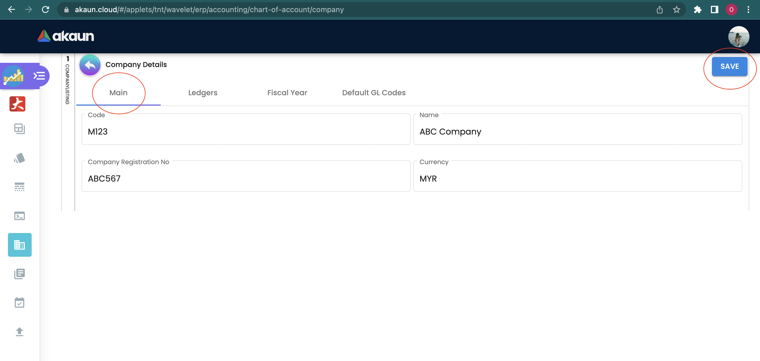
- Main — Company Code (read-only), Company Name, Registration No., Currency, Tax ID, SST ID, Chart of Account, Inventory Cost Base On.
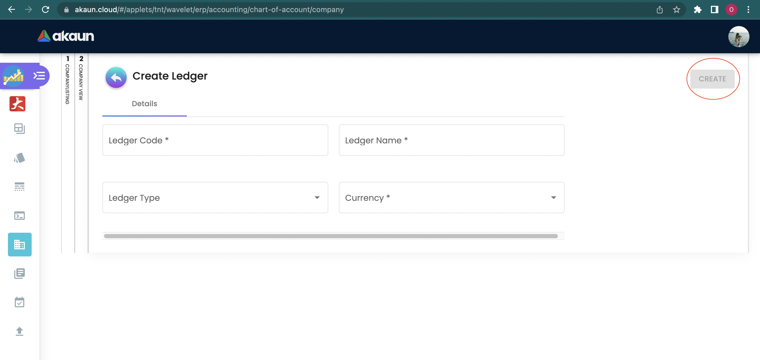
- Ledgers — create ledgers (Code, Name, Type
PRIMARY/SECONDARY/CONSOLIDATED, Currency). Clicking a ledger opens its sub-ledger listing with an Opening Balance tab (primary ledgers only) and a Remove Journal tab. - Fiscal Year — the fiscal years of this company. When at least one Closing Stock Balance toggle is on (see Configuration), clicking a year opens the Closing Stock Balance screen: one tab per stock class (Inventory, Raw Material, WIP, Finished Goods, NSTI), each a month-by-month grid of Stock Value (System), Stock Value (Manual), Select System and Select Manual. The Inventory tab also has a BASE ON cost-basis selector (
MA_COST,WA_COST,FIFO_COST,LIFO_COST,REPLACEMENT_COST,MANUAL_COST). - Default GL Codes — the mapping table that lets documents post automatically (see Configuration). Shown only when the company has a chart of accounts.
Set of Books
A set of books groups one or more ledgers for a reporting purpose (statutory, management, consolidation). Details holds the name; Ledgers links existing company ledgers (each link shows the ledger’s code, type, name and currency read-only, with a Delete to unlink).
Screenshot withdrawn; a recapture from a demo tenant is on the list.
Fiscal Year and Fiscal Periods
Screenshot withdrawn; a recapture from a demo tenant is on the list.
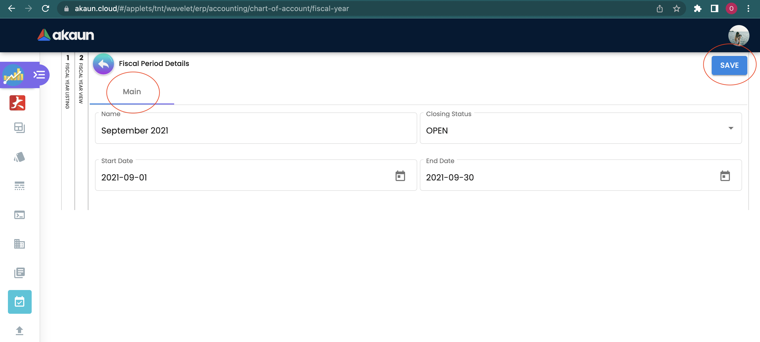
Create a fiscal year with Company, Name, Start Date and End Date; the screen generates one period per calendar month, snapping the start to the first of its month and the end to the last. Only the screen is monthly — periods created through the API can be any length. The year itself has a status of ACTIVE or CLOSED; each period has a Closing Status of OPEN, LOCK_GL, LOCK_TXN or LOCK_ALL (see Lifecycle). Click a period row to open Fiscal Period Details, change the status and Save. The year’s Main tab also carries a two-click DELETE.
Import GL Category / Import GL Code
Download the *Sample Format CSV from the import screen, fill it, drag-and-drop or upload, review the row flags (green = ready, red = error, hover for the reason) and click ADD.
Import GL Category serves MasterData_Upload_GLCategoryData.csv with columns GL_CATEGORY_CODE | GL_CATEGORY_NAME | PARENT_CATEGORY | DESC | ACCOUNT_NO | SECTION_CODE. Each row is linked to the report section whose code is SECTION_CODE; an unknown code fails the row with INVALID SECTION CODE.
Import GL Code serves MasterData_Upload_GL_Code.csv with columns CHART_OF_ACC | GL_CATEGORY | GL_CODE_1 | GL_NAME | DESC | GL_CODE_3 — CHART_OF_ACC is the chart’s code and GL_CATEGORY is the category code (not its name; failure text GL Category is invalid). A row whose GL_CODE_1 already exists in that chart updates the existing code’s name, category and description instead of failing.
GL Code Merge
Choose the chart, the category, the Source (duplicate) code and the Target (surviving) code, click MERGE and confirm. All history moves to the target and the source is deactivated. Both codes must be in the same GL Category.
GL Code Create Item
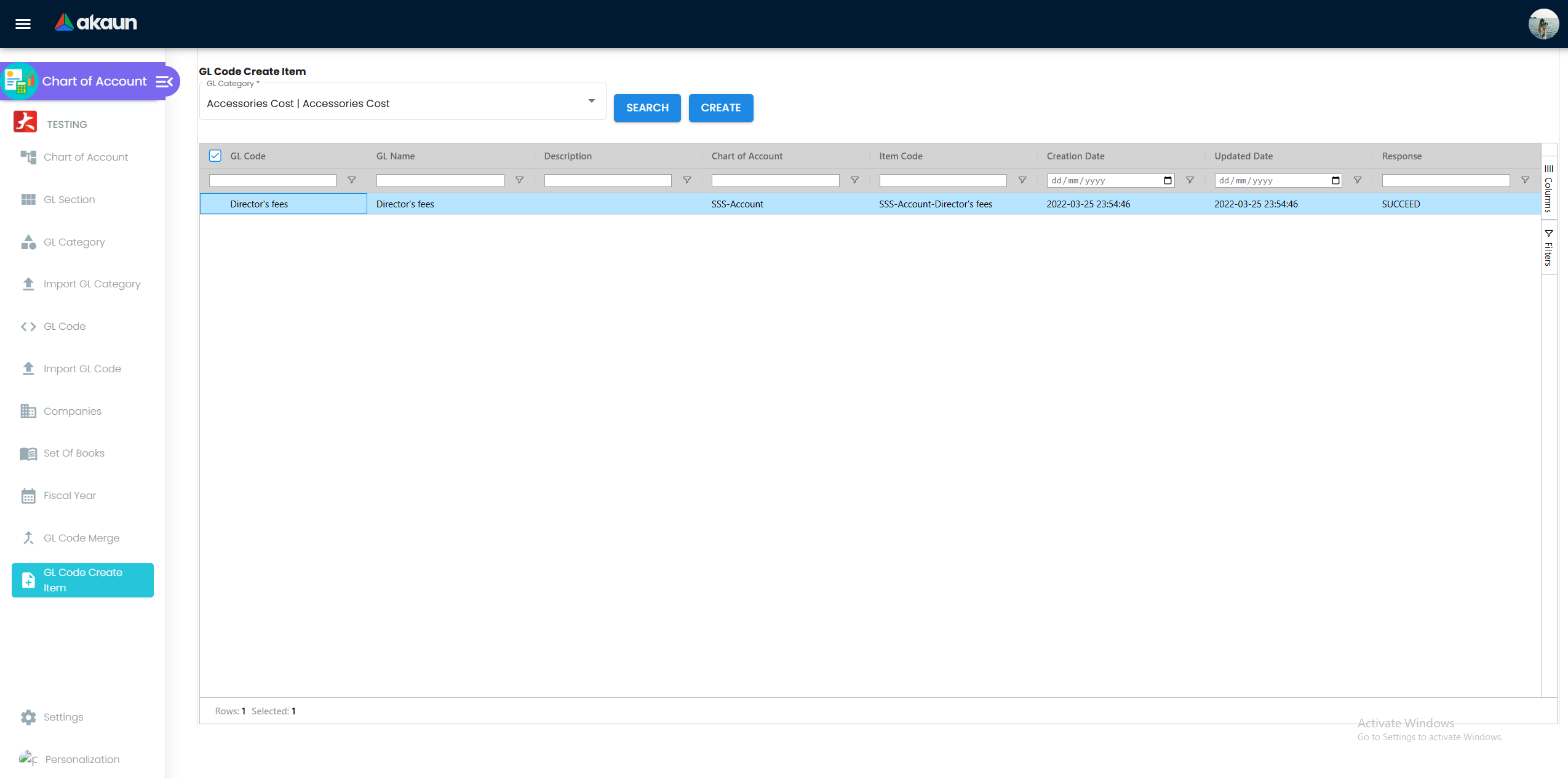
Select a GL Category, SEARCH to list its GL codes, CREATE to generate one Account Code item per GL code in Doc Item Maintenance. Sales staff can then invoice “Consulting income” as a line and the revenue lands on the right account.
Configuration
Before you can use it
| Prerequisite | Where | Why |
|---|---|---|
| Company created and assigned a chart of accounts | Organisation | Every ACTIVE company appears under Companies; only one with a chart renders its Default GL Codes tab |
| GL sections, categories and codes | this applet (or CSV import) | Default GL Codes can only be mapped to codes that exist in the company’s chart |
At least one PRIMARY ledger per company | Companies > Ledgers | Saving a default GL code creates (or reuses) a sub-ledger on the primary ledger; journals post into it; the balances you start with are entered on it |
| Default GL Codes mapped | Companies > Default GL Codes | Which mapping is needed depends on the document — see the failure rules under Applet settings |
| A fiscal year covering today | Fiscal Year | Documents and journals are validated against the period of their transaction date |
| A set of books | Set Of Books | Financial reports run against a set of books |
Recommended setup order: verify the company → create ledgers → build (or import) sections, categories, codes → map Default GL Codes → create a set of books and link the ledgers → create the fiscal year.
Who owns the chart, and how the codes are numbered
The chart decides how the business will be read for years, so it is one person’s decision rather than everybody’s data entry. In a group like GadgetSphere that is the group finance manager, and a new code goes through them. Two facts make the friction worth it. A GL Category is shared by every chart on the tenant (see GL Category — Details), so renaming one for GadgetSphere Distribution renames it for GadgetSphere and GadgetSphere Online as well. And near-duplicate codes are how a ledger splits: staff pick whichever of two similar names they see first, and deleting the “wrong” one later strands every document that used it (see Troubleshooting). The owner’s own check is to read the GL Code listing once a month for codes nobody approved.
Each GL code carries two identifiers: the GL Code itself and the Account No. beside it. The built-in
template uses both — a word-like code such as cashOnHand with the six-digit account number 110102 — so a
word in GL Code and a number in Account No. is the shape a new chart starts with. The numbering decision is
really two, and both conventions are defensible:
- A mnemonic code with the number beside it —
SALES-SMARTPHONEin GL Code, a six-digit number in Account No. The code reads on every journal line, import file and picker without a lookup, and the number keeps the order your accountant and auditor expect. This is the convention the wiki’s guides use. - A numeric code —
4100in GL Code. Familiar to an accountant trained on numbered charts and easy to map to an auditor’s template; the cost is that a journal line or an import row needs the name beside it before anyone can read it.
Either way, settle it before the first import, because Import GL Code finds an existing code by its GL Code
text. The Edit screen does accept a new GL Code, and the history follows the account (postings point at the
account, not at its text), but a renamed code no longer matches the CSV you keep, and the server does not
check a renamed code against the rest of the chart. Neither convention needs the branch in the code: the
branch is already a column on every journal line (see Chart of Account (tree view)). Cash and bank are the
exception — CASH-PRI-KV01 is a separately reconciled balance and keeps its suffix.
Applet settings
All three Settings screens save tenant-wide, so a change applies to every user of the applet. The Personalisation > Default Selection screen saves per user. Anyone who can open the applet’s gear menu can change them: the applet registers no permission definitions (see Feature visibility / permissions).
Settings > General Settings
| Setting | What it controls | Default | Effect when changed |
|---|---|---|---|
The five stock-class toggles — SHOW_INVENTORY_STOCK_VALUE, SHOW_RAW_MATERIAL_STOCK_VALUE, SHOW_WIP_STOCK_VALUE, SHOW_FINISHED_GOODS_STOCK_VALUE, SHOW_NSTI_STOCK_VALUE | One per Closing Stock Balance tab — Inventory, Raw Material, WIP (work in progress), Finished Goods, NSTI (non-stock and trade-in) | all off | With all five off, clicking a fiscal year under Companies > Fiscal Year does nothing at all — no screen opens and no message appears, which reads as a broken row rather than as a setting. Turn on the one class you count |
The toggles only govern screen visibility inside this applet; no report reads them. What the Profit and Loss report reads is the data entered on those tabs — see Lifecycle and effects.
Rendered but not consumed. The Default GL Code text area on the same screen is saved and read by nothing. It has no effect on posting or on new charts; leave it empty.
Settings > Default Selection
| Setting | What it controls | Default | Effect when changed |
|---|---|---|---|
CHART_OF_ACCOUNT_DETAILS_TAB_ORDER | Order of the tabs on the Chart of Account edit screen (drag the tab names into order and SAVE) | Details, GL Code Link, GL Code, Segment Tree, Dimension Tree, Profit Center Tree, Project Tree | The chart edit screen renders the tabs in the saved order for every user; tabs added in a later build that are missing from a saved order are appended |
Rendered but not consumed. The same screen offers Default Branch / Default Location pickers, and the Personalisation > Default Selection screen stores the per-user pair. No screen in this applet reads them — the applet has no branch- or location-scoped listing.
Settings > Field Settings shows eight slide toggles (Unit Discount, SST/VAT/GST, WHT, Blanket Order, Segment, G/L Dimension, Profit Center, Project). None is bound to a form control or a stored key; the screen has no effect.
Companies > Default GL Codes — the mapping that matters most. Each key takes exactly one GL code from the company’s chart; saving stores the mapping and, if the primary ledger has no sub-ledger for that GL code yet, creates one and links it:
| Tab | Keys |
|---|---|
| General | RETAINED_EARNING, PROFIT_LOSS, NSTI, FIXED_ASSET_REGISTER, ROUNDING, SETTLEMENT_CHARGES |
| Entity | DEBTOR, DEBTOR_NON_TRADE, DEBTOR_NOT_INVOICED, DEBTOR_NON_TRADE_NOT_INVOICED, CREDITOR, CREDITOR_NON_TRADE, CREDITOR_NOT_INVOICED, CREDITOR_NON_TRADE_NOT_INVOICED, MERCHANT_RECEIVABLE, MERCHANT_PAYABLE, EMPLOYEE_OTHER_PAYABLE |
| Sales | SALES, SALES_RETURN, SALES_DISCOUNT, OUTPUT_TAX |
| Purchase | PURCHASE, PURCHASE_RETURN, PURCHASE_DISCOUNT, INPUT_TAX |
| Stock | STOCK_ADJUSTMENT, RESET_MA, STOCK_BALANCE, COGS, INVENTORY_NOT_INVOICED, STOCK_BALANCE_RAW, COGS_RAW, STOCK_BALANCE_WIP, COGS_WIP, STOCK_BALANCE_FG, COGS_FG, STOCK_BALANCE_NSTI, COGS_NSTI |
| Forex | FOREX_GAIN, FOREX_LOSS |
| Consignment | CONSIGNMENT_STOCK, CONSIGNMENT_LIABILITY |
Screenshots (the General tab capture is pending a recapture): Entity · Sales · Purchase · Stock · Forex · Consignment
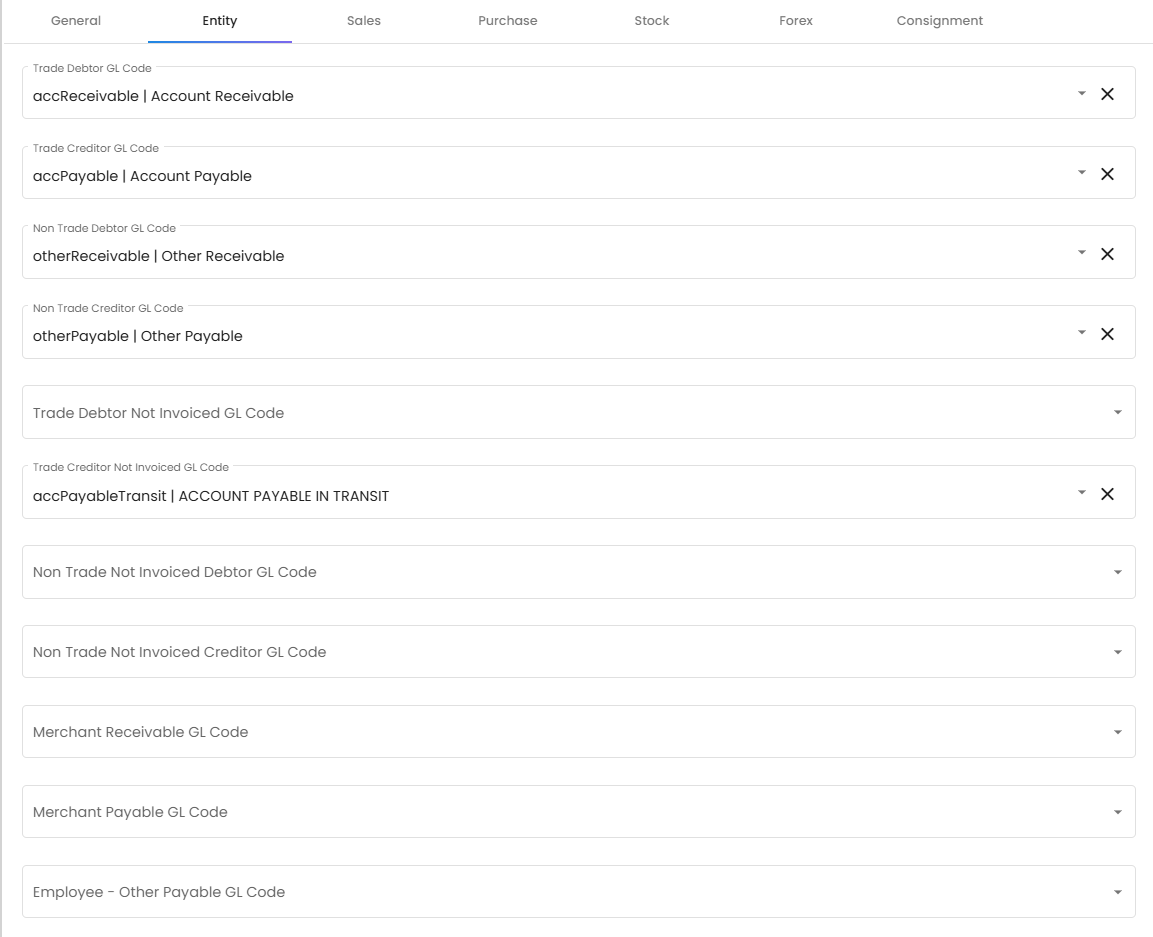
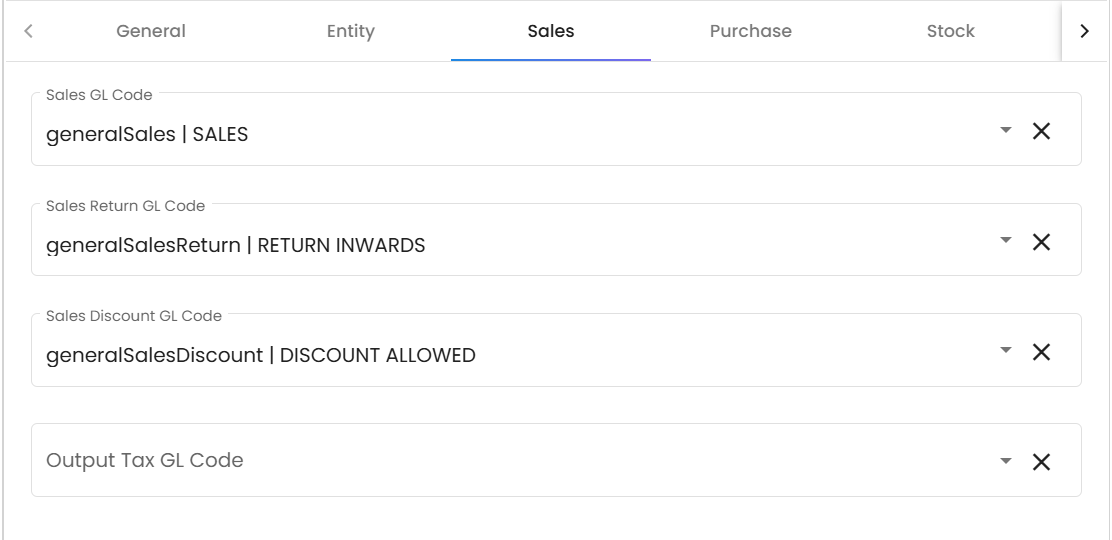
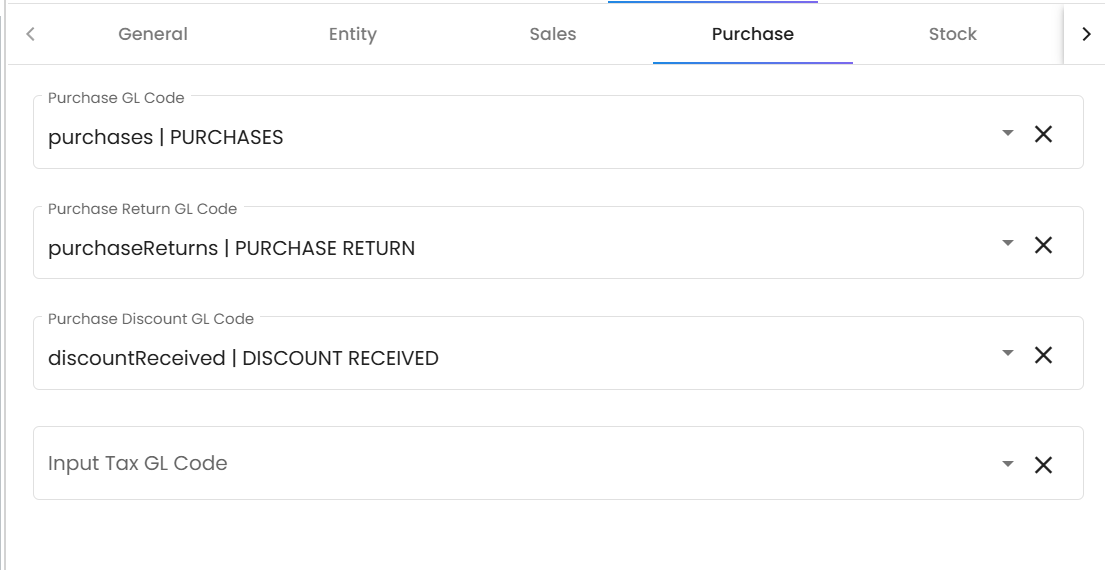
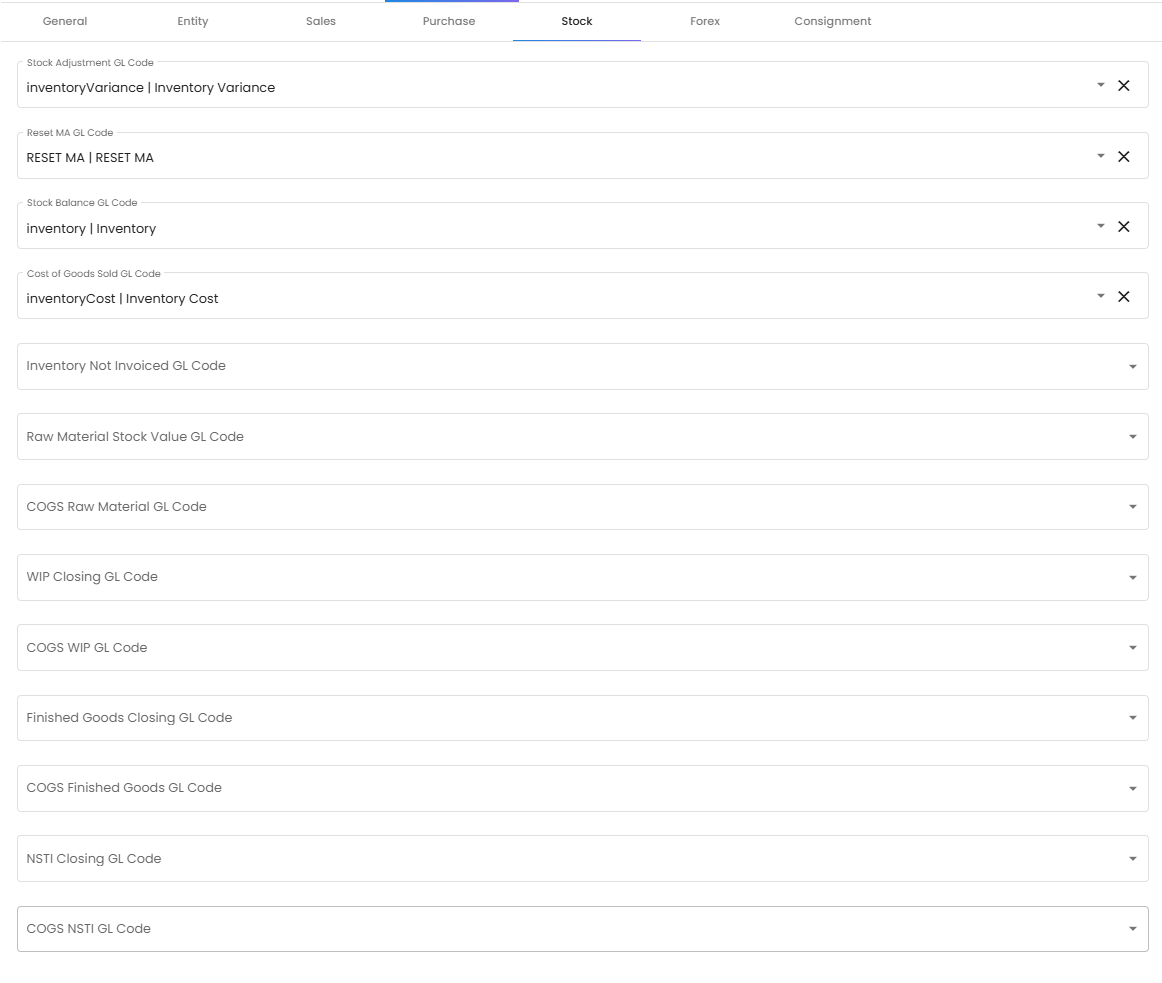
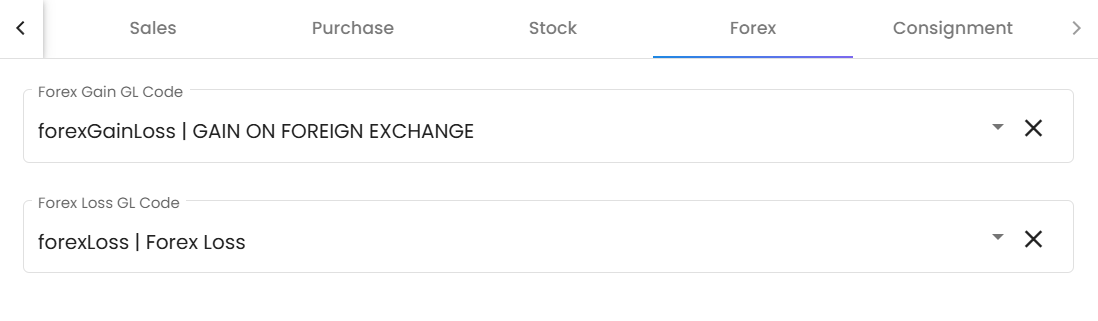
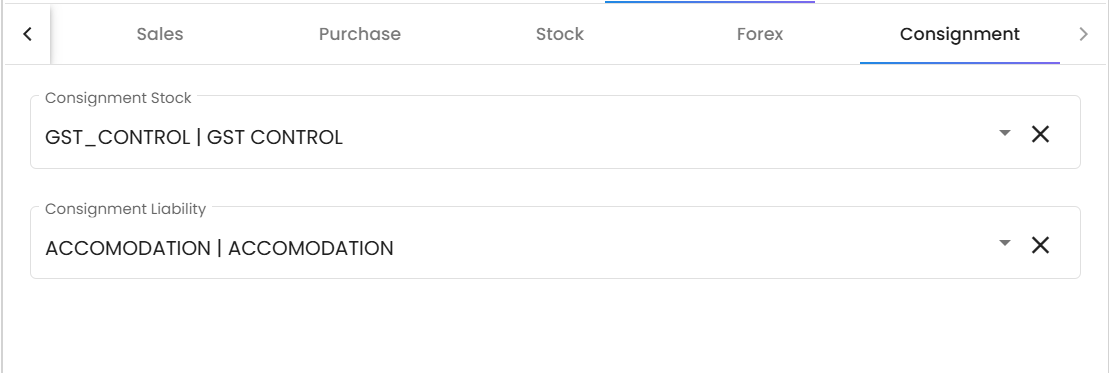
A missing mapping does not stop FINAL. FINAL changes the posting status and queues the journal posting, and what happens then depends on the mapping type:
- Entity mappings (
DEBTOR*/CREDITOR*chosen from the entity’s AR/AP type for this company,CONSIGNMENT_LIABILITY,CONSIGNMENT_STOCK,CREDITOR_NOT_INVOICED,INVENTORY_NOT_INVOICED): the job throwsMISSING_DEFAULT_GL_CODE: <key>— only on a document that needs that line, one whose kept lines add up to something other than zero (see What one FINAL sets off). - Item, tax, charges and stock-balance lines (
SALES,SALES_RETURN,PURCHASE,PURCHASE_RETURN,NSTI,ROUNDING,OUTPUT_TAX,INPUT_TAX,SETTLEMENT_CHARGES,STOCK_BALANCE*): the GL code is resolved in the order line GL code → document header GL code → item-company GL link → company default — except the two tax codes,OUTPUT_TAXandINPUT_TAX, which take the company default only, so a GL code on the line, the header or the item does not supply them. If none is found the journal line is silently omitted, and on a sales or purchase document nothing fails: the customer’s or supplier’s line is built from the lines that remain, so it absorbs the gap and the journal balances and posts. A RM 106 invoice (RM 100 goods, RM 6 SST) with noSALEScode posts debit trade debtors RM 6, credit output tax RM 6; a RM 1,060 supplier invoice (RM 1,000 goods, RM 60 SST) with noPURCHASEcode posts debit input tax RM 60, credit trade creditors RM 60. You notice only in the receivable or payable GL account, which stops agreeing with the ageing — the customer and supplier statements and the ageing are built from documents and look right, and Trace Document finds nothing because a journal exists. The job fails only when there is nothing to absorb the gap:TOTAL_DEBITS_AND_TOTAL_CREDITS_NOT_BALANCES: Total Debits: …, Total Credits: …when the customer or supplier has no AR/AP type, or the missing code isSTOCK_BALANCE*on a stock adjustment;NO_JOURNAL_CREATEDwhen no line at all could be resolved. Before go-live, check that every sales, purchase, return and charge code has a company default here, or every item its own, and that both tax codes have a company default here.
When the job fails, the document is FINAL and has no journal; its Trace Document → Journal Txn is empty, and Financial Report › Error Checking › Trace Document reports Missing Journal against it. The job itself is listed nowhere — that screen checks whether the journal exists and reads no job record, so it cannot tell you the job threw, let alone which of the messages above it threw. The message arrives only when you press Resolve and the repost fails the same way. Add the mapping under Companies > Default GL Codes first, then Resolve the job there — a second FINAL is refused (Generic Document has already been posted to FINAL). Resolve is offered only for the document types the repair screens accept (the list); any other type reads Unsupported document type. A consignment GRN, return or billing can still be posted from the Stock Flow Report’s Difference Listing (how); for a refund note, consignment GIN or reimbursement voucher, ask BigLedger support to post it and to read the reason. Only the fiscal-period lock and the stock, serial and blacklist validations stop FINAL itself.
Document behaviour settings
Not applicable — the applet maintains master data and has no document status flow of its own. Posting behaviour is governed by the Default GL Codes and fiscal period locks described here, not by document switches.
Feature visibility / permissions
This applet has no client-side permissions and no SHOW_* / HIDE_* checks. Access is controlled by installing the applet for a user; there is no per-tab or per-menu permission inside it. The only conditional screen is the Default GL Codes tab, which renders once the company has a chart of accounts.
Fields
GL Code — Details
A GL code also takes a GL Name (required) and an optional Description and Account No., each capped at 255 characters and read by nothing but the reports that print them. The rows below are the ones that fail, block or change something.
| Field | Meaning | Required | Notes / validation |
|---|---|---|---|
| GL Code | Account code | Yes | Max 255. Create refuses a code the chart already holds. The Edit screen accepts a new code and the server saves it without that check, so a rename can duplicate another code in the chart; history follows the account, but Import GL Code matches by this text (see Who owns the chart) |
| Chart of Account | Chart the code belongs to | Yes in practice | Must exist, or the save is refused |
| GL Category | Category the code belongs to | Yes in practice | Must exist, or the save is refused |
| Status | ACTIVE / INACTIVE | — | Inactive codes disappear from the GL Code listing and the manual-journal line picker, but stay selectable on document lines (see Troubleshooting) |
GL Category — Details
A category takes a GL Category Name, an optional Description and Account No., and — on the Edit screen only, not on Create — an optional GL Category (parent). The parent is stored and read by no report: a sub-category is not rolled up into its parent anywhere, so if you want a sub-total, make it a category of its own under the section.
A category belongs to no chart. Neither the Create nor the Edit screen offers a Chart of Account, and the category record has nowhere to keep one. Every chart on the tenant shares the same categories; it is the GL code that ties a category to a chart. So if GadgetSphere keeps a second chart for its distribution company, renaming a category or changing its MITRS flag changes it for both charts at once. To give one company a different grouping, create a new category with its own code and move that company’s GL codes into it from the GL Code screen.
| Field | Required | Notes |
|---|---|---|
| GL Category Code | Yes | Cannot be changed after creation. Create refuses a code it already holds (GL Category Code already exists!), but it compares only against the first 100 categories it loads and the server does not check at all — so on a tenant with more than 100 categories, search the listing for the code before you create it. A Financial Report snapshot records each line’s category by its code, so two categories sharing one code cannot be told apart there |
| Include for MITRS | No (defaults to NO) | Decides what the MITRS (Malaysian Income Tax Reporting Standard) tab of a Financial Report shows: its Profit and Loss and Balance Sheet keep only lines whose category is flagged YES. The flag is read when the tab is opened, not when the snapshot was generated, so a change shows on existing snapshots without regenerating them. If no category on the tenant is flagged YES, the tab filters nothing and shows every line — it then looks exactly like the ordinary Profit and Loss and Balance Sheet, which is how you can tell nothing is flagged. The product does not say which categories belong in the MITRS statements: that mapping is the decision of whoever prepares the tax computation, and it is worth reviewing before each filing. Check it by opening the MITRS tab and confirming one category you left at NO is absent. Read from source, not run: try it on one snapshot before relying on it |
Chart of Account, Segment, Dimension, Profit Center, Project
The shape is described under Screens and menus above: a Code that cannot be changed after creation, a Name, an optional Description, a Status that can be, and — on the four trees but not on the chart itself — an optional Parent and Ref 1 – Ref 5. Nothing on these five screens validates against anything else, and nothing outside them reads the Ref fields.
Company — Main
The identification half of this tab — Company Code (read-only), Company Name, Company Registration No., Currency, Tax ID#, SST ID# and the audit stamps — is stored and printed and changes nothing else. Two fields on it decide how the company’s numbers come out.
| Field | Required | Notes |
|---|---|---|
| Chart of Account | No | Select from the tenant’s charts; enables the Default GL Codes tab |
| Inventory cost base on | No | MA_COST, WA_COST, FIFO_COST, LIFO_COST, REPLACEMENT_COST, MANUAL_COST; read by the P&L report when computing opening / closing inventory; MA_COST when never set |
Company — Ledger
A ledger takes a Ledger Code, a Ledger Name and a Currency. The one field that changes what you can do with it is the type.
| Field | Required | Notes |
|---|---|---|
| Ledger Type | Yes | PRIMARY, SECONDARY, CONSOLIDATED; opening balances only on primary |
Company — Ledger detail (sub-ledger listing)
| Tab | Fields | Notes |
|---|---|---|
| Opening Balance (primary ledgers only) | Grid of GL Code, Description, Debit, Credit lines; Add GL Code opens a picker | Saved as an opening-balance journal on the primary ledger; a Financial Report view of that journal (trial balance, P&L, balance sheet) opens from the same tab |
| Remove Journal | Search grid (Journal No, Description, Transaction Date, Company, Doc Type, Doc No, Type, Posting, Amount, audit columns); CONFIRM key field; DELETE | Permanently deletes the selected journals once the confirmation key is typed. There is no undo |
Company — Default GL Codes
| Field | Required | Notes |
|---|---|---|
| One GL Code select per key (41 keys across General, Entity, Sales, Purchase, Stock, Forex, Consignment) | No | Single-select, restricted to codes in the company’s chart; SAVE on the company header writes every changed key. A missing key has the FINAL-time consequences listed under Configuration |
Company — Closing Stock Balance (per fiscal year, per stock class)
One row per fiscal month, per stock class.
| Field | Editable | Notes |
|---|---|---|
| BASE ON | Yes (Inventory tab only) | Cost basis used to regenerate the System column; refresh recalculates |
| Stock Value (System) | No | Generated from the stock ledger |
| Stock Value (Manual) | Yes | Saved immediately on cell edit; a zero here counts as no manual value, so the P&L falls back to the system figure even with Select Manual ticked |
| Select System / Select Manual | Yes | Mutually exclusive. Select Manual is what makes the P&L use the manual figure |
Set of Books
| Screen | Field | Required | Notes |
|---|---|---|---|
| Details | Name | Yes | The only editable field; Created / Modified By and Date are read-only |
| Ledgers | Ledger (pick an existing company ledger) | — | The link screen shows Ledger Code, Ledger Type, Ledger Name and Currency read-only; DELETE unlinks |
Fiscal Year / Fiscal Period
Each period carries an editable Period Name, Start Date and End Date.
CLOSED locks nothing. The year’s status is stored and read by no posting, journal or document check. A document or a manual journal dated inside a CLOSED year posts exactly as it would in an
ACTIVE one. Symptom: you close last year, someone back-dates an invoice into it, and it posts without
complaint. Cause: the year status is a label; the lock lives on each period. Fix: set every period
of the year to LOCK_ALL — that is what closes a year in this product.| Field | Required | Notes |
|---|---|---|
| Company, Name, Start Date, End Date | Yes | Monthly periods are generated from the range by the screen; the API accepts arbitrary periods |
| Period Closing Status | — | OPEN, LOCK_GL, LOCK_TXN, LOCK_ALL. The only lock in this screen that stops anything — what each one blocks is in Lifecycle |
Lifecycle and effects
Chart of account records do not post; they are the targets of posting. The applet nevertheless writes four things other applets depend on, and controls when posting is allowed.
What it writes
| Action | What is written | Consumed by |
|---|---|---|
| Save a Default GL Code | The company’s default GL code mapping and, when needed, a new sub-ledger on the primary ledger | Journal posting at document FINAL; the Profit and Loss report for COGS* / STOCK_BALANCE* closing-stock journals |
| Edit Closing Stock Balance | The month-end closing stock values per class — system, manual, and which one is selected | The Profit and Loss report: when Select Manual is ticked for Inventory and the manual value is non-zero it replaces the computed opening / closing inventory; for WIP, NSTI, raw material and finished goods the selected value (manual if selected, else system) is posted as a closing-stock journal against the class’s COGS_* / STOCK_BALANCE_* defaults; COGS = opening + purchases − purchase returns − closing |
| Opening Balance | An opening-balance journal on the primary ledger | General Ledger balances |
| Remove Journal | Hard-deletes journal headers and lines | Nothing — the rows are gone |
Fiscal period locks. The backend checks the period of the document’s or journal’s transaction date for its company:
| Closing status | Manual journals (General Ledger / Ledger and Journal) | Operational documents (invoices, bills, stock, payments) |
|---|---|---|
OPEN | Allowed | Allowed |
LOCK_GL | Blocked on create — “The selected date falls within a locked fiscal period”; journals the system posts automatically still post. The check is not repeated on clone or update, so a clone lands in the locked month and an existing journal can be re-dated into one | Allowed |
LOCK_TXN | Allowed | Blocked — “The selected date falls within a locked fiscal period” |
LOCK_ALL | Blocked (automatic journals excepted) | Blocked |
Two document types are explicitly exempt from LOCK_TXN / LOCK_ALL: outbound and inbound stock transfers — Stock Transfer documents can still be finalised into a locked period.
Reopening is done by setting the period back to OPEN; there is no separate approval step in the applet, so restrict who can install it.
What one FINAL sets off, and where the default GL codes are read
FINAL on a sales or purchase document saves the status and queues one job; the screen comes back before the journal exists. The journal job then reads this company’s Default GL Codes as they stand when it runs, not as they stood when the document was drafted, and builds the journal in three steps:
- It looks up the company’s primary ledger and its default GL codes. A company with no primary ledger, or with no default GL code mapped at all, stops the job before anything is built.
- Each goods, tax and charge line looks for its account — line, header, item, company default; tax takes the company default only. A line that finds none is left out, and nothing fails (FACT-0006).
- The customer’s or supplier’s line is built from whatever the kept lines add up to, and a missing default for it stops the journal. Which default it asks for comes from that party’s AR/AP Type for this company: the row on the customer’s or supplier’s Company Linking tab where one exists, the type on the record itself otherwise. A trade receivable asks for the trade debtors default, an other receivable for non-trade debtors, a merchant receivable for merchant receivable; a trade payable for creditors, an other payable for non-trade creditors, a merchant payable for merchant payable, and an employee for employee other payable. The mapping is asked for only on a document that needs a receivable or payable line — one whose kept lines add up to something other than zero.
Because the type is read per company, one supplier can sit in two different payable accounts: a distributor that is a trade creditor of GadgetSphere Distribution, and from which GadgetSphere buys only shop fittings, can be a non-trade creditor of GadgetSphere — set once on the Company Linking tab, with no second supplier record.
What the defaults touch elsewhere. Every posting document reads them. A receipt’s or payment’s money line posts to the GL code of the cashbook its settlement method names, so a cashbook with no GL code fails that journal (see Troubleshooting). Month End Processing reads the cost-of-sales, stock, purchase, profit-and-loss and retained-earnings defaults when it closes a month (what each one does there). A sales invoice’s own journal carries no cost of sales; that is written at the month-end close.
Changing a default later changes the journals posted from then on, and none already written. Repost on Trace Document rebuilds a document’s journal with the defaults as they are that day. That is how you re-route a document posted to the wrong account, and why you should not Repost a document in a month already reported: its journal changes under the report.
Where the figures come from
- Live: a document’s Journal Txn grid, the journal listings in Ledger and Journal, and the ad-hoc Profit Loss Report read posted lines as you open them.
- A manual journal is final the moment Create succeeds. There is no draft: the server refuses it unless debits equal credits, gives it a posting number and posts it in the same step.
- Stored: the Trial Balance, Profit and Loss and Balance Sheet of a Financial Report snapshot read a monthly summary of each account, and that summary is written only when Month End Processing creates or processes a month. A journal dated into a closed month reaches the statements only after that month and every later one are processed again and the snapshot is regenerated — and that includes the go-live figures you key on the primary ledger, which are a journal too, so close the month they are dated in first.
Closing a period: whose job it is, and how they know it is closed
The product holds the lock; deciding when a month is finished is the accountant’s job. The four statuses fit a close that happens in stages. Locked for transactions, a month stops taking invoices and vouchers while the accountant still makes adjustments by journal — the shops are already trading in April, the books for March are still being finished. Locked for the general ledger is the reverse: documents still flow while hand-keyed journals stop, for example while an outside reviewer reads the month’s journals. Locked for everything is the month closed.
A workable order for GadgetSphere at each month-end:
- Clear the month. Ledger and Journal’s Missing Journal listing shows nothing for its dates (for the document types it lists), and the bank and cash GL codes are tied to their cashbooks (how).
- Lock the period for transactions, post the adjustments, then run Month End Processing for each Set of Books. The lock does not stop Month End Processing — its journals are written by the close itself — so locking first is safe.
- Lock the period for everything once the statements are read.
Three things a lock does not hold, which is where the close owner has to look:
- Repairs. Resolve and Repost on Trace Document post on the document’s own date whatever its period says, so a document repaired after the close changes the locked month. Re-run Month End Processing for that month and every later one, and regenerate the snapshot.
- Edits and clones of manual journals (see the lock table above). An existing manual journal can be re-dated or changed with UPDATE inside a locked month. Two defensible ways to correct a mistake follow from that, and the choice is yours: correct it in place with UPDATE, which keeps one entry but changes a month somebody may already have reported; or post a correction journal in the open month, which leaves the original and the fix both on record at the cost of two entries (Journal entries walks both).
- The year’s own status. Closing a fiscal year locks nothing; locking every period of it does (see Fields).
Reopening is one change of status with no approval step, so the person who closes the month should not be the person who posts into it, and anyone who reopens a period should say why to whoever owns the close.
How you know the set-up is right
Run this once per company after mapping the defaults, and again after any change to them.
- Post one real sale and read its journal. Finalise a sales invoice for a laptop at RM 2,000 plus RM 120
SST to a customer whose AR/AP Type is trade, then open the invoice’s Journal Txn. Right: three lines —
debit your trade debtors account (
DEBTOR-TRADE-RETAIL) RM 2,120, credit the laptop’s sales account (SALES-LAPTOP) RM 2,000, creditLIAB-SST-OUTPUTRM 120. A debtor line of RM 120 and no sales line means neither the item nor the company has a sales code. A debtor line of RM 2,000 and no tax line means the company’s output tax default is unmapped. An empty grid that stays empty means the job failed: Resolve on Trace Document’s Missing Journal shows why. There is no cost-of-sales line, and there should not be one. - Try a journal into a locked month. In Ledger and Journal, create a manual journal dated in a month you have locked for the general ledger or for everything. Right: The selected date falls within a locked fiscal period, and no journal.
- After the first close, tie a control account. The trade debtors GL code on the Trial Balance should equal the debtor ageing at the same month-end. A past month’s ageing is a stored copy taken by a scheduled job, and one that ran late holds the balances of the day it ran rather than the month-end’s, so a difference can be the copy’s age; a difference of exactly a sales or tax amount points back to step 1.
Related applets
- Organisation — creates companies and branches and assigns each company its chart of accounts.
- Ledger and Journal — manual journals against these GL codes; subject to
LOCK_GL. - Financial Report — trial balance, P&L and balance sheet by set of books; the P&L reads the company’s cost basis and the Closing Stock Balance selections made here.
- Cashbook — every cashbook maps to a bank or cash GL code.
- Tax Configuration — tax codes whose document lines post to the
INPUT_TAX/OUTPUT_TAXdefaults. - Doc Item Maintenance — Account Code items generated by GL Code Create Item; the item-company GL link is the third step of the GL precedence.
- Customer Maintenance and Supplier — the entity’s AR/AP type decides which
DEBTOR*/CREDITOR*default is used. - Stock Transfer — the one document family that bypasses
LOCK_TXN/LOCK_ALL.
Troubleshooting
| Symptom | Cause | Fix |
|---|---|---|
A FINAL document has an empty Journal Txn grid, and Financial Report’s Trace Document reports Missing Journal. The reason BigLedger support reads is MISSING_DEFAULT_GL_CODE: DEBTOR (or CREDITOR, CONSIGNMENT_LIABILITY, CREDITOR_NOT_INVOICED, INVENTORY_NOT_INVOICED, …) | The entity-side default for that company is not mapped; the journal job failed after FINAL | Map it under Companies > Default GL Codes, then Financial Report › Error Checking › Trace Document → Missing Journal → Resolve. Resolve, pressed while the cause is still there, posts nothing and shows the reason in the check’s message, so it doubles as the diagnosis. A document type it calls Unsupported document type: post a consignment GRN, return or billing from Error Checking › Stock Flow Report (the Purchase Consignment row’s Difference Listing, CREATE); for a refund note, consignment GIN or reimbursement voucher, ask BigLedger support to post it |
A FINAL document has no journal; the reason BigLedger support reads is TOTAL_DEBITS_AND_TOTAL_CREDITS_NOT_BALANCES or NO_JOURNAL_CREATED, and Resolve, pressed before the fix, shows only Total Debits: …, Total Credits: … | An item, tax, charges or stock-balance line could not resolve any GL code (no line GL, no header GL, no item-company link, no company default such as SALES / OUTPUT_TAX / STOCK_BALANCE), so its journal line was dropped — and there was no customer or supplier line to absorb it (the party has no AR/AP type, or the document is a stock adjustment), or nothing resolved at all | Map the missing default, or set the GL code on the item; then Resolve as above, or ask BigLedger support for a type Trace Document does not accept |
| No error, but the trade-debtor or trade-creditor GL account no longer agrees with the ageing, and sales, purchases or tax are short by the same amount | The same dropped line on a document whose customer or supplier has an AR/AP type: the party line absorbed it and the journal posted | Map the missing default. Then open each affected document in Error Checking › Trace Document and press Repost beside Posting Journal: it replaces the journal with one built from the document. The button is there for any posted document that is not linked to another or a foreign-currency copy, whatever its type. A failed Repost shows nothing and leaves the document with no journal, so check its Journal Txn grid afterwards; if it is empty, Resolve on Missing Journal shows why (for the types that check takes), or ask BigLedger support. Or post a correcting journal |
A FINAL receipt / payment has no cashbook line or journal; the reason BigLedger support reads is MISSING_CASHBOOK: STL_MTHD [code] or MISSING_GL_CODE: STL_MTHD [code] | The settlement method has no cashbook, or its cashbook has no GL code | Fix in Cashbook — the GL code itself must exist here — then in Trace Document press Resolve on both Missing Journal and Missing Cashbook. Each repairs only its own half; for many documents, the Data Fix applet’s Cashbook › Missing Cashbook tab restores the cashbook lines by date range. For a document type either check calls Unsupported document type, ask BigLedger support |
| “The selected date falls within a locked fiscal period” on a journal | Period is LOCK_GL or LOCK_ALL — checked on create only | Date the journal in an open period, or reopen the period |
A journal appeared in a LOCK_GL / LOCK_ALL month without the lock being lifted | It was cloned or its date was edited — neither path checks the period | Void or re-date it; treat the lock as a guard on new journals only |
| Documents cannot be finalised for a date | Period is LOCK_TXN or LOCK_ALL | Same; note that LOCK_GL alone does not stop documents, and stock transfers are never stopped |
| Every FINAL document of one company stays without a journal, and Resolve on Missing Journal reports that the primary ledger, or the company’s default GL codes, do not exist | The company has no primary ledger, or not one Default GL Code mapped; the job checks both before it builds anything | Create the primary ledger under Companies > Ledgers, map the defaults, then Resolve each document |
| A month you closed and locked no longer agrees with its Financial Report snapshot | A document was repaired with Resolve or Repost, or a manual journal in it was edited or cloned — none of these checks the period lock | Re-run Month End Processing for that month and every later one, in order, then regenerate the snapshot; see Closing a period |
| Default GL Codes tab missing on a company | The company has no chart of accounts assigned | Set it on the company’s Main tab (or in Organisation) and reopen |
| Clicking a fiscal year under Companies > Fiscal Year does nothing | All five SHOW_*_STOCK_VALUE toggles are off | Turn on the classes you use under Settings > General Settings |
| P&L closing stock ignores the manual figure | Select Manual not ticked for that month / class, or the manual value is zero | Tick Select Manual and enter a non-zero value on the Closing Stock Balance screen |
| Cannot delete a GL code | It is linked to an item, a cashbook, a company’s default GL codes, or a journal line (a voided document’s journal counts) | Set it INACTIVE, or move its history with GL Code Merge |
| A GL code deleted without complaint, and finalised documents are now missing from the ledger | Delete checks journal lines, not document lines. A code sitting on draft documents, or on finalised documents whose journal did not post, deletes cleanly — and each of those documents then fails to post with MISSING_GL_CODE. The common shape is two codes with near-identical names: the one everybody kept picking is the one somebody deleted, and the survivor’s ledger shows only the few documents that happened to use it | Before deleting, search Missing Journal and the document listings for the code. If it has happened, do not re-create the code — the documents point at the old one — ask your BigLedger contact to restore it, then re-post from Missing Journal |
| GL Code Merge refuses the pair | Source and target are in different GL Categories | Move one code to the other’s category first |
| GL code missing from a journal-line dropdown or from the GL Code listing | Code is INACTIVE (the applet listings and the journal-line selector request ACTIVE only; item-level selectors on document lines do not filter on status — see The built-in template), or not linked to the chart the company uses | Filter the GL Code listing by Status INACTIVE, check the Chart of Account Link tab |
| Company not listed under Companies | The company is not ACTIVE (the listing shows active companies only); a missing chart of accounts does not hide it | Reactivate the company in Organisation |
| Import GL Code rows flagged red (GL Category is invalid) | GL_CATEGORY is not an existing category code in that chart, or CHART_OF_ACC is wrong. An existing GL code is not an error — the row updates it | Put the category code (not the name) in the CSV and re-upload |
| Import GL Category rows fail with INVALID SECTION CODE | SECTION_CODE is not the code of an existing GL Section | Use the section’s code as shown on the GL Section screen |
Related documentation
- Chart of accounts setup guide — the walkthrough for a new tenant.
- Financial Accounting module and Opening balances.
- Core module.