Entity Maintenance
Watch this as a presentation — 1 on this page, slides with narration.
See every customer, supplier, employee and merchant in one list, and create a record that is more than one of them, such as the agent you both buy from and sell to. A record with none of the four flags appears in no type-specific applet, only here, which is how records go missing without being deleted.
Overview
Entity Maintenance is the type-agnostic view of BigLedger’s entity master. Every customer, supplier, employee and merchant is one row in the same entity master with four flags — customer, supplier, employee, merchant — and this applet is the one place where you can create a record with any combination of those flags, or see all of them in a single listing regardless of type. The dedicated applets (Customer Maintenance, Supplier, Employee Maintenance, Merchant) edit the same rows through a richer, type-specific form.
Nothing forces a record to carry exactly one flag. A record can be both a customer and a supplier, or both a customer and an employee, and this applet is the only screen that will create one — the freight agent you buy from and sell to, or the staff member who also holds an account. A record can also carry none of the four flags at all: it still holds a name, addresses and contacts, but no type-specific applet will list it, and this screen is the only place it is visible. That is how records go missing — not deleted, just untyped.
It is opened by master-data administrators who need the cross-type view (for example, to turn an existing customer into a supplier as well), and by whoever maintains the four category trees — Entity, Customer, Employee and Supplier categories — that the type-specific applets tag their records with.
Where it fits
| Direction | Applet / document | Why |
|---|---|---|
| Upstream | Organisation | Companies for the Company Linking tab; branches (and their company) for the Intercompany Branch tab |
| Upstream | Tax Configuration | Tax codes, filtered by country, offered on the Tax tab |
| Upstream | Cashbook | Settlement methods are the Payment Type choices on the Payment Config tab |
| Upstream | Tenant Admin | Confirmed logins that the Login tab looks up by e-mail (the tab cannot save the link — see below) |
| Sibling | Customer Maintenance, Supplier, Employee Maintenance, Merchant | Same table, same rows; each sibling edits its own type and adds the type-specific tabs (e-Invoice, credit control, categories, logins, spending limits…) |
| Downstream | Sales, purchase, receivables and payables documents; claims; payroll | Pick the entity by type; the AR / AP type, currency, addresses, contacts and payment methods maintained here are read at document time |
Modules: Core, Purchasing, HR & Payroll, Claims.
Screens and menus
Left menu:
| Menu | What it is for |
|---|---|
| Entity | Search, create and edit entities of any type |
| Entity Category | Tree of entity categories |
| Customer Category | Tree of customer categories — the same categories the Customer Maintenance applet tags customers with |
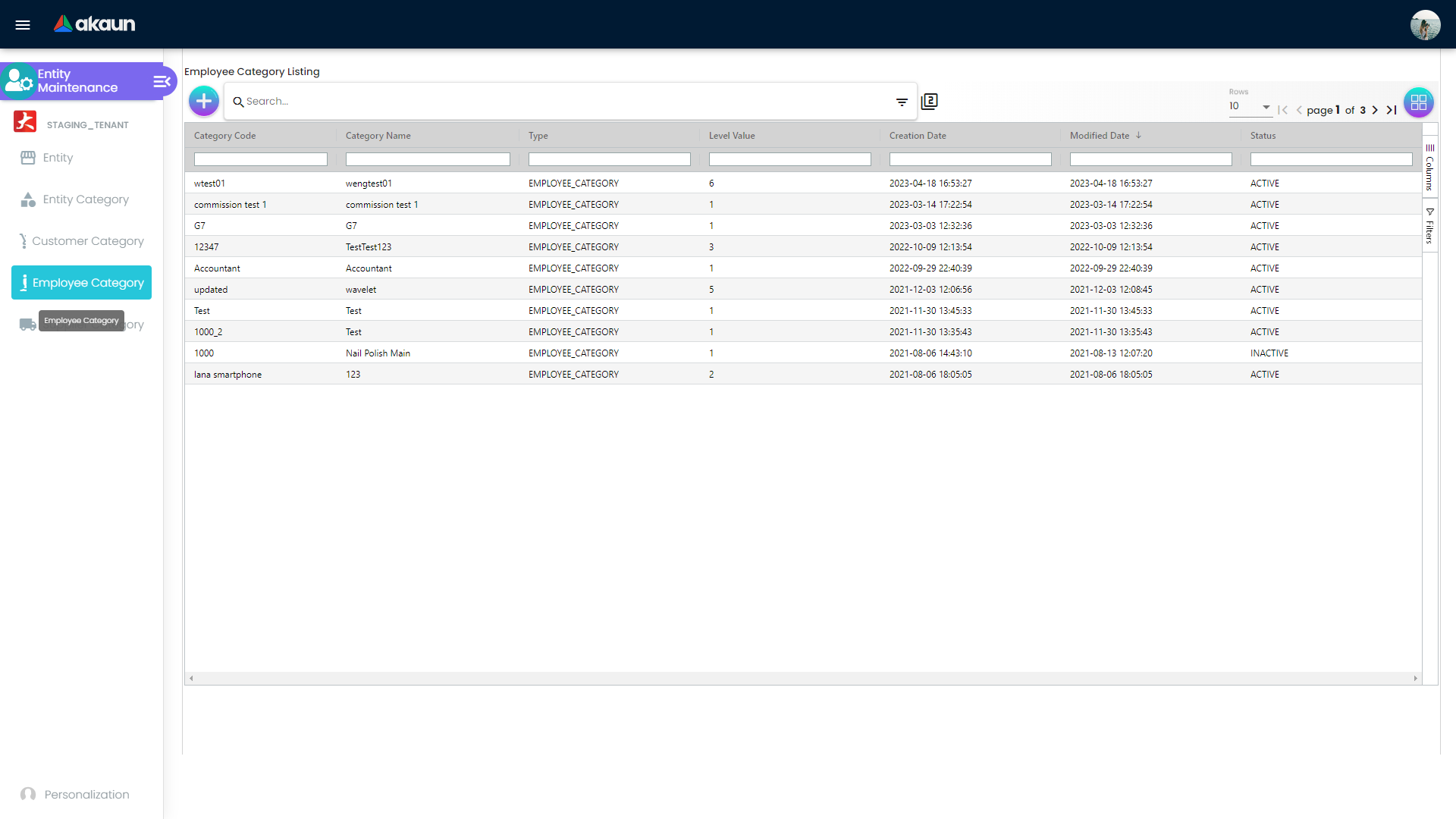
| Employee Category | Tree of employee categories — as used by Employee Maintenance |
| Supplier Category | Tree of supplier categories — as used by the Supplier applet |
Gear (Settings) menu: Field Settings and Default Selection under System Configuration. Webhook, Feature Visibility and the shared Permission Set / User / Team / Role listings also exist but are not listed in the settings menu; they are reachable only by typing the URL. Personalisation offers a per-user Default Selection.
Entity listing
Columns: Entity Name, Entity Ext Type (the type flags joined — for example CUSTOMER, EMPLOYEE), Entity Type (CORPORATE / INDIVIDUAL), Currency, Status, Creation Date, Modified Date; newest modification first. The advanced search offers a keyword (matched against the name and the customer / supplier / employee / merchant codes), Entity Type, Status and a Modified Date range. The + button opens the create form; clicking a row opens the edit form.
Create form
A single Main tab. CREATE is enabled only while every required field is valid (see Fields).
Edit form
Tabs, in order: Main, Entity Category, Login, Payment Config, Tax, Address, Contact, Intercompany Branch, Company Linking, Remark, Credit Term and Limit (with inner Credit Term and Credit Limit tabs). There is no Branch tab.
How the tabs save differs, and it matters:
- Update (header button) saves the Main tab, the Remark, and every row you added on the Tax, Address and Contact tabs — those tabs only stage rows in memory until you press Update.
- Payment Config, Company Linking and Intercompany Branch save immediately through their own services when you press Add / Save inside the tab.
- Entity Category, Login, Credit Term and Credit Limit have Add / Save buttons that persist nothing (see Lifecycle and effects).
- There is no delete: the edit form has no Remove button.
Category screens
Each of the four category menus is a listing (Category Code, Category Name, Level Value, Type, Creation Date, Modified Date, Status; keyword search plus Status and Modified Date filters) with a create panel (Category Code, Category Name, Description — all mandatory — and an optional parent picked from the existing tree) and an edit panel that adds Status. The first time a category of a given kind is created the applet also creates the list it belongs to.
Configuration
Before you can use it
- Companies and branches in the Organisation applet — Company Linking picks companies; Intercompany Branch picks a branch and derives its company.
- Tax codes in Tax Configuration — the Tax tab lists the tax types and codes of the chosen country; with no codes for that country the Tax Type list is empty.
- Settlement methods in the Cashbook applet — they are the Payment Type options on Payment Config.
- Entity code prefixes — this applet never sends a customer / supplier / employee / merchant code, so the backend generates one for every flag that is set, from the
CUSTOMER_ID/SUPPLIER_ID/EMPLOYEE_ID/MERCHANT_IDrunning numbers plus the tenant’s per-type prefix. Set the prefixes before you create entities if you want codes likeC000123.
Applet settings
Settings live in two applet-local screens — Field Settings and Default Selection — plus a per-user Default Selection under Personalisation. None of them is functional, and nothing in the applet reads any applet setting:
| Screen | What you see | What happens |
|---|---|---|
| Field Settings | Eight slide toggles in two panels — Lines Settings: Unit Discount, SST/VAT/GST, WHT, Blanket Order; Department Settings: Segment, G/L Dimension, Profit Center, Project — and a SAVE button | The toggles are not connected to anything and the button does nothing. Nothing is saved |
| Default Selection | Default Branch and Default Location pickers and SAVE | Choosing a value fails silently and SAVE stores nothing |
| Personalisation › Default Selection | The same two pickers under User Default Settings — This will override Applet Default Settings | Same screen, same result |
There is no working applet setting. If you need hidden fields, mandatory-field switches or default currency / country / credit terms, they exist in Customer Maintenance and Employee Maintenance, not here.
Document behaviour settings
Not applicable — this is a master-data applet with no document statuses, posting or printables.
Feature visibility / permissions
- Client-side permissions: the applet defines and checks no client-side permission codes. The Feature Visibility route is the shared Manage Team Access screen only.
- Server-side permissions: the Permission Set / User / Team / Role routes are the shared containers; permission targets can be any of the Applet, Branch, Company, Currency, Customer, Employee, Entity, Entity Login, GL Code, Label / Label List, Location, Merchant, Settlement Method, Supplier, Tax Code, Team and Tenant lookups.
Fields
Create — Main tab
Entity Name and Description are plain text of up to 255 characters. The form will not create a record without a name; Description is optional. Three things about them are not on the screen:
- The name is not unique, and nothing checks it. The form requires a name, but neither the form nor the server’s entity checks compare it with other records, so a second record called GadgetSphere Trading is accepted without a word. Each gets its own generated code, so everywhere else the two look like different customers, with balances and statements split between them. This is read from the code, not tried. Checking for a duplicate is the job of whoever creates the record, and it takes ten seconds: before CREATE, type the name into the listing’s search box. If a record comes back, open it and add the extra role (customer, supplier, employee or merchant) under Type instead of creating a second record. One record carrying several roles is what this applet is for.
- Renaming a record does not rename documents already raised. A document keeps its own copy of the name, taken when the customer or supplier was picked. The sales invoice screen, for one, copies it in at that moment, and the purchase order print and the document view read that copy, not the record. Saving a new name here changes the documents you raise from now on. Earlier invoices keep the old name, on screen and when reprinted. If a customer needs a document in its new name, that means a new document, and your accounts team decides whether to raise one. Nothing here does it for you.
- Description is searched but not shown. The listing has no Description column, but its keyword search looks in Description as well as the name, codes and ID number. That makes it a good place for something people search by and would not otherwise see, such as a former trading name or the group a company belongs to. This too is read from the code, not tried: put a word in one record’s Description, search for it, and confirm the record comes back before your team relies on it.
| Field | Meaning | Required | Notes / validation |
|---|---|---|---|
| Status | Record status | Yes | ACTIVE / INACTIVE; defaults to ACTIVE |
| Type | The role flags, multi-select | Yes | CUSTOMER, SUPPLIER, EMPLOYEE, MERCHANT. Selecting EMPLOYEE clears Entity Type and restricts it to INDIVIDUAL (hint: “Please uncheck Employee Type for Corporate dropdown”) |
| Entity Type | Legal form | Yes | CORPORATE / INDIVIDUAL; backend rejects anything else |
| Identity Type | Identity document type | Yes when INDIVIDUAL | PASSPORT / IDENTITY_CARD; shown for individuals only |
| AR / AP Type | Which receivable / payable control account the entity posts to | Yes | AR_TRADE, AR_OTHER, AR_MERCHANT, AP_TRADE, AP_OTHER, AP_MERCHANT, AP_EMPLOYEE; backend requires it (…DEFAULT_ARAP_TYPE_IS_NULL_OR_EMPTY) |
Edit — Main tab
The same fields plus Tax Registration Number (label changes to Company Tax Registration Number for CORPORATE), Phone Number, Email (both max 255, no format check), and read-only Created By, Creation Date, Modified By, Modified Date. Picking INDIVIDUAL defaults Identity Type to IDENTITY_CARD when empty. The Currency field is shown and marked required, but Update does not write it back — currency can only be set on create (see Troubleshooting).
Edit — other tabs
| Tab | Fields (mandatory in bold) | Writes |
|---|---|---|
| Entity Category | Tick categories from the category grid (Category Code, Name, Level Value, dates, Status) | Nothing — the selection goes nowhere |
| Login | User email (Verify looks up a USER_CONFIRMED e-mail login), Rank (OWNER, ADMIN, MANAGER, MEMBER, GUEST, VISITOR, ANNONYMOUS), Status | Attempts to save the link, but the entity is never filled in, so the backend rejects it |
| Payment Config | Payee Residential Status (RESIDENT / NON-RESIDENT), Payment Type (a settlement method), Country, Bank (a fixed list of Malaysian banks), Bank Identifier Code (settlement type: BANK_TRANSFER, CASH, CHEQUE, CREDIT_CARD, E_WALLET, FPX_EMANDATE, PAYMENT_GATEWAY, MEMBERSHIP_POINT_CURRENCY, OPEN_CREDIT, OTHERS, VOUCHER), Bank Acc No., Bank Acc Holder Name, IBN Number, Account Expiry | The payment method on the record (immediately) |
| Tax | Country (Malaysia, Singapore, Thailand, Indonesia — a hard-coded list of four), Tax Type, Tax Code, Tax Rate (%) — read-only, copied from the chosen code’s filing rate — Tax Option (INCLUDE TAX / EXCLUDE TAX). One row per country. See the warning below | The tax details on the record — on Update |
| Address | Address Name, Address Type (BILLING_ADDRESS / SHIPPING_ADDRESS), Address Line 1, lines 2-5, Country, State, City, Postcode | The address on the record — on Update |
| Contact | Contact Name, Contact ID, Designation/Position, Office No, Extension No, Mobile No, Fax No, Phone Number, Email, Other No | A contact line on the record — on Update |
| Intercompany Branch | Branch (picker; the Company field fills from the branch), Selected Entity (read-only), Description | The entity-branch link (immediately); the edit panel changes the description |
| Company Linking | Tick companies (Name, Code, Email) | The company link (immediately); the edit panel shows Code, Name, Registration No. and lets you set the link’s AR/AP Type or delete the link |
| Credit Term | Credit Term Code, Credit Term Name, Status, Set Year / Month / Day, Add Year / Month / Day | Nothing — Save only resets the form |
| Credit Limit | Credit Limit Code, Credit Limit Name, Status, Currency, Credit Limit Amount | Nothing — Save only formats the amount |
The Credit Term and Credit Limit listings read credit-term / credit-limit records that nothing in this applet writes; credit control is maintained in Customer Maintenance.
The Tax tab here has neither guard its siblings have, and its Tax Code list will usually not fill. Two differences from Customer Maintenance and the Supplier applet, which edit the same rows:
- No sales/purchase guard. Those two force the Malaysian Tax Type list to the three output types and the three input types respectively. This screen offers every tax type and withholding type the tenant’s tax codes carry, for any country, so an output code can be attached to a record you buy from.
- A missing null check. On any tax code with no withholding type, choosing a Tax Type errors and the Tax Code list stays empty or short; the sibling screens guard against this, this one does not. A code only carries a withholding type if somebody gave it one in Tax Configuration; on every other code the field is null, which is exactly the case that throws.
And the rate you see is a copy, not a link. It is filled by copying the chosen code’s filing rate when you pick the code and frozen into the row; changing the rate afterwards in Tax Configuration does not move it. The row’s one consumer anywhere is the shared pricing-scheme picker, which offers a fallback scheme built from it when a document line’s item returns no pricing scheme at all. So this tab is not where your tax gets configured: the rates and codes live in Tax Configuration, and what a document actually charges is decided there and on the item, not by the tax row here.
Lifecycle and effects
This applet writes master data; nothing here posts to the ledger or moves stock.
- The AR / AP type is supplied once, and only when blank. The backend fills it with
AP_TRADEwhen the supplier flag is on andAR_TRADEotherwise, on create and on update, but only if the value it is handed is empty. Ticking a second flag later never revisits it — a record created as a customer staysAR_TRADEfor its purchases too, and nothing on the screen warns you. Check the AR / AP type by hand every time you tick a new flag on an existing record. - Codes are rewritten on save. Any customer, supplier, employee or merchant code sent is upper-cased, trimmed and stripped of every space before it is stored.
- Status is
ACTIVEorINACTIVEin this applet’s forms; the backend also acceptsTEMP, which the sibling applets can set. Changing the status is a normal Update — no other effect is triggered. - Create saves the header with its currency, ID number and tax registration number. The backend requires a status, an Entity Type of
INDIVIDUALorCORPORATEand a default AR / AP type, then generates the per-type codes for every flag that is set. Because the applet sends no codes, the…CODE_SHOULD_NOT_BE_SETand…CODE_ALREADY_EXISTSrules cannot fire from here. - Update first re-reads the entity to copy the current revision of the header and of every extension and line, then saves the whole record. Each address, contact and tax row is validated for its parent, status and revision (
ENTITY_EXT_OBJECT_*,ENTITY_LINE_OBJECT_*errors). A success toast “The Entity has been updated” returns you to the listing. - Payment methods are saved immediately; the backend requires the entity, a country code that exists, and — when given — an existing settlement method and bank.
- Company links are saved, updated and deleted immediately; the backend requires an existing company and entity. The client refuses to add a company that is already linked (toast “…is already linked to this entity”) before calling the backend.
- Intercompany branches are saved immediately; the backend requires an existing entity and branch.
- Logins: the backend requires both the entity and the login. The create panel never fills in the entity, so every attempt from this applet fails; the listing filters on a fixed entity rather than the open one and therefore never shows the open entity’s logins.
- Categories (all four menus) are saved as labels of the matching kind (
ENTITY_CATEGORY/CUSTOMER_CATEGORY/EMPLOYEE_CATEGORY/SUPPLIER_CATEGORY), statusACTIVE, with an optional parent. The backend requires code, name, kind and status, an existing parent, and a code that is unique across every label in the tenant — the uniqueness check ignores the list and the kind. - Tagging an entity with a category is not persisted by this applet: the Entity Category tab’s selection is sent to an action that nothing handles, and Update does not include it.
- No webhook or job is triggered from this applet’s code; the Webhook route is the shared configuration screen.
Related applets
- Customer Maintenance — the customer view of the same rows, with the working category, login, credit-term / credit-limit, e-Invoice and file-import features that this applet lacks.
- Supplier — the supplier view; uses the Supplier Category tree maintained here.
- Employee Maintenance — the employee view; uses the Employee Category tree maintained here and adds logins, branch / company linking and spending limits.
- Merchant — the merchant view (
AR_MERCHANT/AP_MERCHANT). - Organisation — companies and branches for Company Linking and Intercompany Branch.
- Tax Configuration — the tax codes offered per country on the Tax tab.
- Cashbook — settlement methods, the Payment Type list on Payment Config.
- Tenant Admin — the confirmed logins the Login tab verifies against.
Troubleshooting
| Symptom | Cause | Fix |
|---|---|---|
CREATE stays disabled after choosing EMPLOYEE in Type | Selecting EMPLOYEE clears Entity Type and limits it to INDIVIDUAL | Re-select INDIVIDUAL in Entity Type; to create a corporate record, remove EMPLOYEE from Type |
| Currency changed on the edit form reverts after Update | Update never writes the currency back | Set the currency when creating; to change it later use the sibling applet for that type |
| Categories ticked on the Entity Category tab disappear after Update | The selection is sent to an action nothing handles and is not part of what Update saves | Tag the record in Customer / Supplier / Employee Maintenance |
| Login tab shows logins that do not belong to this entity, or Add fails | The listing filters on a fixed entity rather than the open one; the create panel sends no entity, and the backend rejects it because no entity is set | Link logins on the Login tab of Customer / Supplier / Employee Maintenance |
| Credit Term / Credit Limit rows never appear | Both create forms discard the input; the listings read credit-term / credit-limit records nothing writes | Maintain credit terms and limits in Customer Maintenance |
| Field Settings or Default Selection do not save | The screens are not connected to storage (see Applet settings) | Nothing to configure here; the switches you are looking for live in the sibling applets |
| Category create is refused as a duplicate code although no category of that kind has the code | Label codes are unique across the whole tenant — item categories, customer categories and every other label share the namespace | Choose a code not used by any other label |
| Category create is refused because the parent does not exist | The chosen parent was deleted or belongs to another tenant context | Refresh the tree and pick the parent again |
| Tax tab: Tax Type list is empty after choosing a country | No tax codes exist for that country | Create them in Tax Configuration |
| Payment Config: Payment Type list is empty | No settlement methods are defined for the tenant | Create them in the Cashbook applet |
Payment Config save fails with ENTITY_PAYMENT_METHOD_OBJECT_COUNTRY_CODE_* | Country is mandatory and must be a known code | Pick a country from the list |
| “… company is already linked to this entity” when adding a company | The applet checks this before saving | Nothing to do — open the existing link to change its AR / AP type |
| Create from an integration is refused for an unknown entity type | Entity Type must be exactly INDIVIDUAL or CORPORATE | Fix the calling payload; the UI cannot send anything else |
| The record you need is missing from a sales / purchase picker | The relevant flag (customer / supplier) is not set on the entity, or the status is INACTIVE | Add the type in Type on the Main tab and set the status to ACTIVE; the backend then generates the missing code |
Related documentation
- Core module · Purchasing module · HR & Payroll module · Claims module
- Customer Maintenance — the fullest description of the shared entity model and its settings