Supplier
Watch these as presentations — 6 on this page, slides with narration.
Overview
The Supplier applet is BigLedger’s supplier master. A supplier must exist here before a purchase requisition, purchase order, goods receipt, purchase invoice, debit or credit note, payment voucher or self-billed e-Invoice can name them. One record holds who you buy from (corporate or individual, registration and tax numbers), how you pay them (bank accounts, currency, AR/AP type, credit term and limit), how they are grouped and priced (categories, item pricing, branch and company links), and the identity data that self-billed e-Invoices and Peppol routing depend on.
It is opened by procurement staff who onboard suppliers, by finance who set payment and credit terms, and by master-data teams who bulk-load or de-duplicate supplier records. Suppliers, customers, employees and merchants are all rows in the same entity table; this applet is the supplier-typed view of it.
Where it fits
| Direction | Applet / document | Why |
|---|---|---|
| Upstream | Organisation | Companies and branches for Branch Linking, Company Linking and Supplier Branch |
| Upstream | Chart of Accounts | The payable GL codes the supplier’s AR/AP type resolves to |
| Upstream | Tax Configuration | Tax codes and rates on the Tax tab and on Item Pricing |
| Upstream | Doc Item Maintenance, Inventory Item Maintenance | Items referenced by the Item Pricing tab |
| Sibling | Customer Maintenance, Employee Maintenance, Merchant Admin, Entity Maintenance | Same table, same rows; each sibling edits its own entity type |
| Downstream | Purchase Requisition, Purchase Order, Blanket Purchase Order, Purchase GIN | Every purchase document selects a supplier and inherits its currency, tax and addresses |
| Downstream | Purchase Invoice (Internal), Purchase Debit Note, Purchase Credit Note, Purchase Refund Note | The supplier’s AR/AP type decides which payable account the journal credits |
| Downstream | Payment Voucher (Internal), Purchase Report | Settlement against the supplier; supplier is a filter and grouping dimension |
| Downstream | Consignment GIN, Consignment GRN | Consignor / consignee entity on consignment stock movements |
| Downstream | Stock Replenishment | Reads Entity Pricing to choose a supplier and price for generated purchase orders |
| Downstream | Supplier Delivery Order and the *-supplier-access-* applets | The supplier’s login link is what gives their staff a portal account |
| Downstream | MY E-Invoice Admin, MY E-Invoice Portal, MyPeppol Admin | Self-billed e-Invoices use the supplier as issuer; Peppol IDs here are the routing target |
Modules: Core, Purchasing, Financial Accounting, E-Invoice.
Screens and menus
The route base is applets/wavelet/erp/entity/supplier-applet. Left menu (every entry except Supplier can be hidden in Application Settings):
| Menu | Route | What it is |
|---|---|---|
| Supplier | supplier-listing | The supplier directory and the entry point to create or edit a record |
| Category | category-listing | The supplier category tree |
| Credit Term Listing | credit-term-listing | Reusable credit-term definitions |
| Credit Limit Listing | credit-limit-listing | Reusable credit-limit definitions |
| File Import | file-listing | Supplier CSV import jobs and their per-row checking results |
| Upload Credit Terms | credit-terms-file-listing | Bulk assignment of credit terms to suppliers |
| Upload Credit Limits | credit-limits-file-listing | Bulk assignment of credit limits to suppliers |
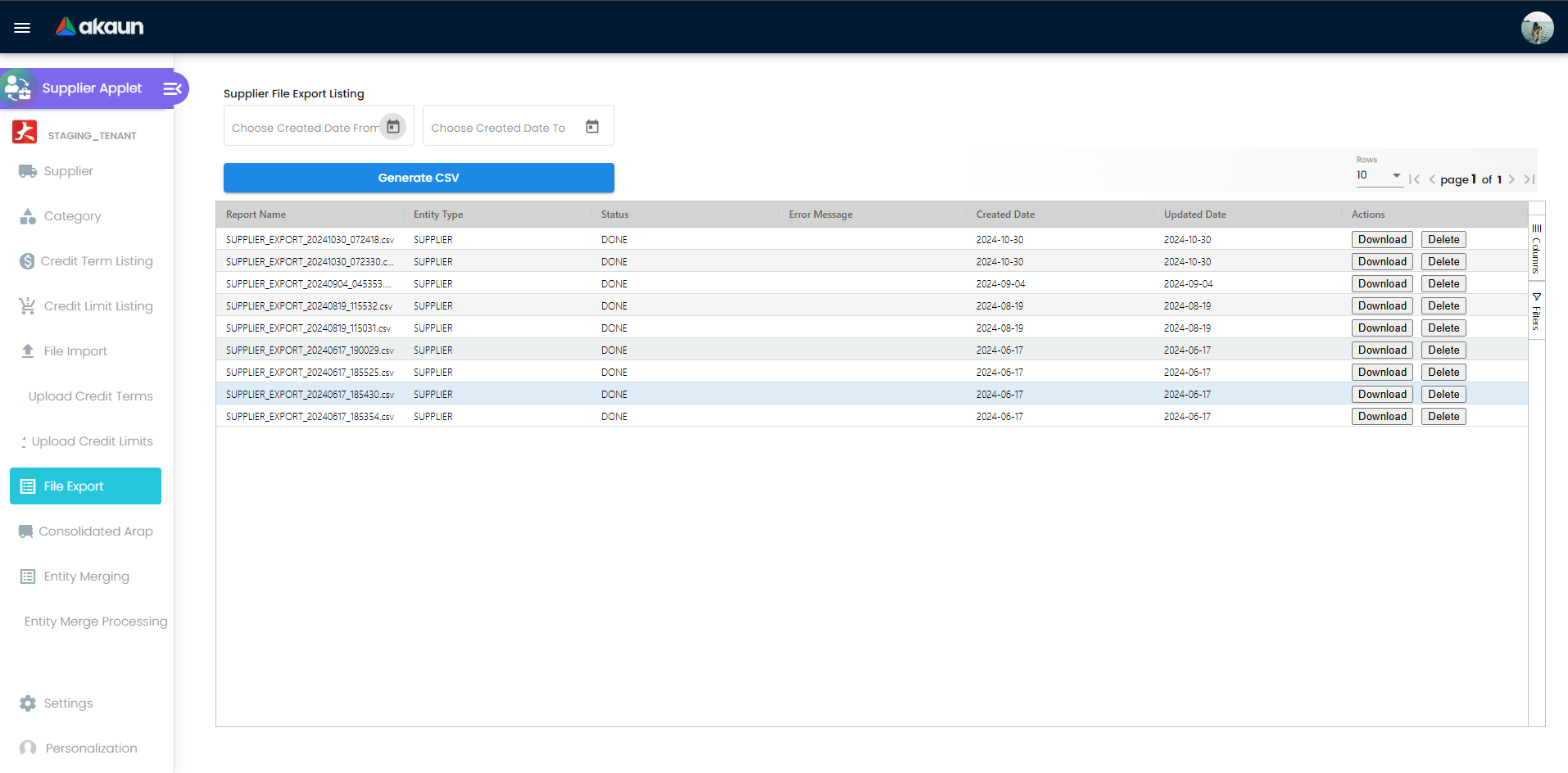
| File Export | file-export | Generates and lists supplier CSV extracts |
| Consolidated Arap | consolidated-arap | Named groups of entities used to give one portal login visibility of several suppliers. It holds no amounts — it is a grouping and access concept, unrelated to consolidated e-Invoicing |
| Entity Merging | entity-merging | Finds duplicate entities and queues a merge |
| Entity Merge Processing | entity-merge-processing | The merge queue and its outcome per job |
| Audit Trail | audit-trail | Change log rows for the applet (applet code, table, action, user, dates) |
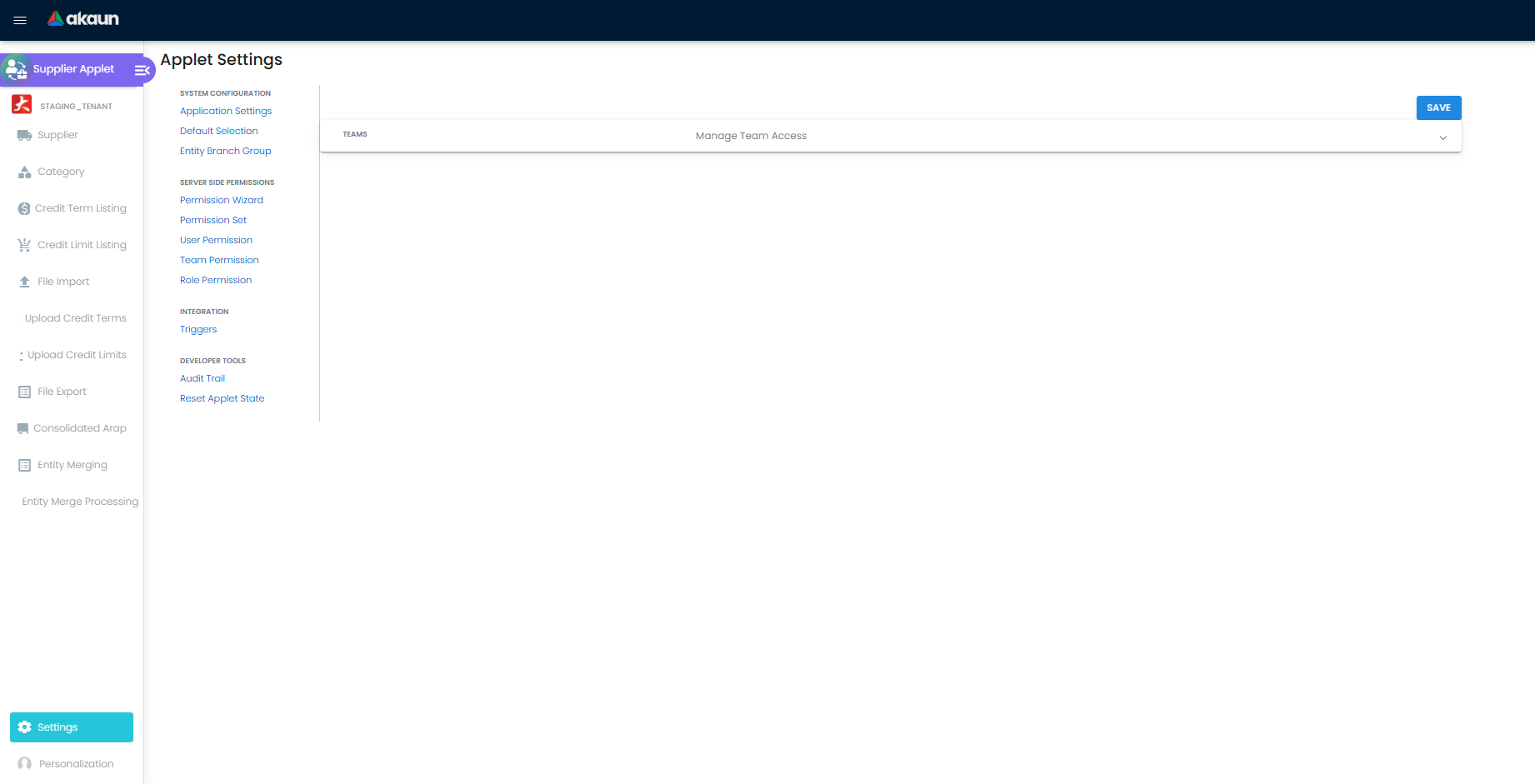
Settings (Settings in the sidebar) groups: System Configuration — Application Settings, Default Selection, Entity Branch Group, Resource Bundle Configuration, Custom Field Placement; Server Side Permissions — Permission Wizard, Permission Set, User / Team / Role Permission; plus Feature Visibility and Webhook. Personalization offers Default Selection and Sidebar.
Creating a supplier
On the current listing the + button does not open a separate create form. It looks for an entity you previously left with status TEMP and reopens it; if there is none it inserts a new entity row with status = TEMP and opens Supplier Edit on it. The new row is pre-filled from Application Settings — Entity Type from DEFAULT_ENTITY_TYPE (default SUPPLIER), Supplier Type from DEFAULT_SUPPLIER_TYPE (falls back to CORPORATE), Identity Type from DEFAULT_ID_TYPE (falls back to BRN).
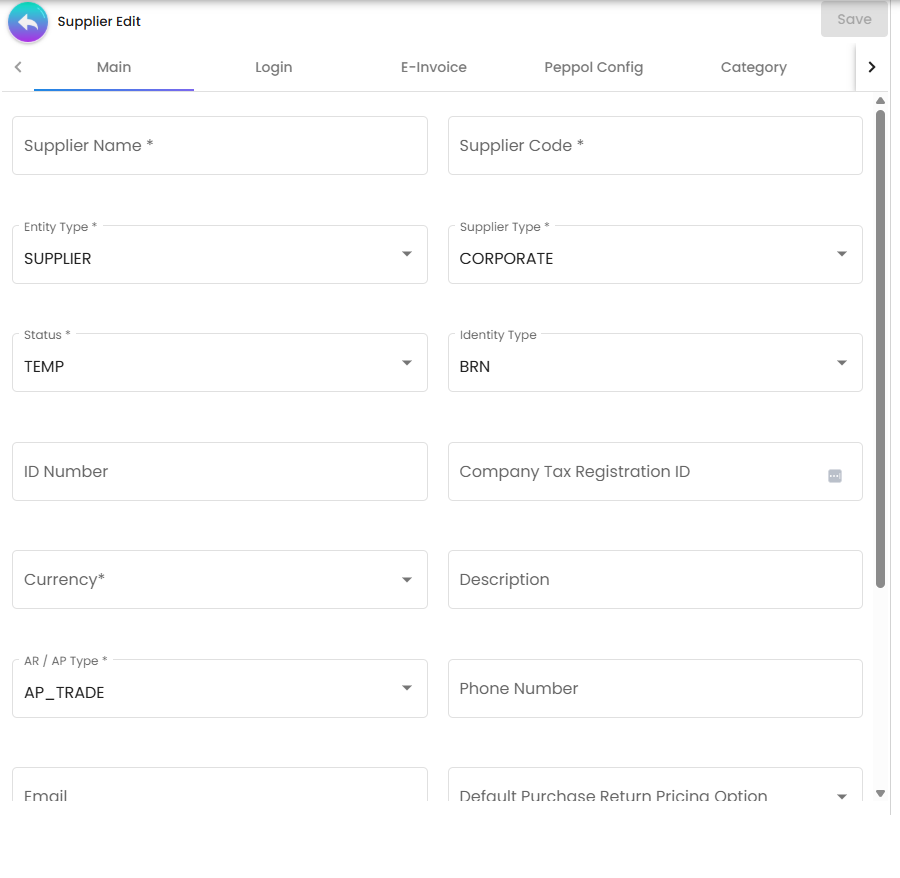
TEMP rows are real rows. Because the record is inserted before you type anything, abandoning the form leaves a blank supplier with status TEMP in the listing. The listing does not filter them out. See Troubleshooting.Supplier edit tabs
| Tab | What it holds | Hidden by |
|---|---|---|
| Main | Core profile — see Fields | — |
| E-Invoice | Self-billed flag, tax identification number, SST and tourism-tax numbers, SIC code and business activity, plus the identity and address block that goes on a self-billed e-Invoice | HIDE_E_INVOICE |
| Peppol Config | Peppol participant IDs (exactly one should be flagged Default — it is the receiver on outbound documents) and the e-Invoice notification methods | HIDE_PEPPOL_CONFIG |
| Category | Links the supplier to nodes of the supplier category tree | HIDE_CATEGORY |
| Login | Links an akaun.com login to the supplier — the prerequisite for every supplier-access applet | HIDE_LOGIN |
| Applet Catalog | Applet catalogues installed for the supplier’s logins | HIDE_APPLET_CATALOG |
| Driver Login | Driver logins used by delivery-side applets | HIDE_LOGIN (shares the Login switch) |
| Payment Config | Bank accounts you pay this supplier from | HIDE_PAYMENT_CONFIG |
| Tax | Country, tax code, type, rate and option per supplier | HIDE_TAX |
| Address | Billing and shipping addresses, one flagged as the e-Invoice address | HIDE_ADDRESS |
| Contact | Contact people | HIDE_CONTACT |
| Credit Term and Limit | The credit term and credit limit assigned to this supplier | HIDE_CREDIT_TERM_LIMIT |
| Branch Linking | Which of your branches may transact with this supplier | HIDE_BRANCH_LINKING |
| Supplier Branch | Intercompany supplier branch records with their own address, credit terms, control account and tax code | HIDE_INTERCOMP_BRANCH |
| Company Linking | Per-company AR/AP type and per-company supplier / customer / employee / merchant code | HIDE_COMP_LINKING |
| Item Pricing | Supplier-specific purchase and sales prices, tax and withholding codes per item | HIDE_ITEM_PRICING |
| Remark | Free text | HIDE_REMARK |
| Employee | Employee-entity context | HIDE_EMPLOYEE |
| Documents | Purchasing and payment documents raised against this supplier | HIDE_DOCUMENT |
Tab order is not fixed: Settings > Default Selection > Details Tab Ordering is a drag-and-drop list saved as SUPPLIER_DETAILS_TAB_ORDER, and the edit screen renders the tabs in that order (tabs added by a later release are appended at the end). With ENABLE_VERTICAL_UI and ENABLE_SIMPLIFIED_UI both on, the same tabs render as a stacked accordion instead of a tab strip.
Configuration
Before you can use it
| Prerequisite | Where | Why |
|---|---|---|
| Companies and branches | Organisation | Branch Linking, Company Linking, Supplier Branch, and the Entity Branch Group screen |
| Payable GL codes and company defaults | Chart of Accounts | The supplier’s AR/AP type resolves to a payable account when a purchase document posts |
| Tax codes | Tax Configuration | Tax tab and the tax / withholding codes on Item Pricing |
| Credit terms and credit limits | this applet (Credit Term Listing / Credit Limit Listing) | They must exist before they can be attached to a supplier |
| Supplier categories | this applet (Category) | The Category tab picks from this tree; the same tree is editable from Entity Maintenance |
| Items | Doc Item Maintenance | Item Pricing tab |
| Company e-Invoice and Peppol enablement | Organisation | Self-billed e-Invoices and Peppol routing only run when the company is enabled for them |
| An applet installation saved at least once | this applet (Application Settings) | Until Application Settings is saved, the applet falls back to a two-key default — see below |
Applet settings
Settings › Field Settings. This applet has its own settings screen rather than the shared one the document applets use, and 95 of its 107 toggles hide a menu entry, a tab or a field on the supplier form — flip one and you can see what it did. The six below change what the applet will let you do, and three of them are felt in a different module altogether. How settings are stored and who they apply to.
| Setting | What changes | Default when never saved | Advisory or hard |
|---|---|---|---|
ALLOWED_AR_AP_TYPES — on Default Selection, not Field Settings | Restricts the AR/AP Type list on a supplier to a subset of the seven. That field is not cosmetic: the type you pick decides which payable account every purchase invoice for that supplier posts to — AP_TRADE to the company’s creditor code, AP_OTHER to non-trade creditors, AP_EMPLOYEE to employee payables. Restricting the list is how you stop a clerk from quietly re-pointing a supplier’s postings | All seven offered — the filter is skipped when the key is empty | Advisory — it shortens a dropdown. The API accepts any type |
DEFAULT_AR_AP_TYPE | Pre-fills that same field on a new supplier, so it is what you get when nobody thinks about it | AP_TRADE | Advisory — a pre-filled value the user can change |
DEFAULT_ENTITY_TYPE | Decides which of the four roles a record created here is given — supplier, customer, employee, merchant. Take SUPPLIER out of the list and records created from this applet are not suppliers, so they never appear in the supplier picker on a purchase document and the person who created them cannot see why | ['SUPPLIER'] | Advisory in the screen, permanent in the data — the roles are saved on the entity record |
INSTALL_ALL_APPLETS_ON_INVITE | Adds a catalogue picker to the Login tab, and the invitation then asks the platform to install every applet in the chosen catalogues for the new login. The catalogue is the boundary, and that is the point. Installing everything inside a catalogue you composed on purpose — the three or four screens a supplier needs to see their own orders and deliveries — is a reasonable convenience, and the picker is mandatory precisely so that boundary has to be chosen. What it must never become is a catalogue that is really everything the tenant has: these logins belong to people outside your company. Build a supplier catalogue, keep it small, and check what is in it before you hand it over rather than after | Off — the invitation only adds the person to the tenant | Advisory on the screen; what it sends to the platform is real |
DEFAULT_CURRENCY | The currency a new supplier is created in. Every purchase document for that supplier then opens in it, which pulls in exchange rates, foreign-exchange gain and loss postings, and a base-currency conversion on every line | Blank, and the user picks | Advisory — a pre-filled value |
DISABLE_SWITCHING_CREATE_MODE_SELECT_MODE | Removes the create a new one instead toggle from the credit-term and credit-limit pickers, so a user linking a supplier to credit terms may only attach a definition that already exists. It is the difference between a controlled list of credit terms and one that grows every time somebody is in a hurry | The toggle is shown, on both pickers | Advisory — the toggle is not rendered |
Two things about hiding a field here that hiding does not usually mean. HIDE_SUPPLIER_CODE,
HIDE_SUPPLIER_NICKNAME, HIDE_EMAIL and HIDE_PHONE_NUMBER do not merely hide their field — they
disable it, and a disabled field is left out of what the form saves. The value is not hidden, it is
not saved. And HIDE_AUDIT_LOG_MENU is the one menu toggle with no SHOW_* escape hatch, so it takes
the Audit Trail away from administrators too.
APPLET_SETTINGS row exists, the applet’s session loader substitutes {HIDE_EMAIL: true, HIDE_PHONE_NO: true}. HIDE_EMAIL is a key this applet reads, and because it disables the control rather than merely
hiding it, Email is both invisible on the form and absent from every supplier record created before
somebody opens Field Settings and presses SAVE. HIDE_PHONE_NO is not a key this applet reads — the
phone key is HIDE_PHONE_NUMBER — so phone numbers are unaffected. The fallback is a defect, not a
default anyone chose, and it has been reported for a fix. Until that fix ships, the workaround is to open
Field Settings and save it once on a new tenant before anyone creates a supplier.On the screen and doing nothing
DEFAULT_ID_TYPE— read when a new supplier is created, where it sets the record’s identity type and falls back toBRN. No screen in this applet renders it, so there is no way to change it from the product. It matters because the identity type travels to LHDN on an e-Invoice; a supplier identified by passport or NRIC has to be corrected on the record.HIDE_IDENTITY_TYPE— the supplier form honours it, and it is missing from the settings form model, so the toggle on the Main Details panel has nothing to bind to and the value cannot be set here.- The contact-designation and listing-contact-title hides — declared, rendered and saved, and no screen reads them.
- The Lines Settings and Department Settings panels — eight toggles (Unit Discount, SST/VAT/GST, WHT, Blanket Order, Segment, G/L Dimension, Profit Center, Project) with no form control behind them, copied from the document-applet settings screen. Nothing is read and nothing is even saved.
HIDE_SUPPLIER_CODE_PREFIXand the Supplier Code Prefix input are commented out in both the settings screen and the supplier form. The prefix that does work is a separate record —ENTITY_CODE_PREFIX/SUPPLIERin the application-configuration table — written by this applet’s Settings effects, not byAPPLET_SETTINGS.- Personalization › Default Selection offers Default Branch and Default Location and cannot save:
the component is never given the applet container it writes into, so the first change throws in the
browser. Nothing in this applet reads either key in any case. Saving Default Selection also writes
DEFAULT_BRANCH,DEFAULT_LOCATIONand the default AR/AP type asnullfor the same reason — three form fields with no control on the screen.
The one personal setting that does work is DEFAULT_TOGGLE_COLUMN (SINGLE / DOUBLE), written
silently to your own settings whenever you use the one-column / two-column toggle on the listing.
Negative claims above are whole-identifier greps across the applet project, its bundled
shared-utilities and the backend at the commit in sources.settings:.
Document behaviour settings
Not applicable — this applet maintains master records. There is no status flow beyond TEMP / ACTIVE / INACTIVE, no approval, no printable format registry and no e-Invoice submission flag on the applet itself (the supplier’s own EINVOICE_SELF_BILLED flag is a field on the record, not an applet setting).
Settings in other applets that control this applet
| Setting | Where it is set | Effect here |
|---|---|---|
| Company e-Invoice status, TIN, issuer type | Organisation → Company → E-Invoice | Self-billed e-Invoices built from a supplier only enter the pipeline when the company is enabled |
| Company Peppol status and participant ID | Organisation → Peppol Config | Whether a supplier’s Peppol participant IDs are usable for routing |
| Knock Off Configuration (document flow pairs) | Organisation → Company | Which purchase documents can be raised from which — supplier data is copied along that chain |
| Custom field definitions | Tenant Admin → Custom Fields, then Settings > Custom Field Placement here | Adds tenant-defined fields to the supplier, address, contact, credit-term and credit-limit forms |
Who can change what
The applet checks ten client-side permission codes — SHOW_CATEGORY_MENU, SHOW_FILE_IMPORT_MENU, SHOW_UPLOAD_CREDIT_TERMS_MENU, SHOW_UPLOAD_CREDIT_LIMITS_MENU, SHOW_CREDIT_TERM_LISTING, SHOW_CREDIT_LIMIT_LISTING, SHOW_FILE_EXPORT_MENU, SHOW_CONSOLIDATED_ARAP_MENU, SHOW_ENTITY_MERGING_MENU, SHOW_ENTITY_MERGING_PROCESSING_MENU — and applies each as hide = !SHOW_X && HIDE_X, so a holder of the permission keeps a menu the tenant has hidden.
HIDE_*_MENU switch hides the menu for everyone including administrators. This is the same gap recorded for several other applets.Server-side permissions (Permission Wizard, Permission Set, User / Team / Role Permission) and the Feature Visibility screen are the shared platform ones and gate access to the applet’s services in the usual way.
Fields
Main tab
| Field | Meaning | Required | Notes |
|---|---|---|---|
| Supplier Name | The supplier’s legal or trading name | Yes in the form | The form insists on it; the backend does not validate it, so an API or import path can create a nameless supplier |
| Supplier Code | Your reference for the supplier | No in the form | The form shows a * but carries no validator. Leave it blank and the backend generates one from the SUPPLIER_ID running number plus the tenant’s supplier code prefix — but only once the status is no longer TEMP. Codes are upper-cased and stripped of spaces on save, and must be unique. Disabled when HIDE_SUPPLIER_CODE is on |
| Supplier Nickname | Short name | No | Must be unique among suppliers — the backend rejects a duplicate with ENTITY_HDR_OBJECT_SUPPLIER_NICKNAME_ALREADY_EXISTS |
| Entity Type | CUSTOMER / SUPPLIER / EMPLOYEE / MERCHANT, multi-select | No | Sets is_customer / is_supplier / is_employee / is_merchant; controls which sibling applets also list the record |
| Supplier Type | CORPORATE or INDIVIDUAL | Yes | Defaults from DEFAULT_SUPPLIER_TYPE. The backend accepts nothing else |
| Status | TEMP on creation, then ACTIVE or INACTIVE | — | Leave it TEMP and the record stays a stub |
| Identity Type / ID Number | BRN, NRIC, PASSPORT, … and the number | No in the applet | Mandatory for e-Invoicing; foreigners must use PASSPORT and Malaysian NRIC is 12 digits without hyphens |
| Currency | Document currency for this supplier | Yes in the form | Defaults from DEFAULT_CURRENCY. Not validated by the backend and not checked against the currency master |
| AR/AP Type | AR_TRADE, AR_OTHER, AR_MERCHANT, AP_TRADE, AP_OTHER, AP_MERCHANT, AP_EMPLOYEE | Yes | Defaults to AP_TRADE; the list can be narrowed with ALLOWED_AR_AP_TYPES. This is what decides the payable account on posting — and the account for sales too, if you also sell to this supplier: a sales invoice raised on an AP_TRADE supplier debits CREDITOR, netting against what you owe them, with no contra document. If it somehow arrives empty the backend fills in AP_TRADE |
| Phone Number, Email | Contact details on the header | No | Disabled when their HIDE_* switch is on |
| SIC Code, Business Activity Description | Malaysian industry classification | No in the applet | Required on the E-Invoice tab |
| Default Purchase Return Pricing Option | LAST_PURCHASE_PRICE, MA_COST (Moving Average Cost) or PURCHASE_INVOICE_PRICE | No | Which price a purchase return values lines at |
| Branch | Branch on the header | No | Rendered only when SHOW_LOCATION is on |
The tab also takes a Company Tax Registration ID, a free-text Description, and a read-only audit block (created and modified by, with dates). None of the three is validated, defaulted or read anywhere else.
E-Invoice tab
Thirteen fields carry Validators.required: SIC code, business activity description, supplier name, ID number, contact number, email, address name, address line 1, country, state, city, postcode and e-Invoice ID type. The tab is validated as a block — a partially filled tab keeps the whole record from saving.
Seven fields are not on that list and the record saves without them: the self-billed flag, ATIGA number, FTA information, tourism-tax ID, SST number, and — the two that matter most — the tax identification number (TIN) and the e-Invoice ID value. Those last two are not checked at save; they are checked at submission, where a blank one diverts the document with “Supplier TIN is missing” or “Supplier id value is missing” (see Self-billed e-Invoices and Peppol routing). So a supplier record that saved cleanly is not evidence that its e-Invoice details are complete.
EINVOICE_SELF_BILLED on this tab is the flag that routes a supplier’s invoices into the self-billed e-Invoice pipeline (document types 11–14) with the supplier as issuer.
Address tab
| Field | Meaning | Required | Notes |
|---|---|---|---|
| Name | Label for the address | Yes | Hidden by HIDE_ADDRESS_NAME |
| Address Type | Billing or Shipping | Yes | Replaced by the custom list when SHOW_CUSTOM_ADDRESS_TYPE is on; forced to Billing when HIDE_ADDRESS_TYPE is on and the custom list is off |
| Postcode | Postal code | Yes | Malaysia: 1–5 digits. Any other country: letters, digits, spaces and hyphens, up to 50 characters |
| Default address / Default e-Invoice address | Flags | No | The e-Invoice flag picks the address that goes on an e-Invoice |
An address record also holds Address Line 1–5, Country, State and City (all four required), and a delivery contact — Receiver Name, Mobile No. and Email.
Contact tab
Contact Name, Contact ID, Position and Mobile No. are required; Office No., Extension No., Fax No., Other No., Email and Phone are optional.
Payment Config tab
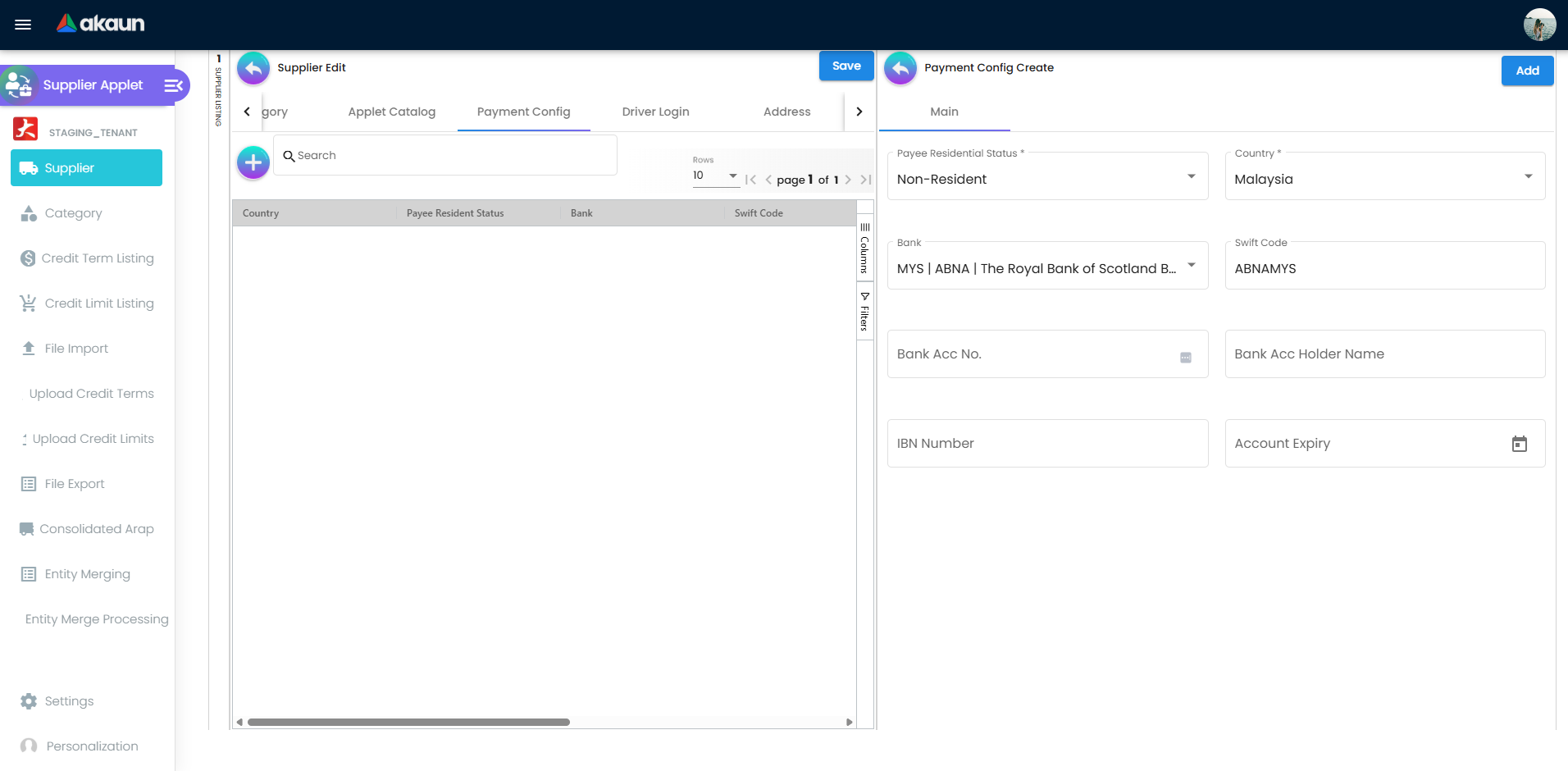
One field on this tab is enforced and one fills itself in; the rest are a record of the supplier’s bank details — Country, Bank (from the platform bank list), Bank Acc No., Bank Acc Holder Name, IBN Number, Account Expiry and Status.
| Field | Meaning | Required |
|---|---|---|
| Payee Residential Status | Resident / Non-Resident — drives withholding treatment | Yes |
| Swift Code | Auto-filled from the bank you choose; you do not type it | No |
Tax tab
One row per country, chosen from a hard-coded list of four — Malaysia, Singapore, Thailand, Indonesia. Each row carries a Tax Type, a Tax Code, a Tax Rate and a Tax
Option (INCLUDE TAX / EXCLUDE TAX); a second row for a country you already have is refused. On Malaysia
the Tax Type list is fixed to the three input types — GST-INPUT, SST-SLS-INPUT, SST-SVC-INPUT —
whatever the tenant’s tax codes offer. That is the deliberate mirror of the customer applet,
which fixes the same list to the three output types; the shared
Entity Maintenance tab applies neither guard.
All five boxes are marked required, but you cannot type the Tax Rate: it is readonly disabled and is
filled by copying the chosen code’s tax_rate_filing into the form. The whole row is then stored as a TAX_DETAILS JSON extension on the entity — so the rate is a
copy taken at that moment, not a live reference. Change the rate later in
Tax Configuration and this row keeps the old one.
Its one consumer is the shared pricing-scheme picker: when a purchase line’s item returns no pricing scheme
for this supplier, the picker offers a fallback built from the stored code, rate and type, and selecting it stamps all three onto the line. Nothing in
the backend reads a TAX_DETAILS row. So this tab is not where a purchase line’s tax comes from: the tax
on a line is resolved from the item and the pricing scheme, and this row is only the fallback the picker
offers when that resolution returns nothing.
Credit Term and Credit Limit
A credit term and a credit limit are reusable master records; the tab attaches one of each to the supplier. Read Lifecycle and effects before you rely on them — on the purchase side neither is enforced by the backend.
Credit term — Code and Name are required. The due date is expressed as set and add parts: Set Year / Set Month / Set Day fix a component of the date, Add Year / Add Month / Add Day shift it. Credit Term Logic offers None or End of Month; choosing End of Month pre-fills Set Day = 1, Add Month = 2, Add Day = −1 — that is, the 1st of the document’s month, plus two months, minus a day, which lands on the last day of the following month.
Credit limit — Code, Name and Currency are required; Amount is validated against ^[0-9]*$, so it takes whole numbers only. Decimals, thousands separators and currency symbols are rejected silently by the pattern.
Company Linking
Company and AR/AP Type are both required; AR/AP Type defaults to AP_TRADE. The link also carries this supplier’s per-company Customer Code, Supplier Code, Employee Code and Merchant Code, so one entity can have a different code in each of your companies.
Item Pricing
Per supplier and item: entity item code and name, UOM, currency, purchase unit / min / max price (with and without tax), the sales equivalents, tax code and percentage, and withholding-tax code and percentage. This is the Entity Pricing data that Stock Replenishment reads when it picks a supplier and a price for a generated purchase order — links whose entity is inactive or not of type supplier are dropped from that selection.
Login tab
The tab takes the user email or phone number of the akaun.com identity to link, a Rank and a
Status. Rank defaults to MEMBER.
The flow is: type the address, Verify (checks whether the login already exists), then either Send Invite for an email or Send Tac / Verify Tac Code for a mobile number, then Invitation Accepted to resolve the new subject and Save. Save is blocked until a subject has actually been resolved. With INSTALL_ALL_APPLETS_ON_INVITE on, a catalogue picker appears and the invitation asks for every applet in the chosen catalogues to be installed for the new user.
An invitation creates a pending registration, not a link — the row in the supplier ↔ login table is written only when the invitee follows the emailed link and confirms, along with any applet catalogues and roles the invitation carried. Invitation links do not expire, so an old one stays usable until it is used. Rank defaults to MEMBER; the vocabulary is OWNER, ADMIN, MANAGER, MEMBER, GUEST, VISITOR, ANONYMOUS.
Lifecycle and effects
A supplier is master data. It has a status (TEMP → ACTIVE / INACTIVE) and no journal of its own — creating, editing or deactivating a supplier posts nothing to the General Ledger and moves no stock. What the record does is supply values that other documents post with.
What the backend enforces on save (EntityDataConsistencyObject, create and update validator sets):
| Rule | Error code |
|---|---|
| Status must be present | ENTITY_HDR_OBJECT_STATUS_IS_NULL_OR_EMPTY |
Supplier Type must be exactly INDIVIDUAL or CORPORATE | ENTITY_HDR_OBJECT_TXNTYPE_DOES_NOT_EXISTS |
AR/AP type must be present — when it is not, the backend fills in AP_TRADE for a supplier (and AR_TRADE for a non-supplier) before validating | ENTITY_HDR_OBJECT_DEFAULT_ARAP_TYPE_IS_NULL_OR_EMPTY |
| Supplier Code must be unique among non-deleted entities | API_TNT_DM_BL_FI_MST_ENTITY_HDR_OBJECT_SUPPLIER_CODE_ALREADY_EXISTS |
| Supplier Nickname must be unique among suppliers | ENTITY_HDR_OBJECT_SUPPLIER_NICKNAME_ALREADY_EXISTS |
| The internal supplier id must be unique among non-deleted entities | ENTITY_HDR_OBJECT_SUPPLIER_ID_ALREADY_EXISTS |
| A supplier code may not be set on a record that is not flagged as a supplier | API_TNT_DM_BL_FI_MST_ENTITY_HDR_OBJECT_SUPPLIER_CODE_SHOULD_NOT_BE_SET |
| A referenced consolidated AR/AP account must exist | ENTITY_HDR_OBJECT_CONSOLIDATED_ARAP_GUID_DOES_NOT_EXIST |
Codes and the TEMP status. Codes are normalised on save — upper-cased, trimmed and stripped of spaces. Running numbers are only allocated when the status is not TEMP, so a stub record never consumes a supplier number; the number is issued the moment you set a real status and save. The prefix in front of the running number comes from the tenant configuration row ENTITY_CODE_PREFIX / SUPPLIER, not from an applet setting (the applet’s own prefix control is commented out).
What the supplier contributes when a purchase document is finalised
| Field on the supplier | Where it is used |
|---|---|
| AR/AP Type | Selects the payable account — see the posting block below |
| Company Linking (per-company AR/AP type) | Takes precedence over the header AR/AP type for the company raising the document |
| Currency | Document currency and the forex rate the document is booked at |
| Item Pricing | Default purchase price, tax code and withholding code on purchase lines |
| Addresses and contacts | Copied onto the document |
| E-Invoice block and self-billed flag | Issuer identity on a self-billed e-Invoice |
| Peppol participant IDs | The routing target; the ID flagged Default is the receiver |
Deactivating a supplier does not touch documents already raised against it. Creating, updating or deleting a supplier fires the SUPPLIER_CREATED / SUPPLIER_UPDATED / SUPPLIER_DELETED webhooks.
Deleting is blocked while money is outstanding. The delete endpoint refuses with HTTP 403 and CLIENT_ENTITY_HAS_OUTSTANDING_GENERIC_DOCUMENT when any active generic document for the entity still has a non-zero AR/AP balance. Otherwise the header is soft-deleted and the extension, line, login-link and payment-method rows are removed outright.
How the AR/AP type reaches a GL code
Posting is done by the document, not by this applet — this is what the supplier contributes to it.
- Posting uses the effective AR/AP type: the company’s Company Linking value if it has one, otherwise the supplier’s own — so a per-company override always wins.
- It maps that type to a transaction code:
AP_TRADE→CREDITOR,AP_OTHER→CREDITOR_NON_TRADE,AP_MERCHANT→MERCHANT_PAYABLE,AP_EMPLOYEE→EMPLOYEE_OTHER_PAYABLE,AR_TRADE→DEBTOR,AR_OTHER→DEBTOR_NON_TRADE,AR_MERCHANT→MERCHANT_RECEIVABLE. Consignment flows ignore the entity’s type and use the document type’s own default instead. - The code is looked up in the company’s default GL codes. If there is none for it, posting fails with
MISSING_DEFAULT_GL_CODE: CREDITOR(HTTP 400); if the company has no mappings at all,COMPANY_DEFAULT_GL_CODE_NOT_EXIST.
MISSING_DEFAULT_GL_CODE.What credit terms and limits actually do
On the purchase side, neither is enforced. Nothing in the backend reads a supplier’s purchase credit limit at posting time — there is no block and no warning. The purchase credit limit can be recorded, imported and queried, and nothing acts on it; available credit is worked out for the sales limit only. Nothing on the server derives a due date from a supplier’s credit term either: the due date and the credit terms on a document are filled in by the screen that raises it. The only server code that reads a credit term is statement-of-account reporting, and it is hard-coded to the sales tables.
The blacklist machinery that does block documents (credit_limit_status = BLACKLISTED, message “Customer is blacklisted due to credit limit. Transactions are not allowed for this customer.”) is scoped to customers: the nightly job only queries is_customer, and the block only applies to four sales document types. Because the flag lives on the shared entity header, an entity that is both customer and supplier can be blacklisted for its receivables behaviour — but that still only stops its sales documents.
Treat supplier credit terms and limits as recorded, reportable, importable policy — not as a control.
Sales and purchase credit terms are stored in separate tables, so a supplier that is also a customer keeps two independent sets. The entity header carries default_sales_credit_term_guid and default_sales_credit_limit_guid; there are no purchase equivalents.
Bulk load and extract
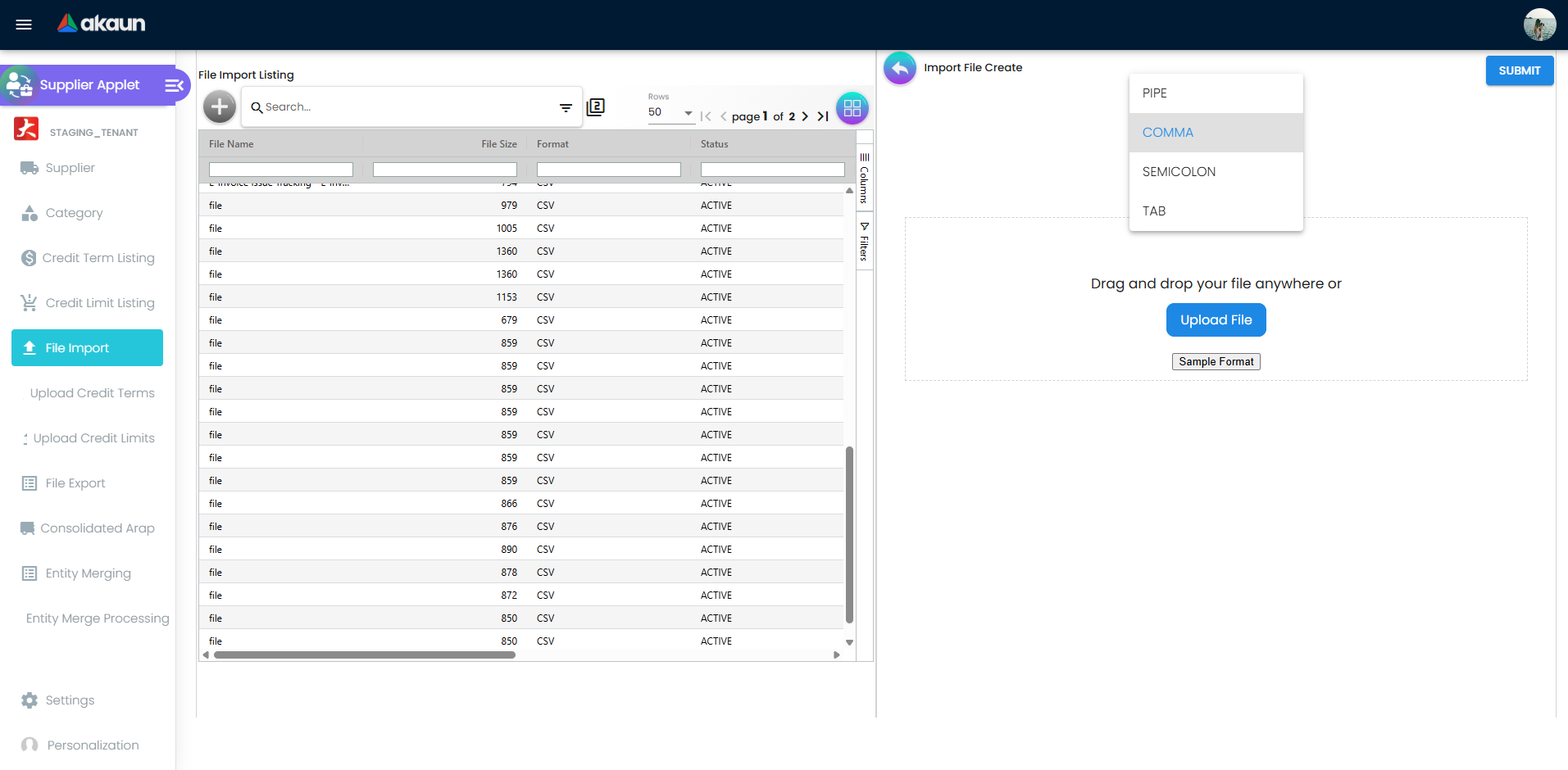
File Import takes one UTF-8 CSV with a chosen delimiter — PIPE, COMMA (preselected), SEMICOLON or TAB. Four columns are mandatory: SUPPLIER_NAME, SUPPLIER_TYPE, DOC_CURRENCY, ARAP_TYPE. Forty-one column names are recognised in total, covering supplier code, identity type and ID number, tax registration number, description, phone and email, a twelve-field billing block and a twelve-field shipping block, the self-billed flag, SST registration and tourism-tax numbers, SIC code, the e-Invoice tax identification number and the supplier category code. Column order does not matter, but a column name the importer does not recognise fails the whole file rather than being ignored. Sample Format downloads a template in the delimiter you selected.
Processing is two-stage: the file is parsed into per-row helper records, then each row is validated and created. Validation is all or nothing — if any row fails, the job ends FAILED and no supplier is created. Per-column messages such as “SUPPLIER TYPE is Invalid”, “DOC CURRENCY is Invalid” or “Supplier Category Code is Invalid” are rolled up into the row’s validation description, which the job’s Checking tab shows.
File Export generates a supplier CSV for a created-date range; the listing tracks status and offers download or delete per file. Files are capped at 1,000 rows — a larger extract is split into SUPPLIER_EXPORT_<timestamp>_PART<n>_OF_<total>.csv, each with its own header row. Only one export may be queued at a time; a second request is answered with “Please wait until the current file finishes before generating additional files.”
EINVOICE_TAX_ID_NO, EINVOICE_SELF_BILLED, SST_REG_NO, TOURISM_TAX_ID, SIC_CODE and SUPPLIER_CATEGORY_CODE. An exported file re-imports without complaint and silently drops all of that e-Invoice, tax and category data. Do not use export → edit → import as a bulk-edit route for suppliers that carry e-Invoice details.Upload Credit Terms and Upload Credit Limits are the same mechanism for attaching credit definitions to suppliers in bulk.
Entity merging
Merging is a platform function shared with customer maintenance, not something local to this applet.
- On Entity Merging, choose a Merge Criteria — Entity Name, Entity ID No, Entity Phone or Entity Email — type at least two characters of a search term and optionally adjust the similarity threshold (0.7 by default). The grid stays empty until all three are supplied; the search is fuzzy, not exact-substring.
- Results are grouped by the normalised criteria value. Open a group and mark exactly one entity Keep as main and one or more Merge and delete. The action is refused unless there is one main and at least one merge target.
- Confirming queues the merge (
IN_QUEUE), with the surviving record and the records being merged into it. - Entity Merge Processing shows the main and old entity codes and names, the merge status and a merged/total counter.
Two processors then run in sequence. The first swaps the entity GUID; the second refreshes the denormalised entity snapshots on generic document headers — the entity JSON, the sales entity name and code, the three person-in-charge slots, the delivery entity and the e-Invoice buyer and supplier blocks. The queue moves through IN_QUEUE → MERGING → DATA_REPLACING_IN_PROGRESS → SUCCESSFUL or FAILED; failures carry an error message on the row. The merged-away suppliers are set to INACTIVE, not deleted.
Self-billed e-Invoices and Peppol routing
When a purchase document is submitted as a self-billed e-Invoice, this record supplies the supplier party block: tax identification number, e-Invoice ID type and value, ID number, SST number, tourism-tax ID, industry classification code and business activity description.
Missing data does not raise an error — the document is diverted with a reason recorded against it. The reasons are, verbatim, “Supplier TIN is missing”, “Supplier id type is missing”, “Supplier id value is missing”, “Supplier id no is missing” and “Supplier business activity description is missing”. A blank SST or tourism-tax number is substituted with NA and a blank industry classification code with 00000, so those two never stop a submission — they just go out wrong.
The tax identification number is not validated against the tax authority when the document is generated; validation happens only in the separate TIN update and bulk-upload flows, so a wrong-but-present number surfaces as a rejection after submission.
For Peppol, the receiver on an outbound document is the participant ID flagged Default on this supplier. The lookup takes the first matching row with no tie-break, so flagging two IDs as default gives a non-deterministic result. There is no separate scheme field — the identifier scheme is fixed, so the ICD prefix (for example 0230:) has to be part of the participant ID string itself.
Related applets
- Customer Maintenance, Employee Maintenance, Merchant Admin, Entity Maintenance — the same entity table through other type lenses. Entity Maintenance can create a record with any combination of types and maintains the same category trees.
- Organisation — companies and branches for the linking tabs; the company-level e-Invoice, Peppol and knock-off configuration that governs what this master data can be used for.
- Chart of Accounts — the payable accounts the AR/AP type resolves to.
- Tax Configuration — tax codes for the Tax tab and Item Pricing.
- Cashbook — settlement methods used when the supplier is paid.
- Doc Item Maintenance, Inventory Item Maintenance, Pricebook — items and pricing referenced by the Item Pricing tab.
- Purchase Requisition, Purchase Order, Blanket Purchase Order, Purchase GIN — purchase documents that name the supplier.
- Purchase Invoice (Internal), Purchase Debit Note, Purchase Credit Note, Purchase Refund Note, Payment Voucher (Internal) — the payables side, which reads the AR/AP type and credit term.
- Purchase Report — supplier as a filter and grouping dimension.
- Consignment GIN, Consignment GRN — consignment counterparties are supplier entities.
- Stock Replenishment — chooses a supplier from Entity Pricing when generating replenishment purchase orders.
- Supplier Delivery Order — depends on the Login tab link.
- MY E-Invoice Admin, MY E-Invoice Portal, MyPeppol Admin — self-billed submission and Peppol routing built on the E-Invoice and Peppol Config tabs.
Troubleshooting
| Symptom | Cause | Fix |
|---|---|---|
The listing fills with blank suppliers whose status is TEMP; users report records were lost | Pressing + inserts an entity row with status = TEMP before anything is typed, and the listing does not filter TEMP out. Abandoning the form leaves the stub forever | Nothing was lost. Filter the listing to Active. Only press + when you intend to save. Housekeeping of accumulated stubs is a support request |
| Pressing + reopens a half-finished supplier instead of a blank one | By design: + first looks for an entity you last updated with status = TEMP and resumes it | Finish or deliberately abandon the existing draft; there is one draft per user |
| Save is greyed out on a new supplier | Supplier Name, Supplier Type, Currency or AR/AP Type is empty — those four carry the form validators. On older builds Supplier Code also appeared to be required (it is not; leave it blank and the backend allocates one) | Fill the four. If the form is invalid with nothing visibly flagged, see the next row |
| The form reports invalid but no field shows an error, and values from fields no longer on screen appear in the saved payload | Orphaned custom-field controls left behind when a custom-field layout re-renders — their required validators stay attached. Fixed in the shared custom-field form component | Reload the record. If it persists on an older build, upgrade the applet |
| Email is missing from the supplier form on a brand-new tenant | With no APPLET_SETTINGS row yet, the session loader substitutes {HIDE_EMAIL: true, HIDE_PHONE_NO: true} | Open Settings > Application Settings, switch HIDE_EMAIL off and Save once. That writes a real settings row |
| A menu or tab has disappeared and no permission brings it back | A HIDE_* switch is on and the paired SHOW_* client-side permission is not seeded for this applet | Turn the HIDE_* switch off in Application Settings; per-role visibility is not available until the permission codes are seeded |
| A newly defined custom field does not appear on the supplier form | The applet reads a cached CUSTOM_FIELD_PLACEMENTS snapshot | Reload the applet. On builds before the refresh fix, open Settings > Custom Field Placement once to force the snapshot to update |
| Created By / Modified By on the supplier header names the wrong user | The header used the denormalised created_by_name / updated_by_name, which were stamped at the TEMP insert rather than at save; every other screen resolves the name from the subject GUID | Trust the audit trail and the other screens; upgrade for the header fix |
| A credit limit of 50,000.00 will not save | The Amount field is validated against ^[0-9]*$ — whole numbers only | Enter 50000. No decimal point, no comma, no currency symbol |
| An overseas supplier’s postcode is rejected, and their e-Invoice fails address validation | Malaysian postcodes are limited to five digits; the alphanumeric pattern applies only when the country is not Malaysia | Set Country before Postcode. On older builds the field accepted digits only for every country |
| Saving fails with a duplicate-nickname error | Supplier Nickname is unique across suppliers on the backend, though the form does not check it as you type | Give the supplier a distinct nickname, or clear it. On builds before this check was added, duplicates already in the data stay until edited |
| Entity Merging shows nothing | The grid needs a Merge Criteria and a search term of at least two characters before it queries | Choose the criteria, type at least two characters, then search. Lower the similarity threshold if near-matches are missing |
| Duplicates you can see are not offered as a merge | They were not grouped into a suggestion, and entities selected individually are refused | Search on a different criteria (ID No or Phone often groups better than Name), or lower the threshold |
| A merge appears to have done nothing | The merge is queued and processed asynchronously; documents carry a denormalised copy of the entity name that is rewritten job by job | Check Entity Merge Processing for the merge status, the merged/total counter and any error message |
| A CSV import ends with a failed process status | Delimiter mismatch, a missing mandatory column, a column name the importer does not recognise, or an invalid value in any row | Download Sample Format in the delimiter you intend to use, remove extra columns, then re-upload and read the Error Message and the Checking tab. Validation is all-or-nothing: one bad row means no suppliers were created |
| Suppliers came back from an export → edit → import round trip with their e-Invoice, SST, tourism-tax, SIC and category data blanked | The supplier export writes only the core, billing and shipping columns; those six are not in the file, so the re-import has nothing to write | Do not bulk-edit e-Invoice-bearing suppliers this way. Edit them in the applet, or build the import file from your own source |
| A large export produced several files | Files are capped at 1,000 rows and split into …_PART<n>_OF_<total>.csv, each with its own header | Expected. Concatenate them, dropping the repeated header rows |
| Saving a supplier fails with “the supplier_code … should not be set”, but you did set a supplier code and it belongs on a supplier | The duplicate-supplier-code check is wired to the wrong message template, so a duplicate code reports itself as “should not be set” | Check whether another non-deleted entity already uses that supplier code. The genuine “should not be set” error only occurs when a code is present on a record not flagged as a supplier |
A purchase document will not finalise: MISSING_DEFAULT_GL_CODE: CREDITOR | The company has no GL mapping for the transaction code the supplier’s AR/AP type resolves to | Add the mapping in Chart of Accounts / the company’s default GL codes, or change the supplier’s AR/AP type |
| A purchase journal posted but does not balance, with no error anywhere | The company’s GL mapping row for the creditor code exists but has no subledger, so the creditor line was dropped silently | Complete the mapping row, then repost. Only a missing row raises an error; a half-filled one does not |
| A supplier cannot be deleted | The entity still has active documents with a non-zero AR/AP balance; the delete endpoint refuses with CLIENT_ENTITY_HAS_OUTSTANDING_GENERIC_DOCUMENT | Settle or void the outstanding documents, or set the supplier INACTIVE instead of deleting |
| A self-billed e-Invoice never reached the tax authority | A required supplier field was blank. The document is diverted with a reason such as “Supplier TIN is missing” rather than failing loudly | Fill the E-Invoice tab: TIN, e-Invoice ID type and value, ID number and business activity description. A blank SST number or industry classification does not stop submission — they are sent as NA and 00000 |
| Peppol documents go to the wrong participant | More than one Peppol ID is flagged Default, and the receiver lookup takes the first match with no tie-break | Flag exactly one. Remember the identifier scheme is fixed, so the ICD prefix has to be inside the participant ID string |
| A supplier’s outstanding balance looks wrong after a merge | The merge rewrites entity references across the whole tenant database, including posted documents, and runs asynchronously | Wait for Entity Merge Processing to report SUCCESSFUL, then re-run the report. A merge cannot be undone — the history row records only how many rows changed |
| Your supplier count does not match the legacy system | The number on the listing footer is the page count, not the record count | Compare against a File Export instead |
| The supplier’s portal login sees no data | The akaun.com login is not linked on the Login tab | Link it there; the supplier-access applets resolve the portal user from that link |
| A code you typed came back upper-cased with the spaces removed | The backend normalises supplier, customer, employee and merchant codes on save (sanitiseCode). The master screens also force-uppercase typed input, email excepted | Expected behaviour — search on the normalised form |
| The main address cannot be saved | On older builds the main address type was not editable from this applet | Edit it from Entity Maintenance, or upgrade — a Main Address option was added to the address-type list |
Related documentation
- Standard procurement workflow — where the supplier record is used end to end.
- Direct invoice workflow — buying without a purchase order.
- Purchasing module and Financial Accounting module.