Commission Scheme
Define how sales commissions and membership points are earned: which sales qualify, and how much each level earns. A scheme never pays anything by itself. Commission is worked out when a sales document is finalised, where your tenant has that follow-on job switched on, or when a cycle is processed in the Sales Commission applet; points come from a scheduled run. Each commission figure is worked out once, from the document and the scheme as they stood at that moment, and stored, so changing either afterwards does not move it. A sale returned or voided later keeps its commission until someone deducts it by hand.
Overview
The Commission Scheme applet is where you define how sales commissions and membership points are earned. A scheme is master data: a set of rules that decide which sales documents qualify (by branch, company, document type, date, customer type, member class, sales agent category, items or item categories) and a treatment that says how much is paid per downline level (a price source, an operator and a value, optionally through a formula or a tiered Pricing Model). Two supporting masters live in the same applet: Sales Groups (named groups of employees) and Pricing Models (range-to-rate tables).
The applet itself never pays anything. Active schemes are read by two backend processes: the sales-commission posting, which runs as a follow-on job of Finalise where your tenant has it switched on and as stage 1 of a cycle in the Sales Commission Applet (cash commission for sales agents and MLM uplines), and the scheduled membership-points run described on the Membership Admin Applet page (points on qualifying bills). A scheme can also be attached to an e-commerce website in CP Commerce Admin and to an MLM program in Membership Admin.
Where it fits
| Direction | Applet / data | Why |
|---|---|---|
| Upstream (master data the rules reference) | Organisation (companies, branches), Employee (sales agents, employee categories, sales-group members), Customer (entity type flags), Inventory Item Maintenance (items, item categories), Membership Admin (member classes, member labels, the points currency picked on the treatment), MLM Admin Applet (MLM programs and lineage) | Every rule and treatment picks from these lists |
| Upstream (documents evaluated) | Sales Invoice (Internal), POS General cash bills, Sales Order (Internal), Receipt Voucher (Internal) | The only server document types a Document Type rule can match (INTERNAL_SALES_INVOICE, INTERNAL_SALES_CASHBILL, INTERNAL_SALES_ORDER, INTERNAL_RECEIPT_VOUCHER) |
| Downstream (consumers) | Sales Commission Applet | Runs the posting that turns matching schemes into commission transaction lines and commission reports |
| Downstream (consumers) | Membership Admin Applet | Scheduled membership-points run awards points from the Level 0 Membership Points treatment; MLM programs reference a scheme |
| Downstream (consumers) | CP Commerce Admin | Website › Commission Scheme tab links a website to a scheme |
Screens and menus
The applet root route is applet/tnt/wavelet/erp/commission-scheme-applet. The left menu has three listings plus Settings and Personalization.
| Menu item | Screen | What it holds |
|---|---|---|
| Commission Scheme (default landing) | Listing (code, name, description, created date, modified date, status) with search and an advanced filter (status, created-date range, modified-date range, keyword). + opens Create Commission Scheme; clicking a row opens Edit Commission Scheme with tabs Main Details, Rules - Doc Hdr, Rules - Multi Line, Rules - Single Line, Treatment, a RESET/SAVE pair and a DELETE button that must be clicked twice within three seconds | The scheme, with its rules and its treatments |
| Sales Group | Listing (code, name, creation date, modified date, status). Edit has two tabs: Group (the header) and Salesman (linked employees with a Weightage column) | The group and its salesmen |
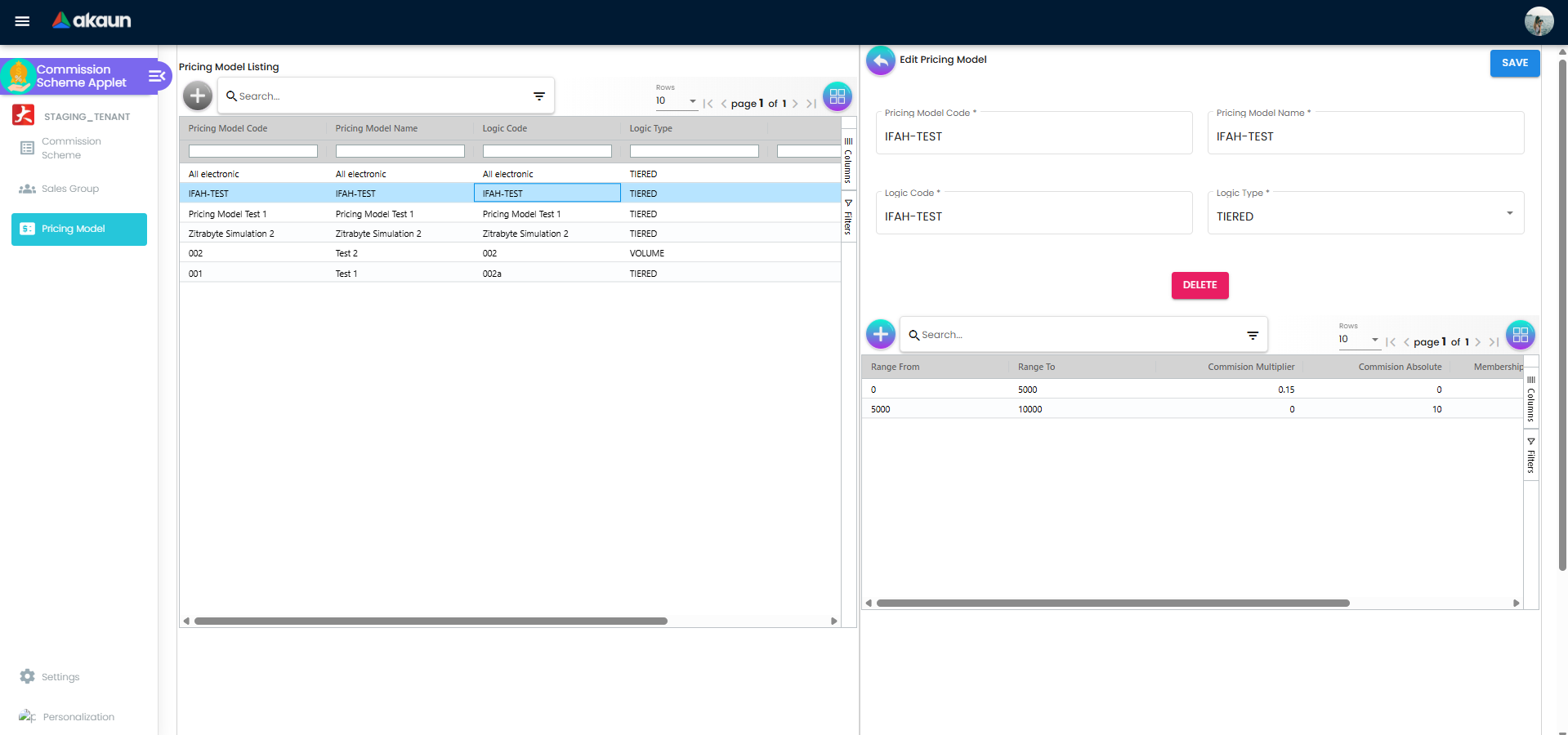
| Pricing Model | Listing (code, name, logic code, logic type, dates). Edit shows the header plus a line grid (range from, range to, commission multiplier, commission absolute, membership point multiplier / value) | The model and its bands |
| Settings | Feature Visibility (landing), Field Settings, Default Selection, Webhook, Permission Wizard / Permission Set / User / Team / Role Permission listings, Release Notes | Shared platform screens except Field Settings and Default Selection |
| Personalization | Default Selection, Sidebar | Per-user |
Rules are added from inside the Edit screen: on a Rules tab, + opens Add Rule - Doc Hdr / Multi Line / Single Line, where a Rule Type dropdown reveals the form for that rule type. Adding a rule, adding filter values to a rule, or editing a treatment only updates the draft in the browser; nothing reaches the server until you click SAVE on the Edit screen (every snackbar ends with “Please save changes”).
Configuration
Before you can use it
- Companies and branches exist in Organisation — needed for Company and Branch rules.
- Employees exist in the Employee Applet with
is_employeeset: only such entities appear in the Sales Group › Salesman picker, and the Employee Category rule matches the categories (labels from theEMPLOYEE_CATEGORIESlist) tagged on the document’s sales agent. - Items and item categories exist in Inventory Item Maintenance — the Item, Item Category and regex line rules read
item_guid,item_code,item_nameand the item’s categories from the document line. - Member classes and labels exist in Membership Admin; a points currency exists in Membership Admin (PTS CCY Module) if the treatment awards points.
- Pricing schemes (maintained outside this applet) exist if a treatment uses the Pricing Scheme price source; the Treatment tab lists the pricing schemes it can find.
- For the money to be paid, the Sales Commission Applet must be installed and its cycle processed: even where Finalise writes the commission lines, only a cycle turns them into a report and a payout. For points, the company’s member-point configuration (
MEMBER_POINT:member_point_award_doc_in,member_point_in_doc_status) decides which document type and posting status the scheduled run picks up. It is set through the company API; the Organisation applet does not show it (Points Setup). - API permissions:
TNT_API_COMMISSION_SCHEME_HDR_{READ, CREATE, UPDATE, DELETE, OWNER, ADMIN, MEMBER}(tenant owner/admin bypasses), and the correspondingTNT_API_SALE_COMMISSION_PRICING_MODEL_HDR_*/_LINE_*sets for pricing models. The commission and points runs read schemes on their own and need no user permission.
Applet settings
The applet has its own Field Settings and Default Selection screens; Default Selection saves for the whole tenant. Anyone with access to the applet’s Settings menu can change them.
Only one setting is shown, saved and actually used:
| Setting | Where | What it controls | Default | Effect when changed |
|---|---|---|---|---|
Details Tab Ordering (COMMISSION_SCHEME_DETAILS_TAB_ORDER) | Settings › Default Selection › Details Tab Ordering (drag-and-drop list) | The order of the five tabs on Edit Commission Scheme | Main Details, Rules - Doc Hdr, Rules - Multi Line, Rules - Single Line, Treatment | Edit Commission Scheme shows its tabs in the saved order; a tab added in a later version is appended at the end |
Shown and saved, and used by nothing:
- Default Branch (
DEFAULT_BRANCH) and Default Location (DEFAULT_LOCATION) on the same Default Selection screen. They are saved (picking a branch also fills in the branch’s main location), but commission schemes, sales groups and pricing models have no branch or location field, so nothing uses them. RESET clears both.
Not functional:
- Settings › Field Settings shows eight toggles (Unit Discount, SST/VAT/GST, WHT, Blanket Order, Segment, G/L Dimension, Profit Center, Project) and a SAVE button that does nothing. Treat the screen as a placeholder.
- Personalization › Default Selection shows Default Branch / Default Location, but choosing a value fails and SAVE saves nothing.
There are no document-behaviour settings: schemes have no posting status, numbering or printables.
Feature visibility / permissions
No SHOW_* / HIDE_* client-side permission is checked anywhere in the applet, and none is defined for it. Access control is therefore the API permission set listed above plus the shared Feature Visibility screen.
Fields
Commission Scheme — Create and Main Details
| Field | Meaning | Required | Notes / validation |
|---|---|---|---|
| Commission Scheme Code | Identifier of the scheme | Yes | Max 255; the input blocks special characters; read-only after creation (“The code cannot be modified after creation”). The backend CommissionSchemeHdrDataConsistencyObject does not check uniqueness — two schemes may carry the same code |
| Status | ACTIVE / INACTIVE | Yes | Defaults to ACTIVE. Only ACTIVE schemes are loaded by the posting and points processes (getActiveCommissionSchemes filters status = ACTIVE) |
| Commission Scheme Name | Display name | Yes | Max 255, special characters blocked |
| Description | Free text | No | Max 255 on create; character counter |
| Commission Type | SALES_AGENT or MLM | Yes | Defaults to SALES_AGENT. Decides whether the posting run walks the customer’s MLM lineage (see Lifecycle) |
| Created By / Created Date / Updated By / Updated Date | Audit columns | — | Read-only on Main Details |
On CREATE the effect writes the header with all three rule groups set to Rules Logic AND / Negation DISABLED and one Level 0 treatment whose commission and membership-points price source and operator are NA.
Rules tabs (Doc Hdr, Multi Line, Single Line)
Each tab has two group-level fields and a grid of rules (Rule Name, Rule Type, Negation Logic):
| Field | Meaning | Required | Notes |
|---|---|---|---|
| Rules Logic | AND (every rule in the group must pass) or OR (any rule) | Yes | Stored as top_level_logic; default AND |
| Negation Logic | ENABLED inverts the result of the whole group | Yes | Stored as negation_logic = TRUE/FALSE; default DISABLED |
Every rule form carries Rule Name (required, max 255) and its own Negation Logic (inverts that one rule). Each rule type can be added once per tab — a second attempt shows “RuleType already exists. Cannot add rule with same ruleType again” and returns to the tab.
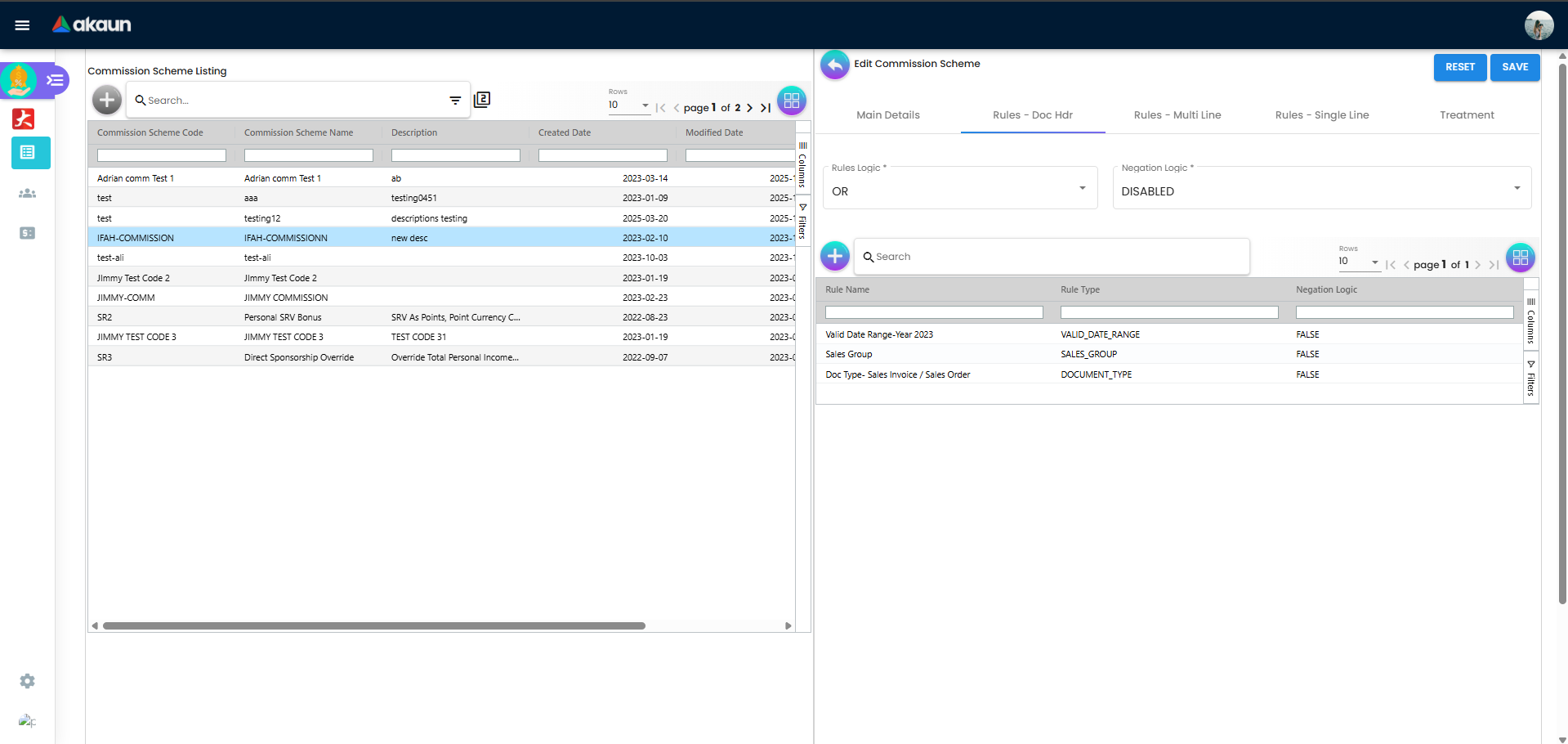
Rules - Doc Hdr (document-level; rule types in the dropdown):
| Rule type | Form | What the backend compares it with |
|---|---|---|
| Valid Date Range | Relative Period (period + unit Day(s)/Month(s)/Year(s)) or Absolute Period (From / To dates) | Absolute: document date_txn between From and To inclusive (an unparsable bound is ignored). Relative is not implemented — it always evaluates false |
| Entity Type | All Entity, or Selected Entity with All Customer / All Supplier / All Employee / All Merchant | “All” passes; “Selected” checks the document customer’s is_customer / is_supplier / is_employee / is_merchant flags |
| Member Class | Pick member classes | The member on the document (member_guid) → membership card → membership_class_guid is one of the picked classes; no member on the document → false |
| Member Label | Pick member labels | Passes when the document’s member has any CRM label link — the picked labels are not compared |
| Company | Pick companies | Document guid_comp |
| Branch | Pick branches | Document guid_branch |
| Sales Group | Pick sales groups | Not implemented in the backend (// TODO): the rule always evaluates false, so with Rules Logic AND it disqualifies every document, and with Negation ENABLED it always passes |
| Document Type | Checkboxes Sales Contract, Receipt Voucher, Sales Order, Sales Invoice | Sales Order = INTERNAL_SALES_ORDER; Sales Invoice = INTERNAL_SALES_INVOICE or INTERNAL_SALES_CASHBILL; Receipt Voucher = INTERNAL_RECEIPT_VOUCHER. Sales Contract is never evaluated |
| Employee Category | Pick employee categories (EMPLOYEE_CATEGORIES labels) | Categories of the document’s sales agent (sales_entity_hdr_guid); no sales agent → false |
A Company, Branch, Member Class, Member Label, Sales Group or Employee Category rule saved with an empty pick list passes unconditionally (the negation is not applied either).
Rules - Multi Line and Rules - Single Line (item-level; same dropdown):
| Rule type | Form | Match |
|---|---|---|
| Item | Pick items; Min Quantity, Min Amount (default 0) | item_guid of the line |
| Item Category | Pick categories; Min Quantity, Min Amount | Any category of the line’s item |
| Item Code Regex / Item Name Regex | Name + Regular Expression rows | Regex found anywhere in item_code / item_name |
| Category Code Regex / Category Name Regex | Name + Regular Expression rows | Regex found in any of the item’s category codes / names |
Only lines with transaction type PNS (product and service lines) are considered. Multi Line is evaluated on the whole document: the matching lines are collected, then their summed quantity_base must be ≥ Min Quantity and summed amount_txn ≥ Min Amount (no matching line → rule fails). Single Line is evaluated per line during treatment: each line must individually match and meet both minimums, and only matching lines earn commission or points.
Treatment tab
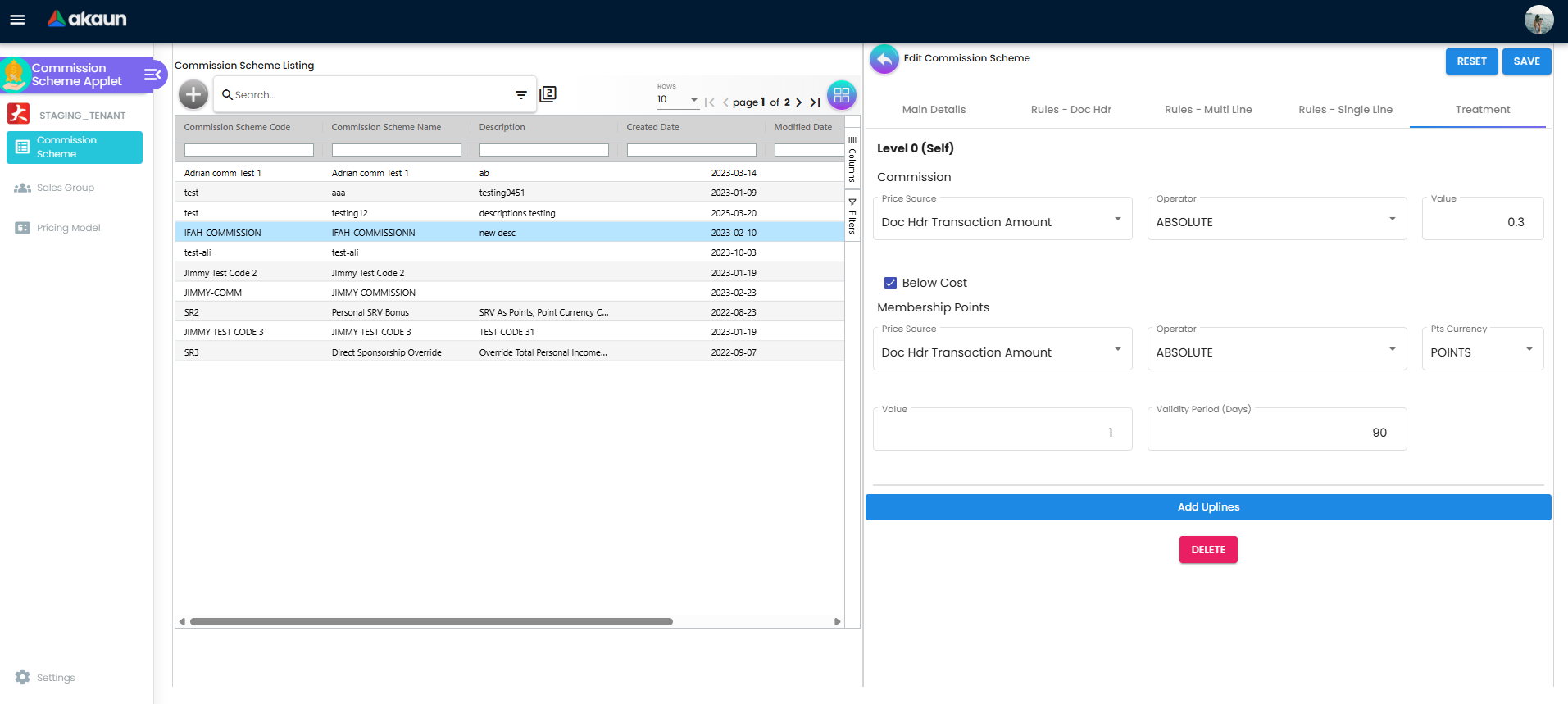
One block per level; Level 0 (Self) always exists, Add Uplines appends Level 1 (Parent), Level 2 … up to 10 levels (MAX_DOWNLINE); the last level can be deleted.
| Field | Meaning | Required | Notes |
|---|---|---|---|
| Commission › Price Source | Base amount for cash commission | No (default NA) | Doc Hdr Standard / Net / Transaction / Open Balance Amount; Doc Line Standard / Net / Transaction Amount; Base Quantity; Price Unit Cost; Pricing Scheme; NA |
| Commission › Operator | How the value is applied | No (default NA) | MULTIPLY, ABSOLUTE, ADD, SUBTRACT, PRICING MODEL, FORMULA, NA |
| Commission › Value | Number | No (default 0) | Rate for MULTIPLY (0.05 = 5 %), fixed amount for ABSOLUTE |
| Commission › Pricing Scheme | Shown when Price Source = Pricing Scheme | — | Dropdown of pricing schemes |
| Commission › Formula | Shown when Operator = FORMULA | — | Hint: {PRICE_SOURCE}*(150-{DAY})/150*0.016 |
| Commission › Pricing Model | Shown when Operator = PRICING MODEL | — | Dropdown of this applet’s pricing models |
| Commission › Below Cost | Checkbox, default checked | — | Unchecked: a line earns 0 when its price-source value is below the line’s moving-average cost divided by its quantity. For a one-unit line that is the unit cost; for several units the bar drops, so a multi-unit line sold below cost can still earn (recorded for engineering). The cost read is whatever the line carries when the commission is written |
| Membership Points › Price Source / Operator / Value | Same lists as commission | No (defaults NA / NA / 0) | Pricing Model and Formula operators have no effect for points |
| Membership Points › Pts Currency | Points currency | — | From the PTS CCY Module in Membership Admin. The screen lets you leave it empty, but the scheduled points run needs one on every active scheme a document matches — including a scheme you built only for cash commission. If any matching scheme has none, the run fails for that document and no scheme awards it points. The currency’s code is copied onto the points report when it is created |
| Membership Points › Validity Period (Days) | Days the points stay valid | No (default 0) | Validity starts at the document’s date_txn |
| Membership Points › Pricing Scheme | Shown when Price Source = Pricing Scheme | — |
Sales Group
| Field | Meaning | Required | Notes |
|---|---|---|---|
| Sales Group Code | Identifier | Yes | Backend rejects a duplicate |
| Status | ACTIVE / INACTIVE | Yes | Default ACTIVE |
Salesman tab › + | Multi-select grid of entities flagged as employees (Salesman Code = employee code, Salesman Name) | — | Adds the employee to the group; linking the same employee twice is rejected |
| Salesman tab › Weightage | Number on the link edit form (default 0) | No | Stored in the link’s property_json.weightage; not read by the commission backend |
A sales group also has a Sales Group Name (required) and a free-text Description.
Pricing Model
| Field | Meaning | Required | Notes |
|---|---|---|---|
| Pricing Model Code / Name | Identifier and display name | Yes | No uniqueness check in the backend DCO |
| Logic Code | Free text | Yes | Required, but only a label: nothing that calculates commission reads it. Use it for your own reference — for example, the sales-policy clause the bands come from |
| Logic Type | TIERED or VOLUME | Yes | Default TIERED; stored only — the engine applies the same first-matching-band lookup for both |
| Line › Range From / Range To | Band boundaries | Yes | Matched as from ≤ value < to against the price-source value, so a value exactly equal to one band’s To belongs to the next band. The band’s rate applies to the whole value, not only the part inside the band. A value below the lowest From or at or above the highest To earns 0, so give the top band a To well above any real sale. Nothing checks that From is below To or that bands do not overlap, and where two bands overlap which one applies is not defined — keep them end to end |
| Line › Commission Operator + Value | MULTIPLY or ABSOLUTE with a number | One of commission or point value | MULTIPLY stores the number in commission_multiplier, ABSOLUTE in commission_value (the other column is written as 0); the edit form infers the operator from whichever column is > 0 |
| Line › Membership Point Operator + Value | Same pattern | Stored in membership_point_multiplier / membership_point_value; not read by any backend service |
The line form enforces “Please enter one of the following fields: Commission Value or Membership Point Value”.
Lifecycle and effects
Commission schemes, sales groups and pricing models are master data: no posting status, no journal, no stock. DELETE does not check whether websites, MLM programs or existing commission reports still use the scheme.
How a scheme is evaluated
- Load every scheme with status ACTIVE.
- For each scheme, each rule group is checked. Doc Hdr and Multi Line groups are evaluated against the whole document and both must pass. Inside a group the rule results are combined with AND or OR and then the group’s negation is applied; an empty group passes.
- If the scheme has Single Line rules, the treatment is computed line by line (only
PNSlines) and summed; otherwise it is computed once on the document. - A scheme is kept for cash commission only if at least one level has a commission price source other than NA and an operator other than NA.
How the treatment amount is computed
- Price source: header amounts are the document’s standard, net, transaction or open-balance amount; line amounts and Base Quantity are summed over the goods lines (or the single line); Price Unit Cost = Σ moving-average cost price × base quantity; Pricing Scheme = the item’s sales unit price in the chosen scheme × base quantity.
- Operator: MULTIPLY = source × value; ABSOLUTE = value; ADD / SUBTRACT = source ± value; FORMULA = the expression evaluated with
{PRICE_SOURCE}replaced by the source (or, for receipt vouchers, the contra amount) and{DAY}by the days between the invoice date and the receipt’s contra date (0 when there is no contra) — a parse error or a negative result yields 0; NA = 0. - PRICING MODEL is not applied when a document is evaluated (it gives 0 there). It is applied only to the intermediate lines of a commission cycle (create full commission in the Sales Commission Applet): the first band that contains the summed source value is used — its commission multiplier when non-zero, otherwise its commission value.
- Below Cost unchecked: for line-level commission, if the price-source value is lower than the line’s moving-average cost divided by the line’s quantity, the commission for that line is 0 (see the Treatment tab row for what that does to a multi-unit line).
Cash commission (Sales Commission Applet)
The commission posting (the SALES_COMMISSION_POSTING_JOB_PROCESSOR job, which runs after Finalise where your tenant has switched it on and has no clock of its own, or stage 1 of a cycle in the Sales Commission Applet) loads the document, refuses it if its commission has already been posted, finds the matching schemes with a usable treatment, and writes one intermediate commission line per scheme (per line when Single Line rules or MLM are involved). Then it marks the document’s commission as posted. Details that matter for scheme design:
SALES_AGENTschemes use the Level 0 treatment for the document’s sales agent.MLMschemes look up the customer’s MLM lineage: each upline at level n receives the Level n treatment, computed per line.- A Receipt Voucher earns commission only through its contra links to invoices; an RV with no contra produces nothing. This is the path where
{DAY}in a formula is meaningful.
Membership points (scheduled)
The scheduled job MEMBERSHIP_POINTS_COMMISSION_QUEUE_PROCESSOR (schedule it in the Scheduler) selects documents of the type and status the company’s member-point settings name, whose points commission has not yet been posted, evaluates the rules (treatment presence is not checked) and applies only the first treatment’s Membership Points block (“Supports only 1 treatment”), creating a membership-points commission report valid from the transaction date to the transaction date + Validity Period. The same number can be previewed for one document through the API.
Where a commission figure comes from
Every number on a commission report is a sum of stored commission lines, and each line is a snapshot taken at the time of one posting:
| Figure | Stored when | Worked out from |
|---|---|---|
| A commission line | At Finalise, where your tenant has the commission follow-on job switched on (the line then carries no cycle); otherwise at stage 1 of a cycle whose dates cover the document’s date | The document’s amounts, copied onto the line at that moment, and the treatment of each matching active scheme as it was at that moment. The commission itself is stored on the line |
| The document’s “commission posted” mark | In the same step, and only if at least one line was written | A document that matched no scheme stays unmarked, so a scheme created later still picks it up in a cycle |
| A report’s Money | Stage 3 of the cycle, or REGENERATE on the report | The stored lines dated inside the cycle, added up. Nothing is re-evaluated against the scheme, except Pricing Model treatments, which stage 2 works out again from the stored line amounts with the scheme as it is now |
Three things follow from that:
- A rate change is not retroactive. Raise a scheme from 2% to 3% on the 10th and every line written before the 10th keeps 2%. The document is already marked, so no later run reads it again.
- Every matching active scheme pays. A store-wide 1% scheme and a 2% smartphone scheme that both match the same line both write a line for it, and the agent earns 3%. Nothing picks the better one, so keep schemes from overlapping unless stacking is what you mean.
- Cost-based settings read the cost the line carried when the commission was written. Costing reaches the document line in a later step of the Finalise chain, and Finalise queues the commission job alongside the other follow-on jobs rather than after costing. Where commission is written at Finalise, Below Cost and the Price Unit Cost source can therefore read a line whose cost has not arrived yet; a cycle processed days later reads the cost that has since been written.
Worked example: 2% on smartphones at GS-KV-01, and a return three weeks later
GadgetSphere pays its sales staff at branch GS-KV-01 2% on flagship smartphones and 5% on accessories, settled monthly. A scheme has one rate per level, so this is two schemes:
| Smartphones scheme | Accessories scheme | |
|---|---|---|
| Commission Type | Sales agent | Sales agent |
| Rules - Doc Hdr | Branch GS-KV-01; Document Type ticked for Sales Invoice | The same |
| Rules - Single Line | Item Category: flagship smartphones | Item Category: accessories |
| Treatment, Level 0 | Doc Line Net Amount, MULTIPLY, 0.02 | Doc Line Net Amount, MULTIPLY, 0.05 |
On 3 March you sell a flagship smartphone at RM 4,200 and wireless earbuds at RM 300 on one sales invoice, with yourself as the sales agent (leave tax aside). When the commission is written, at Finalise or at the March cycle’s stage 1, each scheme passes the header rules and writes a line for the item line its category rule matches: RM 84 on the phone and RM 15 on the earbuds. The March report shows RM 99, and its Line Item tab shows both rows with the scheme beside each.
On 24 March the customer brings the phone back and a sales return is raised against the invoice. The commission does not move. A cycle reads only sales orders, sales invoices, cash bills and knocked-off receipts, and the Document Type rule has no box for a return; the RM 84 line was stored on 3 March and nothing removes or offsets it. The March report still says RM 99, and whoever approves the payout deducts RM 84 on the payment voucher, as the Sales Commission page describes. Had the return come in April, after March was paid, the deduction belongs to April’s payout, and the April report does not mention it either.
That is also why both schemes carry a Document Type rule. Without it, where commission is written at Finalise, the return itself is offered to the schemes like a sale. A return’s lines hold positive amounts and keep their sign in a separate field, and the commission is worked out from the amounts, so the return would add RM 84 instead of taking it back. This is read from the code and has not been seen in tenant data; the Document Type rule prevents it either way.
If the invoice is voided instead, timing decides. Voided before any commission was written, it earns nothing, because only finalised documents are read. Voided after, its lines stay, and stage 3 and REGENERATE still count them, because they select lines by date, not by the document’s state. Whether a return or a void should reduce commission automatically is a policy question still open with BigLedger; today the deduction is a person’s job, done at payout.
Verify a scheme on one invoice before the cycle closes
A scheme can be wrong in ways the Edit screen will never show, so test it on a real document before the first payout:
- Pick one finalised sales invoice from the current period that the scheme should match, at the branch it names, with at least one item each rule should catch.
- In the Sales Commission applet, run the cycle’s three stages in order. Stage 3 replaces the cycle’s reports, which is harmless before a payout is raised.
- Open the agent’s report and its Line Item tab. Expect one row per matching item line, naming the scheme you meant, with Money equal to the rate times the line amount: RM 84 and RM 15 in the example.
| What you see instead | What it means |
|---|---|
| No row for the invoice | It is not FINAL, it is dated outside the cycle, or no scheme matched. A document that matched nothing is not marked, so correct the scheme and run the stages again |
| A row from a scheme you did not expect | Two active schemes match the line, and both pay |
| The right scheme with Money 0 | Price source or operator left at NA, value 0, a formula that failed, or Below Cost unchecked |
| The right scheme at an old rate | The line was written before you changed the scheme; it keeps the old rate |
Other references
- CP Commerce Admin › Website › Commission Scheme links a website to a scheme.
- Membership Admin MLM programs carry a commission scheme.
Related applets
- Sales Commission Applet — runs the posting that reads active schemes and produces commission transaction lines, reports and payouts; the only place a Pricing Model treatment produces a number.
- Membership Admin Applet — member classes and labels used by header rules, MLM lineage used by
MLMschemes, MLM programs that reference a scheme, and the company member-point settings that drive the points run. - MLM Admin Applet — the programs and lineage an
MLMscheme walks; the points currency picked on the Membership Points treatment is defined in Membership Admin (PTS CCY Module). - CP Commerce Admin — links a scheme to a website.
- Sales Invoice (Internal), POS General, Sales Order (Internal), Receipt Voucher (Internal) — the document types a scheme can match; the invoice’s sales agent field is the agent paid.
- Employee, Customer, Organisation, Inventory Item Maintenance — the masters the rules pick from.
Troubleshooting
| Symptom | Cause | Fix |
|---|---|---|
| A scheme with a Sales Group rule never matches any document | The backend has no evaluation for SALES_GROUP (CommissionSchemeGenericRuleNode falls through to false) | Remove the rule; restrict by Employee Category on the sales agent instead, or by Branch / Company. Do not rely on Negation to “fix” it — a negated Sales Group rule passes every document |
| A Valid Date Range rule set to Relative Period never matches | Only ABSOLUTE is implemented; RELATIVE returns false | Use Absolute Period with explicit From / To dates |
| Member Label rule pays every member, not just the labelled ones | The rule only checks that the member has some label link; the picked labels are ignored | Use Member Class, or accept the behaviour until the rule is fixed |
| Commission expected on Sales Contracts never appears | The Sales Contract checkbox is stored but never evaluated; only SO, SI/cash bill and RV server types match | Pay on the resulting invoice instead |
| Treatment with Operator PRICING MODEL yields 0 in the commission transaction lines | The document path returns 0 for PRICING MODEL; it is applied only during the cycle’s full-commission pass on intermediate lines | Run the full commission generation in the Sales Commission Applet, or use MULTIPLY / ABSOLUTE for per-document amounts |
| Points from Level 1 or higher are never awarded | The points run uses the first treatment only | Put the points logic on Level 0 |
| Scheme matches but the commission amount is 0 | Price source or operator left at NA, Value 0, a FORMULA that fails to parse or evaluates negative, or Below Cost unchecked with a selling price below unit cost | Check the treatment values; test a formula with {PRICE_SOURCE} only before adding {DAY} |
| An empty Company / Branch / Item rule “applies to everything” | A rule with no picked values passes unconditionally | Pick at least one value or delete the rule |
| “RuleType already exists. Cannot add rule with same ruleType again” | One rule per type per tab | Edit the existing rule (click its row) and add values there |
| Rule or treatment changes vanished after navigating away | Rules and filter values only live in the browser draft until SAVE on Edit Commission Scheme | Save before leaving the scheme |
| Two schemes with the same code | The backend does not enforce code uniqueness | Rename one; downstream reports show the scheme guid, so duplicates are confusing rather than blocking |
| Re-running the posting for a document is refused as already posted | posting_sales_commission_queue is already POSTED for that document | Expected: its commission lines are already written. REGENERATE on a report re-adds the lines already written and does not re-read the scheme, so a corrected rate reaches only documents posted after the correction; adjust the earlier ones on the payout |
| A returned or voided sale still counts on the report | Commission lines are stored when written; a return is never read by the commission run, and a void leaves the lines in place (see Worked example) | Deduct it on the payout, and check the Line Item tab for returned or voided document numbers before approving |
| Field Settings / Personal Default Selection do nothing | Placeholder screens (see Configuration) | Nothing to configure there |
Related documentation
- Membership module — core concepts and the MLM use case.
- Sales Commission Applet — commission reports and payouts.
- Membership Admin Applet — member classes, labels, MLM lineage and the points run.