Voucher Management Applet
Purpose and Overview
The Voucher Management Applet is a powerful promotional and ticketing engine. It allows Marketing and Sales teams to create highly customized discount rules, generate unique QR-code tickets, and manage automated loyalty programs without needing developer assistance.
This applet bridges the gap between marketing campaigns and the point-of-sale or e-commerce checkout.
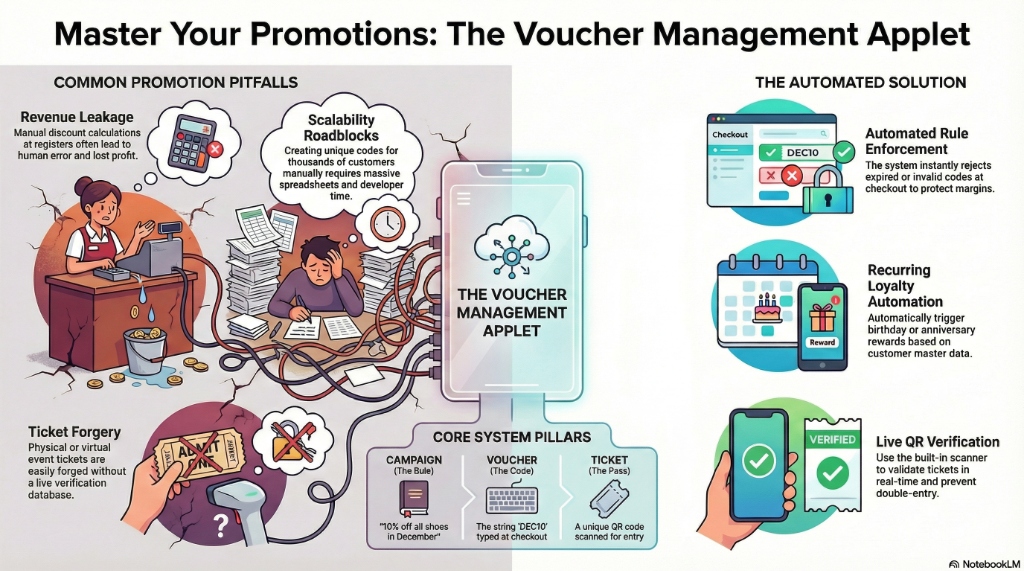
Core Concept: Campaigns vs. Vouchers vs. Tickets
- Campaign (The Rule): E.g., “10% off all shoes in December.” You configure the rules here.
- Voucher (The Code): The actual alphanumeric string (e.g.,
DEC10) the customer types in. - Ticket (The Pass): A specialized voucher used for physical/virtual entry (e.g., a QR code scanned at the door of an event).
What Problems Does This Solve?
Without Voucher Management:
- Staff manually calculate discounts at the register, leading to human error and revenue leakage.
- Creating a unique “Birthday Month” discount code for 10,000 customers requires a massive spreadsheet and developer time.
- Event tickets are easily forged because they aren’t tied to a live verification database.
- Marketing cannot track the ROI of a specific influencer’s promo code.
With Voucher Management Applet:
- ✓ Automated Rule Enforcement - The system rejects expired or invalid codes instantly at checkout.
- ✓ Recurring Automation - Set up dynamic rules (e.g., “Send a $10 voucher 3 days before a customer’s birthday”).
- ✓ Live Ticket Verification - Use the built-in scanner tool to validate unique QR tickets at the door.
- ✓ Granular Tracking - See exactly how many times
INFLUENCER20was used and how much revenue it drove.
Role-Based Quick Start Guides
For Marketing: Create a Promo Code Campaign
Your goal is to create a “Black Friday” promo code that gives RM 50 off, but only for orders over RM 200.
- Go to Voucher Management and click "+" to create a new campaign.
- In the Main Details tab, name it Black Friday 2024 and set the Voucher Code to
BF2024. - In the Apply Rules tab, set the Minimum Spend to
RM 200. - In the Treatment Value tab, set the Discount Amount to
-RM 50. - Set the status to Published. Customers can now use
BF2024at checkout.
For Event Organizers: Generate and Scan Event Tickets
Your goal is to sell 500 tickets to a seminar and scan them at the door.
- Go to Ticket Management and click "+".
- Create the ticket batch for the Q3 Tech Seminar.
- The system generates 500 unique QR codes.
- On the day of the event, open the Scanned Events feature on your mobile or tablet.
- Scan the attendees’ QR codes. The system checks them off in real-time to prevent double-entry.
For Customer Success: Set Up a Recurring Birthday Reward
Your goal is to automatically reward loyal customers.
- Go to Recurring Vouchers.
- Create a new rule: Birthday Month Reward.
- Set the Trigger to
Customer Date of Birth. - Set the Generation Schedule to
1st day of the month. - The system will now automatically generate and email unique 15% off codes to the correct customers every month.
Deep-Dive: The 9 Tabs of Voucher Configuration
When you create a new Voucher Campaign, the real power lies in the configuration tabs. This allows you to build complex logic.
| Tab | What it controls | Example Use Case |
|---|---|---|
| 1. Main Details | The naming, active status, and the actual Code. | Setting the code to SUMMER20. |
| 2. Valid Period | The exact date/time the voucher works. | Active only from June 1st to June 30th. |
| 3. Validity Target | Who can use it? (Specific customer groups). | Only VIP Tier members can use this code. |
| 4. Apply Rules | The prerequisites to trigger the discount. | Cart must have at least 3 items, or total must be > RM 100. |
| 5. Limit Config | How many times it can be used to prevent abuse. | Code can only be used 100 times total, and only 1 time per user. |
| 6. Treatment Target | What items get discounted? | Discount only applies to the “Footwear” category. |
| 7. Treatment Value | The actual reward amount/percentage. | 20% off, capped at a maximum of RM 50. |
| 8. Target Condition | Advanced logic logic combining rules. | If they buy Item A, they get Item B free. |
| 9. Applicable Location | Where it works physically or digitally. | Code only works at the Penang retail store, not online. |
Deep-Dive: The UI Workspaces
1. Voucher Management Listing
The command center for your marketing campaigns.
- See all active, scheduled, and expired campaigns.
- Monitor the Redemption Count in real-time to see which campaigns are performing best.
2. Import Vouchers
Used when migrating from an old system or doing mass offline campaigns.
- Upload a CSV of 10,000 unique codes (e.g., printed on physical flyers).
- The system ingests them and activating them against your predefined rules.
3. Ticket Management
Specifically designed for physical or digital access passes.
- Differs from Vouchers because Tickets are usually meant for single-use physical validation rather than shopping cart discounts.
- Generates unique QR codes or barcodes.
4. Scanned Events
The operational view for door staff.
- A streamlined UI designed for tablets and barcode scanners.
- Instantly returns a big green
VALIDor redALREADY USEDvisual indicator.
5. Recurring Vouchers
The automation engine for loyalty.
- “Set it and forget it” campaigns that run on a cron job.
- Perfect for Anniversary rewards, Birthday month discounts, or “We miss you” campaigns (triggered 90 days after last purchase).
Applet Configuration (For Admins)
Navigate to Settings to customize the applet environment.
Application Settings
ENABLE_MULTIPLE_VOUCHERS: Controls whether a customer can stack multiple codes at checkout (e.g., using a 10% off code and a Free Shipping code simultaneously).AUTO_ARCHIVE_EXPIRED: Keeps the listing clean by moving expired campaigns out of the main view automatically.
Feature Visibility
- Hide the Ticket Management and Scanned Events modules if your business is purely e-commerce and does not run physical events, simplifying the UI for the marketing team.
Auto-Num Configuration
When generating a batch of 5,000 unique codes, configure the prefix logic.
- Example: Set the prefix to
VIP-so the system generates codes likeVIP-A78B9,VIP-X43J2.
Common Real-World Scenarios
Scenario 1: The “Buy One Get One (BOGO) specific item” Sale
The Situation: Marketing wants to clear out old stock of “Winter Jackets”. If a customer buys a Winter Jacket, they get a “Beanie” for free. The Workflow:
- Create a Voucher Campaign named Winter Clearance.
- In Apply Rules, set the required purchase item to
Category: Winter Jackets. - In Treatment Target, set the target item to
Item: Beanie. - In Treatment Value, set the discount rule to
100% off Treatment Target.
Scenario 2: The Physical Event Door Scanning
The Situation: The company is hosting a VIP product launch. 500 digital tickets were sent. We must ensure no one gatecrashes. The Workflow:
- Event team generates 500 Tickets using Ticket Management and emails the QR codes via the CRM integration.
- At the venue door, two staff members open the Scanned Events applet on iPads.
- Guest A shows their QR code. Staff scans it. iPad shows green
VALID. Guest A enters. - Guest A texts a screenshot of their QR code to their friend.
- Friend tries to enter 20 minutes later. Staff scans the screenshot. iPad flashes red
ALREADY USED - Scanned at 7:15 PM. Access denied.
Scenario 3: The Influencer Cap
The Situation: An Instagram influencer is given a 20% off code JENNY20. We have a fixed marketing budget and cannot afford endless discounts.
The Workflow:
- Create the
JENNY20code. - Go to the Limit Config tab.
- Set
Global Max Usagesto 100. - Set
Per User Max Usagesto 1. - The first 100 followers to use the code get the discount. The 101st person gets an “Expiration limit reached” message, protecting the marketing budget.
FAQs
Q: Can a voucher combine a percentage discount and free shipping? A: Yes. In the Treatment Value tab, you can add multiple behavior stacks, assigning both a financial discount and overriding the shipping fee calculation simultaneously.
Q: We printed an apology voucher for a specific angry customer. Can we stop someone else from using it? A: Yes. Use the Validity Target tab and bind the voucher specifically to that customer’s email address or User ID. If anyone else types the code in, the system will reject it.
Q: How does the Recurring Voucher system know when it’s a customer’s birthday? A: The Recurring Voucher module pulls data directly from the Customer Maintenance Applet’s master profiles. Ensure your customer master data is populated to utilize these automations.
Q: If I delete a Voucher Campaign, what happens to orders that used it? A: The historical financial data on the Sales Order remains intact for accounting purposes. However, the code will instantly stop working for any new or pending checkouts.