Money Market Deposit Applet
Purpose and Overview
The Deposit Applet centralizes short‑term cash placement activities: raising MM deposit requisitions, managing approved placements, and maintaining category metadata. It enforces form validation, rate logic, and permissioned state changes (SAVE vs FINAL), while keeping listings consistent and export‑ready.
ℹ️
This applet exposes three menus: MM Deposit Requisition, MM Deposit Register, and MM Deposit Category. Together they cover request→approval→lifecycle management.
Primary Menus
- MM Deposit Requisition
- Create/edit requisitions, invite counterparties, validate inputs.
- Save/Final state control; FINAL disables whenever SAVE is disabled.
- MM Deposit Register
- View and edit live placements once approved/finalized.
- Same interest logic and formatting as requisitions.
- MM Deposit Category
- Maintain deposit groupings for downstream reporting.
Menu source: app/models/menu-items.ts.
User Roles and Benefits
- Treasury Manager: prepare/approve placements, compare fixed vs floating offers, manage rollovers.
- Finance Controller: ensure GL and currency integrity, standardized rounding, audit trail.
- Analyst: review rate effectiveness and term ladders; export consistent listings.
Key Behaviors and Business Rules
- Validation and Permissions
- Required fields drive SAVE availability; FINAL is disabled whenever SAVE is disabled (same condition).
- Read‑only audit fields (Created/Updated by and dates) remain locked.
- Interest Logic (Mutual Exclusivity)
- FIXED: user edits Interest Rate (%); Interest Rate Effective is cleared (null).
- FLOATING: user edits Reference Value and Delta; system disables Interest Rate and recomputes Effective; Interest Rate stays null.
- Programmatic patches round to two decimals to prevent floating‑point artifacts.
- GL Code and Currency Consistency
- Currency list preloads; GL Code list loads by Company.
- GL Code remains selected when navigating between Details and Invitee tabs (persisted and re‑patched safely).
- Invitee Entry Constraints
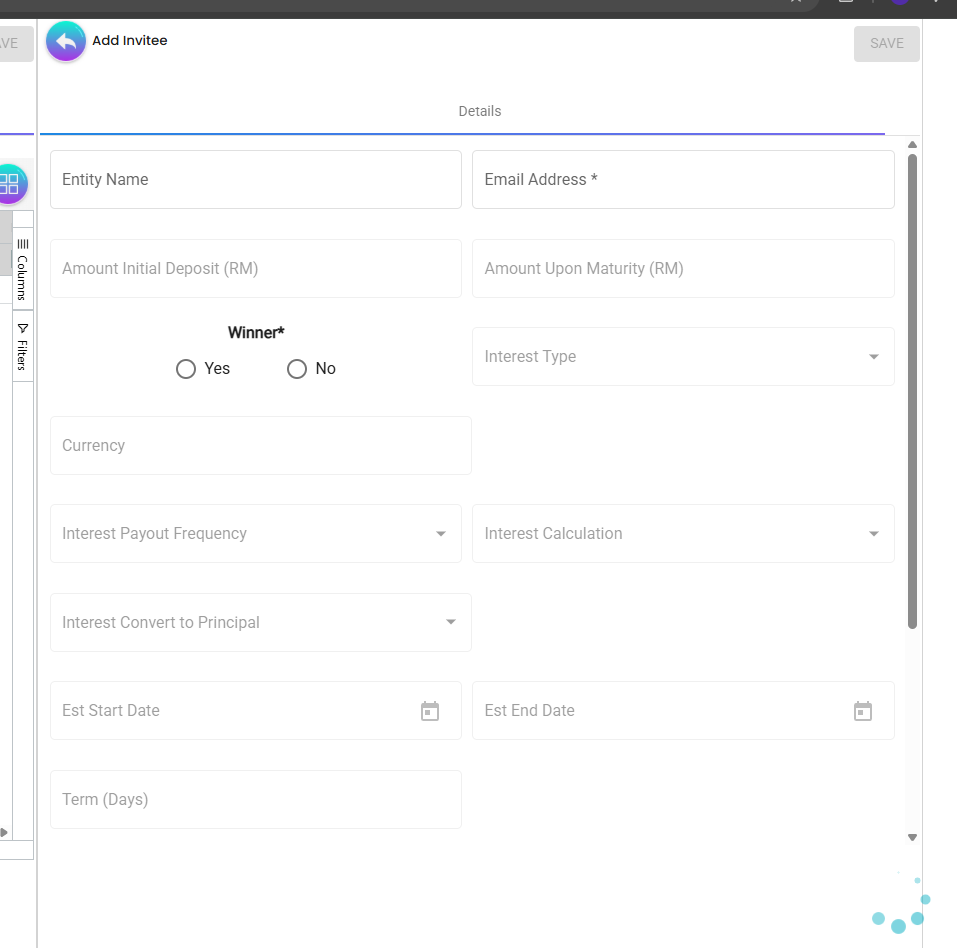
- Only three controls are editable: Entity Name (required), Email Address (required), Winner (optional).
- All other fields—including Term (Days)—are disabled to ensure data parity with the requisition.
- Unified Formatting
- Amounts: thousands separators with 2 decimals.
- Interest rates: always 2 decimals.
- Right‑aligned numeric columns across all listings.
- Dates: YYYY‑MM‑DD.
Screens and Workflows
MM Deposit Requisition
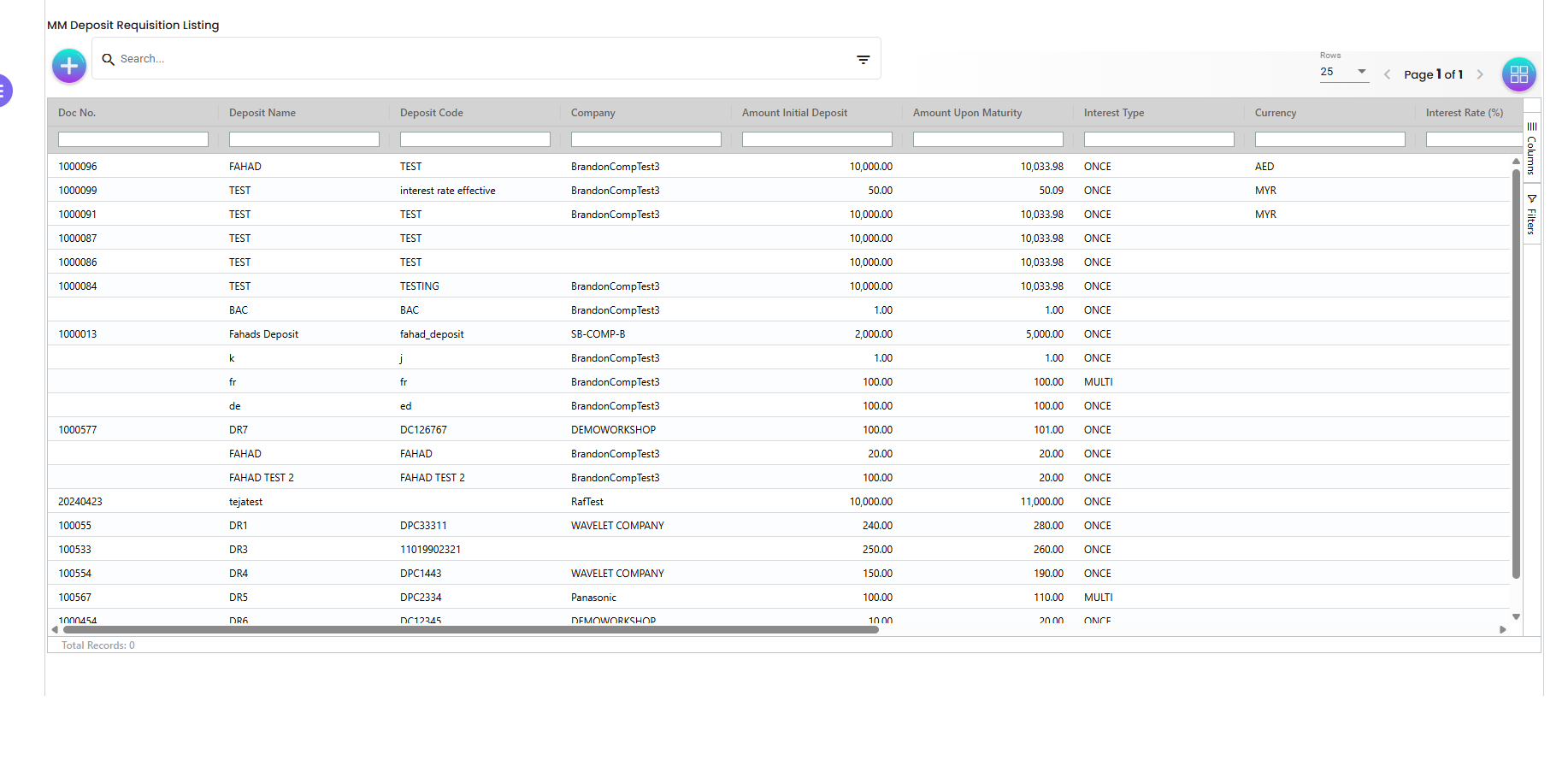
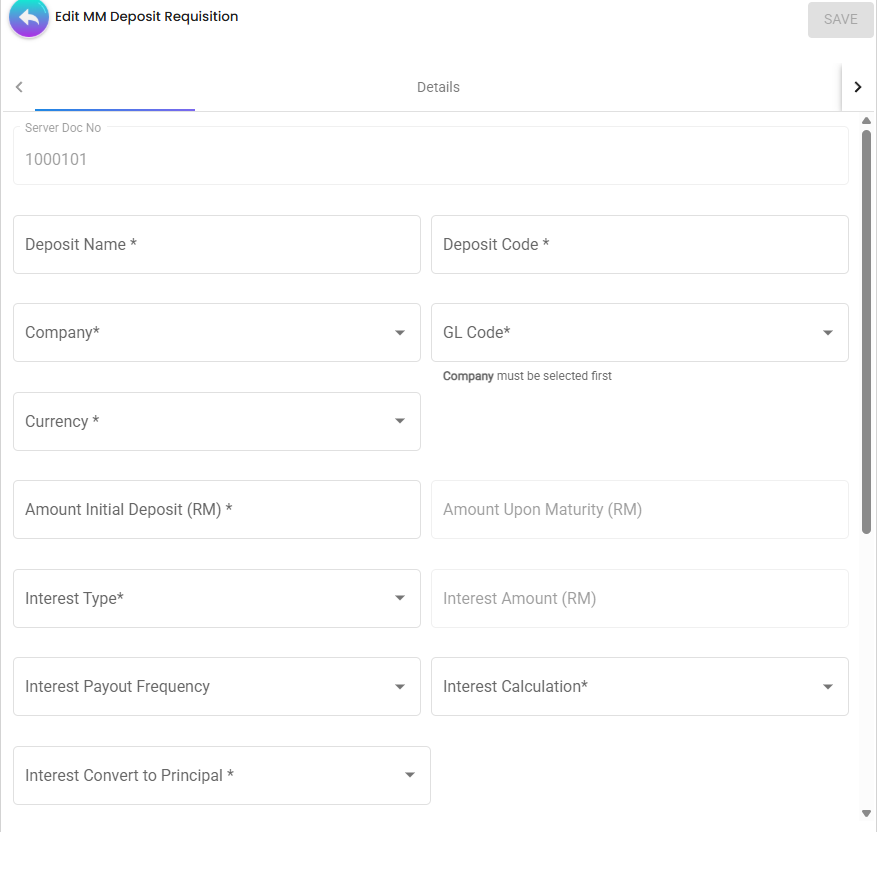
- Header fields: Deposit Name, Deposit Code, Company, GL Code, Currency, Amount Initial Deposit, Amount Upon Maturity, Interest Type, Interest Payout Frequency, Interest Calculation, Interest Convert to Principal, Start/End dates.
- Interest rules:
- FIXED: Interest Rate is required, Interest Rate Effective = null.
- FLOATING: provide Ref Value + Ref Delta; Interest Rate = null and disabled; Effective auto‑computed.
- Navigation:
- Details tab (main form) ↔ Invitee tab (counterparty offers).
- On return to Details, GL Code is re‑applied even if control was previously disabled.
- Actions:
- SAVE: available when the form is valid and user has permission.
- FINAL: uses the exact same disable rule as SAVE.
Customer Management (Select / Create / Edit)
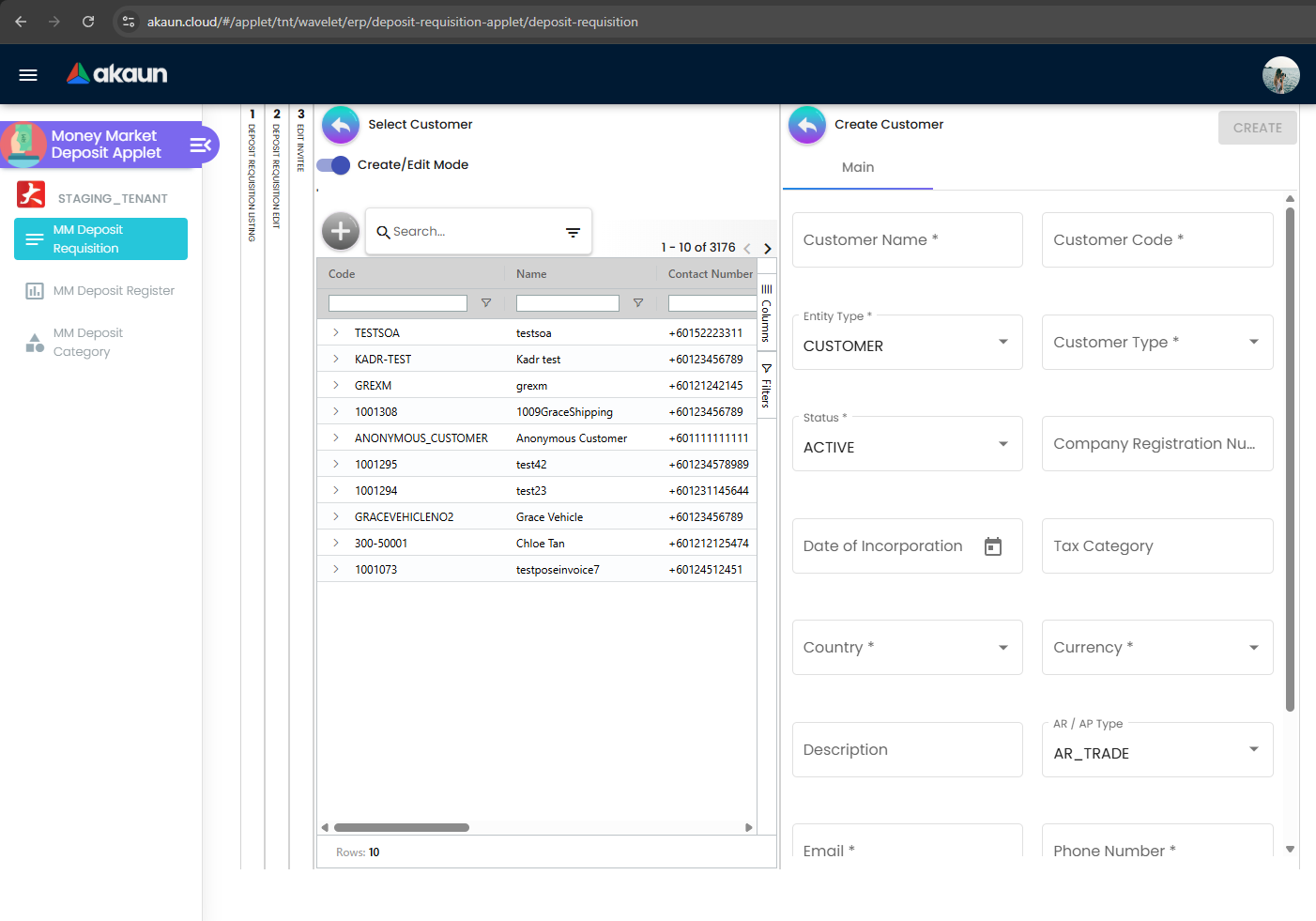
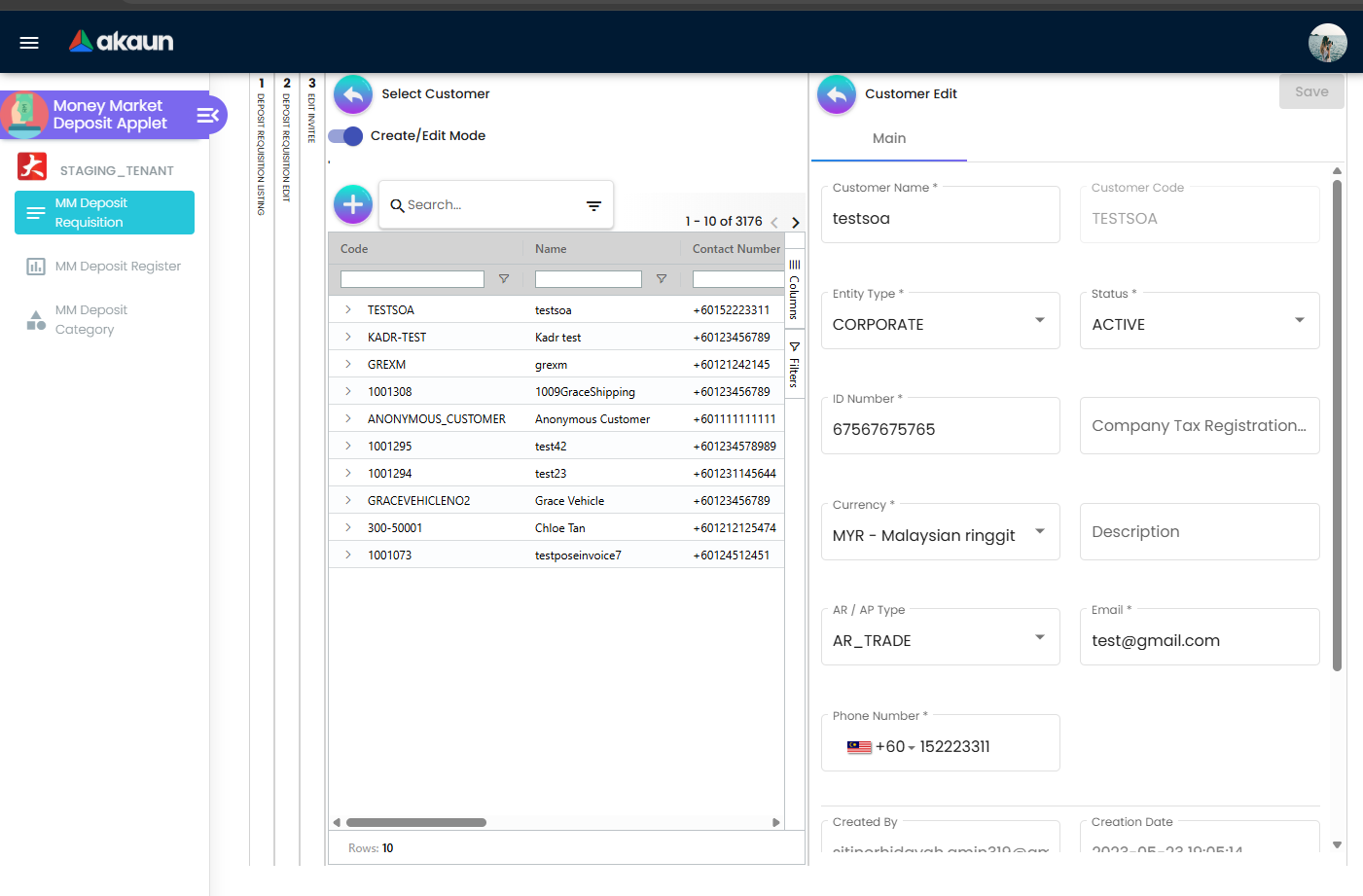
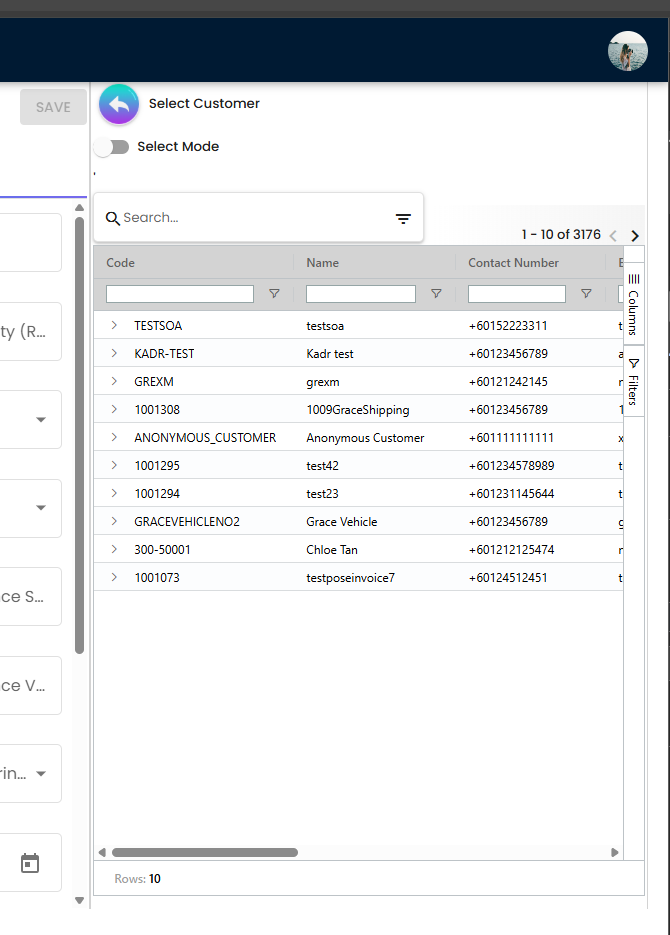
- Select existing customer from the left panel with search, column filters, and column chooser.
- Create/Edit mode opens on the right panel:
- Core fields: Customer Name, Customer Code, Entity Type, Status, Company Registration, Date of Incorporation, Tax Category, Country, Currency, AR/AP Type, Email, Phone Number.
- Required fields are marked with “*”.
- Save creates a new customer or updates the selected one and keeps the selection bound to the requisition.
- The selector supports quick switching between records; grid shows 10+ rows with pagination.
Invitee Flow (within Requisition)
- Add Invitee form: only Entity Name, Email Address, Winner enabled; all others disabled including Term (Days).
- Listing columns (aligned with requisition listing) show: Deposit Name/Code, Currency, Interest Type, Interest Rate, Interest Rate Effective, Amount Initial Deposit, Amount Upon Maturity, Start/End dates, and Actions.
- Numeric fields display two decimals; dates show in YYYY‑MM‑DD.
ℹ️
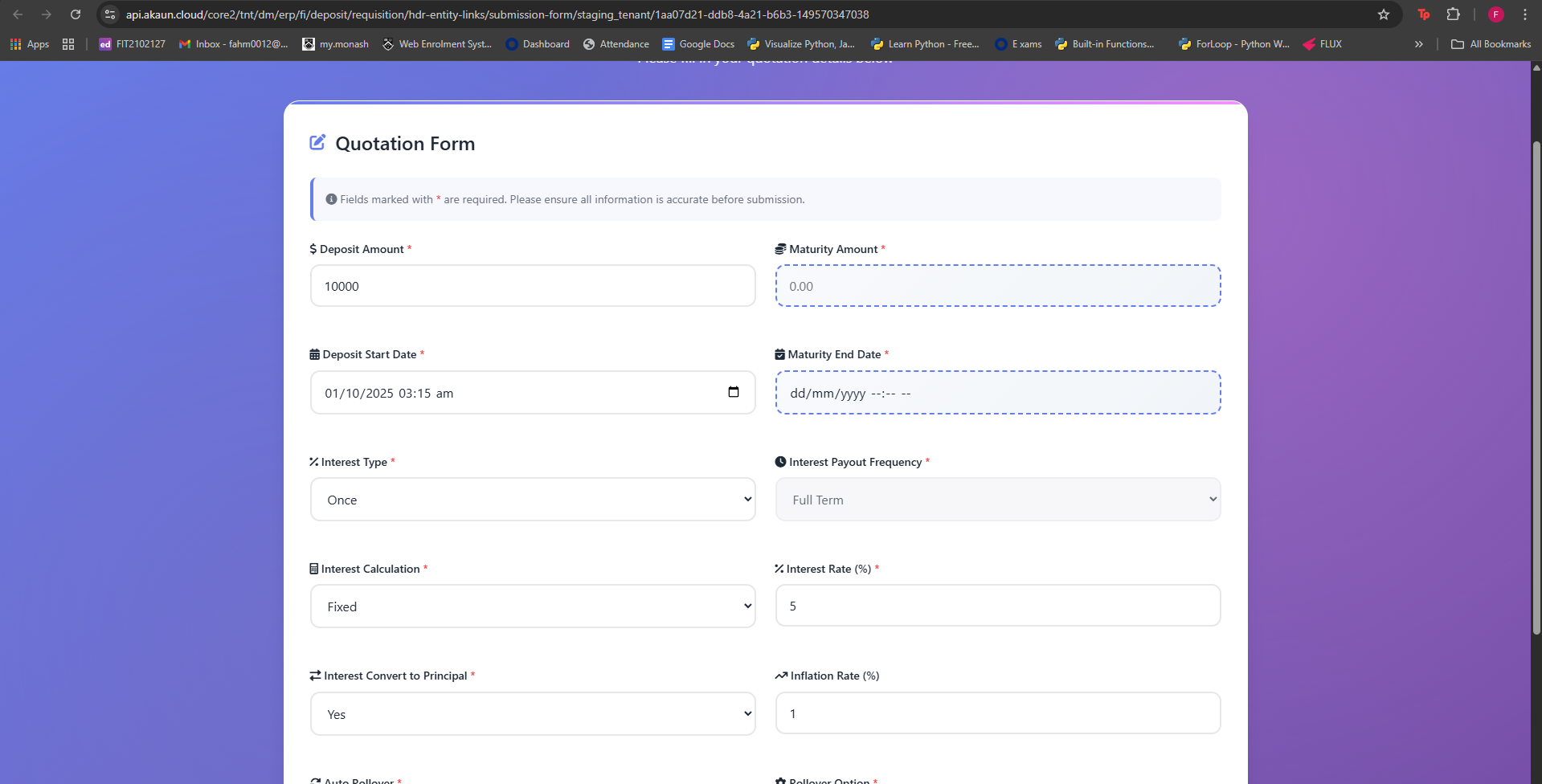
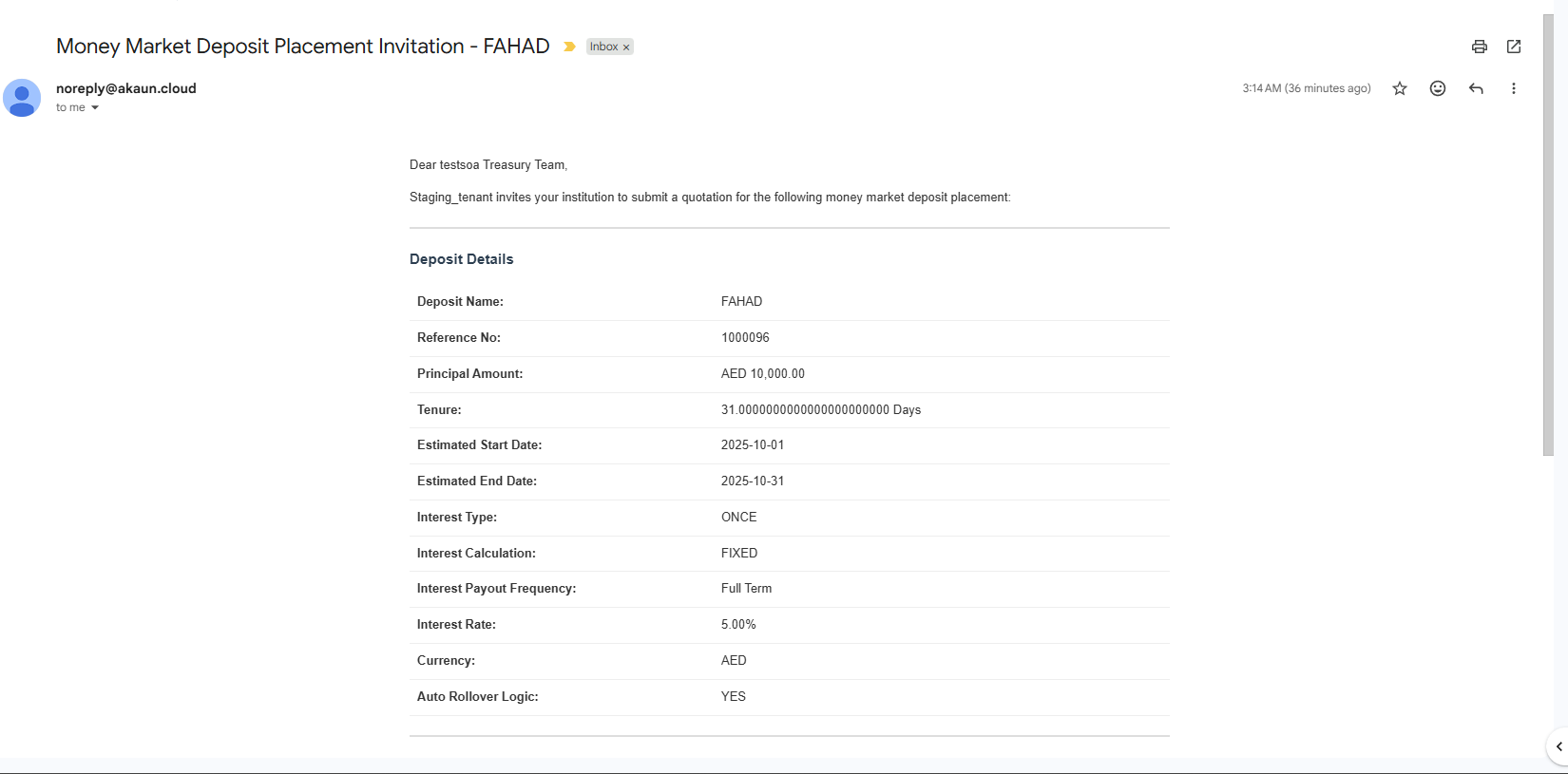
When a requisition is finalized (FINAL), the system automatically emails all invitees with a secure link to submit their offers. This ensures a consistent, auditable collection of quotations tied to the finalized requisition.
MM Deposit Register
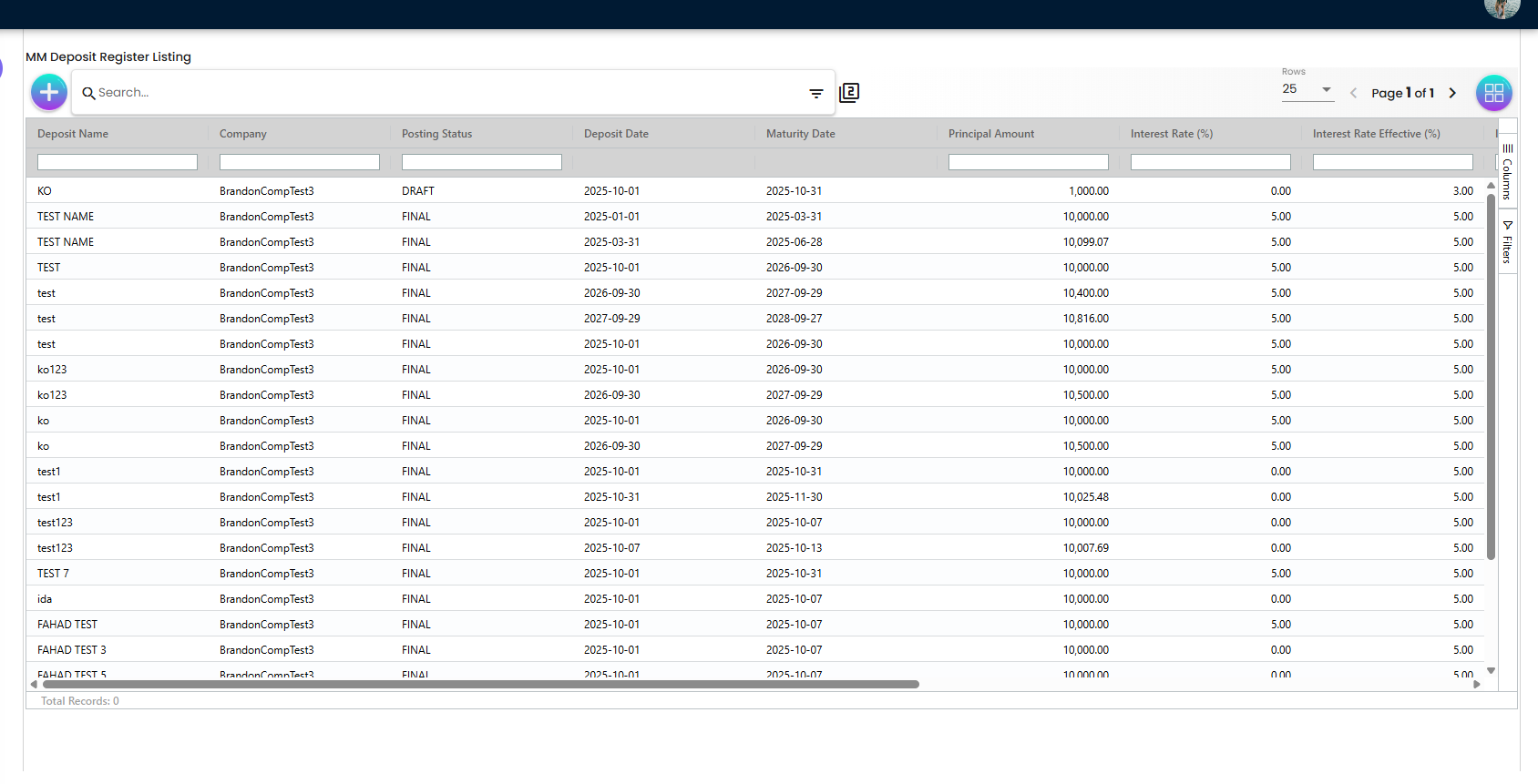
- Listing mirrors requisition formatting: thousands separators, two decimals, right‑aligned numeric columns.
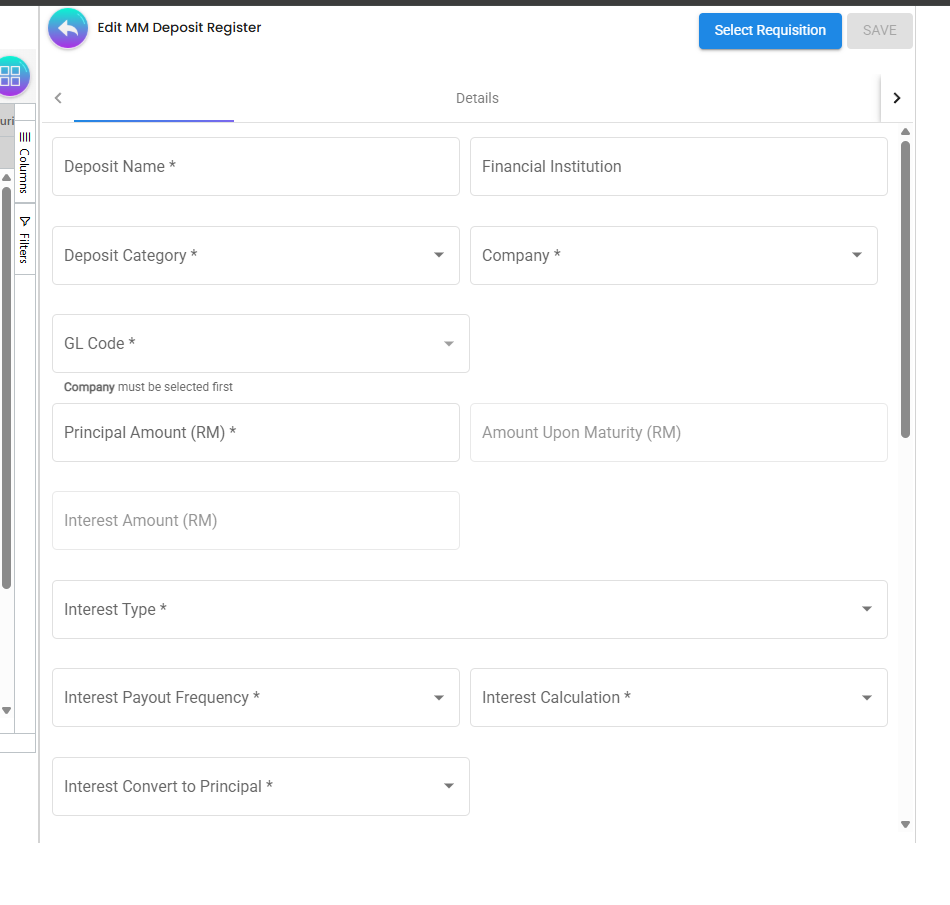
- Edit form inherits the same interest rules and rounding/formatting:
- Switching to FLOATING nulls and disables Interest Rate; Effective recomputed from Ref Value + Delta.
- Switching to FIXED clears Effective and enables Interest Rate.
- SAVE/FINAL parity maintained.
ℹ️
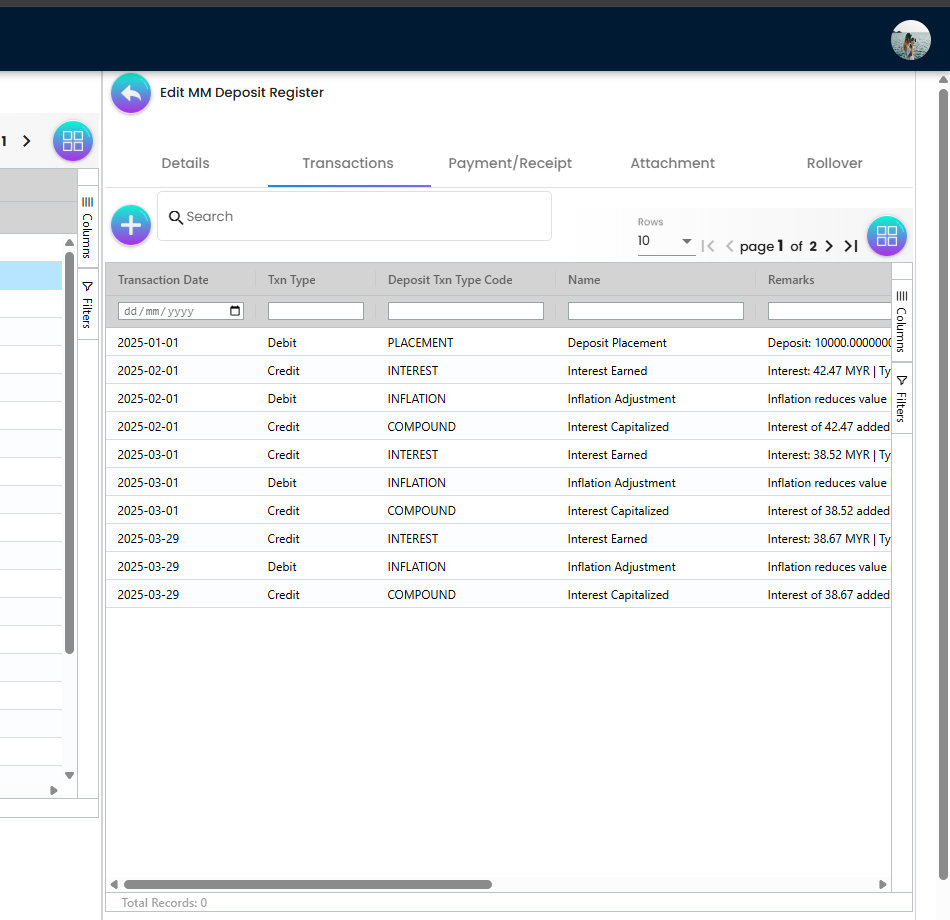
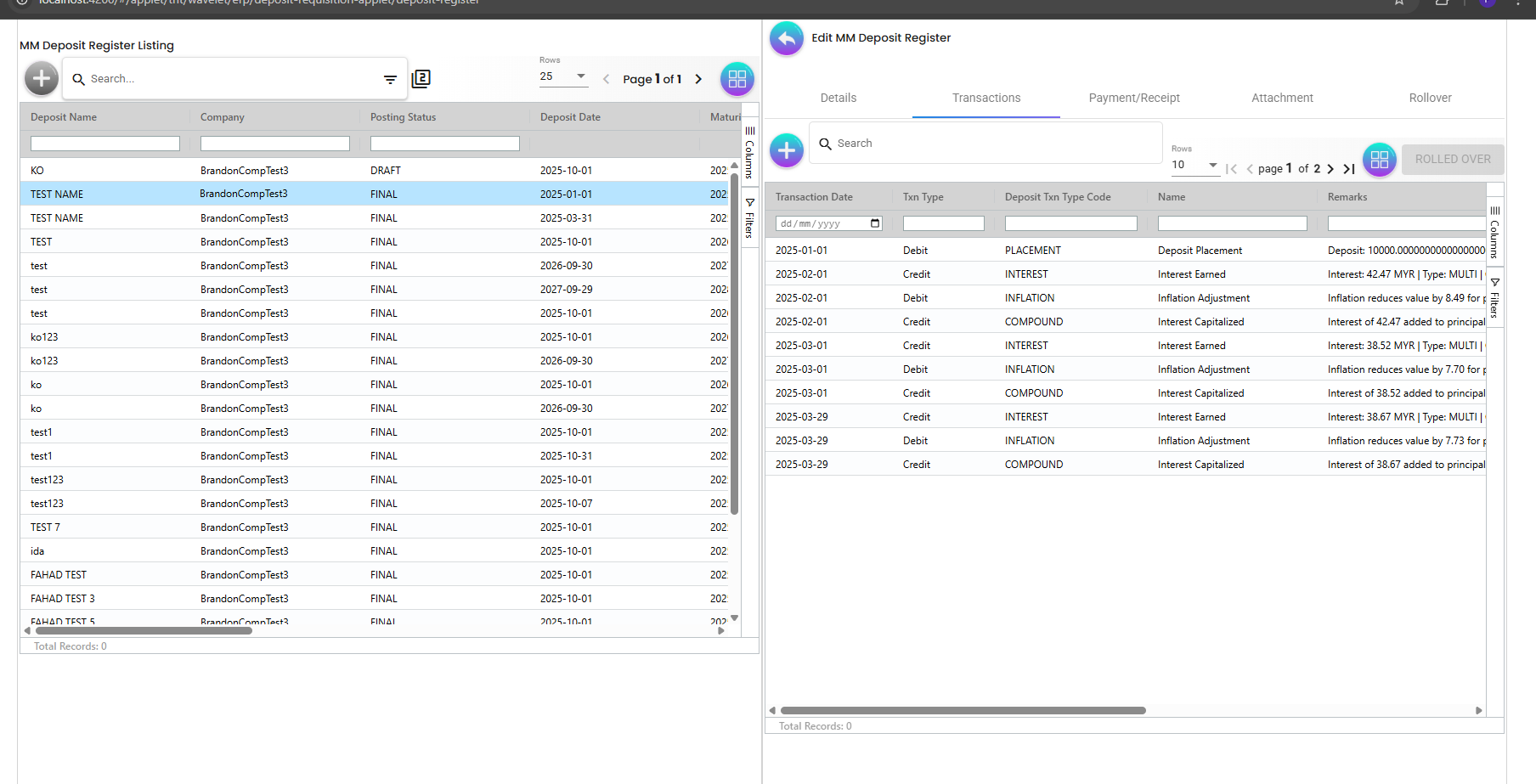
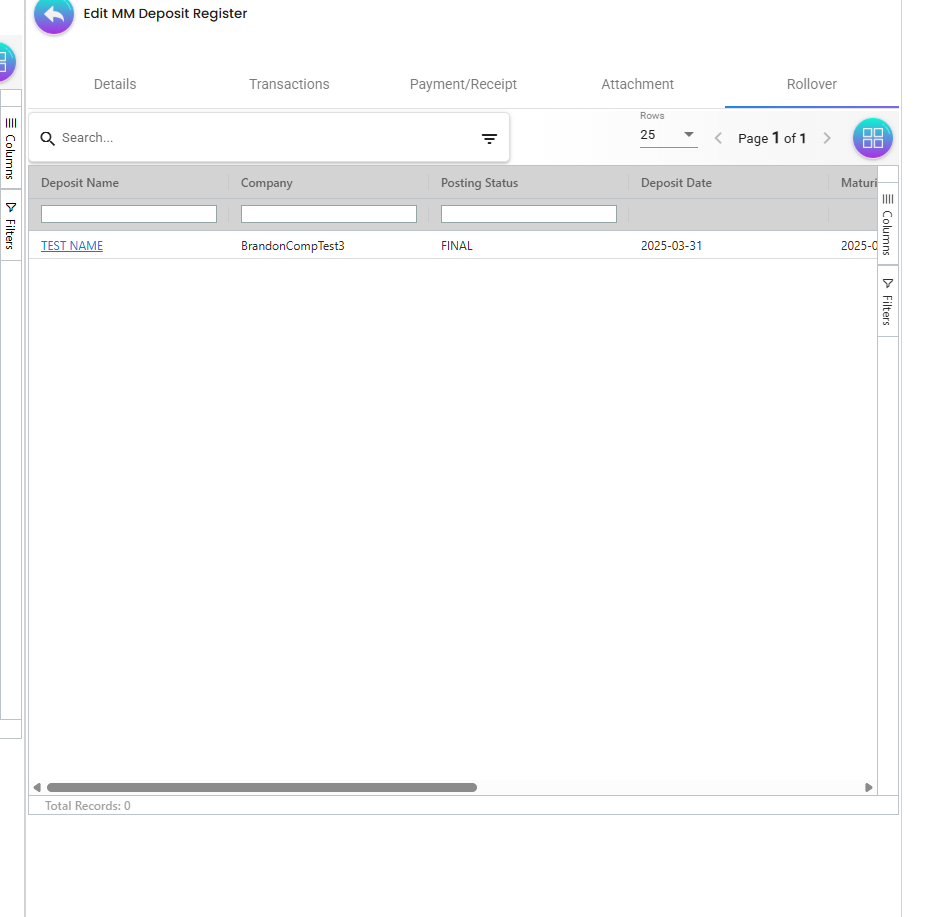
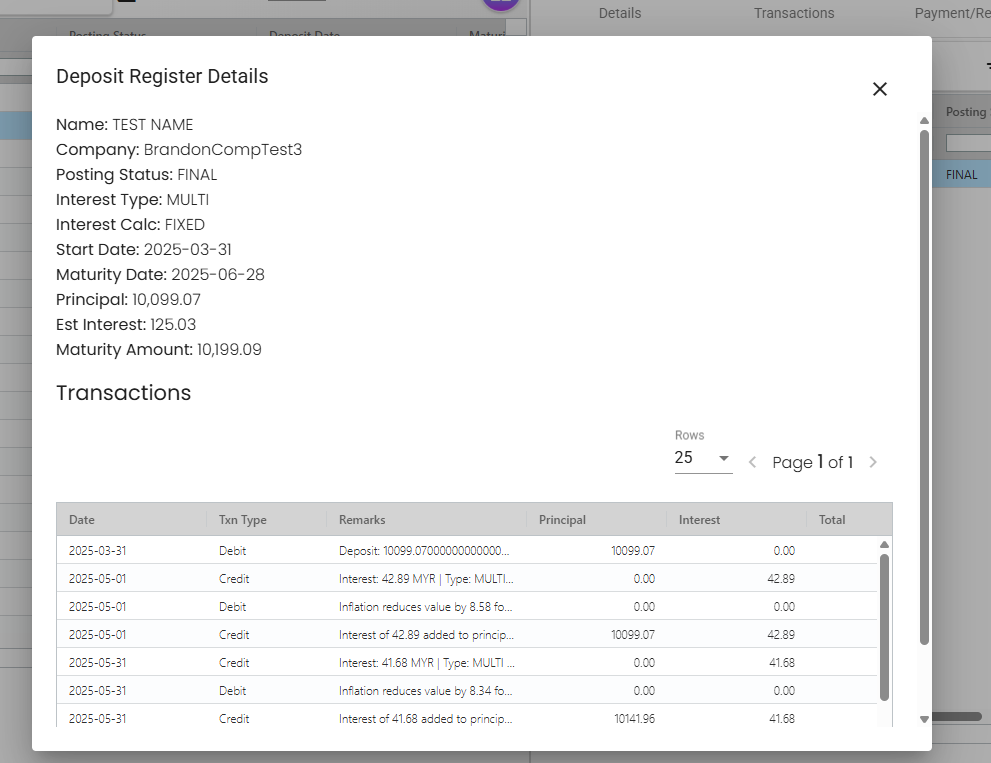
Select Requisition lets you pick a previously APPROVED/FINAL requisition and bring its details into the Register. When a Register entry is finalized (FINAL), the system auto‑creates the relevant transactions (e.g., Placement, periodic Interest, Inflation adjustments, Compounds). You can perform manual Rollovers and immediately see the rolled‑over status; Auto Rollover can be enabled to keep rolling on schedule until explicitly stopped.
MM Deposit Category
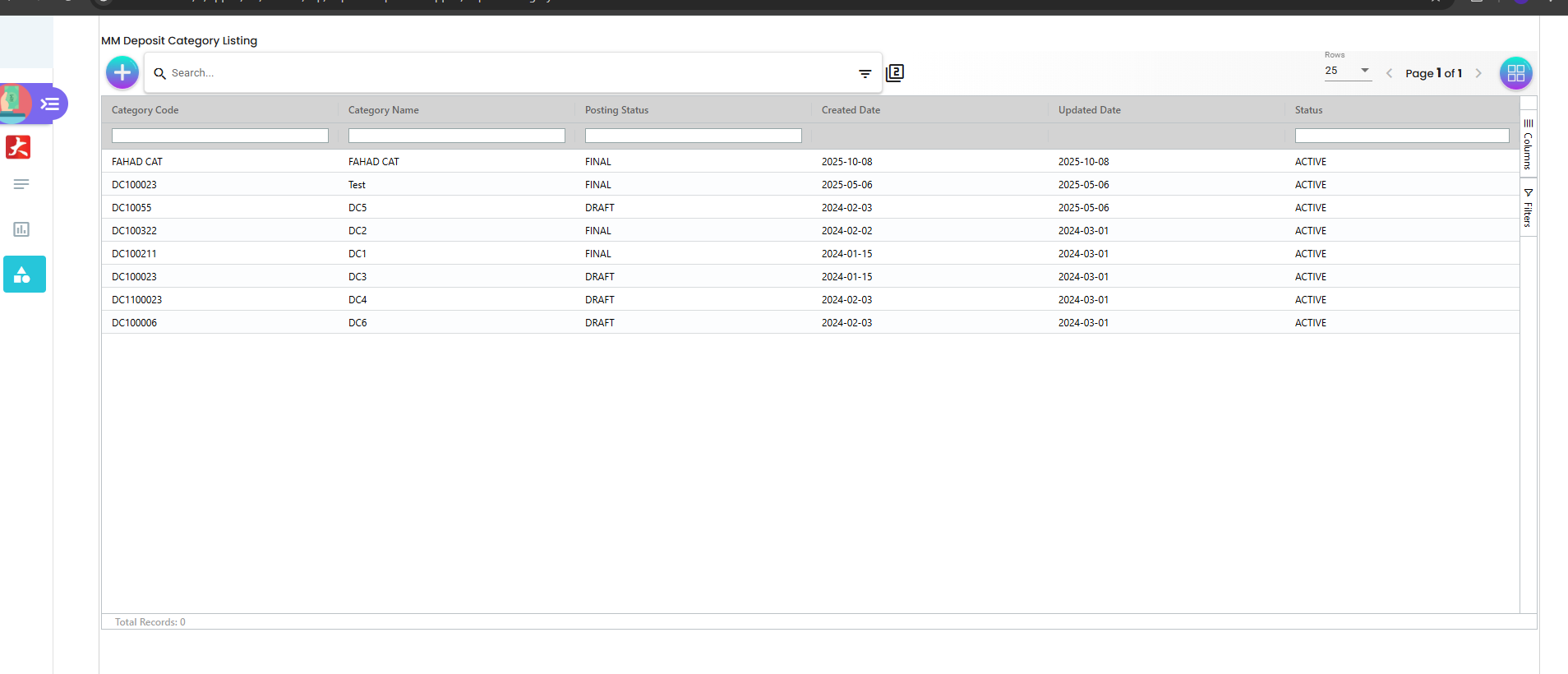
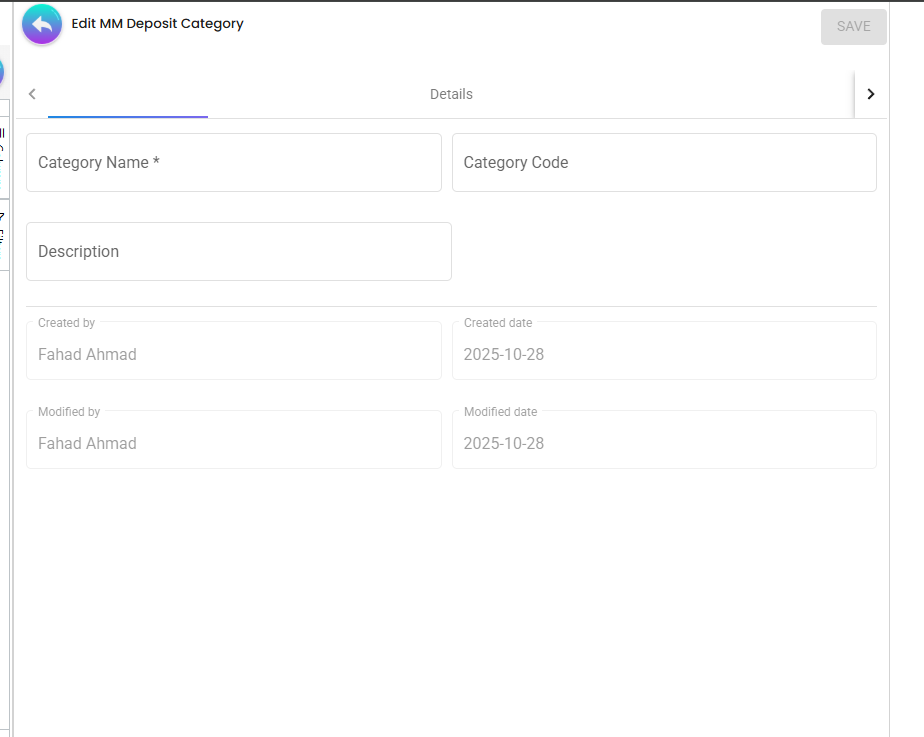
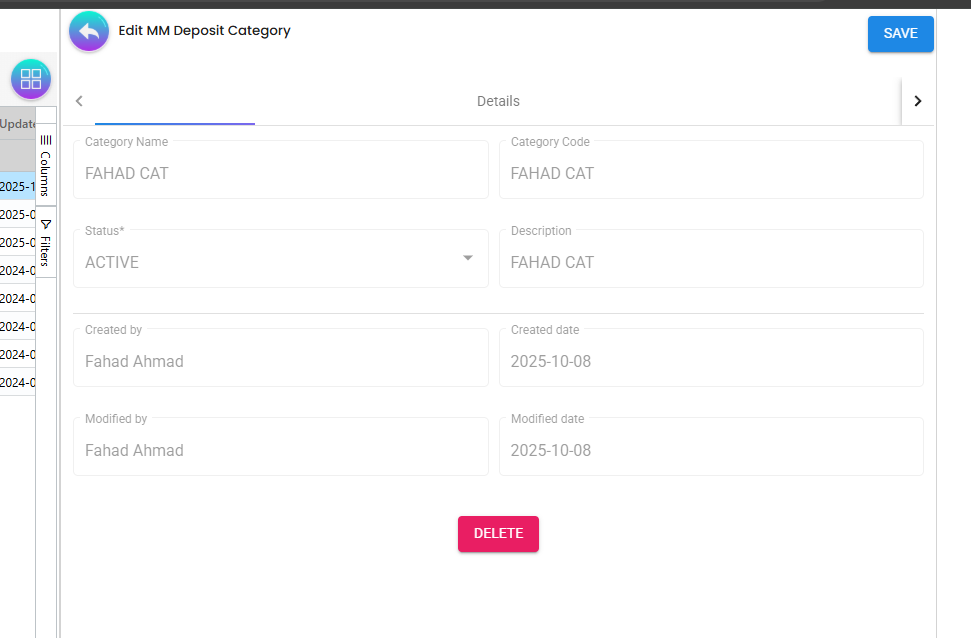
- Maintain category code, name, description, and status.
- Inactive categories are hidden from pickers to preserve data integrity.
Data Models (conceptual)
Requisition Header (selected fields)
- code, depName, company, gl_code_guid, currency, deposit_amount, maturity_amount
- interest_type, interest_payout_frequency, interest_calculation_logic
- interest_rate (fixed) OR interest_rate_effective (floating)
- interest_ref_type, interest_rate_ref_source, interest_rate_ref_value, interest_rate_ref_delta
- deposit_start_date, maturity_end_date, duration_in_days
- created_by/updated_by, created_date/updated_date
Invitee Row (common columns)
- entity_name, email, winner
- currency, deposit_amount, maturity_amount
- interest_type, interest_rate, interest_rate_effective
- deposit_start_date, maturity_end_date
- created_date, updated_date
Register Row (live placement)
- company, currency, gl_code, deposit_amount, maturity_amount
- interest calculation fields (respecting exclusivity)
- start/end dates, auto‑rollover logic (if used)
- audit fields
Listings
Shared behaviors
- AG Grid with column filters and column chooser.
- Numeric formatters:
- Amounts: toLocaleString(’en-US’, { minimumFractionDigits: 2, maximumFractionDigits: 2 })
- Rates: number → fixed(2)
- Date renderers: YYYY‑MM‑DD.
- Right‑aligned styles for numeric columns.
Locations (selected)
- Requisition listing: components/sales-invoice-container/sales-invoice-listing/
- Invitee listing: components/sales-invoice-container/sales-invoice-create/invitee/
- Register listing: components/line-items-container/deposit-register-listing/
Form Architecture
- Angular Reactive Forms with FormGroup controls.
- Required validators on core fields (e.g., depName, compContainer, glCodeContainer, currencyContainer, amounts, dates).
- Control enable/disable toggled by interest logic and invitee restrictions.
- Immediate two‑decimal rounding when patching Interest Rate and Effective Rate to avoid “5.0000000000…” artifacts.
State & Services
- Controllers coordinate data retrieval and view models:
- state-controllers/deposit-requisition-controller/
- state-controllers/deposit-register-controller/
- state-controllers/deposit-category-controller/
- Services perform API calls (REST):
- services/sales-invoice-pages.service.ts (requisition)
- services/line-items-pages.service.ts (line items/register)
- Permission resolver guards route access: resolver/permission.resolver.ts.
SAVE/FINAL Governance
- FINAL button is hard‑linked to SAVE’s disabled state; if the form is invalid or user lacks permission, both are disabled.
- Long‑running calculations or unresolved dependencies can also disable actions where implemented.
Demo Script
- Create Requisition
- Go to MM Deposit Requisition → “+”.
- Fill required fields; choose Company to load GL Codes; pick Currency.
- Customer: use the left panel to search and select an existing customer, or switch to Create/Edit mode to add a new one; Save to bind selection to the requisition.
- Select Interest Calculation:
- FIXED: set Interest Rate; Effective clears to null.
- FLOATING: set Ref Value and Delta; Interest Rate disables and nulls; Effective auto‑fills with 2 decimals.
- Observe SAVE disabled until all required fields are valid; FINAL mirrors SAVE.
- Add Invitee
- Switch to Invitee tab → Add Invitee.
- Only enter Entity Name, Email Address, and optionally Winner; other fields are disabled.
- Save and confirm listing shows amounts/rates with commas and two decimals; dates in YYYY‑MM‑DD.
- Return to Details
- Navigate back; confirm GL Code remains selected and Interest fields retain proper state and rounding.
- Finalize when ready; notice FINAL enables only when SAVE would enable.
- Register Review
- Open MM Deposit Register; view formatted listing.
- Edit an item: flip between FIXED/FLOATING to see exclusivity and 2‑decimal formatting; SAVE/FINAL parity persists.
- Category Maintenance
- Open MM Deposit Category; add/edit a category; set status Active; verify availability in requisition.
Troubleshooting
- GL Code lost after tab switch:
- Ensured control is enabled before patch; selection persisted and re‑applied on return from Invitee.
- Interest Rate shows many decimals:
- Patch‑time rounding to two decimals enforced on Interest Rate and Effective.
- FINAL enabled while SAVE disabled:
- FINAL now uses the exact same condition as SAVE.
Files of Interest (selection)
- Menus: app/models/menu-items.ts
- Requisition Details: components/sales-invoice-container/sales-invoice-create/main-details/
- Invitee: components/sales-invoice-container/sales-invoice-create/invitee/
- Requisition Listing: components/sales-invoice-container/sales-invoice-listing/
- Register Edit: components/line-items-container/edit-deposit-register/edit-deposit-register-main-details/
- Register Listing: components/line-items-container/deposit-register-listing/
- Controllers: app/state-controllers/…
- Services: app/services/…
Summary
The Deposit Applet provides an end‑to‑end workflow for MM deposits with:
- Strict form validation and SAVE/FINAL synchronization
- Accurate interest handling (fixed vs floating) with enforced exclusivity
- Robust GL/Currency handling across tab navigation
- Consistent, export‑ready listings with two‑decimal formatting
- Clear invitee constraints to preserve data integrity
- Category administration for standardized reportingUse this applet to move from ad‑hoc spreadsheets to a controlled, auditable treasury process with clean data and reliable approvals.