Purchase GIN (Internal)
Creates and finalises purchase-side Goods Issue Notes — a record that goods left your premises toward a supplier, for a return, a warranty send-back or a sample out for evaluation — linked line by line to the order, receipt or invoice they came from. Read this first: FINAL does not reduce stock, does not touch moving-average cost and does not post a journal; it is a traceable paper trail. If the goods must actually leave stock and the supplier’s account be debited, raise a Purchase Return instead, or a Stock Adjustment for the physical movement alone.
Overview
The Purchase GIN (Internal) applet creates and finalises Goods Issue Notes on the purchase side: a record that goods (returns to a supplier, warranty send-backs, samples going out for evaluation) left your premises, addressed to a supplier entity. Warehouse or purchasing staff open it after a Purchase Order, GRN or Purchase Invoice exists and before the supplier’s credit note or replacement arrives.
Read this before anything else: in the backend the Purchase GIN is a zero-movement, zero-value document. Its server document type INTERNAL_PURCHASE_GOODS_ISSUED_NOTE (short code PURGIN) carries quantity signum 0 and amount signum 0, so FINAL does not reduce stock, does not touch Moving Average cost and does not post a journal. It is a traceable paper trail, linked line-by-line to the source document. If the goods must actually leave stock and the supplier’s account must be debited, use Purchase Return (Internal) (quantity signum −1, amount signum +1) instead, or a Stock Adjustment for the physical movement alone.
Where it fits
Module: Purchasing. The GIN sits between receiving and settlement, but it moves neither stock nor money.
| Direction | Document | Relationship to the Purchase GIN |
|---|---|---|
| Upstream (source pickers) | Purchase Order, Purchase Requisition, Purchase Quotation, Purchase Invoice, Purchase Return, Delivery Order, Sales Order, Jobsheet | The Lines tab can copy a line from any of these eight document types and links the GIN line to its source, so the source line’s open quantity is reduced in the picker. |
| Sibling (stock actually moves) | Purchase Return (Internal) | The return is the document that takes goods out of stock and debits the supplier; the GIN only records the dispatch. |
| Sibling (inbound counterpart) | Purchase GRN (Internal), Purchase GRN Stock In | GRN records receipt; GRN Stock In is the receiving document that moves stock and feeds MA cost. |
| Same family, other side | Sales GIN (Internal), Consignment GIN (Internal) | Sales GIN is also signum 0/0; Consignment GIN (INTERNAL_PURCHASE_CONSIGNMENT_GIN) does move stock. |
| Downstream | Supplier credit note, replacement GRN | Not linked by the applet; reference the GIN number manually. |
Screens and menus
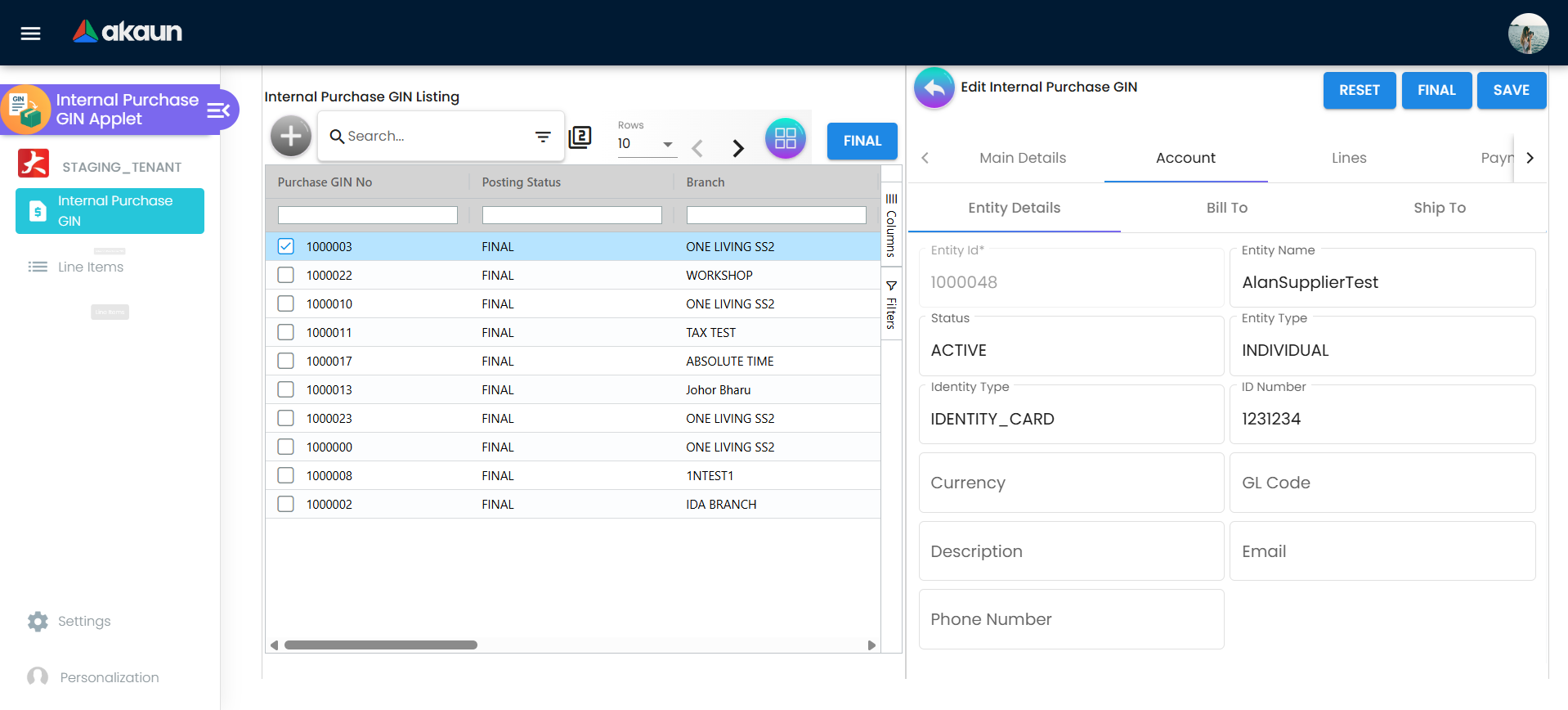
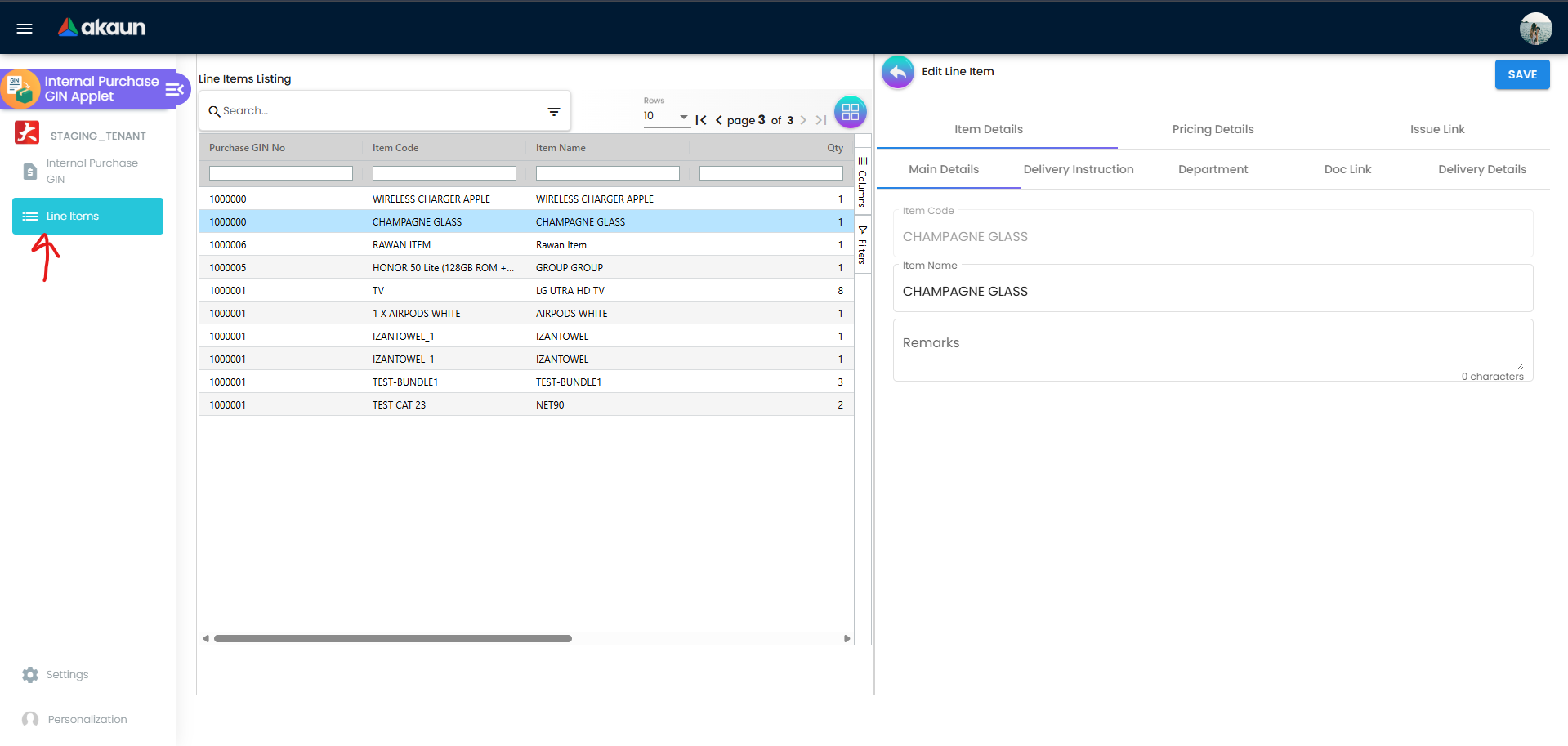
The applet has two menu items, Internal Purchase GIN (the document listing) and Line Items (every GIN line across documents, searchable by document number, item code, item name and quantity). HIDE_LINE_ITEMS_MENU removes the second item.
Listing. Columns: Purchase GIN No, Posting Status, Branch, Supplier Name, Purchaser, Updated Date, Created Date, Transaction Date, Created by. Toolbar: Create (+), search, advanced search, rows-per-page, a grid/pivot toggle, an inline settings gear, and a FINAL button that finalises every selected non-FINAL row. There is no VOID or DISCARD action anywhere in this applet’s code.
Create form tabs: Main Details, Account (Entity Details, Bill To, Ship To), Lines, Payment (hidden by HIDE_PAYMENT_TAB), Department Hdr (hidden by HIDE_DEPARTMENT_HDR_TAB). The CREATE button stays disabled until Main Details is valid, at least one line exists and the supplier form is valid.
Edit form (opened by clicking a listing row) shows the same tabs plus Contra, Doc Link, Attachments and Export, with RESET, FINAL (hidden by HIDE_FINAL_BUTTON), SAVE and, for non-FINAL documents, a two-click DELETE. The tab order is configurable (Default Selection, “Details Panel Ordering”) and the same panels can be rendered as vertical expansion panels (VERTICAL_ORIENTATION).
Line editor (Add / Edit Line Item): Item Details (Main Details, Delivery Instruction, Department, Doc Link, Delivery Details sub-tabs), Pricing Details, Issue Link, plus Serial Number / Batch Number / Bin Number tabs that appear according to the item’s sub-item type, and Costing Details.
Settings menu (System Configuration): Application Settings, Default Selection, Printable Format Settings; plus the shared Webhook, Feature Visibility and the five permission listings. Personalization: Default Selection (personal) and Sidebar.
Configuration
Before you can use it
- Company and branch with a main location, in Organisation. Branch, company and location are required on every GIN; picking a branch fills company and currency from the branch record.
- Supplier entities in Supplier. Entity ID is required; credit terms are offered from the supplier’s own
CREDIT_TERMSextension rows and the field is disabled until a supplier that carries them is chosen. There is nodoc_entity_hdr_jsonon a supplier record: that column lives on the document, and holds the copy of the supplier taken when the note was issued — see Purchase Credit Note — the supplier on this note is a copy. - Items in Doc Item Maintenance / Inv Item Maintenance. Serial, batch and bin tabs follow the item’s
sub_item_type. - Running numbers for
INTERNAL_PURCHASE_GOODS_ISSUED_NOTEare assigned by the backend on FINAL, so the document-numbering configuration for this server document type must exist before the first FINAL. - Not required: default GL codes, tax codes, cashbooks and settlement methods. The GIN posts nothing (see Lifecycle), so none of the
MISSING_DEFAULT_GL_CODE/MISSING_CASHBOOKprerequisites of the invoice family apply. - Backend permissions:
TNT_API_DOC_INTERNAL_PURCHASE_GOODS_ISSUED_NOTE_CREATE / READ / UPDATE / DELETE_TGT_GUID. FINAL uses the UPDATE permission.
Applet settings
Where settings live:
| Screen | Where | What it holds |
|---|---|---|
Settings → Application Settings (field-settings) | The shared settings screen | The HIDE_* / ENABLE_* toggles below. 125 of the 172 settings this applet has are shown there; the other 47 — its tab-hide, KO-for, external-document and menu settings — are not offered for this applet. |
| Inline gear | On 31 screens, each with its own list of settings | The same master settings, plus per-user personal overrides. Keys that are gated out of the shared screen but listed on a gear are still editable there. |
| Settings → Default Selection | This applet’s own screen | DEFAULT_BRANCH, DEFAULT_LOCATION, INTERNAL_PURCHASE_GIN_DETAILS_PANEL_ORDER (drag-and-drop tab order). |
| Settings → Printable Format Settings | This applet’s own listing with “set default” | PRINTABLE (default printable format used by Export). |
| Personalization → Default Selection | This applet’s own screen | Shows Default Branch / Default Location, but choosing a branch fails and nothing is saved. Use the gear’s personal mode instead. |
Master settings are saved by users of rank OWNER or ADMIN (through the Settings menu or the gear’s master mode). Personal mode on the gear is available to every user and stores only true overrides. A personal value wins over the applet-wide one.
The table lists every setting that is shown, saved and used by this applet. All are off / empty by default.
| Setting | What it controls | Default | Effect when changed |
|---|---|---|---|
DEFAULT_TRANSACTION_DATE | Listing date filter preset (1_day, 1_week, 1_month) | empty (no filter) | Listing opens pre-filtered to the last day/week/month. |
DISABLE_GEN_DOC_LISTING | Locks the listing | off | Hides the Create button and ignores row clicks; the listing becomes read-only. |
HIDE_GENDOC_FINAL_BUTTON | FINAL button on the listing | off | Removes the multi-select FINAL button; the edit-form FINAL button is separate. Re-openable per role by the SHOW_GENDOC_FINAL_BUTTON client-side permission (not seeded, see below). |
HIDE_FINAL_BUTTON | FINAL button on the edit form | off | Documents can then only be finalised from the listing. |
ENABLE_PRINT_FINAL_GEN_DOC_ONLY, HIDE_EXPORT_AS_PDF_BUTTON | Export tab | off | EXPORT AS PDF is the only way this applet prints (CSV, DOCX and ZIP are commented out, and the listing has no print). The first switch holds the button back until the note is FINAL, so a draft cannot be printed and handed to a driver; the second removes it, and then nobody prints a GIN from here at all. |
ENABLE_EMPLOYEE_LOGIN_AUTO_DETECTION | Purchaser field | off | On a new document the purchaser is looked up from the logged-in user’s employee record. |
HIDE_SALES_AGENT | Purchaser field (labelled “Sales Agent/Purchaser” on the shared screen) | off | Hides the field and clears its required validator; without it Purchaser is mandatory. |
MANDATORY_REMARKS_FIELD | Remarks | off | Makes Remarks required on Main Details and on every line — a ten-line GIN needs eleven remarks before CREATE lights. A remarks box hidden by HIDE_REMARKS or HIDE_LINE_ITEM_DETAILS_REMARKS is left optional. |
HIDE_REMARKS, HIDE_REFERENCE, HIDE_PERMIT_NO, HIDE_TRACKING_ID, HIDE_CREDIT_TERMS, HIDE_MAIN_DETAILS_TRANSACTION_DATE | Main Details fields | off | Hide the named field. HIDE_REFERENCE, HIDE_REMARKS, HIDE_CREDIT_TERMS and HIDE_MAIN_DETAILS_TRANSACTION_DATE are gated out of the shared screen for this applet code and are reachable only through the Main Details gear. |
HIDE_BILL_TO_TAB, HIDE_SHIP_TO_TAB | Account sub-tabs | off | Hide the billing / shipping address sub-tab. |
HIDE_PAYMENT_TAB | Create form | off | Hides the Payment tab on create (gear only; the shared control is PO-only). |
HIDE_DEPARTMENT_HDR_TAB | Create and edit forms | off | Hides the header-level Department tab (gear only). |
HIDE_MAIN_CONTRA_TAB, HIDE_CONTRA_TAB | Edit form | off | Either key hides the Contra tab. |
HIDE_DOC_LINK_FROM, HIDE_DOC_LINK_TO | Doc Link tab (header and line) | off | Hide the “from” / “to” halves (gear only). |
HIDE_COSTING_DETAILS, HIDE_DELIVERY_DETAILS, SHOW_DELIVERY_DETAILS | Line editor tabs | off | Costing Details tab hidden; Delivery Details hidden unless SHOW_DELIVERY_DETAILS forces it back (`!HIDE |
HIDE_SEGMENT, HIDE_DIMENSION, HIDE_PROFIT_CENTER, HIDE_PROJECT | Department tab (header and line) and line listing | off | Hide the dimension column and picker. |
HIDE_QTY_BASE, HIDE_QTY_UOM, HIDE_UOM_TO_BASE_RATIO | Line Main Details | off | Hide quantity fields. |
HIDE_UNIT_PRICE_STD_PRICING_SCHEME, HIDE_UNIT_PRICE_STD_INCL_TAX, HIDE_UNIT_PRICE_STD_EXCL_TAX, HIDE_UNIT_PRICE_STD_UOM_INCL_TAX, HIDE_UNIT_PRICE_STD_UOM_EXCL_TAX, HIDE_UNIT_PRICE_NET_EXCL_TAX, HIDE_UNIT_PRICE_NET_UOM_EXCL_TAX, HIDE_UNIT_PRICE_TXN, HIDE_UNIT_PRICE_TXN_UOM_INCL_TAX, HIDE_UNIT_DISCOUNT, HIDE_UNIT_DISCOUNT_UOM_EXCL_TAX, HIDE_AMOUNT_STD_EXCL_TAX, HIDE_DISCOUNT_AMOUNT_EXCL_TAX, HIDE_AMOUNT_NET_EXCL_TAX, HIDE_AMOUNT_TXN, HIDE_TAX_CONFIG_SELECTION, HIDE_WHT_CONFIG_SELECTION | Line Main Details price / tax fields | off | Hide the field for everyone; the matching SHOW_* client-side permission (seeded for this applet) shows it again for a role. |
HIDE_LINE_ITEM_DETAILS_REMARKS, HIDE_LINE_ITEM_LISTING_UOM, HIDE_LINE_ITEM_LISTING_TXN_AMOUNT | Line remarks; Lines tab and Line Items listing columns | off | Hide the field / column (gear only for this applet code). |
VERTICAL_ORIENTATION, EXPAND_MAIN_DETAILS, EXPAND_ACCOUNT, EXPAND_LINE_ITEMS, EXPAND_PAYMENT_TAB, EXPAND_DEPARTMENT_HDR, EXPAND_MAIN_CONTRA, EXPAND_DOC_LINK, EXPAND_ATTACHMENT, EXPAND_EXPORT | Vertical UI | off | Render the edit form as stacked expansion panels; the first EXPAND_* that is true is the panel opened by default. |
INTERNAL_PURCHASE_GIN_DETAILS_PANEL_ORDER | Tab / panel order (Default Selection) | Main Details, Account, Lines, Payment, Department Hdr, Contra, Doc Link, Attachments, Export | Saved order is applied to the edit form; new panels are appended. |
PRINTABLE | Default printable format (Printable Format Settings) | empty | Pre-selects the template on the Export tab; the user can still pick another. |
Read without a control (declared and consumed, but no shared or gear control exists for this applet code): HIDE_LINE_ITEMS_MENU (removes the Line Items menu; the shared toggle is rendered only for the delivery-order family), DEFAULT_ORIENTATION and DEFAULT_TOGGLE_COLUMN (column layout of the view-column container). They can be set only by another applet sharing the same settings store or by API.
Saved but never applied: DEFAULT_BRANCH and DEFAULT_LOCATION from Default Selection are persisted and the shared session effect loads the branch, but no component in this applet reads them, so a new GIN opens with an empty Branch. the default company is patched into a form that has no such control and is never saved.
Dead toggles: the inline gears offer 92 keys that nothing in this applet reads. 31 of them are not even declared in its model (for example HIDE_PO_LINE_WITH_GRN_KO_LISTING, SHOW_PO_FREE_GIFT_MENU, HIDE_EAN_CODE, HIDE_ETA, the MANDATORY_*_DATE external-document keys); the other 61 are declared and still unread, among them ENABLE_EDIT_PAYMENT_DATE, CANNOT_EDIT_CURRENCY_RATE, LOCK_PURCHASER_TO_CURRENT_USER, SHOW_BUDGET and the MANDATORY_* external-document and dimension keys. Flipping one on a gear saves a setting and changes nothing here. Likewise the 78 shared-screen toggles that this applet declares but never reads (HIDE_GENDOC_SAVE_BUTTON, the gen-doc void-button hide, HIDE_SERIAL_NUMBER, HIDE_BATCH_NUMBER, HIDE_BIN_NUMBER, HIDE_ENTITY_DETAILS_*, HIDE_CLIENT_DOC_*, SORT_ORDER, DEFAULT_POSTING_STATUS, and so on) are saved and ignored.
Document behaviour settings
- Posting behaviour is not configurable in the applet: FINAL is a fixed 0/0 document (see Lifecycle).
FINAL_STATUS_GUID,VALIDATE_STOCK_ON_FINALIZE, the serial-validation-on-final switch (which the shared screen does not even show for this applet) and the workflow-status keys are not read by this applet. - Printables: Printable Format Settings manages Jasper templates for the applet; Export calls
POST …/internal-purchase-goods-issued-notes/print-jasper-pdf/{guid}with the selected template.ENABLE_PRINT_FINAL_GEN_DOC_ONLYandHIDE_EXPORT_AS_PDF_BUTTONare the only switches. - Workflow / approval: none wired.
HIDE_WORKFLOW_STATUS/HIDE_WORKFLOW_RESOLUTIONare rendered on the shared screen but never read. - e-Invoice: not applicable; the backend copies the entity’s
skip_einvoiceflag on FINAL but no LHDN submission exists for this type.
Feature visibility / permissions
Client-side permissions defined for this applet (22): SHOW_COSTING_DETAILS, SHOW_LAST_PURCHASE_PRICE and the twenty SHOW_* price / quantity / tax column codes matching the HIDE_UNIT_PRICE_*, HIDE_QTY_*, HIDE_AMOUNT_*, HIDE_UNIT_DISCOUNT*, HIDE_UOM_TO_BASE_RATIO, HIDE_TAX_CONFIG_SELECTION and HIDE_WHT_CONFIG_SELECTION settings. The line editor shows the field to a role that holds the code, even if the tenant setting hides it.
Checked in code but not seeded: INTERNAL_PURCHASE_GIN_DISPLAY_PRICING (the Lines tab and Line Items listing hide unit price and amount columns for users without it; OWNER / ADMIN rank passes ClientSidePermissionChecker regardless, so ordinary users see no prices until the code is seeded and granted) and SHOW_GENDOC_FINAL_BUTTON (pair of HIDE_GENDOC_FINAL_BUTTON). Seeded but never checked: SHOW_LAST_PURCHASE_PRICE.
Feature Visibility and Webhook are the shared screens; the applet adds nothing to them.
Fields
Main Details
| Field | Meaning | Required | Notes / validation |
|---|---|---|---|
| Branch | Issuing branch | Yes | Selecting a branch sets Company (comp_guid) and Currency (ccy_code) from the branch. |
| Company | Owning company | Yes | Filled from the branch; hidden field. |
| Location | Issuing store / location | Yes | The list offers only the locations linked to the branch you picked on this form; until you pick one — including on a saved note you reopen — it offers every location in the tenant. Picking a branch fills in its main location — but a branch with no main location keeps whatever was chosen before, even another branch’s location (read, not run). Check Location after changing Branch. |
| Purchaser | Responsible buyer | Yes unless HIDE_SALES_AGENT | Auto-filled from the employee record when ENABLE_EMPLOYEE_LOGIN_AUTO_DETECTION is on. |
| Transaction Date | Document date | No (defaults to today) | Editable; on FINAL the backend checks it against locked fiscal periods. |
| Credit Terms | Supplier terms | Yes when a supplier with terms is selected | Disabled (and excluded from validation) until the Account tab has a supplier with a creditTerms list. |
| Reference, Remarks, Permit No, Tracking ID | Free text | Remarks only when MANDATORY_REMARKS_FIELD | Remarks shows a character counter. |
| Currency | Document currency | No | Copied from the branch; disabled once FINAL. |
Account
| Field | Meaning | Required | Notes / validation |
|---|---|---|---|
| Entity ID | Supplier | Yes (Validators.required) | Picked from the Select Supplier listing; Name, Status, Type, Identity Type, ID Number, Currency, GL Code, Description, Email, Phone are shown read-only from the entity. |
| Bill To / Ship To | Addresses | No | A copy of one of the supplier’s addresses, kept on this note: once picked, every line can be typed over here without touching the supplier record, and a later change to the supplier does not reach it. Pick the supplier first — choosing or changing the supplier resets both tabs to its name, e-mail and phone, and drops any address already picked. |
Lines
| Field | Meaning | Required | Notes / validation |
|---|---|---|---|
| Item | Item code / name | Yes | From Search Item, or copied from one of the eight source-document tabs (Sales Order, Jobsheet, Delivery Order, Purchase Order, Purchase Requisition, Purchase Quotation, Purchase Invoice, Purchase Return). A copied line creates a doc link with quantity_signum −1 and quantity_contra = line quantity; the picker shows open_qty = source quantity plus the sum of existing *_IPGIN links. |
| Qty | Quantity issued | Yes | Validators.min(1); default 1. |
| Unit price / discount / amount fields | Pricing | No | All min(0); defaults 0.00. The header totals stay at 0.00 MYR because every line is saved with amount signum 0. |
| Remarks | Line remarks | When MANDATORY_REMARKS_FIELD | |
| Serial numbers | Per-unit serials | No (client) | Recorded in serial_no.serialNumbers; see Lifecycle for what the backend checks. |
| Batch: batch no, issue date, expiry date, qty | Batch tracking | Yes on the Batch tab | Picking a batch fills in its dates with quantity 1. The same batch twice, or an expiry before the issue date, is refused; a quantity above the batch’s balance only shows “The quantity is invalid” and ADD still takes it. The Quantity total under the list is never compared with the line’s Qty, so the two can disagree. |
| Bin: bin code, container measure, container qty, qty | Bin tracking | Yes on the Bin tab | All four Validators.required; the backend also rejects zero or missing container values. |
| Department (segment, dimension, profit centre, project) | Analysis codes | No | Hidden per HIDE_* setting. |
| Delivery Instruction | Requested delivery date | No | Stored as a REQUESTED_DELIVERY_DATE document extension. |
Payment and Contra
| Field | Meaning | Required | Notes / validation |
|---|---|---|---|
| Payment lines | Settlement-method lines | No | Recorded as receipt lines (or payment lines for CASH_BACK) on this purchase document; the amount cannot exceed the document’s open balance. Because a GIN carries no amounts, these lines have no accounting effect. Record supplier settlement on the Purchase Invoice / Payment Voucher instead. |
| Contra | Contra entries | No | The Select Document screen offers every FINAL document type present in the tenant; amount is limited to the chosen document’s balance. A GIN itself has no AR/AP balance. |
Lifecycle and effects
Statuses: a new GIN is saved as a draft (posting status empty). FINAL is the only transition the applet offers, from the listing (multi-select) or the edit form. A FINAL document is refused a second FINAL (HTTP 403 “already been posted to FINAL”). There is no VOID, DISCARD or “set to draft” action in this applet. DELETE (edit form, non-FINAL only) deletes the document.
What posting does:
| Fact | Value |
|---|---|
| Document type | INTERNAL_PURCHASE_GOODS_ISSUED_NOTE, short code PURGIN |
| Amounts and quantities | Zero on every line — a GIN moves no money and no stock |
| Journal | none. If journal posting is switched on for every FINAL in your tenant, its job fails with NO_JOURNAL_CREATED for a GIN; the document stays FINAL |
| Stock | none, and no effect on moving-average cost |
| What VOID reverses | nothing; there is no VOID in this applet |
What FINAL actually does:
- Validation: forex rate; duplicate serial numbers within the document (always) — but a GIN’s serial numbers are stored, not checked against stock; bins; a refusal if the transaction date falls in a
LOCK_ALL/LOCK_TXNperiod. - Update, assign running numbers, set the finalised date.
- Start the main posting job, which sets off the follow-on jobs your tenant has switched on, after the company’s include / exclude list. The inventory job writes nothing and marks the stock as posted; the journal job, if switched on, fails with
NO_JOURNAL_CREATED(the document stays FINAL); lines are opened for a follow-on document only if the company’s Knock Off Configuration has a row for the GIN.
Related applets
- Purchase Return (Internal) — the document to use when stock must leave and the supplier must be debited; the GIN is documentation only.
- Purchase GRN (Internal) and Purchase GRN Stock In (Internal) — the inbound counterparts; the GIN’s Purchase Order picker computes open quantity from
IPO_IPGINlinks, independently of GRN knock-offs. - Purchase Order (Internal), Purchase Requisition (Internal), Purchase Quotation (Internal), Purchase Invoice (Internal) — purchase-side sources for GIN lines.
- Delivery Order (Internal), Sales Order (Internal), Jobsheet (Internal) — sales-side sources the picker also offers (e.g. returning a customer’s faulty unit to the supplier).
- Sales GIN (Internal) — the sales-side twin, same 0/0 shape.
- Consignment GIN (Internal) — unlike this applet, the consignment GIN moves stock and feeds MA cost.
- Stock Adjustment — the way to remove quantities physically sent out on a GIN when no Purchase Return is raised.
- Supplier, Organisation, Doc Item Maintenance, Inv Item Maintenance — master data the form depends on.
Troubleshooting
| Symptom | Cause | Fix |
|---|---|---|
| Stock did not go down after FINAL | Expected: a GIN moves no stock. | Raise a Purchase Return (stock out, supplier debited) or a Stock Adjustment for the physical movement; keep the GIN as the dispatch record. |
| Supplier balance / creditor report unchanged; totals show 0.00 | Expected: amount signum 0, no journal. | Settle on the Purchase Invoice or Payment Voucher; use the GIN’s Contra tab only to attach an existing FINAL document for reference. |
The journal posting job fails with NO_JOURNAL_CREATED for GIN documents | Journal posting is switched on for every FINAL in your tenant, and a GIN has no amounts to post. | Harmless for the document. If the failures clutter the job log, ask BigLedger support to exclude journal posting for this company. |
| FINAL fails with “The selected date falls within a locked fiscal period” | The Transaction Date is inside a LOCK_ALL / LOCK_TXN fiscal period. | Change the transaction date or reopen the period in the fiscal-year configuration. |
| FINAL fails with a duplicated serial number error | The same serial appears twice on the same item within the document. | Remove the duplicate; note that the backend does not check whether the serial exists in stock for this document type. |
| CREATE stays grey | Main Details invalid (Branch, Company, Location, Purchaser, Credit Terms), no lines, or no supplier. | Purchaser can be dropped from the check with HIDE_SALES_AGENT; Credit Terms only becomes required once a supplier with terms is chosen. |
| Ordinary users see no unit price / amount columns; admins do | INTERNAL_PURCHASE_GIN_DISPLAY_PRICING is checked but not seeded; OWNER / ADMIN rank passes automatically. | Ask BigLedger to add the code to this applet’s permission list, then grant it to the buyer role (or accept that prices are admin-only). |
| A toggle in Application Settings or a gear does nothing | The key is one of the 78 declared-but-unread shared-screen keys or the 92 unread gear keys listed above (e.g. HIDE_SERIAL_NUMBER, ENABLE_EDIT_PAYMENT_DATE). | No fix in configuration; the field is not wired in this applet. |
| Default Branch set in Default Selection is ignored on Create | DEFAULT_BRANCH / DEFAULT_LOCATION are saved but never read by the create form. | Select the branch manually; personal Default Selection is non-functional too (its SAVE has no subscriber). |
| Tab-hide toggles (Delivery Details, Doc Link, Trace Document, KO For, ARAP) are missing from Application Settings | The shared screen does not offer those sections for this applet. | Use the inline gear on the edit form for HIDE_DOC_LINK_TAB / HIDE_MAIN_CONTRA_TAB / HIDE_DEPARTMENT_HDR_TAB; the others have no control here. |
| Downstream picker cannot find a FINAL GIN in its KO tab | Open-queue rows are created only when the company’s Knock Off Configuration has an enabled row for INTERNAL_PURCHASE_GOODS_ISSUED_NOTE. | Add the source → target row under Organisation → Company → Knock Off Configuration, then re-run the queue repair for existing documents. |
| Labels are English only | Internationalisation is not implemented for this applet. | None yet. |
Related documentation
- Purchasing module
- Purchase Return (Internal) — for the document that actually moves stock and debits the supplier
- Standard procurement workflow — where GRN, invoice and return sit; the GIN is an optional dispatch record alongside it