Purchase Refund Note Applet (Internal)
Record a supplier giving value back after an invoice, as a document of its own with item lines, settlement lines for the money that changes hands and an e-Invoice tab for self-billed submission. Read the lifecycle before relying on the accounting direction: since April 2026 a finalised refund note behaves like a return to the supplier — item lines on the Revenue tab move stock out and the supplier’s balance falls — and the applet still sends the old header sign, so the screen cannot create or save a refund note today. Import PRN (the CSV import) still can, because the importer builds the note at the sign the server now expects.
Overview
The Purchase Refund Note Applet (Internal) records a refund on the purchase side — a supplier giving value back after an invoice — as a document of its own, with header, supplier, item lines (split into a Revenue and an Expense tab), Settlement lines for the money that changes hands, contra against other supplier documents, and an E-Invoice tab for self-billed submission to LHDN. Finance staff open it; procurement rarely does.
Read the Lifecycle section before relying on the accounting direction. The backend changed the document’s signums on 2026-04-23 (from quantity 0 / amount −1 to quantity −1 / amount +1), so a FINAL refund note now behaves like a Purchase Return: item lines on the Revenue tab move stock out and credit the purchase account, the supplier’s balance falls, and settlement lines credit the cashbook. The applet itself still sends the old header signum (−1), so the server refuses CREATE and SAVE from the screen; Import PRN builds the header at +1 and is the way to record a refund note until that changes — see Troubleshooting. The previous version of this page described the applet as an “intercompany” refund tool; there is no intercompany pairing for this document type, and that description has been removed.
Where it fits
Modules: Purchasing, Financial Accounting, E-Invoice.
| Direction | Document / applet | Relationship |
|---|---|---|
| Upstream | Purchase Invoice (Internal) | The invoice the refund relates to. Not linked automatically; the line editor’s Related Documents tab and the header Doc Link tab record the link by hand. The line editor still shows Purchase Order / Purchase Invoice / Delivery Order reference fields inherited from the sibling applets. |
| Siblings | Purchase Return (Internal), Purchase Credit Note (Internal), Purchase Debit Note (Internal) | The other purchase-side adjustment documents. Since April 2026 the refund note carries the same signums as the Purchase Return. |
| Settlement | Payment Voucher (Internal) | A CASH_BACK settlement line is stored with document type INTERNAL_PAYMENT_VOUCHER. The refund note’s own ARAP balance can be contra’d in the Contra tab against FINAL documents of the same supplier. |
| Sales-side twin | Sales Refund Note (Internal) | Same screen layout (Revenue / Expense / Settlement / ARAP tabs). The two applets are copies of the receipt-voucher family. |
| e-Invoice | MY e-Invoice Admin | A refund note flagged Self Billed is submitted as LHDN document type 14 — Self-billed Refund Note. |
Screens and menus
Menu items: Purchase Refund Note (listing) and Import PRN (CSV import). A Line Items screen exists but has no menu entry, so it is reachable only by URL.
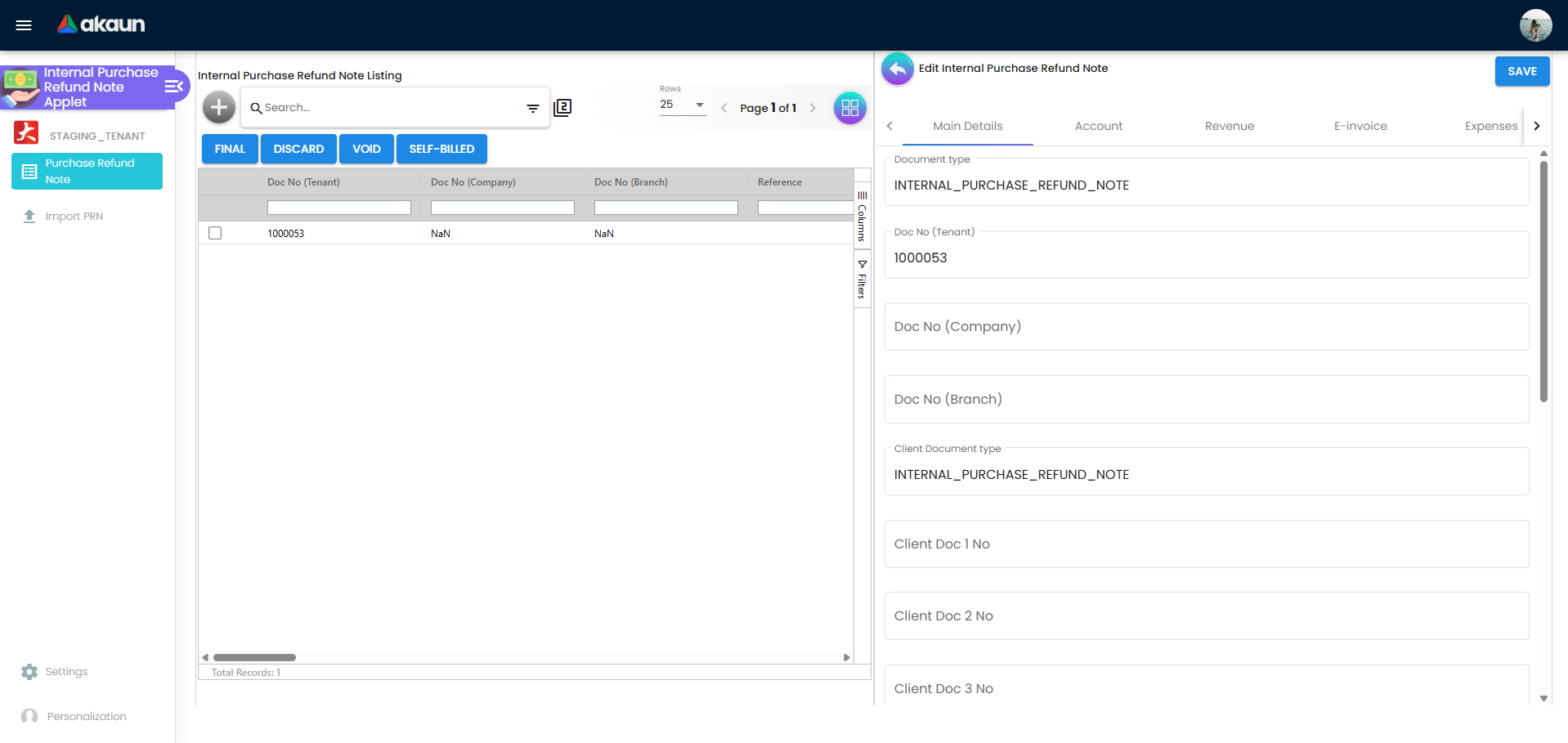
Listing. Columns: Doc No (Tenant), Doc No (Company), Doc No (Branch) — each hidden by HIDE_SERVER_DOC_1/2/3 unless the role holds the matching SHOW_DOC_NO_* code — Reference, Posting Status, Status, Branch Code, Customer Name (the column is labelled “Customer” but shows the supplier — a leftover of the receipt-voucher copy), Item Remarks, Amount Txn, Settlement Amount, the five ARAP figures (PNS, Settlement, Doc Open, Contra, Bal — each HIDE_ARAP_* / SHOW_ARAP_*) and Self Billed. Toolbar: Create (+) (disabled without the server-side create permission), FINAL, DISCARD, VOID (each hidden by HIDE_GENDOC_*_BUTTON unless the role holds SHOW_GENDOC_*_BUTTON) and SELF-BILLED (no setting and no permission). The listing loads the last month by default unless ENABLE_FILTER_BY_TODAYS_TXN is on; results are paged at the pagination component’s rows-per-page and sorted by SORT_ORDER when set.
Create form tabs: Main Details, Account, Revenue (HIDE_REVENUE_TAB), Expense (HIDE_EXPENSES_TAB), Settlement (HIDE_SETTLEMENT_TAB), Department Hdr (HIDE_DEPARTMENT_HDR_TAB). Delivery Details, Contra and Posting tabs are commented out of the template. CREATE is enabled once branch, location and currency are set, a supplier is selected and the draft is still TEMP; it converts the draft to ACTIVE (see Lifecycle). RESET clears the draft.
Edit form. Buttons: SAVE (disabled when the document is FINAL / VOID / not ACTIVE, or the user lacks the server-side update permission) and, on a FINAL foreign-currency document, a currency toggle that switches the view between the document and its base-currency shadow. The FINAL / DISCARD / VOID buttons and the DELETE button are commented out of this template — those actions are listing-only. Tabs, in the order saved by Default Selection → Details Tab Ordering: Main Details, E-invoice, Account, Revenue, Expenses, Settlement, ARAP, Department Hdr, TraceDocument, Contra, Doc Link, Export, Attachments. Each tab is dropped from the tab strip when its hide key is on; with VERTICAL_ORIENTATION (or DEFAULT_ORIENTATION = VERTICAL) the same tabs render as expansion panels whose initial state follows the EXPAND_* keys.
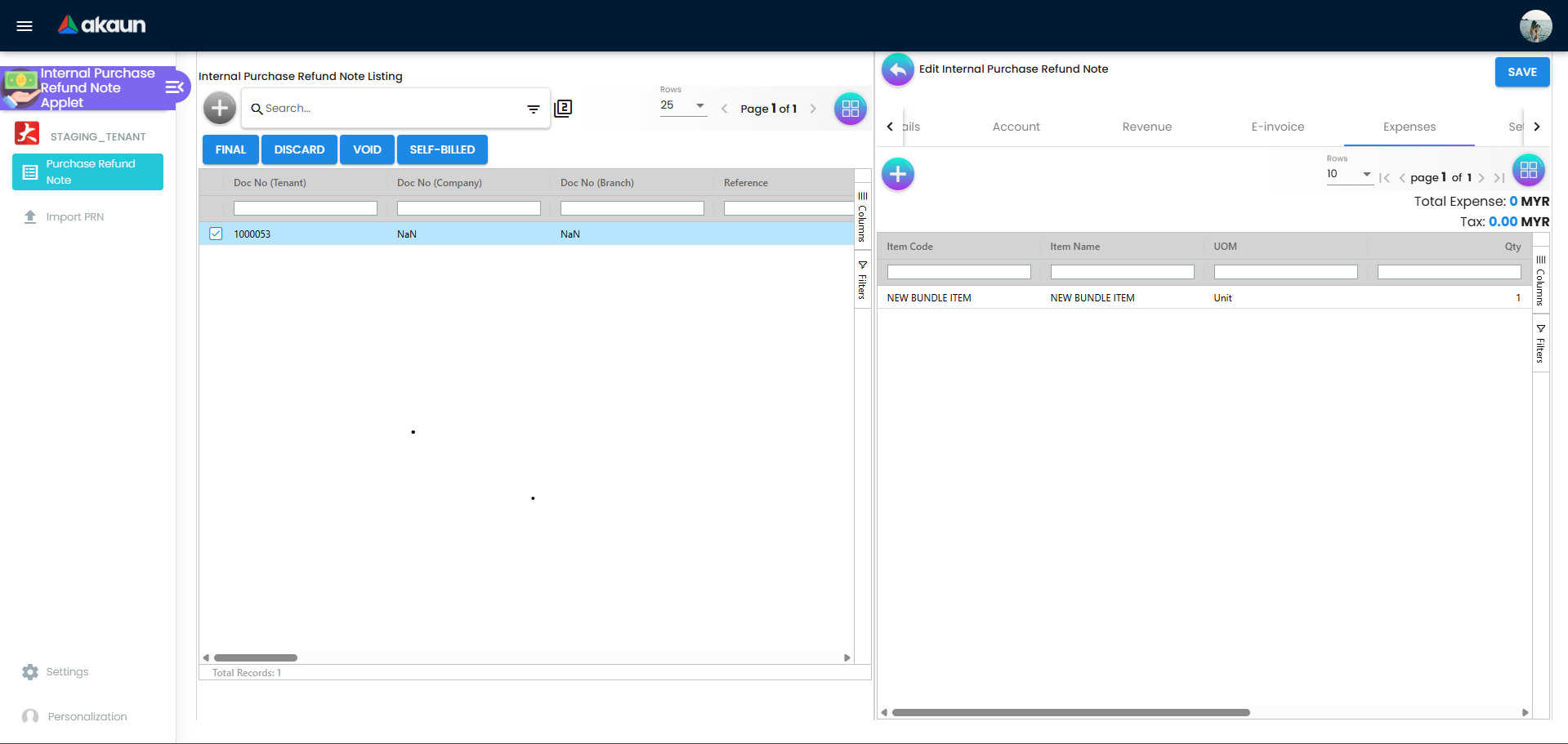
Revenue and Expense tabs. Both are line grids with their own + button; the difference is what the line editor writes. A line added from the Revenue tab is stored with document type INTERNAL_SALES_INVOICE; a line added from the Expense tab with INTERNAL_PURCHASE_INVOICE. Each grid shows only its own type and hides the three price columns unless the role holds INTERNAL_PURCHASE_REFUND_NOTE_DISPLAY_PRICING. Totals (“Total Revenue” / “Total Expense” and Tax) sit above each grid.
Line editor (Add / Edit Line Item): Item Details (Main Details, Delivery Instructions, Department, Related Documents copy-from / copy-to), Pricing Details, Costing Details (HIDE_COSTING_DETAILS), Serial Number / Batch Number / Bin Number (by the item’s sub-item type) and Issue Link.
Settlement tab. A grid of settlement lines (Date, Amount, Details, Remarks) with Total Settlement, Doc Open Amount and Doc ARAP Balance above it. The Add Settlement form takes a settlement method (from Branch Settings → Default Settlement Method), a settlement type — CASH, CASH_BACK, CREDIT_CARD, VOUCHER, TT_PAYMENT, BANK_TRANSFER, MEMBERSHIP_POINT_CURRENCY, CHEQUE, POST_DATED_CHEQUE — a date, an amount and the type’s own fields (card details, cheque number and date, transaction number, voucher number, points).
ARAP tab. Read-only figures: Product & Services, Settlement, Doc Open Amount, Contra, Outstanding.
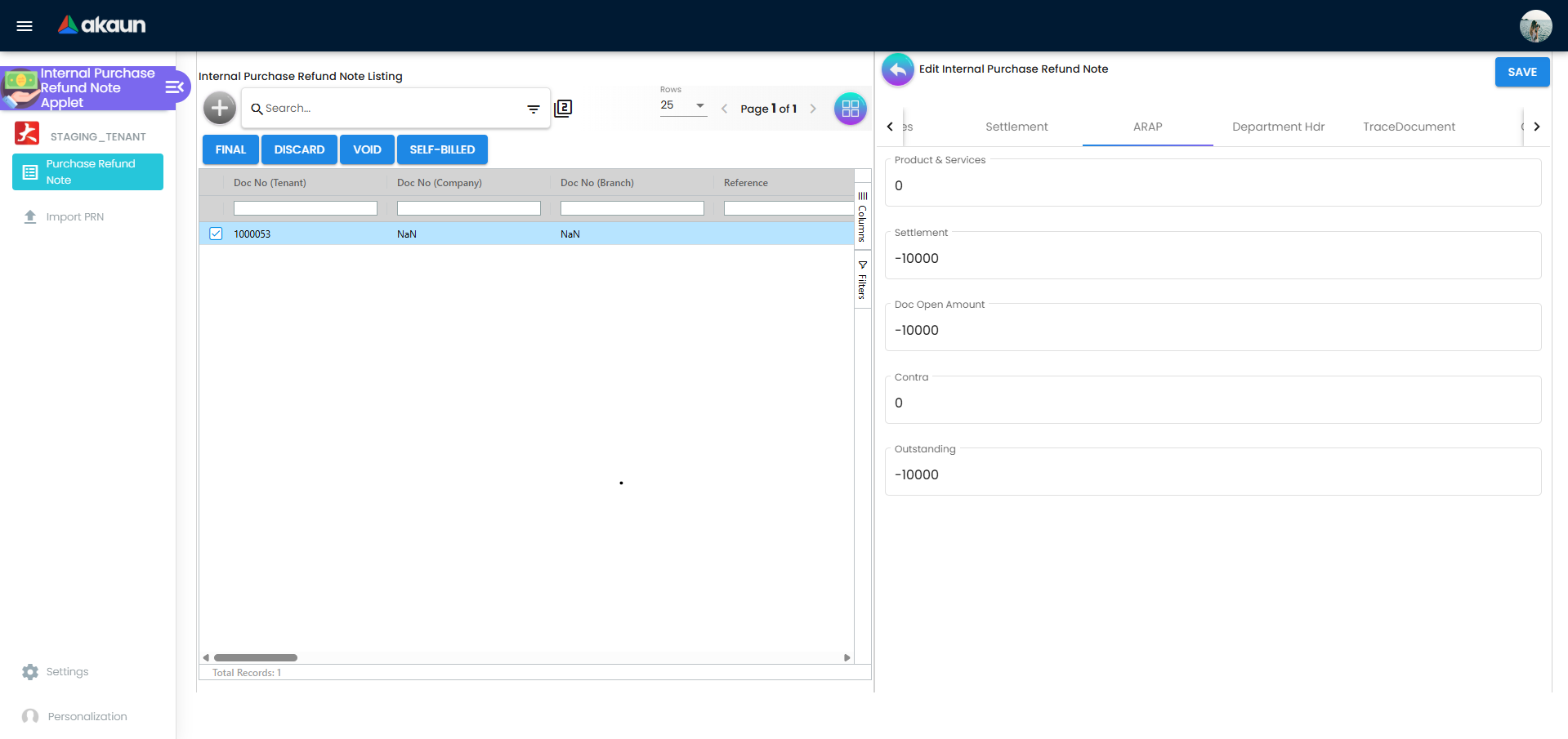
Contra tab. Lists the contras recorded against this document; Add Contra opens a Select Document picker of the same supplier’s FINAL documents whose balance has the opposite sign to this document’s, with DISCARDED and VOID rows removed, then asks for a contra amount.
E-invoice tab (edit only): Submission (submission type, document number and type, e-Invoice number and UUID, Original E-invoice Ref No picker that records the original e-invoice, document date, billing frequency and period, skip flag), Progress (pending posting, pending batch, pending submission, submitted), Notification, Cancellation and Matched History.
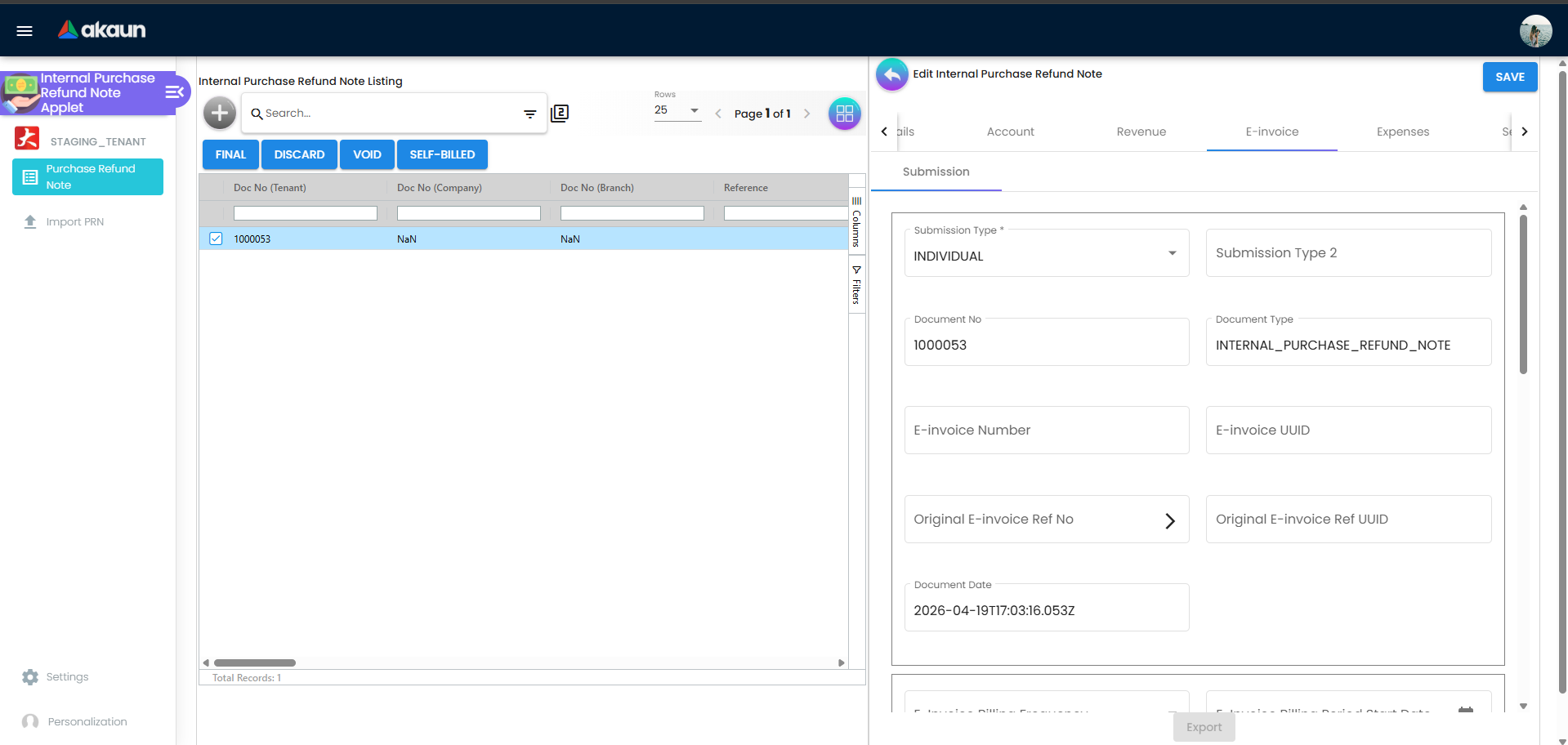
Other tabs. Department Hdr (dimension, profit centre, project, segment on the header), TraceDocument (the shared posting-trace component), Doc Link (copy-from / copy-to document links), Export (printable-format picker defaulting to the branch’s default printable format, then PRINTABLE), Attachments.
Import PRN. A file-import listing, create and edit screen (the component is the receipt-voucher import container reused). The CSV header row is checked against the expected column set; missing or unknown columns are written to the import header’s error message (see Troubleshooting). Today this is the screen to use for a new refund note: the importer sets the header amount sign to +1 and each line to quantity −1 / amount +1, which is what the server checks for, so imported notes are created where the Create button’s are refused. The import has no Revenue / Expense split, so every imported line with a stock item moves stock out at FINAL: list only goods that actually went back to the supplier, and use a service item for a refund with no goods.
Settings menu (System Configuration): Application Settings (the shared field-configuration screen), Default Selection, Branch Settings (Branch Details, Item Category Filter, Pricing Scheme, Printable Format, Default Settlement Method), Printable Format Settings; the routes also expose Webhook, Feature Visibility and the shared permission listings. Personalization: Default Selection (per-user branch and location) and Sidebar.
Configuration
Before you can use it
| Prerequisite | Where | Why |
|---|---|---|
Company default GL codes CREDITOR (and CREDITOR_NON_TRADE), PURCHASE, INPUT_TAX, SETTLEMENT_CHARGES | Chart of Account → Companies → the company → Default GL Codes | Not checked at FINAL — the posting job runs after the status change. The creditor mapping is a hard stop in that job (MISSING_DEFAULT_GL_CODE: CREDITOR). A missing PURCHASE or INPUT_TAX default silently drops the line from the journal and the job then fails with TOTAL_DEBITS_AND_TOTAL_CREDITS_NOT_BALANCES. Either way the note stays FINAL with no journal. Once the mapping exists, ask BigLedger support to re-post the note’s journal: Financial Report’s Trace Document and the Missing Journal screens do not accept this document type, so the journal cannot be re-posted from your side. SETTLEMENT_CHARGES is used only when the settlement item carries charges. |
| Supplier with AR/AP type | Supplier | The journal uses CREDITOR for an AP_TRADE supplier and CREDITOR_NON_TRADE for AP_OTHER. |
| Cashbook behind every settlement method | Cashbook; Branch Settings → Default Settlement Method | A settlement item without a cashbook fails the posting job — after FINAL — with MISSING_CASHBOOK: STL_MTHD [code]; a cashbook without a GL code with MISSING_GL_CODE: STL_MTHD [code]. The note stays FINAL with no journal. Neither Financial Report’s Trace Document nor Ledger And Journal’s Missing Journal accepts this document type (Trace Document reports it as unsupported), so once the cashbook is fixed, ask BigLedger support to re-post the note’s journal, and its cashbook line where your company writes one for this document’s payment lines. |
| Branch and location | Organisation | Both are required on the header. Revenue-tab item lines are stock movements; the stock moves at the line’s delivery location if set, else the line’s location, else the header’s. |
| Items and tax codes | Doc Item Maintenance, Tax Configuration | Stock items on the Revenue tab move stock at FINAL; the tax code on a line drives the INPUT_TAX journal line and the e-Invoice tax type code. |
| Fiscal periods | Organisation | A transaction date in a locked period fails FINAL. |
| Permissions | Settings → Permission Wizard / Set / User / Role | Server-side codes TNT_API_DOC_INTERNAL_PURCHASE_REFUND_NOTE_{CREATE,READ,UPDATE,DELETE}_TGT_GUID gate the Create button and SAVE; API_TNT_INTERNAL_PURCHASE_REFUND_NOTE_IMPORT_FILE_HDR_* / _HELPER_* gate the import. |
| e-Invoice (self-billed only) | MY e-Invoice Admin | e-Invoice must be enabled for the company; the SELF-BILLED bulk action flags the document as self-billed. |
Applet settings
Settings live in three places. Tenant-wide keys are edited on the shared Application Settings screen, which shows a control only when it is meant for this applet. Default Selection (applet-local) holds the default branch and location and the Details Tab Ordering. Personalization → Default Selection lets a user override branch and location for themselves. There is no inline settings gear in this applet. Anyone with access to the Settings menu can change tenant-wide keys; personal defaults are per user.
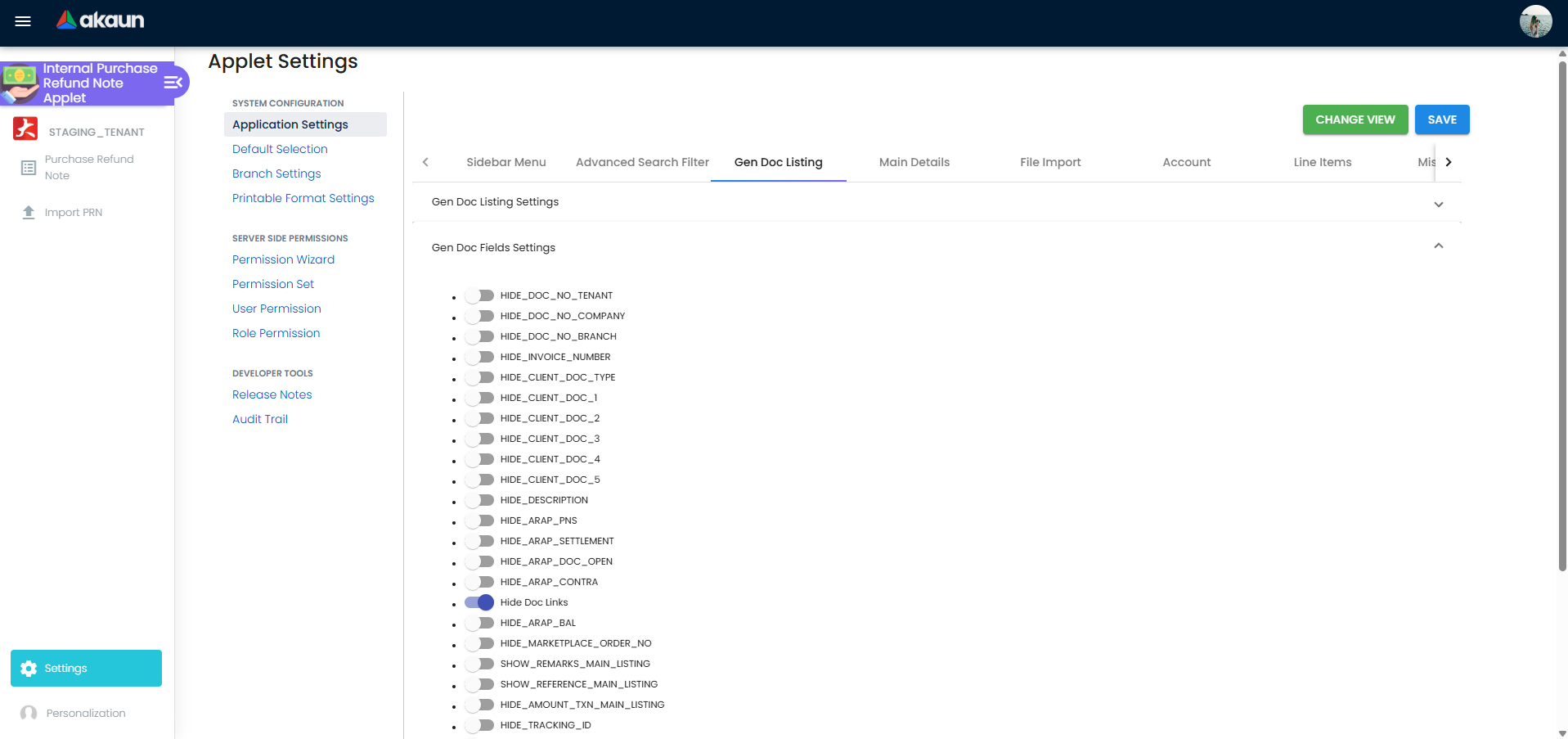
45 settings are rendered, saved and read by the applet. All toggles start off (nothing is stored until Application Settings is saved once, so a fresh tenant sees every field and button until that first save).
| Setting | What it controls | Default | Effect when changed |
|---|---|---|---|
DISABLE_GEN_DOC_LISTING | Whether the listing loads on open | off | On: the listing stays empty until a search is run. |
HIDE_GENDOC_FINAL_BUTTON, HIDE_GENDOC_DISCARD_BUTTON, HIDE_GENDOC_VOID_BUTTON | The three listing bulk actions | off | On: the button disappears for everyone unless the role holds SHOW_GENDOC_FINAL/DISCARD/VOID_BUTTON (checked in code, not seeded — see Permissions). |
SORT_ORDER | Listing sort order sent with every search | unset | Overrides the listing’s built-in order. |
VERTICAL_ORIENTATION | Edit form as expansion panels instead of tabs | off | On: panels; DEFAULT_ORIENTATION (read, no control) can still force HORIZONTAL. |
HIDE_SERVER_DOC_1, HIDE_SERVER_DOC_2, HIDE_SERVER_DOC_3 | Doc No (Tenant / Company / Branch) on Main Details and the listing | off | On: hidden unless SHOW_DOC_NO_TENANT/COMPANY/BRANCH is granted. |
HIDE_CLIENT_DOC_TYPE, HIDE_CLIENT_DOC_1 … HIDE_CLIENT_DOC_5 | Client document type and the five client document numbers | off | On: hidden unless the matching SHOW_CLIENT_DOC_* is granted. |
HIDE_ARAP_PNS, HIDE_ARAP_SETTLEMENT, HIDE_ARAP_DOC_OPEN, HIDE_ARAP_CONTRA, HIDE_ARAP_BAL | The five ARAP columns on the listing | off | On: column hidden unless the matching SHOW_ARAP_* is granted. |
HIDE_UNIT_PRICE_STD_PRICING_SCHEME, HIDE_UNIT_PRICE_STD_INCL_TAX, HIDE_UNIT_PRICE_STD_EXCL_TAX, HIDE_UNIT_PRICE_STD_UOM_INCL_TAX, HIDE_UNIT_PRICE_STD_UOM_EXCL_TAX, HIDE_UNIT_PRICE_NET_UOM_EXCL_TAX, HIDE_UNIT_PRICE_NET_EXCL_TAX, HIDE_UNIT_PRICE_TXN_UOM_INCL_TAX, HIDE_UNIT_PRICE_TXN | Unit-price fields in the line editor | off | On: the field is removed from the line editor’s Main Details. |
HIDE_UNIT_DISCOUNT, HIDE_UNIT_DISCOUNT_UOM_EXCL_TAX, HIDE_DISCOUNT_AMOUNT_EXCL_TAX | Discount fields in the line editor | off | On: hidden. |
HIDE_QTY_BASE, HIDE_QTY_UOM, HIDE_UOM_TO_BASE_RATIO | Quantity fields in the line editor | off | On: hidden. Quantity Base stays required. |
HIDE_AMOUNT_STD_EXCL_TAX, HIDE_AMOUNT_NET_EXCL_TAX, HIDE_AMOUNT_TXN | Amount fields in the line editor | off | On: hidden. |
HIDE_TAX_CONFIG_SELECTION, HIDE_WHT_CONFIG_SELECTION | SST/GST/VAT and WHT pickers on a line | off | On: hidden; lines are then untaxed unless the item carries a default. |
HIDE_COSTING_DETAILS | Costing Details tab of the line editor | off | On: tab removed. |
HIDE_ATTACHMENT_TAB | Attachments tab of the edit form | off | On: tab removed (also read through the panel list). |
DEFAULT_BRANCH, DEFAULT_LOCATION (Default Selection) | Pre-selected branch and location on a new document | null | Personal Default Selection overrides them per user; Reset writes null. |
INTERNAL_PURCHASE_REFUND_NOTE_DETAILS_TAB_ORDER (Default Selection → Details Tab Ordering) | Order of the edit form’s tabs / panels | the built-in order listed above | Drag to reorder; tabs added by a later release are appended after the saved ones. |
Rendered on the shared screen but never read by this applet (saving them changes nothing): HIDE_LAST_PURCHASE_PRICE, HIDE_TRACKING_ID, HIDE_PERMIT_NO, HIDE_VALIDITY_DATE, HIDE_DESCRIPTION, the plain hide final button toggle and enable branch filter.
Read by the applet with no control on any screen (they cannot be set from the UI): HIDE_REVENUE_TAB, HIDE_EXPENSES_TAB, HIDE_SETTLEMENT_TAB, HIDE_TRACE_DOCUMENT_TAB, HIDE_DOC_LINK_TAB, HIDE_EXPORT_TAB, plus ENABLE_FILTER_BY_TODAYS_TXN, DEFAULT_TOGGLE_COLUMN, DEFAULT_ORIENTATION and PRINTABLE (the Export tab’s fallback when the branch has no default printable format).
Also read. With a control on the shared screen: ALLOW_TO_CONTRA_MORE_THAN_DOC_OPEN_AMOUNT (Contra section; off → Add Contra rejects an amount above the document’s open balance), HIDE_MAIN_CONTRA_TAB, and the panel-expansion keys EXPAND_MAIN_DETAILS, EXPAND_ACCOUNT, EXPAND_SETTLEMENT, EXPAND_MAIN_ARAP, EXPAND_DEPARTMENT_HDR, EXPAND_TRACE_DOCUMENT, EXPAND_MAIN_CONTRA, EXPAND_DOC_LINK, EXPAND_EXPORT, EXPAND_ATTACHMENT (vertical mode only). Without any control: HIDE_MAIN_ARAP_TAB, HIDE_DEPARTMENT_HDR_TAB, EXPAND_E_INVOICE, EXPAND_REVENUE, EXPAND_EXPENSES.
Document behaviour settings
There are none in the applet. FINAL, VOID and DISCARD behaviour is fixed by the backend (next section); FINAL runs with the backend’s default checks — stock balance is validated; serial-number and sell-below-cost checks are not. Printables: Branch Settings → Printable Format sets the branch default that the Export tab pre-selects; Printable Format Settings maintains the formats. The e-Invoice tab’s Skip switch excludes the document from e-Invoice submission.
Feature visibility / permissions
No client-side permission is registered for this applet — the permission listing is empty. The applet nevertheless checks these codes, so registering them would make them work:
| Code checked in code | Effect when granted |
|---|---|
SHOW_GENDOC_FINAL_BUTTON, SHOW_GENDOC_DISCARD_BUTTON, SHOW_GENDOC_VOID_BUTTON | Re-show a listing button hidden by HIDE_GENDOC_*_BUTTON for the role. |
SHOW_DOC_NO_TENANT, SHOW_DOC_NO_COMPANY, SHOW_DOC_NO_BRANCH, SHOW_CLIENT_DOC_TYPE, SHOW_CLIENT_DOC_1 … SHOW_CLIENT_DOC_5, SHOW_DESCRIPTION, SHOW_ARAP_PNS, SHOW_ARAP_SETTLEMENT, SHOW_ARAP_DOC_OPEN, SHOW_ARAP_CONTRA, SHOW_ARAP_BAL | Re-show the field or column hidden by the matching HIDE_* setting. |
SHOW_TRANSACTION_DATE | Unlocks the Transaction Date picker on Main Details. Not registered, so on a live tenant the date stays at the value set when the document was created. |
INTERNAL_PURCHASE_REFUND_NOTE_DISPLAY_PRICING | Shows the unit-price and amount columns on the Revenue and Expense grids. Not registered, so the columns are hidden for every role today. |
Server-side: TNT_API_DOC_INTERNAL_PURCHASE_REFUND_NOTE_CREATE_TGT_GUID enables the listing’s Create button; _UPDATE_TGT_GUID (or the admin / owner variants) enables SAVE; _READ_TGT_GUID and _DELETE_TGT_GUID are enforced by the API. SHOW_DOCUMENT_DELETE_BUTTON is read but the DELETE button it would reveal is not on the edit form.
Fields
Main Details
| Field | Meaning | Required | Notes / validation |
|---|---|---|---|
| Document type, Client Document type | INTERNAL_PURCHASE_REFUND_NOTE | — | Read-only; shown on the edit form only. |
| Doc No (Tenant / Company / Branch), Client Doc 1–5 No | The generic document’s three running numbers and five client references | — | Read-only. Hidden by HIDE_SERVER_DOC_1/2/3 and HIDE_CLIENT_DOC_*. |
| Branch | Owning branch | Yes | Drop-down limited to the user’s permitted branches; defaults from Default Selection / Personalization. |
| Location | Stock location the Revenue-tab lines move from | Yes | Drop-down filtered by the selected branch. |
| Transaction Date | Posting date | Yes | Picker locked unless the role holds SHOW_TRANSACTION_DATE; the transaction-date rule applied at FINAL can overwrite it. |
| Currency | Document currency | marked with an asterisk, not validated | Defaults to MYR. Foreign currency creates a base-currency shadow document at FINAL. |
| Base rate | Exchange rate to the company’s base currency | — | Numeric. Checked for consistency at FINAL. |
| Reference, Remarks | Free text | — | Reference is a listing column and is not checked for duplicates. |
All header controls lock once the document is FINAL / VOID or no longer ACTIVE.
Checked By and Approved By open a list of your employees and store the name you pick on the note. They are a record, not a control: nothing asks for them before FINAL, and a name can be replaced but not cleared from this screen. Outside this form they are read only by printable formats, so they reach paper and nothing else. If a supplier refund needs a second pair of eyes, that check is a person’s job and it happens before FINAL: the checker compares the note’s lines and settlement with the supplier’s own credit or refund advice, and the approver finalises (or asks the clerk to) only after that. The names in these two boxes record who someone said did it; they are not evidence that it happened, so an approver who wants the record to mean something picks their own name at the moment they approve.
Account
| Field | Meaning | Required | Notes |
|---|---|---|---|
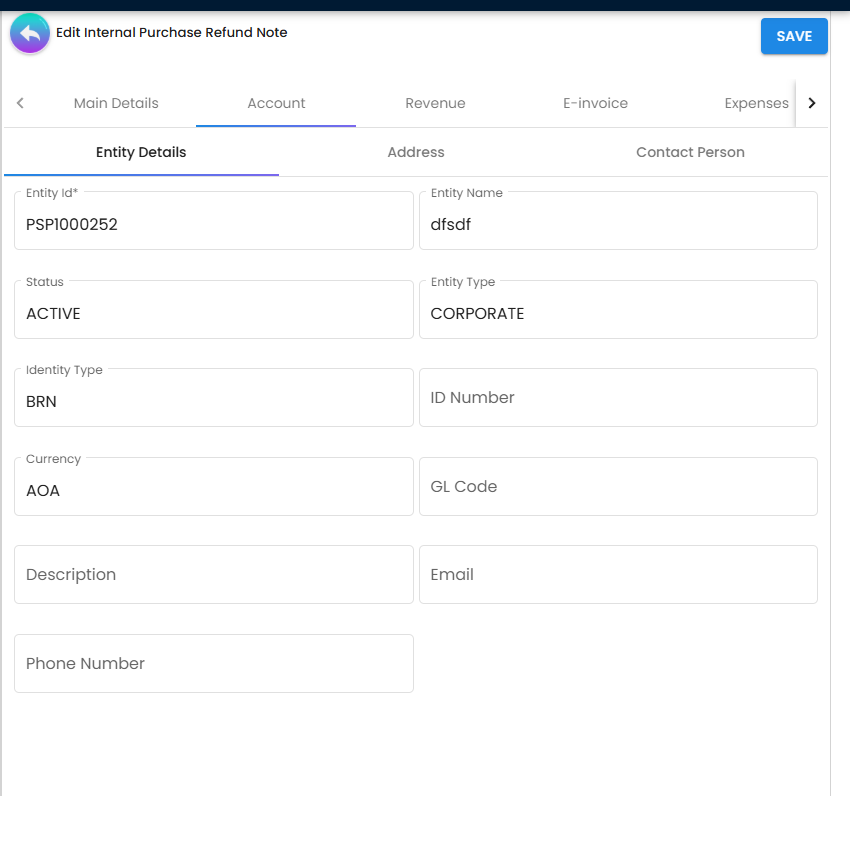
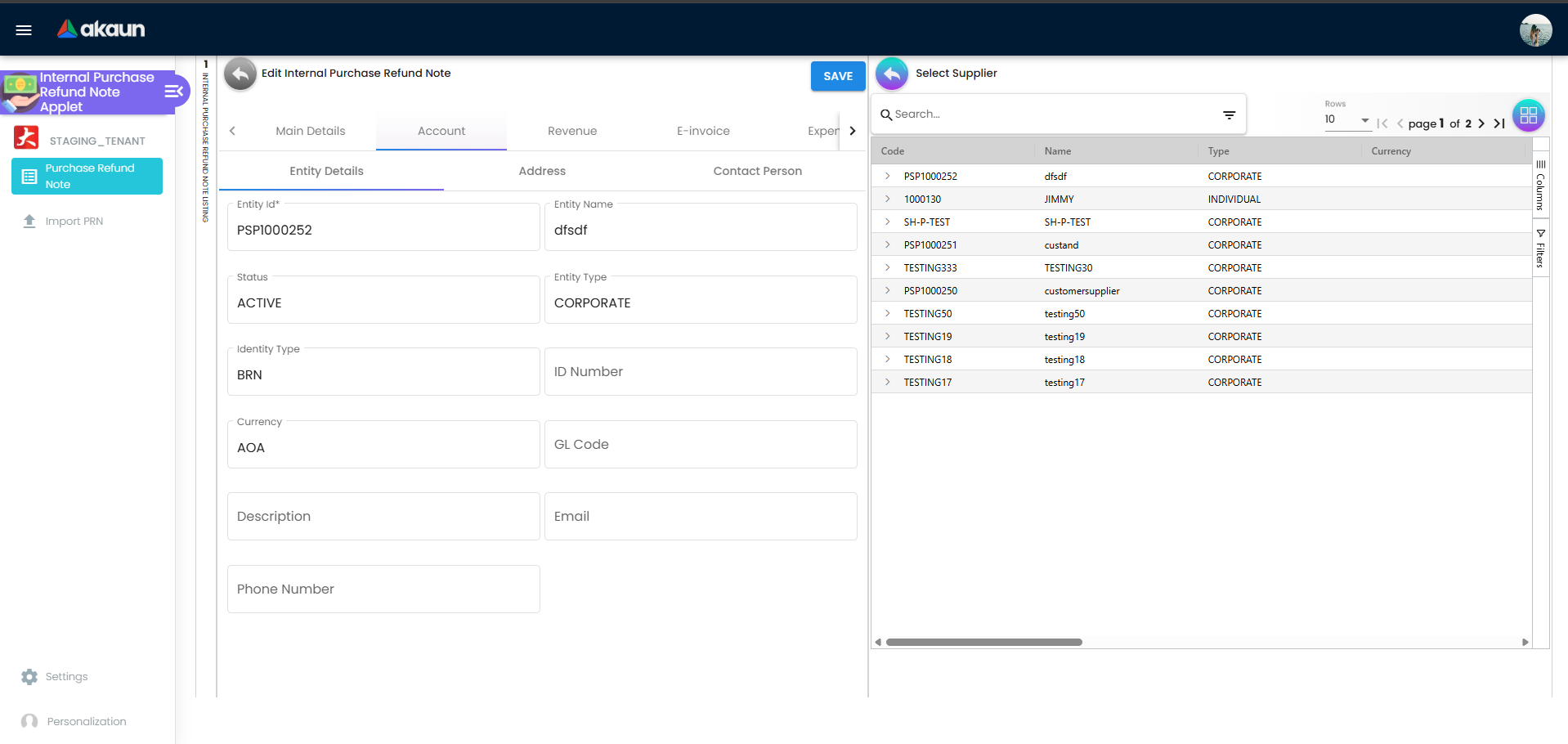
| Entity Id | supplier code | Yes | The only editable control on Entity Details; it opens Select Supplier, which lists supplier records. Picking one copies the supplier’s name, codes, contact details, identity and tax numbers and its self-billed e-Invoice flag onto the note, clears any credit terms, and fills the billing and shipping addresses (next row). It does not change the note’s Currency: the supplier’s currency is shown here for comparison only, so a refund from a USD supplier stays in whatever currency Main Details holds until you change it there. Opening a saved note re-reads the supplier record and refreshes these copied details in the editor, so SAVE writes the supplier’s details as they are today (read from the code, not tried: change a supplier’s phone number, open one draft refund note for that supplier and look at Account before saving). |
| Entity Name, Status, Entity Type, Identity Type, ID Number, Currency, GL Code, Description, Email, Phone Number | supplier master data | — | Read-only copies of the supplier record. |
| Billing / Shipping address | copied address | — | Picking the supplier fills each one with the supplier’s default address, or its only address if it has one. If the supplier has several and none is marked default, or has none, the box keeps whatever it held before — including the previous supplier’s address if you changed supplier on a draft (read from the code, not tried). After changing supplier, open the Address tab and check both before SAVE. The address is a copy: editing the supplier later does not change a saved note, and the Address tab only offers the chosen supplier’s own addresses, so a missing address is added on the supplier record first. |
| Contact Person | contact JSON | name required when adding | Contact Person tab. |
Line editor (Revenue and Expense tabs share it)
| Field | Meaning | Required | Notes |
|---|---|---|---|
| Item Code / Item Name | The item | Yes (via the item picker) | Search Item panel; the tab the line was started from decides the stored document type. |
| Quantity Base | Quantity in the base unit | Yes, minimum 1 | Quantity by UOM and UOM to Base Ratio derive from it. |
| Unit Price STD (excl. / incl. tax), Unit Price Net, Unit Price Transaction, by-UOM variants | pricing | Yes, minimum 0 | Each hidden by its HIDE_UNIT_PRICE_* key. |
| Unit Discount, Discount Amount | discounts | — | HIDE_UNIT_DISCOUNT*, HIDE_DISCOUNT_AMOUNT_EXCL_TAX. |
| SST/GST/VAT, Tax Amount, WHT, WHT Amount | tax | — | Pickers hidden by HIDE_TAX_CONFIG_SELECTION / HIDE_WHT_CONFIG_SELECTION. |
| STD Amount, Amount Net, Txn Amount | line totals | — | STD Amount is the standard unit price (excluding tax) × quantity, before any discount, and cannot be typed. Amount Net is STD Amount less the discount, before tax. Txn Amount is Amount Net plus tax, less withholding tax: the figure the line contributes to the note’s total. Typing Amount Net or Txn Amount works backwards — the difference from STD Amount becomes the line’s discount. When you type Txn Amount, the standard unit price is read without its cents for that back-calculation, so STD Amount and the discount can come out wrong by the cents × quantity while Txn Amount stays as typed, and Quantity by UOM is rewritten as the base quantity multiplied, not divided, by the unit ratio (both read from the code, not tried: on one draft line priced with cents, in a unit other than the base unit, type a Txn Amount and compare STD Amount with price × quantity and Quantity by UOM with what you entered). Where they matter, type the unit price and discount instead. |
| E-Invoice Tax Type Code, classification | e-Invoice line attributes | — | Recorded on the line. The taxable type is worked out from the line’s tax amount at submission, not taken from this field — see Tax Configuration. |
| Sales Order / Purchase Quotation / Purchase Requisition / Jobsheet / Purchase Order / Delivery Order / Purchase Invoice No. | reference numbers | — | Inherited reference fields; no knock-off behind them. |
| Remarks | Line remarks | — | Becomes the journal line description. |
| Batch: batch no, expiry date, issue date, qty; Bin: bin code, container measure, container qty, qty | sub-item data | Yes when the item uses batches / bins | Serial numbers by scan, import or list. |
Settlement
| Field | Meaning | Required | Notes |
|---|---|---|---|
| Settlement Method | settlement item (cashbook) | Yes (picker) | From Branch Settings → Default Settlement Method. |
| Settlement Type | CASH, CASH_BACK, CREDIT_CARD, VOUCHER, TT_PAYMENT, BANK_TRANSFER, MEMBERSHIP_POINT_CURRENCY, CHEQUE, POST_DATED_CHEQUE | Yes | Decides the extra fields and the stored line document type (see Lifecycle). |
| Date | Settlement date | Yes | Defaults to today, not to the header date. |
| Amount | Settlement amount | Yes, minimum 0.01 | Starts at 0.00 rather than at what is left to settle, and zero is refused. Nothing on the screen compares the settlement lines with the note’s total: Total Settlement above the grid is simply their sum, so a settlement for more or less than the refund saves and finalises without a warning. Matching them is the clerk’s check before FINAL — Total Settlement against the refund total and against the money that actually arrived from the supplier (bank statement or cheque). A VOUCHER line has no date box and is always dated the day it is added. |
| Card No / Name on Card / Issuer / Type / Expiry / CVV; Cheque No (and Cheque Date); Transaction No; Voucher No; Points; Cash back amount | type-specific | required per type | Stored on the settlement line. |
Contra
| Field | Meaning | Required | Notes |
|---|---|---|---|
| Document | the FINAL supplier document to offset | Yes | Select Document picker (opposite-sign ARAP balance, not DISCARDED / VOID). |
| Contra amount | amount to offset | Yes | Capped at the document’s open amount unless ALLOW_TO_CONTRA_MORE_THAN_DOC_OPEN_AMOUNT is on; the error text reads “Should not contra more than the receipt amount”. |
Lifecycle and effects
| Status | Meaning | Allowed next |
|---|---|---|
| TEMP | Draft header created when the Create screen opens (no validation). | ACTIVE (CREATE) |
| ACTIVE, no posting status | Editable document. | FINAL, DISCARDED (listing) |
| FINAL | Posted. Header and lines locked. | VOID (listing) |
| VOID | Reversed. | none |
| DISCARDED | Abandoned draft. | none |
CREATE and SAVE both send the whole document through the same update path, which fills each line’s signums from the rules of the line’s own document type and then checks the header amount signum against the refund note’s rules. The applet sets the header to −1; since 2026-04-23 the backend requires +1 — see Troubleshooting.
Backend checks on FINAL (from the listing’s FINAL button):
| Check | Result when it fails |
|---|---|
| Not already FINAL | Generic Document has already been posted to FINAL |
| Stock available for outbound lines (checked by default) | Refused when there is not enough stock at the location, for Revenue-tab item lines (quantity signum −1) |
| Forex rate consistent | Exchange-rate errors |
| Transaction date not in a locked fiscal period | FINAL refused |
What FINAL does once the checks pass: applies the transaction-date rule, sets the e-Invoice skip flag, generates running numbers, creates and posts the base-currency shadow for a forex document, and queues the postings that follow — journal, stock and the rest, subject to the company’s posting configuration.
Posting proof block
| Item | Value |
|---|---|
| Server document type | INTERNAL_PURCHASE_REFUND_NOTE (short code IPRN) |
| Header amount signum | +1 (checked on create and update; was −1 until 2026-04-23) |
| Line signums | Filled per line from the rules of the line’s own document type: refund-note lines quantity −1 / amount +1; Revenue-tab lines (INTERNAL_SALES_INVOICE) −1 / +1; Expense-tab lines (INTERNAL_PURCHASE_INVOICE) +1 / −1; CASH_BACK settlement lines (INTERNAL_PAYMENT_VOUCHER) 0 / +1; a CHEQUE settlement line carries no document type and keeps the applet’s −1. |
| Journal rules | The generic purchase rules apply: the entity line goes to CREDITOR, item lines to PURCHASE, tax to INPUT_TAX. |
| Dr/Cr equation | Each line: amount signum × sign of the amount, positive → credit, negative → debit. Refund-note and Revenue lines therefore credit the purchase account and their tax credits INPUT_TAX; Expense lines debit it; settlement lines other than CHEQUE credit the settlement method’s cashbook GL; the balancing entity line takes the sum of debits less credits and debits CREDITOR / CREDITOR_NON_TRADE when that sum is negative. Net effect for a document with Revenue lines and a settlement: Dr Creditor / Cr Purchase, Cr Input Tax, Cr Cashbook — the supplier balance falls and the cashbook is credited. |
| GL precedence for an item line | line GL code → header GL code → item-company GL link for PURCHASE → company default PURCHASE. An unresolvable purchase line or tax line is silently omitted. |
| Hard stops in posting (after FINAL) | The journal job, not FINAL, throws: MISSING_DEFAULT_GL_CODE: CREDITOR / CREDITOR_NON_TRADE; MISSING_CASHBOOK: STL_MTHD [code], MISSING_GL_CODE: STL_MTHD [code]; TOTAL_DEBITS_AND_TOTAL_CREDITS_NOT_BALANCES only when a line was dropped and the supplier has no AR/AP type (with one, the supplier line absorbs the dropped line and the journal posts wrong, with no error — see Troubleshooting). FINAL has already succeeded when these fire; the note stays FINAL with an empty Journal Txn grid on its Trace Document tab. No screen shows which of these fired; BigLedger support can read it and re-post the journal once the cause is fixed. Only the fiscal-period lock and the stock check stop FINAL itself. |
| Stock posting | An inventory transaction is written for every item line whose quantity signum is non-zero: Revenue-tab and refund-note item lines move stock out (−1 × quantity), Expense-tab lines move it in (+1). Settlement lines are skipped. |
| What VOID reverses | VOID voids the forex shadow if one exists and queues the reversal, which posts the mirror-image journal and reverses the inventory transactions. |
| Back to DRAFT | Not offered by this applet. |
VOID (listing only) is refused when another document links from this one, and with Generic Document cannot be changed to VOID because e-invoice is enabled — when the document is flagged self-billed. The listing’s VOID and DISCARD confirmations are client-side prompts.
DISCARD (listing only) applies to selected ACTIVE rows that have no posting status.
e-Invoice. The purchase refund note is one of the purchase document types e-Invoice handles. A document flagged self-billed is submitted as LHDN type 14, Self-billed Refund Note; without the flag it is not queued at all. The Original E-invoice Ref No picker records the original e-invoice reference that LHDN requires on a refund note.
Import PRN creates and updates documents through the same server checks as the screen, including the header-signum check, but it passes that check: the importer sets the header to +1 and every line to quantity −1 / amount +1. Only the screen’s −1 is refused. An imported note is then finalised from the listing, whose FINAL sends only the new status.
Related applets
- Purchase Return (Internal) — the same signums (quantity −1 / amount +1) with a working applet; the document to use for goods going back to a supplier.
- Purchase Credit Note (Internal) and Purchase Debit Note (Internal) — the non-stock purchase adjustments; the debit note shares this document’s amount signum.
- Purchase Invoice (Internal) — the invoice a refund refers to; link it in Doc Link or the line’s Related Documents.
- Payment Voucher (Internal) — settles or contras the supplier balance; a CASH_BACK settlement line is stored as a payment-voucher line.
- Sales Refund Note (Internal) — the sales-side twin with the same screens.
- Supplier, Cashbook, Chart of Account, Organisation, Tax Configuration, Doc Item Maintenance — the master data the document and its journal depend on.
- MY e-Invoice Admin — where a self-billed refund note is validated, submitted and cancelled.
Troubleshooting
| Symptom | Cause | Fix |
|---|---|---|
| CREATE (or SAVE) is refused as an invalid amount sign on every document. | The applet sends a header amount signum of −1; since 2026-04-23 the backend requires +1 and validates it on CREATE and SAVE. The draft is created first because that step skips validation. | This is a current limit of the screen, not something a setting changes. Record the refund note through Import PRN instead: the importer builds the header at +1, so it is accepted, and you finalise it from the listing. If you would rather not use a CSV, a Purchase Return (goods back) or a Purchase Debit Note (no goods) records the same event under a different document type. |
| Stock fell after FINAL although “nothing was returned”. | Revenue-tab item lines are stored with quantity signum −1 and are outbound stock movements since the April 2026 change. | Record non-stock adjustments on the Expense tab with a service item, or use a Purchase Debit Note (quantity 0). |
| FINAL fails for lack of stock at the location. | Same cause: a Revenue-tab stock item with insufficient balance at the line’s location; the stock check is on by default. | Correct the location or quantity, or use a non-stock item. |
Note is FINAL and Trace Document → Journal Txn is empty; the reason BigLedger support reads is MISSING_DEFAULT_GL_CODE: CREDITOR (or CREDITOR_NON_TRADE). No screen shows it. | The company has no default GL code for the supplier’s AR/AP type; FINAL succeeded and the journal job failed afterwards. | Map it in Chart of Account → Companies → the company → Default GL Codes, then ask BigLedger support to re-post the note’s journal: Financial Report’s Trace Document and the Missing Journal screens do not accept this document type, so the journal cannot be re-posted from your side. |
Note is FINAL, no journal, and the reason BigLedger support reads is MISSING_CASHBOOK: STL_MTHD [code] or MISSING_GL_CODE: STL_MTHD [code]. | The settlement item has no cashbook, or the cashbook has no GL code — the journal job failed after FINAL. | Fix the cashbook. Neither Financial Report’s Trace Document nor Ledger And Journal’s Missing Journal accepts this document type (Trace Document reports it as unsupported), so once the cashbook is fixed, ask BigLedger support to re-post the note’s journal, and its cashbook line where your company writes one for this document’s payment lines. |
Note is FINAL, no journal, and the reason BigLedger support reads is TOTAL_DEBITS_AND_TOTAL_CREDITS_NOT_BALANCES. | A line’s purchase GL or the INPUT_TAX default could not be resolved and the line was dropped from the journal without a message, and the supplier has no AR/AP type, so no supplier line absorbed it. | Set the line GL, the item-company GL link or the company defaults, then ask BigLedger support to post the note’s journal: no screen posts a missing journal for this document type (Repost appears only once a journal has posted), and a second FINAL is refused. |
| No error, but trade creditors no longer agrees with the creditor ageing, and purchases or input tax are short by the same amount | A line resolved no GL code and was left out of the journal; the supplier’s line was built from the lines that remained, so it absorbed the amount and the journal posted. The note is FINAL with a journal, so Trace Document finds nothing, and the supplier statement and ageing (built from documents) look right. Before go-live, check every code this note uses has a company default, or every item its own | Set the line GL, the item-company GL link or the company defaults first. Then open the note in Error Checking › Trace Document and press Repost beside Posting Journal: it deletes the short journal and builds it again from the note, now with every line, and leaves the note and its e-Invoice as they are. The checks on that screen read Unsupported document type for a refund note; the Repost button does not depend on them. Repost successful means it worked. A failed Repost shows nothing, and it has already deleted the old journal, so open the Journal Txn grid afterwards: if it is empty, the cause is still there; fix it and press Repost again, or ask BigLedger support, who can read the reason. Or post a correcting journal yourself that moves the absorbed amount from the creditor to purchases or input tax, or void the note (its reversal mirrors the wrong journal exactly) and record it again. A self-billed note needs its e-Invoice cancelled before it can be voided. |
| The cashbook is credited, not debited, by the settlement line. | Settlement lines carry the refund note’s own document type and receive amount signum +1; unlike the sales refund note, nothing maps them to the payment voucher. A CHEQUE line, which carries no document type, keeps −1 and posts the other way. | Product decision pending. Check the journal before relying on the cash direction. |
| VOID refused: cannot be changed to VOID because e-invoice is enabled. | The document is flagged self-billed (the SELF-BILLED bulk action). | Cancel the e-Invoice first (E-invoice → Cancellation), then void; or clear the flag through the e-Invoice admin path. |
| VOID refused: the note has already been linked with other documents. | Another document has knocked off or linked to this refund note. | Void or unlink the target document first. |
| FINAL fails because the date is in a locked fiscal period. | Transaction date inside a locked period. | Change the date (needs SHOW_TRANSACTION_DATE) or unlock the period. |
| The Transaction Date picker is greyed out. | The picker is disabled unless the role holds SHOW_TRANSACTION_DATE, which is not registered for this applet. | The permission has to be registered for the applet by BigLedger; until then accept the creation date. |
| Unit price and amount columns are missing on the Revenue / Expense grids. | INTERNAL_PURCHASE_REFUND_NOTE_DISPLAY_PRICING is checked but not registered; the columns are hidden for every role. | The permission has to be registered for the applet by BigLedger. |
| FINAL / VOID / DISCARD buttons are missing on the edit form. | They are commented out of the edit template; the actions exist on the listing only. | Select the row in the listing and use the toolbar. |
| The listing shows “Customer Name” on a purchase document. | Copy of the receipt-voucher listing; the column shows the supplier. | Cosmetic; no fix available in settings. |
| “Should not contra more than the receipt amount” when adding a contra. | Contra amount above the document’s open balance while ALLOW_TO_CONTRA_MORE_THAN_DOC_OPEN_AMOUNT is off. | Reduce the amount or switch the setting on (Contra section of Application Settings). |
| Import PRN stays FAILED with Mandatory Columns Missing or Wrong Columns. | The CSV header row does not match the expected column set. | Export a fresh template from the import screen and re-upload; the message lists the offending columns. |
| A refund note was imported, but the same document keyed on the screen is refused. | Expected today. The importer sets the header amount sign to +1, which the server requires; the screen still sends −1. | Keep using Import PRN for new refund notes until the screen is changed. |
| A fresh tenant shows every field and button although the shared screen shows defaults switched on. | The document form reads stored values; nothing is stored until Application Settings is saved once. | Open Application Settings and Save. |
Related documentation
- MyInvois setup and e-Invoice validation — the refund-note rules LHDN applies (original document reference, self-billed types).
- Purchasing module, Financial Accounting module, E-Invoice module.