Rma Applet (Internal)
Handles goods coming back, through three records that are often confused: a Service Note — the repair or return job, not a document; a Customer RMA, a document that authorises a return from a customer and moves no stock and posts nothing; and a Supplier RTV, the record of goods going back to a supplier. By design neither moves stock nor posts: the RTV is the return record, and the Purchase Return moves the goods and the money. RMA Requests is the inbox for requests raised by a logged-in customer or supplier, which become service notes once approved. Do not expect a Customer RMA to restock the item or raise a credit: that is the Sales Return’s job — one document that brings the goods into stock and credits the customer, with the refund on its own Payment tab. Keep the Sales Credit Note for money off with the goods staying sold; it brings nothing into stock. A service note’s status lives in workflow processes built in Workflow Design, and this applet is that engine’s only consumer.
Overview
The Internal RMA applet handles goods coming back. It carries three different records that are often confused with each other: a Service Note, which is the repair or return job itself and lives in its own records, not a document; a Customer RMA, a return document that authorises a return from a customer; and a Supplier RTV, a return document that records goods going back to a supplier. Neither one moves stock or writes a journal, by design — see What a Customer RMA and a Supplier RTV do. A fourth screen, RMA Requests, is the inbox for requests raised by a logged-in customer or supplier entity, which become service notes once approved.
An older family with a similar name — RMA HQ, RMA Staff and RMA Supplier — was the return workflow of the previous EMP system, tracking head-office approval and supplier acceptance on a document. That naming is no longer used: in this applet a return is a service note, and service notes are grouped either as an RTV (return to vendor) or as an RMA (a group of service notes). The old family is not documented; if you have those screens, you are on the old workflow. Each service note is linked to the RMA or RTV line it belongs to; neither container moves stock or posts (see What a Customer RMA and a Supplier RTV do below).
It is opened by service desk and warehouse staff, and configured by whoever owns returns policy — the return-reason and request-action code lists, and the workflow processes that drive a service note’s status, are all maintained inside this applet.
Where it fits
| Direction | What | Why |
|---|---|---|
| Upstream | Sales Invoice (Internal) | A service note and a Customer RMA are normally raised against an item that was sold; the Customer RMA form carries the invoice item details |
| Upstream | Customer Maintenance and Supplier | The entity on a service note, Customer RMA or Supplier RTV |
| Upstream | Inventory Item Maintenance | The item, serial number and unit of measure on every line |
| Configuration | Workflow Design Applet | Supplies the workflow processes whose statuses a service note moves through. Nothing else in the product uses that engine |
| Downstream | Purchase Return (Internal) | What actually takes returned goods out of stock and lowers the supplier’s balance. A Supplier RTV records the return and does neither |
| Adjacent | Warranty Admin | Warranty and expiry dates on the service note |
Screens and menus
The applet mounts at applet/tnt/wavelet/erp/internal-rma-applet with eight sidebar entries.
| Menu | Route | What it is |
|---|---|---|
| Service Note | service-note | The repair / return job. Not a document |
| Customer RMA | customer-rma | Return authorisation from a customer — a service record; moves no stock, posts nothing |
| Customer RMA Line | customer-rma-line-listing | A line-level view across all Customer RMAs |
| Supplier RTV | supplier-rtv | Return to vendor — a service record; moves no stock, posts nothing |
| Supplier RTV Line | supplier-rtv-line-listing | A line-level view across all Supplier RTVs |
| RMA Requests | rma-submissions | Requests raised by a logged-in customer or supplier, awaiting approval |
| RMA Report | rma-report | A flat report across service notes |
| Audit Trail | audit-trail | Applet-level change history |
Service Note
The edit screen’s tabs are Main Details, Account, Gen Doc, Replacement (with Replacement Details and
Replacement Tracking sub-tabs), Attachments, Export and Events. Every tab except Main Details can be
hidden by an applet setting, and the whole set can be reordered from Default Selection. A separate
simplified layout replaces the Main Details form when SIMPLIFIED_UI is on, and it drops the
Account tab as well.
The Lines tab exists in the template but is commented out.
The listing’s Workflow Status and Workflow Resolution columns are joined live from the
workflow tables by the generic listing endpoint (erp/listing/svc-issue). The RMA Report reads the
stored wf_process_status_code column instead; the server refreshes that column from the status
GUID on every save, so the two agree unless a
row was written by something that bypassed the validator.
Customer RMA and Supplier RTV
Both edit screens carry the same tabs: Main Details, Account, Lines, Attachments, Export, Events. A “Doc Link” tab and, on Customer RMA, “RMA Doc” and “Gen Doc” tabs are commented out.
RMA Requests
The review screen has a details tab (branch, location, expiry and extended expiry dates, remarks,
workflow process and status — everything else is read-only, copied from the request) with its own
SAVE, and an Approval Status drop-down of APPROVED / REJECTED. The drop-down is rendered
only when the request carries property_json.approvalStatusToShow, and the only thing that writes that flag is the
details tab’s SAVE. So a freshly received request shows no
approve or reject control until you have saved its details once — see Lifecycle.
RMA Report
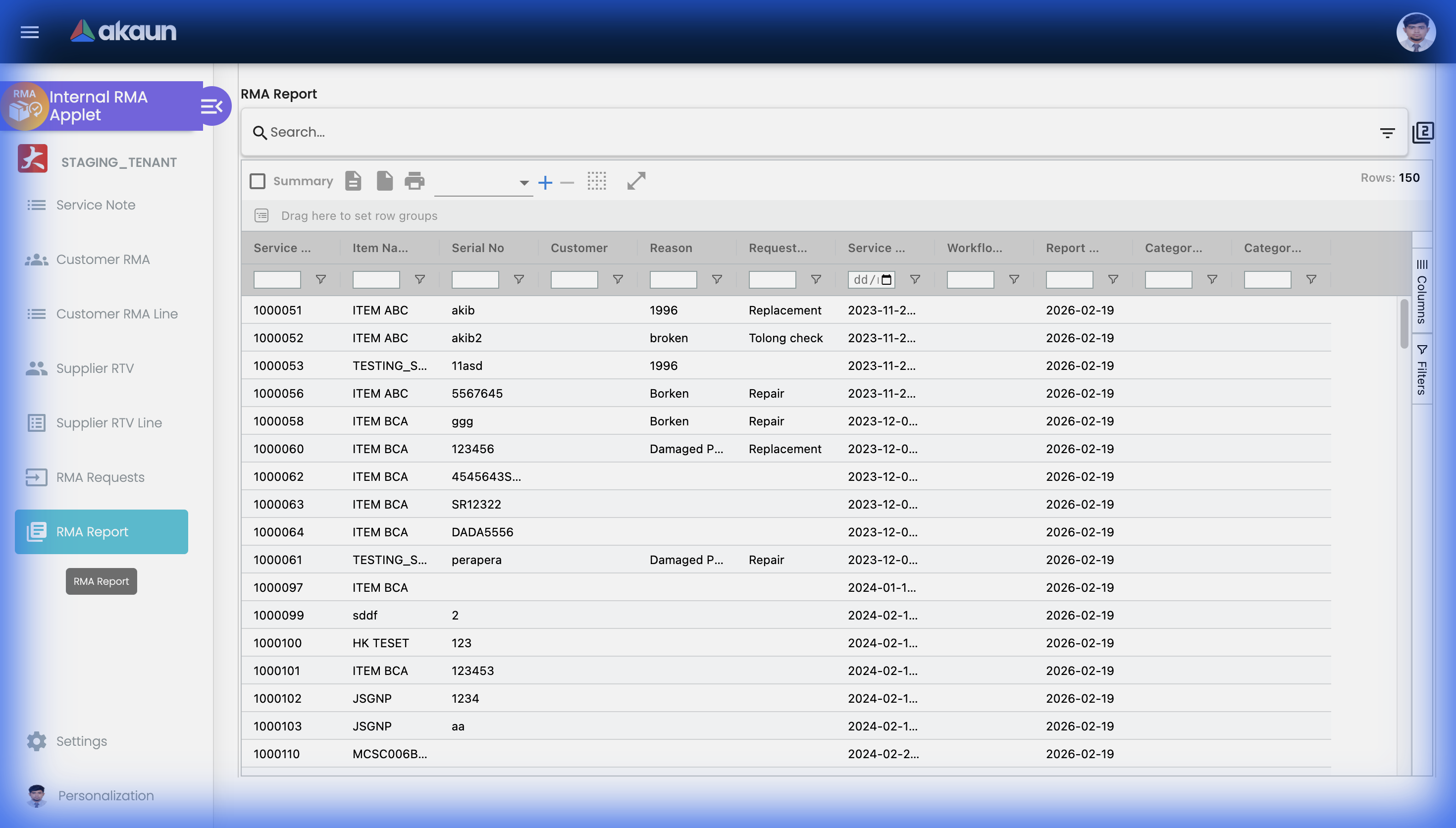
One query feeds both the grid and the CSV export, and it decides what you will and will not see:
| Column or behaviour | Consequence |
|---|---|
| Which service notes appear at all | Only notes whose item is one of your own items. A service note whose item was picked from 3rd-Party Item never appears on the report or in the export. Notes raised from an invoice line, a service-and-repair item or a serial number do |
| Supplier Name | The supplier on the Supplier RTV the note is grouped into — filled only for notes that are in one. A note that is on two RTV lines appears twice, once per supplier |
| Item Qty | Always 1 — the applet saves every service note as one unit and never stores the Quantity box (Fields, below) |
| Workflow Status | The internal status only; the customer and supplier statuses are not on the report |
| Category 0–10, Category Group 0–10 | The item’s eleven category slots and their groups. Categories 2–10 and every Category Group column are hidden by default in the grid and present in the CSV |
| Filters | Service note number, item name, a transaction-date range and the item’s category labels — the only filters the screen offers |
Settings
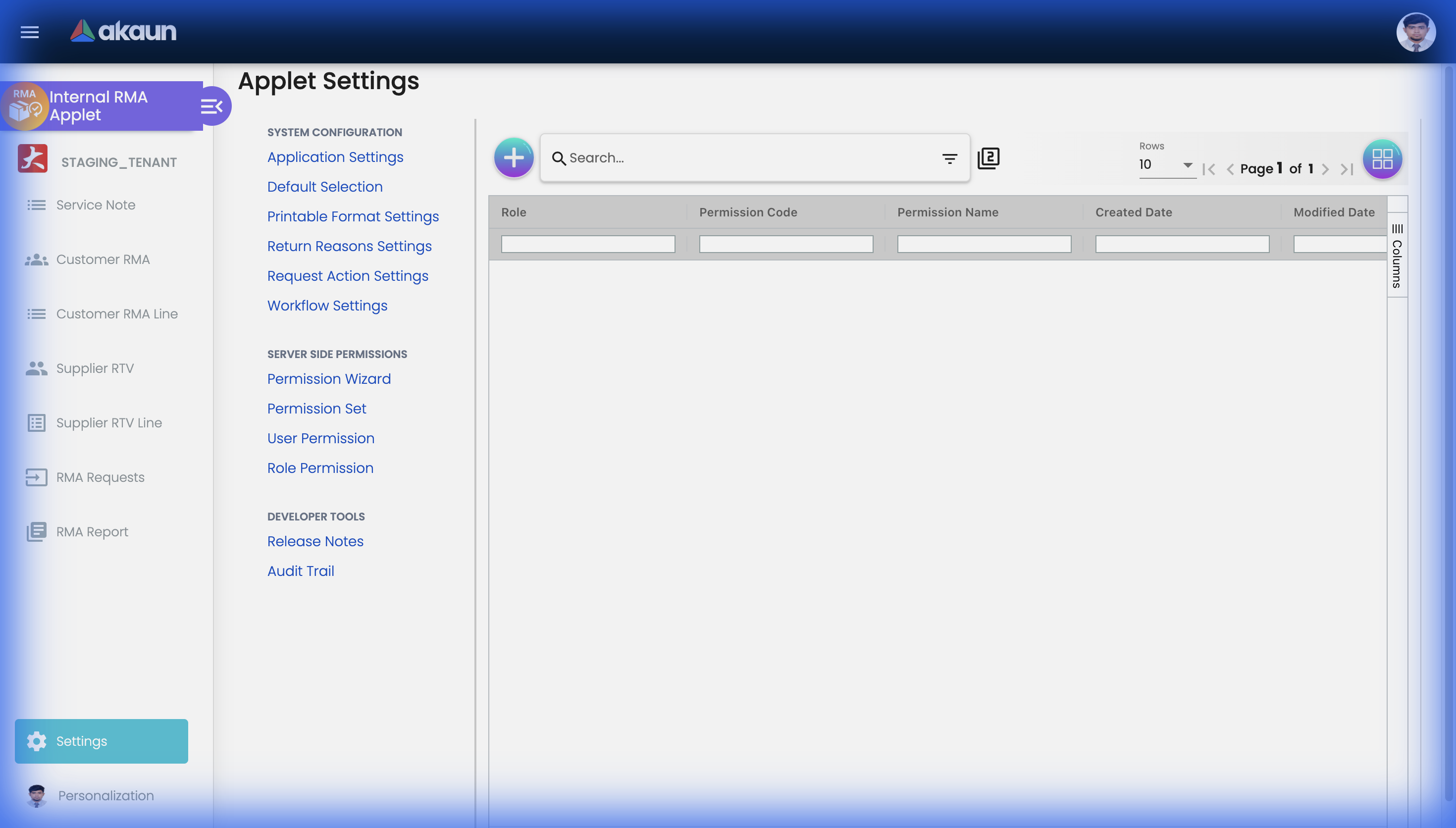
Unlike most applets, every entry in the settings menu opens a real screen: Permission Wizard, Permission Set, User Permission, Role Permission, Release Notes and Applet Log (labelled Audit Trail). Two screens exist with no menu link — Webhook and Feature Visibility — and opening Settings lands on the client-side permission grid even though the menu does not point there.
Configuration
Before you can use it
| Prerequisite | Where it is set | Why it matters here |
|---|---|---|
| Company, branch and location | Organization | Branch and Location are required on a service note, and the branch’s main location is what pre-fills Location when you pick a branch |
| Customer and supplier entities | Customer Maintenance, Supplier | The party on every record here — except a service note of RMA Type INTERNAL, which needs none |
| Every user who will raise service notes, linked to this applet | Tenant Admin → users | The server rejects a service note with no Person In Charge assignee and reporter. With ENABLE_PIC_SELECTION off the form fills both with the current user, but only if that user appears in the applet’s installed-user list; otherwise Create never enables and no field shows why |
| Items with serial numbers where relevant | Inventory Item Maintenance | MAKE_SERIAL_NO_MANDATORY makes the serial number required in the browser; the server never checks it |
| At least one workflow process per role you want statuses for | Workflow Design Applet | Without a process, the Workflow status drop-downs on a service note have nothing to offer |
| A Workflow Settings entry per company | This applet → Settings → Workflow Settings | Binds a workflow process to a company for INTERNAL_SALES_RMA |
| Return reason codes and request action codes | This applet → Settings | Both are required-code, required-name master lists with no seed data |
| Jasper printable formats | This applet → Settings → Printable Format Settings | Needed before a service note, Customer RMA or Supplier RTV can be printed |
| Two e-mail templates, if approval e-mails are wanted | Set up by BigLedger support: an approval template (RMA_EMAIL_APPROVAL_FORMAT) and a rejection template (RMA_EMAIL_REJECTION_FORMAT), each with a title, subject, body and sender e-mail | The RMA-request decision e-mail needs them and fails when one is missing. No screen in any applet sets them up; ask support. See Lifecycle for what happens without them |
Applet settings
Settings › Application Settings. Some eighty toggles here — five tabs, each labelled with its raw key
name — hide a single field, tab, button or menu item and take effect the moment you save; flip one
and you can see what it did. Saving is this.form.value in one dispatch, merged server-side into the applet’s APPLET_SETTINGS
extension row, so keys owned by other screens survive. The settings
below are the ones that change what the applet will let you do.
How settings are stored and who they apply to.
One hide toggle deserves a sentence: HIDE_BRANCH and HIDE_LOCATION remove two required controls
without removing the requirement, which is why the last row of the table exists.
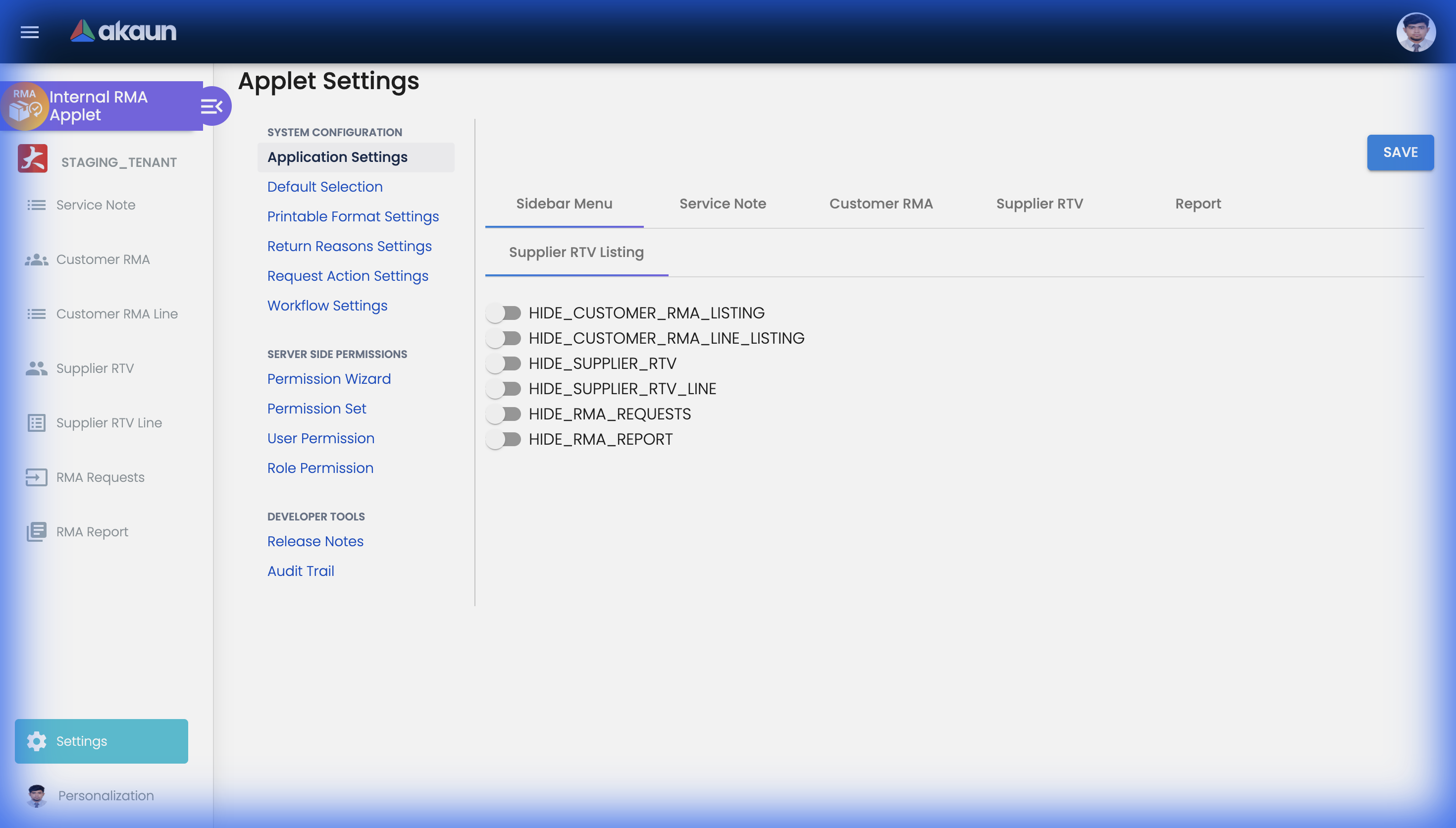
| Setting | What changes | Default when never saved | Advisory or hard |
|---|---|---|---|
WORKFLOW_PROCESS_GUID, CUSTOMER_WORKFLOW_PROCESS_GUID, SUPPLIER_WORKFLOW_PROCESS_GUID | The three processes stamped onto every new service note. A note keeps the process it was created with; changing the setting later re-points nothing, and the status drop-downs on old notes keep offering the old process’s transitions | Empty — new notes carry no process and no status can be chosen | Field disabled in the browser |
SHOW_CUSTOMER_WORKFLOW_STATUS, SHOW_SUPPLIER_WORKFLOW_STATUS | Whether the customer-facing and supplier-facing status drop-downs appear on the edit screen. They are opt-in, the reverse of every HIDE_* key on the same screen | Off — the two statuses exist on the row and can be moved by the API and by workflow triggers, but nobody in this applet can see them | Field hidden in the browser |
ENABLE_PIC_SELECTION | On: Assignee and Reporter are chosen from the applet’s user list. Off: both drop-downs are disabled and pre-filled with you — if you are in that list | Off | Rejected by the server when either is empty, on create and on update |
REASON_UI | DROP_DOWN: Reason is picked from Return Reasons Settings and the code and name are stored separately. INPUT_FIELD: Reason is free text, and the typed text is stored as the code and the name, so the RMA Report’s Reason filter and column carry whatever was typed | DROP_DOWN | Field type in the browser |
MAKE_SERIAL_NO_MANDATORY | Serial No. becomes required on the create form | Off | Browser only — the validator has no serial-number rule, so the API and the RMA-request path create notes without one |
SIMPLIFIED_UI | Replaces Main Details with the one-page layout and removes the Account tab from the edit screen. Same fields, same draft, same save | Off | Layout only |
AUTO_UI | After each step the cursor jumps to the next: entity, then line item, then serial number. The per-field AUTO_UI_* ordering the code once read is commented out, so the order is fixed | Off | Focus only |
DEFAULT_BRANCH, DEFAULT_LOCATION (Default Selection screen) | Pre-fill Branch and Location on a new service note. This is also the only way to satisfy Branch and Location once their hide toggles are on: hiding removes the control and leaves Validators.required on it, so without a default the form is invalid and Create stays greyed with nothing on screen to fill | Empty | Field required in the browser |
On the screen and doing nothing
Shown and saved by the Application Settings screen, and doing nothing in this applet:
- The two document-number hides (customer RMA, supplier return) — nothing uses them anywhere. The document number on a Customer RMA or Supplier RTV cannot be hidden.
HIDE_WORKFLOW_STATUS,HIDE_WORKFLOW_RESOLUTION— do nothing here; the identical settings are used by seventeen other document applets, which is why they appear here. The internal status and resolution on a service note have no working hide setting; the two entity-facing statuses are governed by theSHOW_*pair above.ITEM_CATEGORY_GROUP_1…_10— ten multi-select category-group controls, saved and read back by the settings screen only.
Two more settings exist but are not on this screen: SERVICE_NOTE_DETAILS_TAB_ORDER (owned by
Default Selection, below) and salesManLabels, which nothing sets.
Default Selection
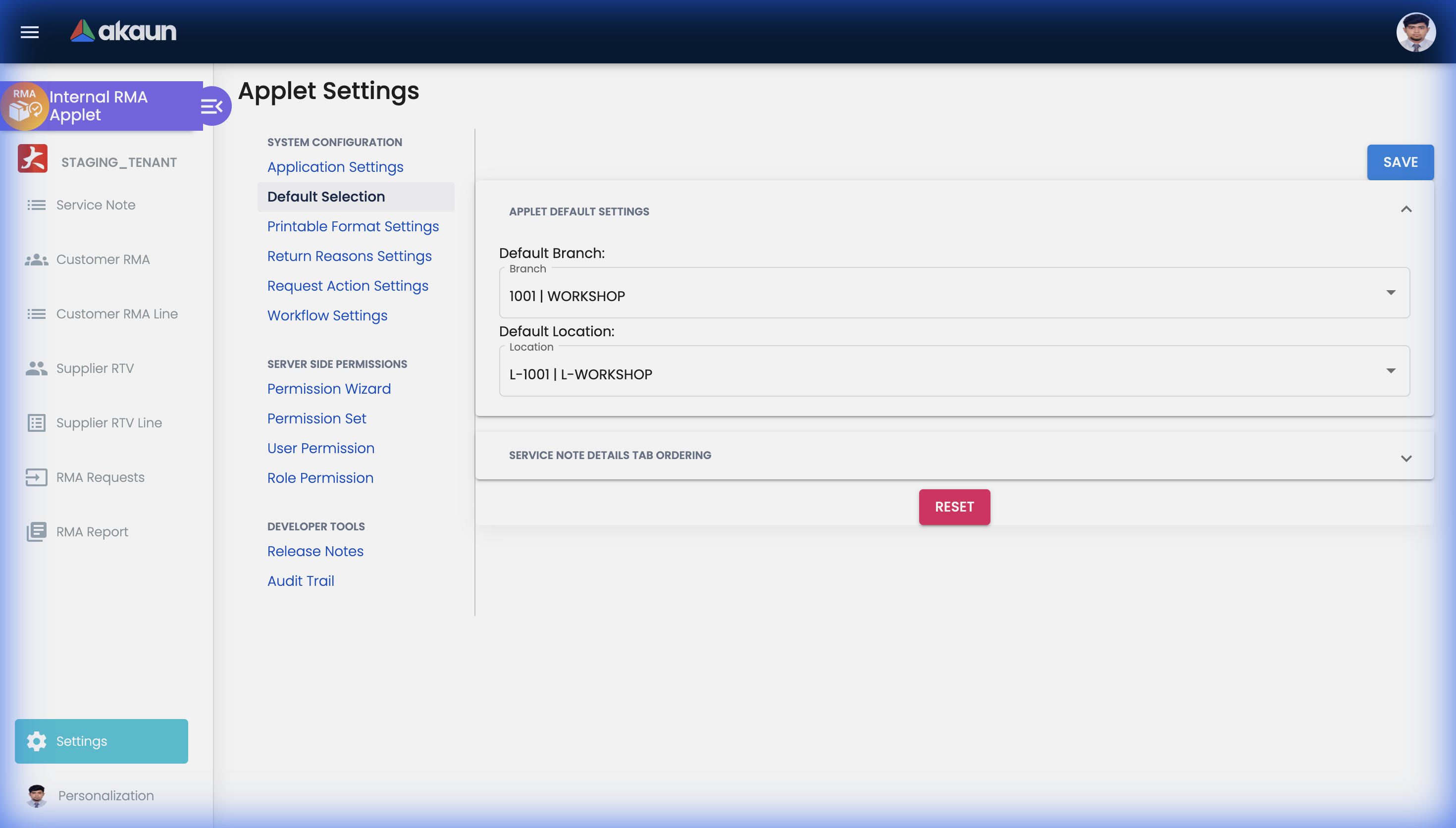
DEFAULT_BRANCH and DEFAULT_LOCATION are in the table above. SERVICE_NOTE_DETAILS_TAB_ORDER
stores the order of the seven service note tabs; the edit screen sorts its panels by the saved order
and appends any tab not in the saved list at the end,
so a tab added in a later release still appears. Picking a branch here also fills
DEFAULT_COMPANY and, when the branch carries a MAIN_LOCATION extension, the default location.
Return Reasons, Request Actions and Printable Formats
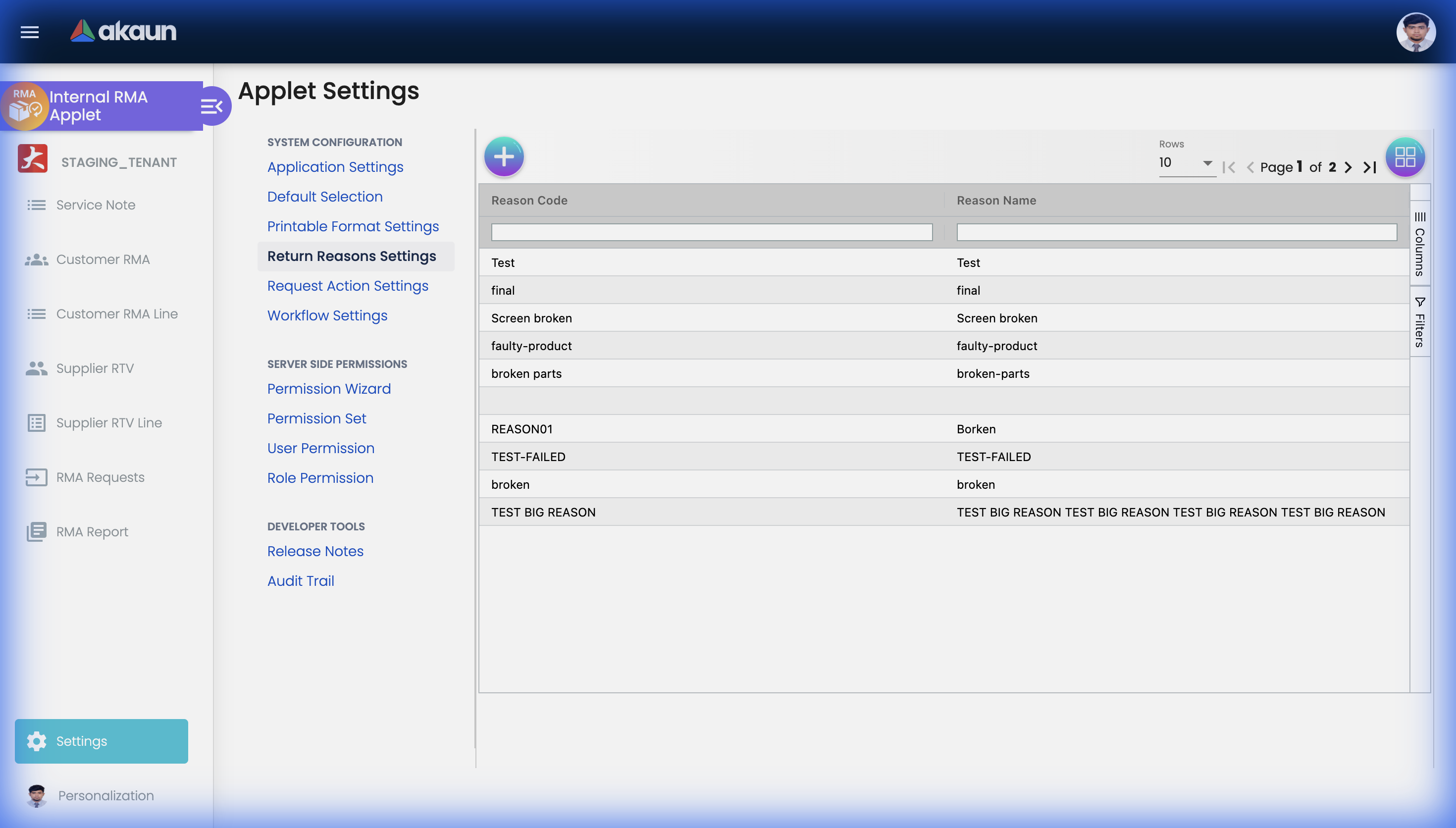
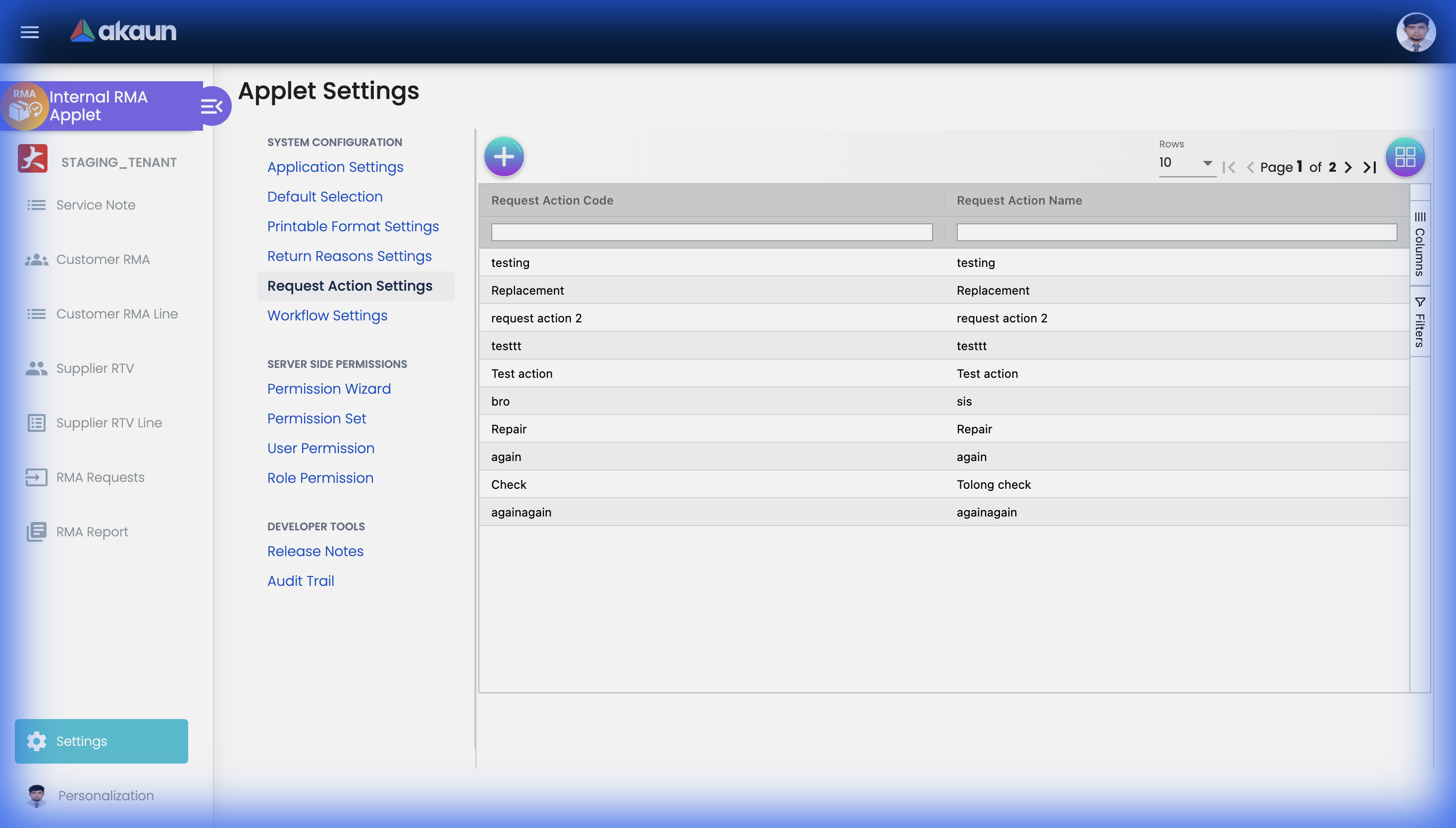
Both are simple two-column masters — code and name, both required — stored at
svc/return-reasons and svc/request-actions. Neither ships with seed data. Return reasons only
reach the service note form when REASON_UI is DROP_DOWN. The service note stores the chosen
code and name as columns of its own (reason_code, reason_name, request_action_code,
request_action_name), so renaming a reason later changes nothing on existing notes and the RMA
Report groups on the old name.
Printable Format Settings lists the Jasper formats available to this applet and marks one as the
default selection per document type; the Export tabs pre-select it from the PRINTABLE key.
Workflow Settings
This screen maps a company and a workflow process to this applet’s Customer RMA (INTERNAL_SALES_RMA),
with a description.
Company and process are both required.
Personalization
The Personalization menu offers only Default Selection (the Field Settings entry is commented out).
The screen never populates its applet container — the subscription that would do so is commented
out — so its branch and location handlers dereference undefined on the first change and SAVE
emits nothing. No personal default is stored.
Who can change what
Access control is server-side, through the TntSvcPermissions families. Each endpoint accepts the
ADMIN and OWNER variants alongside the one named.
| Family | Gates |
|---|---|
TNT_API_DM_SVC_ISSUE_HDR_* | Service notes. Also gates the RMA Report and both settings masters |
TNT_API_DM_SVC_ISSUE_REQUEST_HDR_* | RMA Requests, including the approve / reject action, which needs the UPDATE variant |
TNT_API_DM_SVC_DOC_HDR_*, _DOC_LINE_*, _DOC_EVENT_*, _DOC_ATTACHMENT_* | Service documents, their lines, events and attachments |
TNT_API_DM_SVC_RETURN_REASON_* | Return reason master (create / update / delete) |
TNT_API_DM_SVC_REQUEST_ACTION_* | Request action master (create / update / delete) |
API_TNT_DM_SVC_ISSUE_PROCESSING_QUEUE_* | The service issue processing queue |
TNT_API_DOC_INTERNAL_SALES_RMA_*, TNT_API_DOC_INTERNAL_SUPPLIER_RTV_READ_* | Asked for by the applet’s screens (the Customer RMA listing filters branches by the first). Saving a Customer RMA or Supplier RTV is gated by the service-document family above |
TNT_API_DM_SVC_ISSUE_HDR_READ, not the
family that owns them. So does the RMA Report. A user granted the full
TNT_API_DM_SVC_RETURN_REASON_* family but not the issue-header family can create and edit return
reasons and cannot list them.Three client-side permission codes (Settings › Client Side Permission) change what a user can touch without changing what the server accepts:
| Code | Without it | With it |
|---|---|---|
SHOW_TRANSACTION_DATE | Service Note Date is locked to today | The date can be back-dated or post-dated; the RMA Report’s date filter and the listing’s Date Txn read it |
EDIT_ITEM_NAME | Item Name is read-only, copied from the picked item | Item Name can be overtyped; the note keeps the typed name and the item GUID of the pick, so the report shows the item’s categories under your name |
SHOW_EMAIL | The Email column on the RMA Requests and RMA Report listings is hidden whenever HIDE_EMAIL is saved on | The column shows regardless of the setting |
Fields
Service Note — Main Details
The form takes the usual identification — service note number (assigned on save), external service note number, branch and location, RMA type, faulty-goods pickup type, three dates (service note, customer request, closed), the item block (code, name, serial number, quantity, unit of measure), reason and reason description, remarks, reference, purchase, warranty-expiry and malfunction dates, request action, estimated delivery date, the person in charge (assignee and reporter), sales agent, CRM contact, member card, terms, tracking ID, six charge fields (parts, disposal, labour, government tax, total charges, paid) and, on edit, the three workflow statuses with the internal resolution. Every field on the form except Item Code is typed or picked in place; Item Code opens a picker with four sources — an invoice line, a service-and-repair item, a serial-number search, or a third-party item.
Branch, Location, Status, Assignee and Reporter carry Validators.required; the server independently requires the two people. These are the fields that do
something the screen does not say:
| Field | What the screen does not tell you |
|---|---|
| RMA Type | INTERNAL means no customer: Create enables on the main form alone and the Account tab’s entity is not required. Blank or EXTERNAL needs a customer, or a completed sender block on the Account tab. Nothing else reads the value; it is a filter on the API |
| Faulty Goods Pickup Type | Free text, shown on the create form only. After the first save it is visible nowhere in this applet — the API, the export and the audit trail still carry it |
| Item Code (the picker) | Which source you pick decides more than the item. Invoice line: also fills the customer, contact, serial, warranty dates and links the note to the invoice. Service-and-repair and Serial number: fill the item and, for the first, the customer. 3rd-Party Item: stores name and model as free text and links no item of yours, so the note never appears on the RMA Report |
| Quantity | Stored nowhere. Every save records one unit and ignores the box. A service note is one unit — enter one note per unit, and read 1 on the RMA Report’s Item Qty as the applet’s answer, not yours |
| Serial No. | Required in the browser only when MAKE_SERIAL_NO_MANDATORY; the server never checks it — but since 1 October 2026 it trims leading and trailing spaces from the serial number and the replacement serial on save, so a stray space no longer breaks the exact-match serial trace |
| Reason (Problem) | Drop-down or free text per REASON_UI (above). With free text, the typed value becomes both reason_code and reason_name |
| Service Note Date | Locked unless you hold SHOW_TRANSACTION_DATE; defaults to today |
| Item Name | Read-only unless you hold EDIT_ITEM_NAME |
| Status | ACTIVE / INACTIVE, the record’s own status. This is not the workflow status. Deleting a service note marks it DELETED, and the listing and report leave it out |
| Internal, Customer and Supplier Workflow Status | Each is saved the moment you change it, on its own, not by SAVE — and SAVE then carries the new status. The drop-down offers the current status plus the transitions your role may take; a status the process does not contain is ignored by the server without an error |
| Internal Workflow Resolution | Read-only. It is the resolution attached to the current internal status in the workflow’s status link, not something you set here |
| Parts / Disposal / Labour Cost, Government Tax, Total Charges, Paid | Edit mode only. Six independent numbers stored as columns; nothing totals them, nothing checks Paid against Total Charges, and no journal is posted from a service note |
| Expiry Date, Extended Expiry Date | Stored as due_date and extended_due_date. Picking an invoice line fills them from the line’s warranty; the API names them due_date and extended_due_date, not “expiry” |
| Assignee, Reporter | Required by the server on every create and update. With ENABLE_PIC_SELECTION off the form pre-fills both with you, but only if you are in the applet’s user list — otherwise Create stays disabled with no visible empty field |
A fixed progress list is also available on the record — Ready to send out from Branch, Collected by warehouse/supplier, Investigating, Pending to confirmation, Ready to send out from warehouse, Collected by Branch, Ready to collect by customer, Collected by customer, close. It is hard-coded in the applet and is not configurable.
The Account tab’s customer block is what the public tracking lookup matches against: the e-mail and
phone number on the customer record — or, for an invoice-line pick, on the invoice’s buyer block — are
copied into property_json.email and property_json.phoneNumber at that moment and are not refreshed when the customer record changes.
Customer RMA and Supplier RTV
Both are service records, not ledger documents: there is no FINAL, and saving one starts nothing. The Main Details tab holds Branch, an external reference (External DO No. on the Customer RMA, External Service Note No. on the Supplier RTV), Remarks and a Tracking ID; Account holds the entity; Lines holds the returned items.
RMA Requests
The details tab is editable for branch, location, expiry and extended expiry dates, remarks, and
the workflow process and status; every other field (item, quantity, serial number, contact, member
card, sales agent, tracking ID, purchase date, requested date) is read-only, copied from the
request. Saving the details tab does three things the form does not show: it stamps you as the request’s assignee and reporter, it
sets the flag that makes the Approval Status drop-down appear, and — server-side — it resets the
approval status to PENDING_APPROVAL. Choosing REJECTED
opens a modal that requires a rejection reason.
Lifecycle and effects
The three record types are not one flow
There is no single “RMA lifecycle”. Three independent things happen here.
1. RMA Request → Service Note. A request is created at PENDING_APPROVAL, either by a back-office
user or by a logged-in customer or supplier on a customer-facing portal (which needs the customer or
supplier’s own login, not a permission). The review runs in this order, and the order matters:
- Save the details tab. Until then there is no Approval Status control. The save writes your own user into both Person In Charge fields of the request.
- Choose
APPROVED. A background job then copies the request as it is into a new service note and records the new note on the request. Three things follow from “as it is”: the service note carries the same identifier as the request; its assignee and reporter are whoever last saved the details tab; and if the copy fails its checks — a branch that no longer exists, a person no longer linked — the job ends with no service note and no error shown anywhere. The tell is a request with no service note after approval. That is also the only protection against a double approval: saving the details tab of an already-approved request resets it to Pending, the drop-down re-enables, and approving it again creates nothing — but sends the e-mail again. - Or choose
REJECTED. The modal’s reason is saved by a second details-tab save, and the applet sends that save and the status change at the same time. The save forcesPENDING_APPROVAL, so if it lands second the request reads Pending Approval with a rejection reason filled in, and the e-mail step sends nothing.
Every decision, approve or reject, also starts the notification e-mail. It sends only when the request
has an e-mail address and the status is APPROVED or REJECTED, and it needs the two templates named
under Before you can use it — subject and body may use [customer_name], [service_note_number] and
[serial_number]. Without the template the job fails with “THIS TENANT DOES NOT HAVE THE REQUIRED
RESOURCE FOR: RMA_EMAIL_APPROVAL_FORMAT”, recorded only in the job error log, and the screen shows
nothing; the approval itself has already succeeded. A request with a blank customer name, service note
number or serial number fails the same way. Nothing sets either template up for you, so check that both
exist before you rely on the notification: without them the approval still succeeds and the customer
simply never hears from you.
Once the status is APPROVED or REJECTED the drop-down is disabled — on the screen. Through the API
the status can still be changed by anyone holding TNT_API_DM_SVC_ISSUE_REQUEST_HDR_UPDATE. Every
change is written to the applet audit trail with the old and new values.
2. Service Note → workflow statuses. A service note’s meaningful state is its position in up to
three workflow processes (internal, customer, supplier), each bound by an applet setting and, per
company, by a Workflow Settings entry. Changing a status is one step per change: the applet writes an
audit-trail line (UPDATED INTERNAL WORKFLOW STATUS TO …), the server updates the note and starts a
background job. That job is the piece worth knowing about: it looks up the transition you just took,
finds any transition-to-transition triggers defined on it in Workflow Design, and moves the
other statuses accordingly — a trigger of type TRANSITIONS moves the target process along its
own transition only if that process is currently at the transition’s starting status; any other
trigger type sets the target status outright. So “set the internal status to Repaired and the customer-facing status follows to Ready
for collection” is a configuration, not a habit. It posts nothing and moves no stock.
3. Customer RMA and Supplier RTV → a record, not a posting. Each groups service notes on lines for one customer or one supplier, prints, and keeps attachments and an audit trail. Neither starts a job when you save it — see the next section.
The background jobs on this page
None of them needs scheduling — each runs straight after the action that starts it:
| Job | Started by | What you can see of it |
|---|---|---|
| Turning an approved request into a service note | Choosing APPROVED | Only the result: the request shows its service note. A failure leaves no trace |
| The approval / rejection e-mail | Every approval-status change | Nothing, unless the e-mail arrives; without the two templates it fails silently |
| Moving the other workflow statuses | Every workflow status change | The other statuses moving, where triggers are set up in Workflow Design |
What a Customer RMA and a Supplier RTV do
| Customer RMA | Supplier RTV | |
|---|---|---|
| Stock | None | None — the returned item is still on hand at its location |
| Journal | None | None — no supplier credit, no change to what you owe |
| Saving it | Writes the record and an audit line | Writes the record and an audit line |
The RTV is the return record; the Purchase Return moves the goods and the money. Saving a Supplier RTV records that goods are going back — the service notes, the supplier’s reference, the paperwork. It does not take them out of stock or lower the supplier’s balance, and it is not meant to. Until the Purchase Return is finalised, your stock report still counts the items, their cost stays in inventory, and the supplier’s statement will not match yours once the supplier issues its credit.
Why it works this way. The design keeps the logistics record — what is going back, to whom, under which reference — apart from the ledger document, so only the Purchase Return touches stock and the books.
The step that completes it. Raise a Purchase Return (Internal) for the same items, usually pulled from the original purchase invoice or GRN. Finalising the Purchase Return is what takes the quantity out of stock and lowers what you owe the supplier.
How to check, in a minute. After saving a Supplier RTV, open the item’s stock balance at that location: the quantity has not moved. After finalising the Purchase Return, it has.
A Customer RMA is a tracking and authorisation document only. Any statement that approving a Customer RMA restocks the item or raises a credit is wrong. The document that does both is the Sales Return: the server stamps its lines with quantity +1 and amount −1, so finalising it brings the goods into stock at the location on the line and lowers what the customer owes in the same document, with the refund on its Payment tab. A Sales Credit Note carries amount −1 and quantity 0 — money off, nothing into stock — so a return settled on a credit note leaves the shelf disagreeing with the system, and a credit note plus a separate stock-in is the pair the sales workflow hub warns against. A swap at the counter is one POS bill: a return line for the faulty unit and a sale line for its replacement.
The public tracking lookup
A customer can look up their own service notes without an account, from a customer-facing web page, by giving the e-mail or phone number stored on the note when it was created. So a customer whose e-mail changed afterwards will not find their note. This lookup is being reviewed; ask BigLedger before you build a new customer-facing page on it.
Printing
Service notes, Customer RMAs and Supplier RTVs print one at a time or in batches, each using a format chosen from Printable Format Settings.
Related applets
- Workflow Design Applet — defines the processes, statuses, transitions, roles and transition-to-transition triggers that the three workflow status fields on a service note use. This applet is the engine’s only consumer.
- Sales Invoice (Internal) — the document a returned item usually came from.
- Customer Maintenance and Supplier — the entities on each record.
- Inventory Item Maintenance — items, serial numbers and units of measure.
- Organization — company, branch and location, and the companies listed on the Workflow Settings screen.
- Warranty Admin — the warranty side of the same items.
Troubleshooting
| Symptom | Cause | Fix |
|---|---|---|
| The Workflow status drop-down on a service note is empty | Either no process is selected in Application Settings, or the available-status query finds no transition reachable by this user’s role — it inner-joins transition → role → user | Set the three process settings, then check the user has a Role row in the workflow process |
| The customer or supplier status field does not appear at all | SHOW_CUSTOMER_WORKFLOW_STATUS / SHOW_SUPPLIER_WORKFLOW_STATUS are opt-in, not hide toggles | Turn the relevant one on in Application Settings |
Turning on HIDE_WORKFLOW_STATUS, HIDE_WORKFLOW_RESOLUTION or either document-number hide changes nothing | All four are saved and read by nothing in this applet | Use the two SHOW_* keys for the entity-facing statuses; the internal status, the resolution and the document numbers cannot be hidden |
| An RMA Request shows no Approve / Reject control | The drop-down renders only after the request’s details tab has been saved once | Open the details tab, press SAVE, then choose the status |
| Approving an RMA Request does not produce a service note | Either the request already has a service note (a second approval is skipped), or the copy failed its checks inside the job — a missing branch, location or person — and the job reports nothing | If the request still has no service note after approval, correct the request’s branch, location and people from the details tab, save, and approve again |
| A rejected request reads Pending Approval again | Reject sends two requests at once; the details save forces PENDING_APPROVAL and can land last | Reject once more — the reason is already stored |
| The approval or rejection e-mail never arrives | The RMA_EMAIL_APPROVAL_FORMAT / RMA_EMAIL_REJECTION_FORMAT template is not set up for your tenant, or the request has no e-mail, or the request lacks a customer name, service note number or serial number — the job fails silently in each case | Have support set up the two templates; check the request’s e-mail and the three fields the template fills in |
| The Reason field is free text when it should be a list | REASON_UI is INPUT_FIELD | Set it to DROP_DOWN in Application Settings, and add codes under Return Reasons Settings |
| The Reason drop-down is empty | Return Reasons Settings ships with no data | Add codes there first |
| Reason or Request Action codes will not list, but can be created | Both listings are gated by TNT_API_DM_SVC_ISSUE_HDR_*, not by their own permission family | Grant the issue-header read permission |
| The RMA Report is empty for a user with full service-note rights | Same cross-family gate — the report needs TNT_API_DM_SVC_ISSUE_HDR_ADMIN, _OWNER or _READ | Grant one of those |
| Create stays greyed on a service note with nothing visibly empty | Branch or Location hidden by HIDE_BRANCH / HIDE_LOCATION with no default, or the Person In Charge could not be pre-filled because you are not in the applet’s user list | Set DEFAULT_BRANCH / DEFAULT_LOCATION in Default Selection; link the user to the applet, or turn ENABLE_PIC_SELECTION on and pick someone |
| Service Note Date cannot be changed | It is locked unless you hold the client-side permission SHOW_TRANSACTION_DATE | Grant the code in Settings › Client Side Permission |
| A service note is missing from the RMA Report | Its item was picked as a 3rd-Party Item, so it links no item of yours and the report leaves it out | Re-pick the item from a serial number or a service-and-repair item, or read the note from the listing |
| The same service note appears twice on the RMA Report | It sits on two Supplier RTV lines; the report joins one row per RTV line | Expected; the Supplier Name differs per row |
| The quantity I typed is gone and the report shows 1 | The Quantity box is never stored; every service note is saved as one unit | Raise one service note per unit |
| A returned item never comes back into stock after a Customer RMA | A Customer RMA moves no stock, by design | Raise a Sales Return for the goods; it brings them into stock and credits the customer in one document |
| No journal appears for a Customer RMA | A Customer RMA posts nothing, by design | The Sales Return that takes the goods back carries the credit; raise a Sales Credit Note only for money off with the goods staying sold |
| Goods sent back on a Supplier RTV are still in stock, and the supplier’s balance has not changed | A Supplier RTV is the return record only and posts nothing, by design | Raise a Purchase Return (Internal) for the same items |
| Personalization → Default Selection saves nothing | The screen does not work | Use Settings → Default Selection instead |
| The Supplier RTV Line screen is headed “Customer RMA Line Items Listing” | The supplier line component re-uses the customer component’s title | Cosmetic only; the rows are Supplier RTV lines |