Sales Invoice (Internal)
Watch these as presentations — 4 on this page, slides with narration.
Use this applet to bill a customer. Finalising the invoice is what does the work: it takes the stock out, posts the sale to the General Ledger and opens a receivable against the customer — so if you need to bill without moving stock, use Sales Invoice (No Stock Out) instead.
Overview
The Sales Invoice (Internal) applet creates the document that bills a customer and, on finalisation, deducts stock, posts the sale to the General Ledger and opens a receivable against the customer. It is opened by sales administrators and accounts staff. Upstream it is usually created by knocking off a Sales Order, Delivery Order, Jobsheet or Sales Quotation; downstream it feeds the Pick & Pack queue, receipts and contra settlement, sales returns and credit notes, e-Invoice submission, sales commission and membership points.
INTERNAL_SALES_INVOICE. Amount signum +1, quantity signum −1 (every line takes stock out). If you bill without moving stock, use Sales Invoice (No Stock Out) instead.Where it fits
| Direction | Document / applet | How it connects |
|---|---|---|
| Upstream | Sales Quotation (Internal), Sales Order (Internal), Delivery Order (Internal), Jobsheet (Internal), Stock Transfer | Knocked off in the KO For tab; lines and customer are copied in |
| Upstream | Customer, Pricebook, Tax Configuration, Chart of Account, Organisation | Master data the invoice reads |
| Downstream | Sales Return (Internal), Sales Credit Note (Internal), Sales Debit Note (Internal) | Reverse or adjust a FINAL invoice |
| Downstream | Receipt Voucher (Internal), Contra tab | Settle the receivable |
| Downstream | My E-Invoice Portal | LHDN e-Invoice submission of FINAL invoices |
| Downstream | Sales Commission, Sales Contract, Membership Admin | Commission, contract and reward-point processors run off FINAL invoices |
| Sibling | Purchase Invoice (Internal) | The mirror document created in the receiving company for intercompany sales |
| Sibling | POS General | Cash bills (INTERNAL_SALES_CASHBILL) share the same posting engine and return path |
Screens and menus
Route root: applet/tnt/wavelet/erp/internal-sales-invoice-applet/.
| Menu item | Route | What it shows |
|---|---|---|
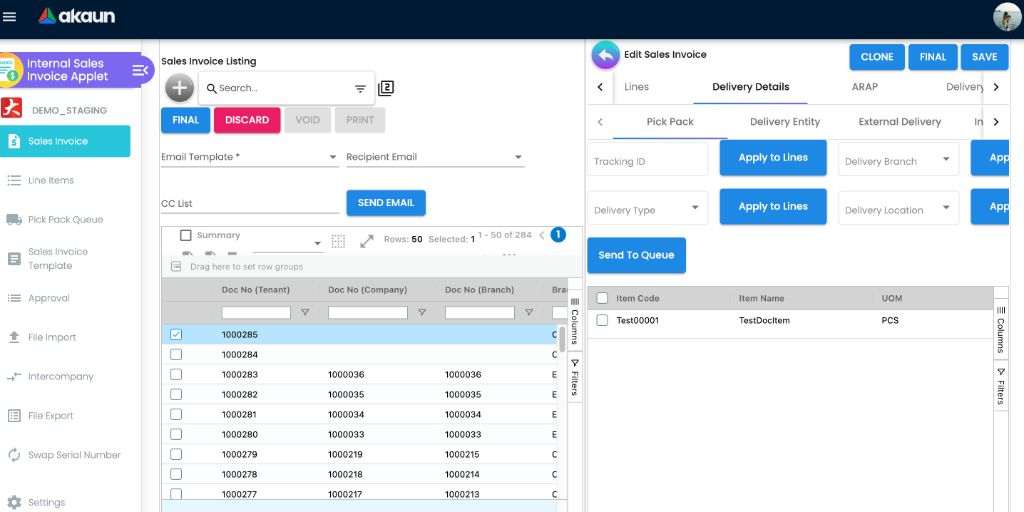
| Sales Invoice | sales-invoice | Listing with advanced search, create and edit |
| Line Items | line-items | One row per invoice line, for line-level reporting |
| Pick Pack Queue | pick-pack-queue | Invoice lines that were sent from the Delivery Details panel with Send To Queue, from which Create Delivery Job makes a Delivery and Installation job. Invoice lines do not go to the warehouse picking queue — that button exists only on the Sales Order applet. FINAL alone puts nothing here — see Delivery Details under Fields |
| Sales Invoice Template | sales-invoice-template | Saved invoice shapes — company, branch, location and lines, no customer. No invoice is started from one here: recurring invoices and sales contracts read them — see Recurring Sales Invoice |
| Approval | approval-permission | Sell-below-price approval requests raised from line items |
| File Import | file-import | Bulk create invoices from CSV |
| Intercompany | intercompany | Manual intercompany queue (invoice → purchase invoice in another company) |
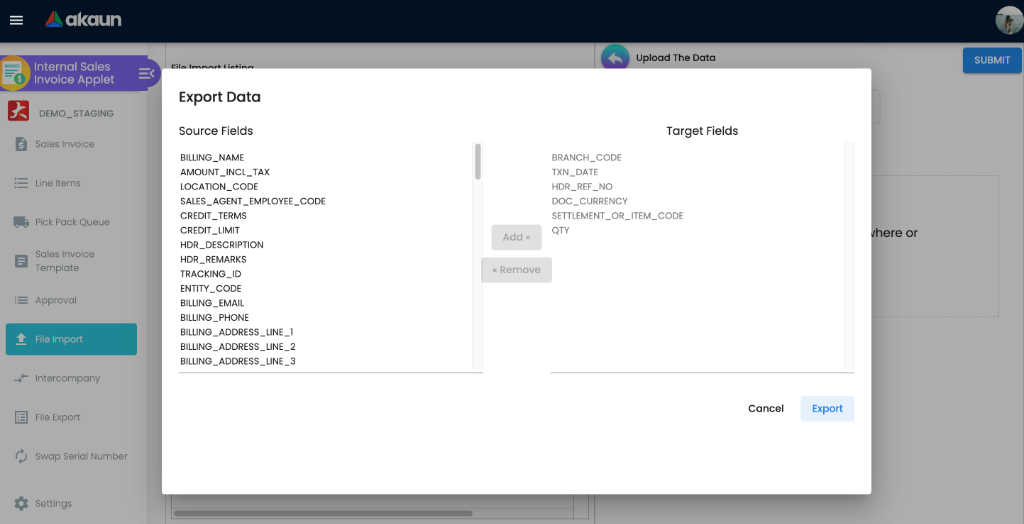
| File Export | file-export | Map source fields to target headers and export |
| Swap Serial Number | swap-serial | Replace the serial number on a FINAL invoice without voiding |
| Settings | settings/… | Administrator configuration (see below) |
| Personalization | personalization/… | Per-user Default Selection and sidebar |
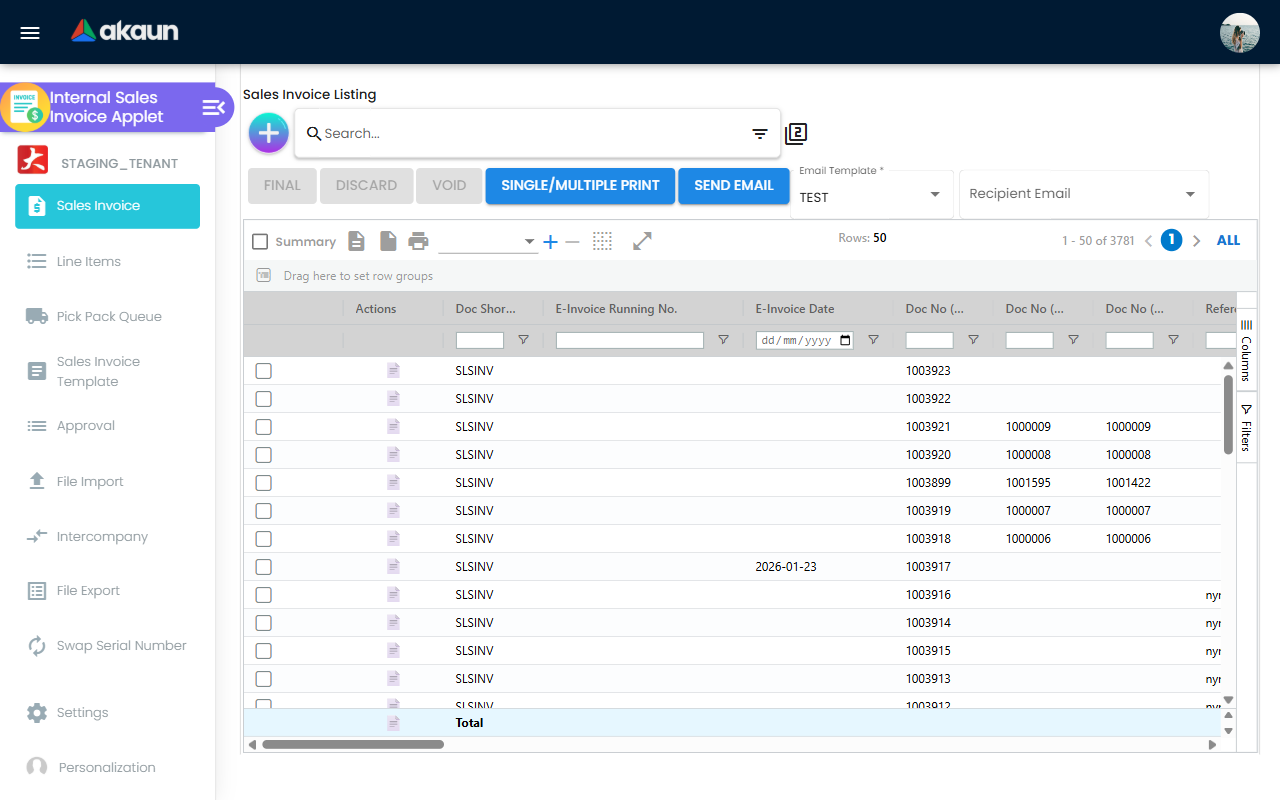
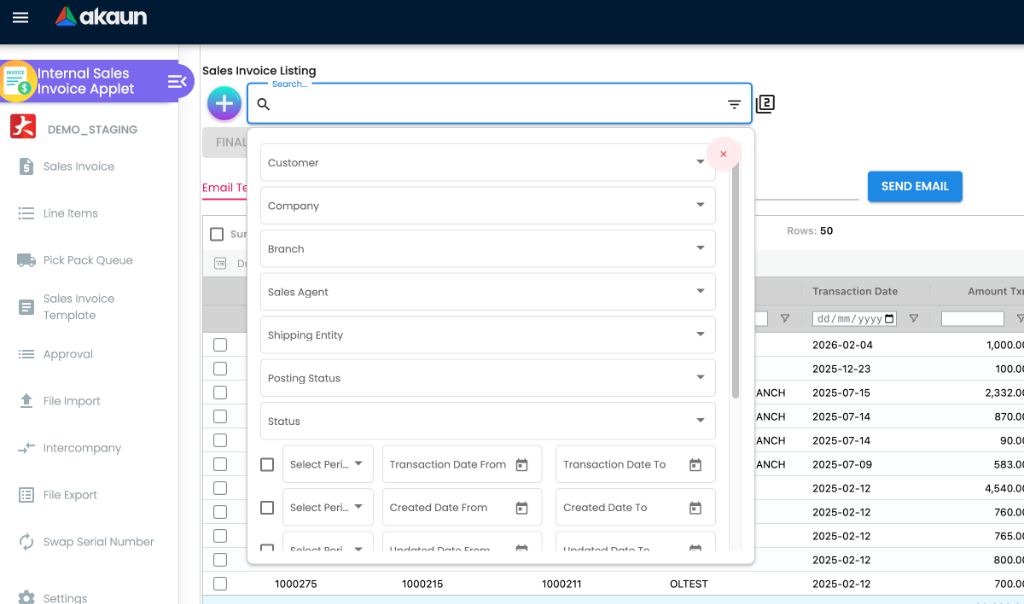
Checking a run of invoice numbers. The advanced search has a Company No field with a from
and a to. It is sent to the server as a condition on the company number, so the listing returns
every invoice in that range, not only the ones on the page already loaded — which the column filter
on the grid cannot do. For an auditor asking for GSD’s invoices 1000700 to 1000780, choose the
company, enter the range, and export what comes back; a number missing from the result is one to
explain (see Document Numbering for why a number can be spent
without reaching a document). The range compares the numbers as text, so keep both ends the same
number of digits.
The three number columns are always there. Doc No (Tenant), Doc No (Company) and Doc No
(Branch) are ordinary columns on this listing. The applet’s code names the HIDE_SERVER_DOC_1..3 /
SHOW_DOC_NO_* pairs but never applies them to this grid, so switching a hide setting on changes
nothing here — unlike the Receipt Voucher (v2) or Sales Debit Note listing, where it does.
The create / edit form
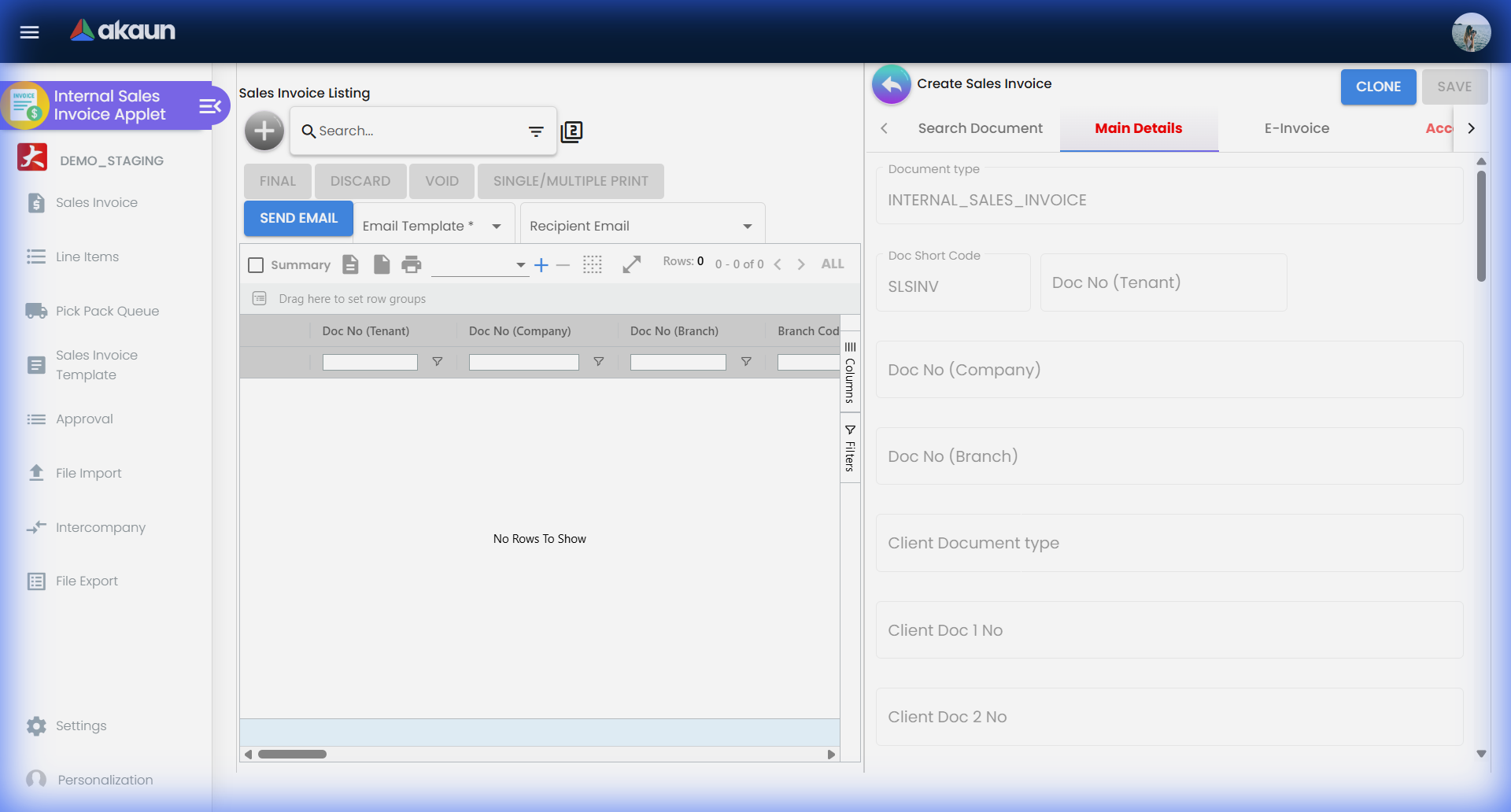
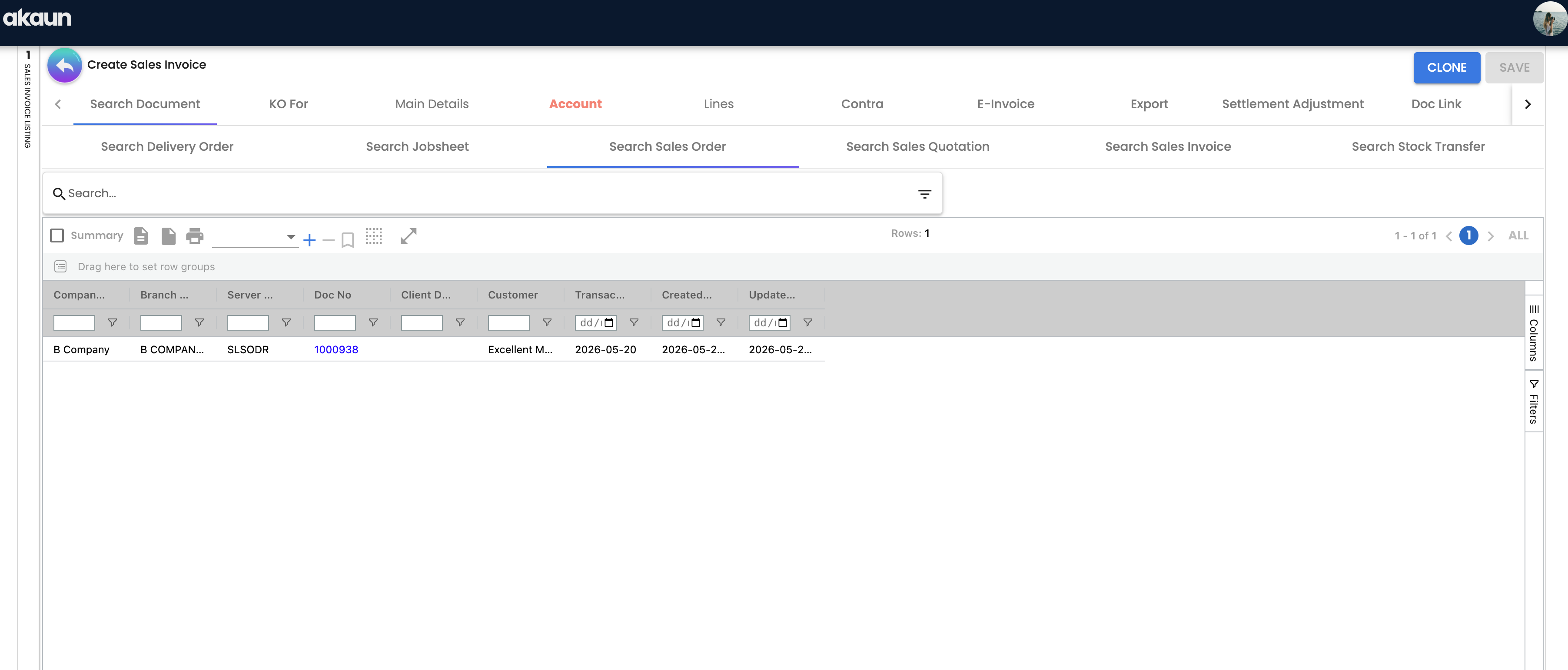
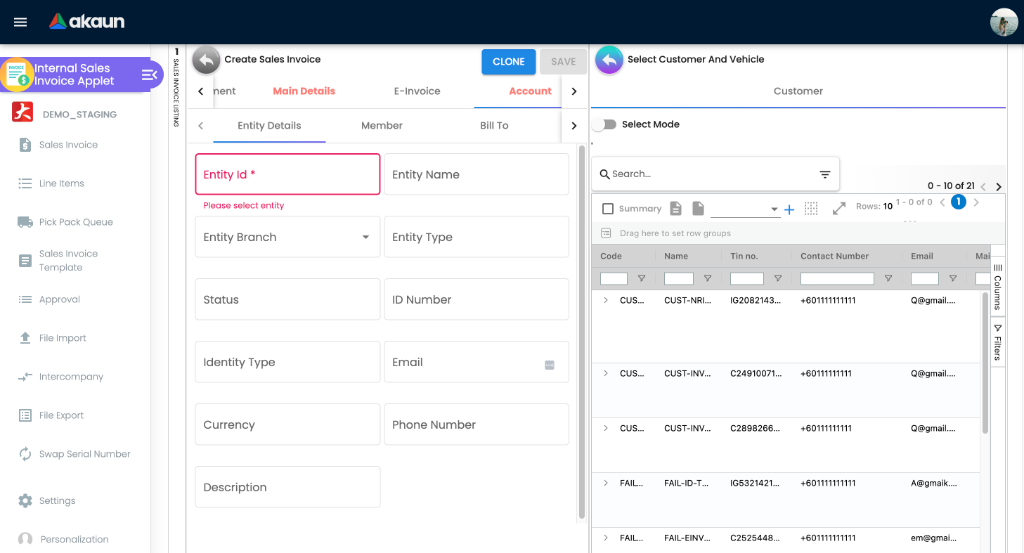
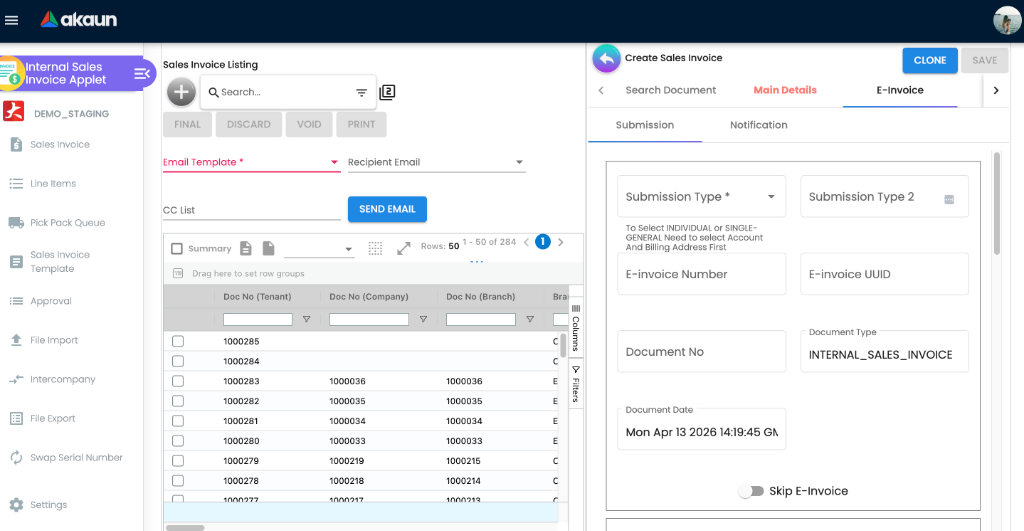
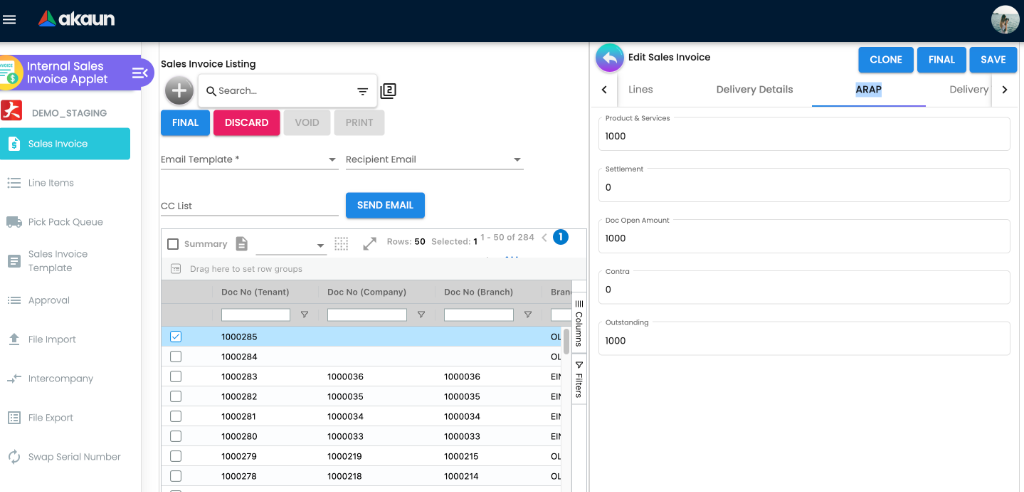
The form is a set of tabs whose order is configurable (Settings → Default Selection → Details Tab Ordering). The full set is: Search Document, Main Details, E-Invoice, Account, Lines, Delivery Details, KO For, ARAP, Delivery Trips, Settlement, Settlement Adjustment, Department Hdr, Posting, TraceDocument, Contra, Doc Link, Export, Attachments, Gross Profit, Service Notes. Most tabs can be hidden with the HIDE_*_TAB settings listed under Configuration.
Settings menu
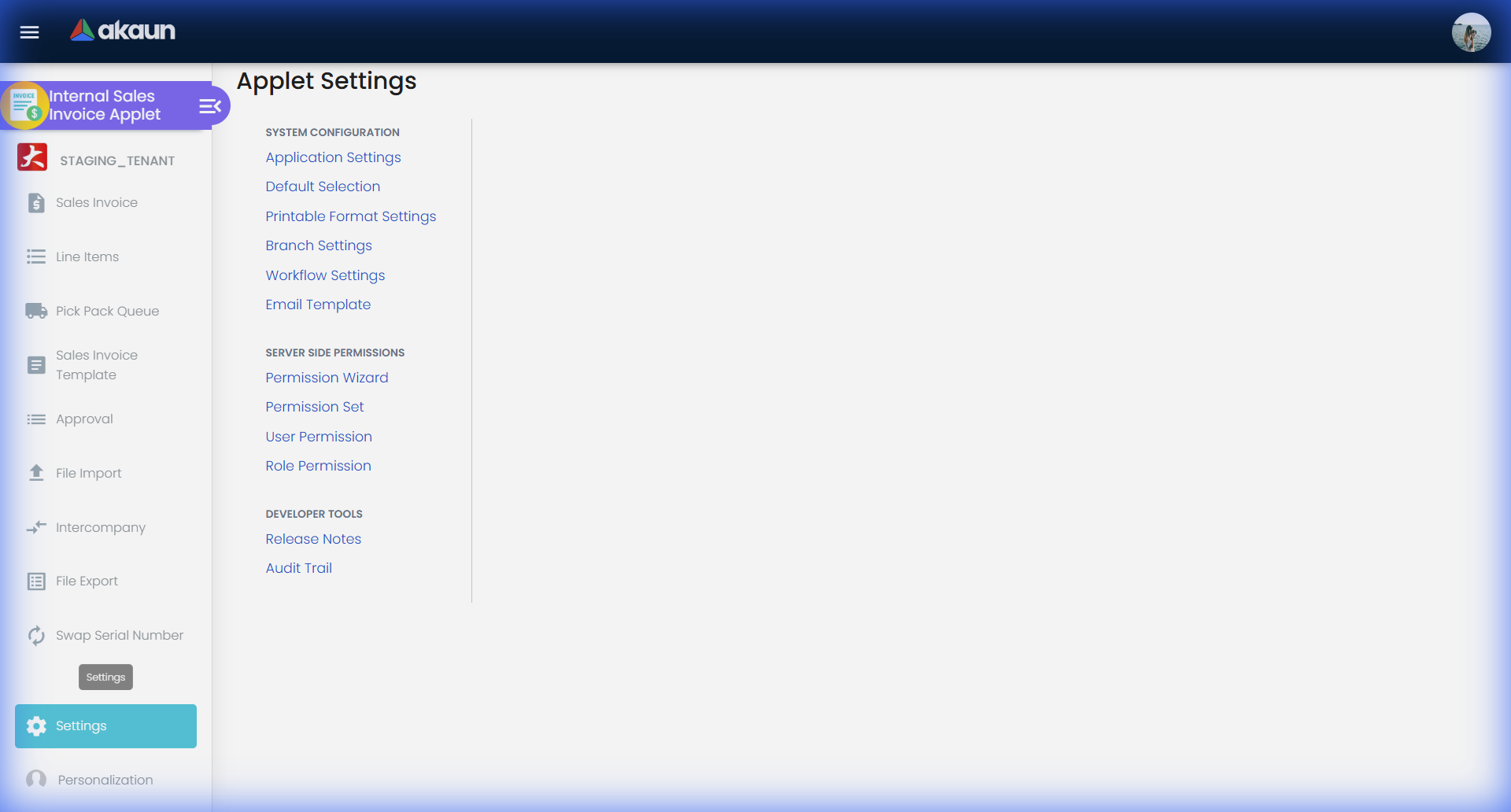
| Settings entry | Route | Purpose |
|---|---|---|
| Application Settings | settings/field-settings | Every hide/show, mandatory and behaviour toggle (shared Field Configuration screen) |
| Default Selection | settings/default-selection | Default branch, location, pricing scheme, pricebook, decimal precision, transaction-date logic, tab order |
| Printable Format Settings | settings/printable-format-settings | Register printable formats for INTERNAL_SALES_INVOICE |
| Branch Settings | settings/branch-settings | Per-branch header and footer, images, PIN and the branch’s default printable format. Choosing a branch on a new invoice looks that default up, and printing from the invoice pre-selects it. Send Email does not use it — see Email Template |
| Workflow Settings | settings/workflow-settings | Makes a workflow process available to this applet for a company; on its own it attaches nothing to an invoice. New invoices take the one process picked under Application Settings › Workflow Selection, whose list shows only what was linked here. That pick is applet-wide, so every company’s new invoices start in the same process’s default status |
| Email Template | settings/email-template | Each template names a printable format, and Send Email renders the invoice in it — or in the applet’s default printable format when the template names none. It never falls back to the branch default, so a branch whose printed invoices look right can still e-mail them in the tenant-wide layout |
| Custom Resource Bundle Configuration | settings/translation-settings | Relabel any field or menu |
| Custom Field Placement | settings/custom-field-placement | Place tenant custom fields on the Main, Account, E-Invoice and Line Item tabs |
| Webhook | settings/webhook | A sales invoice reaches its subscribers when it is finalised, as a full copy and a slimmer copy — whereas most other document types are sent when they are created. A subscriber that waits for the “created” event on an invoice is therefore waiting for FINAL, not for the draft |
| Permission Set / User / Team / Role / Client-Side Permission / Permission Wizard / Role Pricing Scheme Link | settings/*-listing | Access control (shared permission module) |
The menu also carries Feature Visibility, Release Notes and the Applet Log, the shared screens every applet has.
Configuration
Before you can use it
| Prerequisite | Where | Why the invoice needs it |
|---|---|---|
| Company, branch and location | Organisation | Main Details requires all three; picking a branch pre-fills its MAIN_LOCATION |
Company default GL codes for DEBTOR (and DEBTOR_NON_TRADE if any customer has AR type AR_OTHER), SALES, SALES_DISCOUNT, OUTPUT_TAX, FOREX_GAIN, FOREX_LOSS | Chart of Account | Not checked at FINAL: FINAL changes the status and enqueues the posting job; the job then throws MISSING_DEFAULT_GL_CODE: DEBTOR (or DEBTOR_NON_TRADE) when the receivable account is unmapped, and an unmapped SALES / OUTPUT_TAX line is dropped from the journal without a message. The job then fails with TOTAL_DEBITS_AND_TOTAL_CREDITS_NOT_BALANCES or NO_JOURNAL_CREATED only when the customer has no AR/AP type or nothing resolved at all. With an AR/AP type on the customer — the usual case — nothing fails: the dropped line is absorbed by the receivable line and the journal posts wrong (see Troubleshooting). When the job fails, the invoice stays FINAL with no journal until the mapping exists and the job is re-run from Financial Report › Error Checking › Trace Document. No COGS default is needed by the invoice — the SALES handler has no cost-of-goods-sold line; cost of goods sold is the month-end journal written by Financial Report |
| Tax codes and, for withholding, WHT codes | Tax Configuration | Each line carries a tax code; the tax amount posts to OUTPUT_TAX |
Customer entities with an AR type (AR_TRADE or AR_OTHER), credit terms and, optionally, a credit limit | Customer | The AR type decides whether the receivable posts to DEBTOR or DEBTOR_NON_TRADE. A customer whose credit_limit_status or credit_term_status is BLACKLISTED cannot be finalised |
| Inventory items with stock at the invoicing location | Inventory Item Maintenance, Stock Balance | Quantity signum is −1; the backend rejects FINAL when a basic item has no stock at the location (see Lifecycle and effects); serial, batch and bin items must have matching allocations |
| Pricing scheme and pricebook | Pricebook | Default Selection points the applet at a retail pricing scheme and a pricebook |
| Settlement methods with a cashbook and GL code | Cashbook | Payment-tab lines fail posting with MISSING_CASHBOOK: STL_MTHD [code] / MISSING_GL_CODE: STL_MTHD [code] otherwise |
| Document numbering | Tenant running-number setup | Tenant, company and branch running numbers are generated when the document goes FINAL |
API permissions TNT_API_DOC_INTERNAL_SALES_INVOICE_{CREATE,READ,UPDATE,DELETE}_TGT_GUID | Settings → Permission Set / User / Team / Role | Without READ on a branch target the user sees no invoices; branch targets also filter the Default Selection branch list unless the user is TNT_TENANT_ADMIN or TNT_TENANT_OWNER |
| Workflow process (optional) | Workflow Design then Settings → Workflow Settings | Enables the Workflow Status / Resolution fields |
| E-Invoice profile (optional) | My E-Invoice Admin | INTERNAL_SALES_INVOICE is one of the e-Invoice document types; skip_einvoice is copied from the customer entity at FINAL |
Applet settings
Settings › Application Settings. This applet declares 316 settings, and about 205 of them —
every HIDE_* and EXPAND_* key — switch a single field, tab, button, column or menu item off, or
open a panel by default. Flip one and you can see what it did, so they are not listed here. The seven
below are the ones that change what the applet will let you do, or what the server does with the
document afterwards. How settings are stored and who they apply to.
Default when never saved is the fallback in the code that reads the key, not the position the toggle happens to be sitting in on a screen nobody has saved — and for the first row those two are opposites.
| Setting | What changes | Default when never saved | Advisory or hard |
|---|---|---|---|
SHOW_ITEM_STOCK_BALANCE — labelled Disallow negative stock for basic item (validate stock balance) | Two effects, and the second one is the important one. It shows a stock-balance column in item search, and it is what the applet sends to the server as validate_stock_balance when you press FINAL. On, the server refuses to finalise an invoice for basic-item stock the location does not have | On. The applet only sends the flag once the settings screen has been saved at least once; with the flag absent the server’s own fallback is to validate | Hard. The server builds the error and refuses the FINAL: “Not Enough Stock for item …” |
DATE_TXN_LOGIC — labelled Transaction Date Logic | Which date the server writes into the document’s transaction date at FINAL, and therefore which accounting period the invoice lands in: the date typed on the form (USE_DATE_TXN), the moment of finalising (USE_FINAL), the created date (USE_CREATED) or the updated date (USE_UPDATED). Changing it changes nothing already posted and everything posted afterwards | USE_DATE_TXN — the date on the form | Hard, and server-side. One exception, invisible on this screen — a document whose own use transaction date flag is set keeps its typed date whatever this setting says |
ALLOW_EDIT_SALES_AGENT_FINAL | Leaves the Sales Agent field editable after FINAL. Every other header field is locked at that point, so this is the one commission correction you can make without a credit note. It applies to everyone in the tenant — see Who can change what for the field next to it, which does not | Locked. The field is disabled with the rest of the header and only re-enabled if the key is true | Advisory — the browser enables the control; nothing at the server distinguishes the two cases |
DISALLOW_SELL_BELOW_MIN_PRICE, DISALLOW_SELL_BELOW_MA_COST, DISALLOW_SELL_BELOW_REPLACEMENT_PRICE, DISALLOW_SELL_ABOVE_UNIT_PRICE_STD_INCL_TAX | Marks the line invalid when its net price crosses the item’s minimum price, moving-average cost, replacement price or standard price, so the line cannot be added. A fifth key, DISALLOW_SELL_BELOW_MA_COST_WHOLE_DOCUMENT, works one level up: it sums the whole document against the summed moving-average cost, prints a SELLING BELOW COST banner over the lines, and disables Final rather than Add — so the document is built and then cannot be issued, which is the version staff actually notice. A user holding the matching ALLOW_SELL_* permission is exempt, and a line that has been through the approval dialog is exempt from the minimum-price one | Off — every check is skipped when its key is absent | Advisory, and browser-only. The server has an equivalent below-cost check, but it runs only when the finalise request asks for it and no applet in the platform ever asks. An import or an API call is not stopped by these |
VALIDATE_STOCK_ON_FINALIZE | A second, different stock check, and readers confuse it with the first row constantly. This one runs in the browser before FINAL, compares the lines against stock at the header location, and opens a confirmation dialog the user can accept and carry on | Off — no check at all | Advisory, and it silently does nothing when the document has no location — the skip writes a console warning the user never sees. It asks; it never refuses. The row above is the one that actually stops a sale |
ENABLE_DUPLICATE_REFERENCE_CHECK | While you type in Reference, the form looks for another sales invoice with the same reference and flags it — Duplicate Reference SLSINV… — before you save. Useful where the reference is the customer’s PO number and keying it twice is the failure mode | Off — the watcher is only wired up when the key is true | Advisory, and browser-only: it is a lookup in the form, not a constraint. The same duplicate created by an import or the API is accepted |
ENABLE_EDIT_SETTLEMENT_FINAL | Reopens the Settlement Adjustment tab on a document that is already FINAL, so settlement lines can be corrected after the fact. The backend still refuses any change to the settled total — see Lifecycle and effects | Tab absent on FINAL documents | Advisory in the browser; the total is a hard backend rule |
Two more are worth a sentence rather than a row. CANNOT_EDIT_CURRENCY_RATE makes the exchange-rate
field read-only so every foreign-currency invoice takes the rate from the currency master and nobody
can override it on the document — which is what you want if the forex gain and loss postings have to
be defensible. ENABLE_MULTIPLE_KO lets one invoice knock off several source documents at once.
validate_stock_balance: false, and the server stops checking. Nothing
announces it — no warning, no audit line, nothing on the document — and the screen looks identical
either way, so neither state is visible from the outside. If negative stock started appearing after an
administrator “changed a setting”, this is where to look first.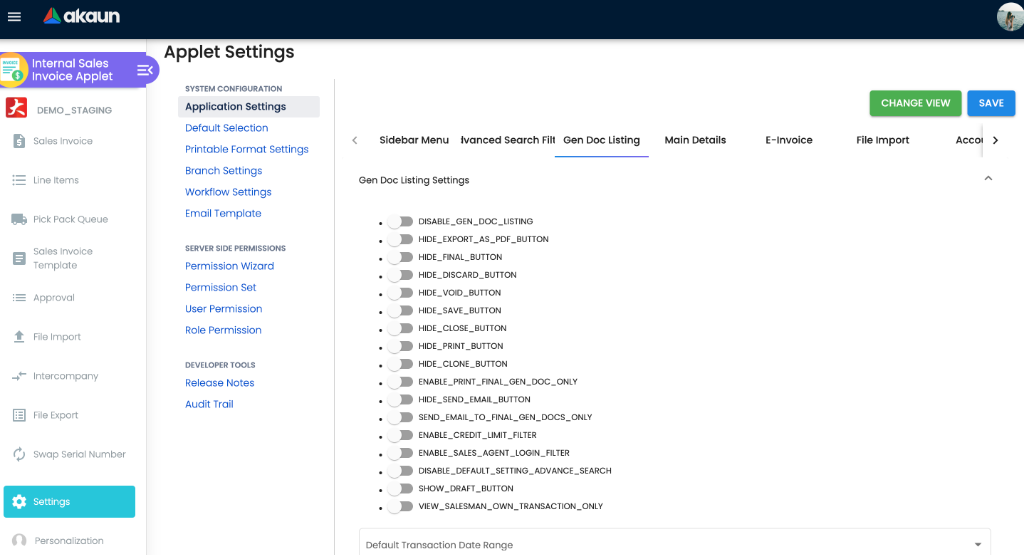
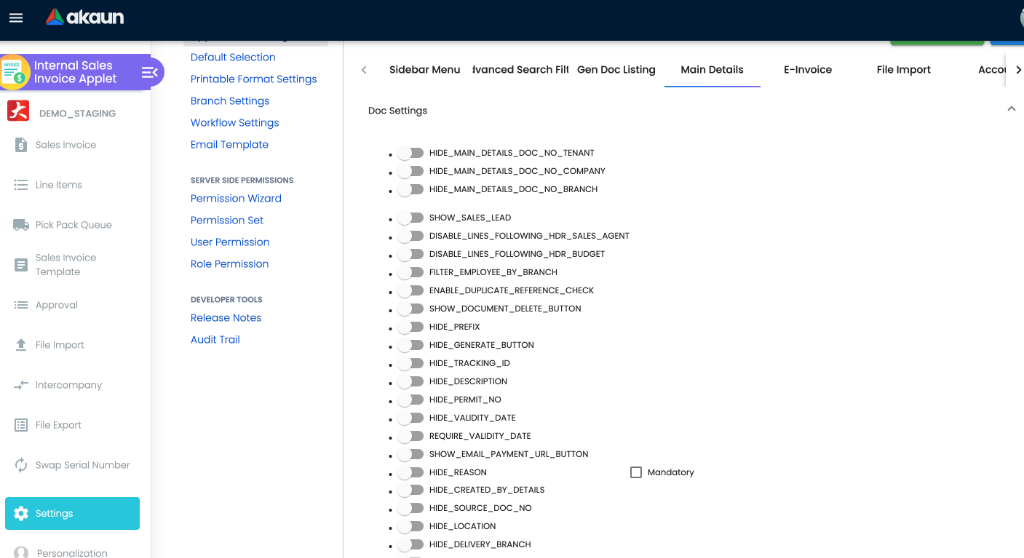
Where the rest of the settings live
There are three more settings surfaces for this applet besides Application Settings: the applet’s own Default Selection (and a personal copy under Personalization), which pre-fills company, branch, location, pricing scheme, pricebook, unit-price decimal precision and the order of the form’s tabs on a new invoice; Workflow Settings; and the shared Printable Format, Branch, Email Template, Custom Resource Bundle and Custom Field Placement screens. None of those pre-filled defaults is a rule — the user can change any of them on the document.
On the screen and doing nothing
Negative stock with confirmation — the switch a reader searches for by name, and it does not exist as a control: it is declared in the model, no settings screen offers it and nothing acts on it. The two keys that do govern stock are the first and fifth rows above, and neither behaves the way this name promises.
DISALLOW_SELL_BELOW_UNIT_PRICE_STD_INCL_TAX— has no toggle on the settings screen and no effect, and is saved asfalseinto your settings every time the panel is saved. The key the price checks actually use isDISALLOW_SELL_ABOVE_UNIT_PRICE_STD_INCL_TAX. There is no way to stop a line being priced below the standard price.HIDE_SELL_BELOW_MIN_PRICE,HIDE_SELL_BELOW_REPLACEMENT_PRICE,HIDE_SELL_BELOW_MA_COST— inert, because the settings screen has no control for any of them, so they are never set and the figures are never hidden by them. The control that really decides whether the minimum, replacement and cost figures are printed beside the line is the client-side permissionSHOW_PRICE_SELL_BELOW_*— a grant, not a setting.The per-line Sell Below Min Price request tab — not shown, here or in Sales Order. The approval route that does work is the Approval menu and its dialog, which is what the troubleshooting table points at.
Auto Final and Final Button Status — both appear on Application Settings (the second only once a workflow is chosen), both are saved, and neither has any effect: Auto Final is read by no applet at all, and Final Button Status by nothing in this applet, the shared code or the server — the Final button still sends the document to FINAL. There is no automatic finalising of sales invoices to switch on.
API upload — same: shown, saved, no effect here. The same switch is live in the Purchase Order (Supplier Access) applet, where it shows or hides the API-upload option on the file-import listing, which is why it looks like one that should work.
The SST and WHT enable and include flags — declared in the model with no control on any screen, and no effect. Service tax and withholding tax on a sales invoice come from the tax codes on the line, configured in Tax Configuration, not from a switch here.
The custom-status enable keys (line and header, five each) — declared in the model with no control on any screen, and no effect. This applet’s status flow is fixed at DRAFT → FINAL → VOID (plus DISCARDED for drafts) and custom statuses cannot be added to it.
The five “enable” toggles for the today’s-transactions filter, dimension, profit centre, project and segment — rendered on Field Settings, saved, and read by nothing in this applet or the shared code (deep read of 4 October 2026, every one of the model’s 315 keys traced). The dimension columns on a line come from the Department settings’ hide toggles, not from these.
Used, with no control in this applet. WORKFLOW_PROCESS_GUID is the mirror image: it
is read by Main Details on a new document to pre-select the workflow process and its default status, but no settings screen in this applet writes it —
Workflow Settings links a company to a process instead. So the key can be in your stored settings
without ever having been set from this applet.
Who can change what
Client-side permissions this applet defines: 74 in the registry (73 until ALLOW_PRINT_DRAFT_GEN_DOC was added on 29 September 2026), more than any other applet on
the platform. They can only ever add something to what a person sees, and they are enforced in
the browser. Grant them through a role. The screens offer links to a team as well, and the
platform has a table for them, but the list the applets actually consult is assembled in the browser
from your login, the roles you hold, and the client-side permissions those roles hold for the
applet you are currently in — one loader, in the shared library, and no applet has one of its own.
A grant that does not reach a role therefore never reaches a screen, and the same code granted here
does nothing in Sales Order, because each applet is a separate grant. The ones worth knowing are the ones that answer a question somebody actually asks:
| Permission code | What appears when it is granted |
|---|---|
SHOW_TRANSACTION_DATE | The Transaction Date field stays editable on a FINAL invoice — in other words, the holder can back-date a finalised invoice. The code’s own comment says so. Treat this as the most consequential grant in the list |
ALLOW_SELL_BELOW_MIN_PRICE, ALLOW_SELL_BELOW_REPLACEMENT_PRICE, ALLOW_SELL_BELOW_MA_COST, ALLOW_SELL_BELOW_MA_COST_WHOLE_DOCUMENT | Exemption from the matching DISALLOW_SELL_* setting above, per person. This is how a branch manager discounts and a counter clerk does not. The fourth check, above standard price, has no registered exemption — its code is read by the applet and is not in the registry, so it has to be created by hand (below) |
ALLOW_APPROVE_SELL_BELOW_PRICE | The holder can approve somebody else’s below-minimum-price line from the approval dialog, which clears that line’s block without granting a standing exemption |
ALLOW_ALL_ITEM_PRICE_EDIT, or one of ALLOW_BASIC_ITEM_PRICE_EDIT, ALLOW_GROUPED_ITEM_PRICE_EDIT, ALLOW_BUNDLE_ITEM_PRICE_EDIT, ALLOW_COUPON_ITEM_PRICE_EDIT, ALLOW_SERVICE_ITEM_PRICE_EDIT, ALLOW_WARRANTY_ITEM_PRICE_EDIT | Who may type a price at all, once RESTRICT_ITEM_PRICE_EDIT_BY_TYPE is switched on — per item type, so you can let staff price accessories and not laptops |
SHOW_GENDOC_FINAL_BUTTON, SHOW_GENDOC_SAVE_BUTTON, SHOW_GENDOC_VOID_BUTTON, SHOW_GENDOC_DISCARD_BUTTON, SHOW_GENDOC_CLONE_BUTTON | Who may finalise, save, void, discard or clone, once the matching HIDE_* setting has hidden that button from everybody. The setting takes it away; the permission gives it back to named people. Neither half works without the other |
ALLOW_VIEW_ALL_SALESMAN_TRANSACTION, ENABLE_SALES_AGENT_LOGIN_FILTER | Whether a sales agent sees the whole listing or only their own documents |
the SHOW_UNIT_PRICE_* family, plus SHOW_COSTING_DETAILS, SHOW_GROSS_PROFIT and SHOW_LAST_PURCHASE_PRICE | Cost, margin and pricing columns on the Lines grid and in item search. This is where who sees our margin is actually decided — subject to the caution below |
The pair a reader trips over. Finalise an invoice and every header field locks. Two come back,
and they come back by different mechanisms: the Sales Agent field by the applet setting
ALLOW_EDIT_SALES_AGENT_FINAL (above, tenant-wide, everybody or nobody) and the Transaction Date
field by the permission SHOW_TRANSACTION_DATE (here, per grantee). Two adjacent fields, two
systems, two different administrators, and nothing on the screen says which is which. If somebody
asks “why is the sales agent greyed out?” the answer is a setting; if they ask “why can’t I change
the date?” the answer is a grant. The listing code states the same pairing outright for the date
column: setting HIDE_TRANSACTION_DATE, permission SHOW_TRANSACTION_DATE.
How a setting and a permission combine on one column, exactly. Where a grid column is governed
by both — and on this applet’s line grid two dozen are — the rule is an OR, never an AND. A key
named HIDE_… shows the column unless the setting is on; a key named SHOW_… shows it only if the
setting is on; and in either case holding the matching permission shows it regardless. So
switching on Hide AR Balance hides the balance from everybody except the people you have granted
Show AR Balance to, which is usually the arrangement you wanted and is never what the toggle’s
label suggests. The half that surprises people the other way: turn a HIDE_ setting on and you will
lose the column yourself unless somebody grants you its permission.
And one screen declares two dozen of these pairs and uses none of them. The Sales Invoice
document listing carries a list of twenty-four column-to-setting-to-permission triples — the
transaction date, the branch code, the client document references, the whole AR block, the
dimension, segment, profit-centre and project codes — and its own template never passes that list to
the grid, so on that screen none of those settings or permissions changes a column. The list on the
line-item grid in the same applet is passed and does work. If you have switched on a HIDE_ key
expecting a column to leave the document listing and it has not, this is why, and there is nothing to
configure.
Dead permission codes. DELETE_ROUNDING_ITEM is registered ACTIVE for this applet and does
nothing. Granting it has no effect, and the rounding item cannot be deleted by granting a permission.
A second group is the mirror image — codes the applet reads that are not seeded in the registry,
so they will not appear in the permission picker and have to be created by hand before they can be
granted: the six SHOW_*_MENU codes, SHOW_PRICE_SELL_BELOW_*,
ALLOW_SELL_ABOVE_UNIT_PRICE_STD_INCL_TAX, SHOW_SALES_AGENT, SHOW_MA_COST, SHOW_DEALER_COST,
SHOW_ARAP_PNS and SHOW_ARAP_SETTLEMENT.
Server-side permissions, which are the ones that can fail a request with a 403 whatever the
browser shows: TNT_API_DOC_INTERNAL_SALES_INVOICE_CREATE_TGT_GUID, …_READ_TGT_GUID,
…_UPDATE_TGT_GUID, …_DELETE_TGT_GUID, with the TNT_API_DOC_TMPL_INTERNAL_SALES_INVOICE_* set
for templates. The target is a branch, company or customer; a null target means everything.
Settings › Feature Visibility currently exposes a single Teams panel and nothing else.
Document behaviour settings
| Area | How it is configured |
|---|---|
| Status flow | Fixed: DRAFT → FINAL → VOID (plus DISCARDED for drafts). No custom statuses are exposed in this applet’s settings screens. |
| Posting at FINAL | Decided by the company’s posting_final_json (includeJobProcessorCode / excludeJobProcessorCode) read by the Generic Document Primary Processor — not by an applet setting. |
| Backend FINAL validations the applet can switch | Only one: SHOW_ITEM_STOCK_BALANCE → validate_stock_balance (see table above). The applet always sends validate_points_redeemed: true for bulk FINAL from the listing and never sends disallow_sell_below_cost or validate_serial_signum_zero, so those backend checks stay at their defaults (off) for this applet. |
| Workflow status | Settings → Workflow Settings links a company to a workflow process for INTERNAL_SALES_INVOICE (fields: Company, Process — both required). The status is a label; it gates nothing. Sales invoices have no document approval engine — the only approval here is the line-level sell-below-price grant, which needs no workflow and is given in the Approval menu by a user holding ALLOW_APPROVE_SELL_BELOW_PRICE. |
| Printables | Settings → Printable Format Settings registers formats under INTERNAL_SALES_INVOICE_APPLET_EXT_CODE_PRINTABLE_FORMAT_GUID_INTERNAL_SALES_INVOICE; formats are per document type, never per company. Ticking a format’s Default checkbox there sets the applet’s PRINTABLE setting, the tenant-wide fallback. Printing from the screen pre-selects the branch’s default (highest priority, a row with no priority above every numbered one) else PRINTABLE; printing several invoices from the listing uses the branch default of the first selected row (most recently updated) else PRINTABLE for every selected invoice, so a mixed-branch selection prints in one branch’s layout; with BATCH_PRINT_MULTIPLE_FORMAT on, each invoice prints once per default row of its own branch. Settings → Branch Settings → Printable Format sets the branch default. See Printable Formats and Per-Branch Defaults. |
Settings → Email Template holds the applet’s e-mail templates, each naming a printable format. The Send Email button sends at once with that template’s format, else PRINTABLE, rendered on the same print service as the screen print (branch header and footer included); it does not read the branch default. A message-template e-mail at FINAL is a separate path that reads the message template’s link, then the branch default, and never carries the header and footer. | |
| e-Invoice | No applet switch. skip_einvoice is copied from the customer entity when the invoice goes FINAL; submission and cancellation are handled by the My E-Invoice Portal queues. Editing submission fields needs the ENABLE_EDIT_EINVOICE_SUBMISSION_FIELDS or ENABLE_EDIT_ALL_EINVOICE_FIELDS client-side permission. |
| Webhooks | Settings → Webhook. At FINAL the backend emits INTERNAL_SALES_INVOICE_CREATED to subscribed endpoints. |
| Intercompany | Decided on each invoice, not by a setting: on the Account › Intercompany sub-tab you pick the buying company’s Intercompany Branch and one or more of this branch’s intercompany rules. At FINAL each chosen rule creates the counterpart INTERNAL_PURCHASE_INVOICE (or INTERNAL_PURCHASE_GOODS_RECEIVED_NOTE) at once (AUTO) or leaves a row under Intercompany › Unprocessed for someone to confirm (MANUAL); either way it is a draft unless the rule has Auto Final Target Doc. The Intercompany menu lists those rows and, under Processed, the linked pairs. A failed pairing is not shown as one — see Troubleshooting. Once created the counterpart is independent: voiding this invoice leaves it standing, and finalising this invoice again (through the API) would raise a second one. What the counterpart copies, its date and the setup it needs: Organisation › What it pairs with in practice. |
Fields
Main Details
| Field | Meaning | Required | Notes |
|---|---|---|---|
| Company, Branch, Location | Selling company, branch and stock location | Yes | Location list follows the branch; a hidden Location still needs a value |
| Delivery Branch / Location | Where goods ship from if different | No | Hide with HIDE_DELIVERY_BRANCH / HIDE_DELIVERY_LOCATION |
| Transaction Date | Accounting date | Yes (backend) | Must not fall in a locked fiscal period; overwritten at FINAL when DATE_TXN_LOGIC is not USE_DATE_TXN |
| Currency, Currency Rate, Base Currency | Document currency and rate to base | Currency yes | Backend rejects FINAL with FOREX_DOC_REQUIRES_NON_ZERO_XRATE when currencies differ and the rate is empty or zero; lock with CANNOT_EDIT_CURRENCY_RATE |
| Sales Agent | Employee credited with the sale | No | Autofill from login with ENABLE_SALES_AGENT_AUTOFILL |
| Credit Terms, Credit Limit, Due Date | Copied from the customer | No | Due date derived from terms |
| Reference, Remarks, External Remarks | Your own text | No | With the duplicate-reference check on, typing a Reference another sales invoice already carries shows Duplicate Reference and that invoice’s number. It is a warning, not a block; it searches this tenant’s sales invoices whatever their status, drafts and voided ones included; and it runs only as you type, so opening an invoice that already has a duplicate shows nothing. Remarks can be emptied, but External Remarks cannot — saving it blank keeps the old text. On a voided invoice Reference and Remarks are the only Main Details fields left open, so the reason can be written down afterwards. An invoice raised from a service note arrives with the note’s number in Reference and the item and serial number in Remarks |
| Doc Short Code, Tenant / Company / Branch Doc No, Custom Document Number | Numbering | Generated at FINAL | Custom number needs SHOW_CUSTOM_DOC_NO |
| Client Document Type, Client Doc 1–5 No | The customer’s own references | No | Read-only here — you cannot type them on this screen. They are filled from outside it: the sales-invoice file import has a column for each. The Pick Pack Queue shows Client Doc 5 beside the invoice number, labelled INV Ref No, and a delivery job created from the queue carries the Client Document Type with it |
| Workflow Status / Resolution | Where this invoice stands in its workflow process | No | How an invoice gets a process is under Workflow Settings in the Settings menu table above. The Status list offers only the statuses the process allows from the current one, and Resolution is filled in from the status you pick — you do not choose it |
| Permit No, CRM Contact, MemberCard, Sales Lead, Prefix, Tracking ID, Budget fields, Source Doc | Optional header attributes | No | Emptying a field does not clear it for Permit No, Sales Lead, Tracking ID and the Credit Terms, Credit Limit and Due Date row above: saving with the field blank keeps the previous value, so you can replace one but not remove it. Tracking ID is read-only; the server builds it once, as the Prefix you pick followed by a running number, and never rebuilds it — changing the Prefix later changes nothing |
Account
| Field | Meaning | Required | Notes |
|---|---|---|---|
| Entity ID | The customer | Yes (Validators.required on entityId) | Copies name, currency, credit terms, billing and shipping addresses; the form shows a warning badge for a blacklisted entity and the backend rejects FINAL (ENTITY_BLACKLISTED) |
| Billing / Shipping address and contacts | Addresses printed and used for delivery | No | Ship-to may be another entity with SELECT_SHIPPING_ENTITY |
| Member, Intercompany, Vehicle sub-tabs | Membership card; the Intercompany Branch and intercompany rule(s) that pair this invoice with another company; vehicle number | No | Each can be hidden. The intercompany selectors appear only when the customer has at least one intercompany branch — in practice the buying company’s own record, since the pairing refuses any other |
The customer on the invoice is a copy, not a link
Picking the customer copies their details onto the invoice rather than linking to them: the customer code, the name (with the contact’s name appended when you picked a contact), status, e-mail, phone, GL code, identity number and type, entity type, description and currency, plus the billing and shipping contact and the billing address you choose from their addresses. The credit terms, credit limit and due date on Main Details are part of the same copy.
Nothing refreshes it afterwards. The server fills that block only when it arrives empty, so re-saving the invoice next year, or correcting the customer record, leaves it exactly as it was. That is the design: an invoice is evidence of what was agreed, and it has to keep the name and address it was billed to.
Four things follow, and none of them is visible on the screen:
- Correcting the customer’s details here corrects this invoice only. The customer record is untouched and the next invoice starts from the master data again. Pushing the correction back is a separate act in Customer Maintenance.
- Not everything on an invoice is frozen. The receivable control account is not: the AR/AP type is read from the customer record at posting time, so correcting that moves the account the next time the document posts — Customer Maintenance → The AR/AP type is decided once.
- What a reprint shows depends on the template. The standard Jasper print service hands the layout both the invoice’s stored snapshot and a live lookup of the customer record. A layout built on the live fields prints today’s name and e-mail on a two-year-old invoice. If a reprint has to match the original, build it on the snapshot fields.
- The e-invoice buyer is a third thing again. The buyer block on the E-Invoice tab is not required to be the account you billed, and it is what the e-invoice queue takes when it is filled — My E-Invoice Admin. Whichever button fills that block — Select From Another Customer, or Select Einvoice Address when that one has been hidden — goes grey at FINAL.
Lines
| Field | Meaning | Required | Notes |
|---|---|---|---|
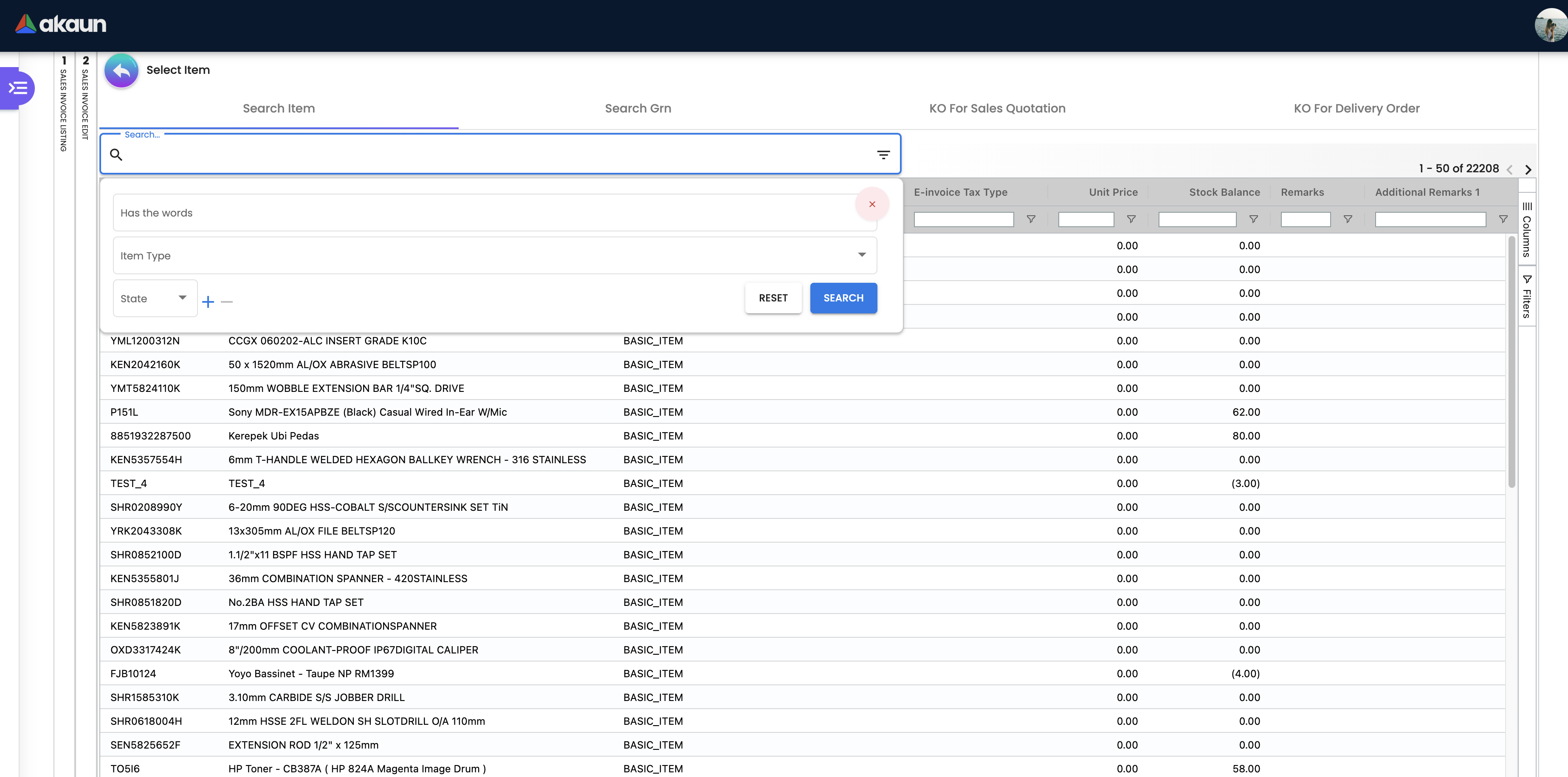
| Item Code / Name | Inventory or service item | Yes | Name editable unless DISABLE_LINE_ITEM_NAME_EDIT |
| Branch | Branch the line belongs to | Yes | Defaults from header |
| Quantity, Quantity by UOM, UOM, UOM to Base Ratio | Quantity sold | Yes (qty, txnAmt, netAmt, netAmtWithTax are Validators.required) | Quantity signum −1 is filled by the backend DCO |
| Unit Price STD (incl/excl tax), Unit Discount, Unit Price Net, Unit Price Transaction, STD / Discount / Net / Txn amounts | Pricing chain | Derived | Below-cost checks compare Unit Price Net against min price, replacement price and MA cost |
| Tax Code, SST/GST/VAT, Tax Amount, WHT Code, WHT Amount, Tariff Code | Tax | Tax code from item or scheme | Tax posts to OUTPUT_TAX |
| GL Code | Overrides the company SALES account for this line | No | Hidden by default; first in GL precedence at posting |
| Serial Number, Batch Number (with Issue / Expiry Date), Bin Number tabs | Allocations for tracked items | Quantities must equal the line quantity at FINAL | Batch batch_no and qty required; issue and expiry dates optional since the fix for a customer issue; bin lines need bin_code, container_measure, container_qty, qty |
| FOC, Trade-in Serial Number, Rebate Date From/To, Remarks, E-Invoice UOM, Tax Exemption Details / Amount, Product Tariff Code, Country of Origin | Optional attributes; the last four travel to the e-invoice | No | A tax exemption reaches the e-invoice only when both Details and Amount are filled — either one alone sends no exemption. A blank Product Tariff Code goes as NA, and a longer one is cut to its first 12 characters. E-Invoice UOM is copied from the item when you pick it and does not follow the unit you sell in; left blank it goes as piece — E-Invoice configuration › Which unit each line reports |
| Segment, G/L Dimension, Profit Center, Project | Department analysis | No | Hidden by default for this applet; line value falls back to the header value at posting |
E-Invoice: Submission Type (and Type 2), E-invoice Number, UUID, Document No / Type / Date, EMP Ref Number, Skip E-Invoice, Billing Frequency and Period, Tax Exemption, Buyer Name / ID Type / ID No / TIN / SST ID / Email / Contact, buyer address lines, Country, State, City, Postcode, Validation URL. All optional at save; LHDN validation happens in the e-Invoice queue.
Settlement (Payment tab) — one line per payment (txn_type = STL_MTHD). Types: Bank Transfer, Cash, Cheque, Post Dated Cheque, Credit Card, Debit Card, e-Wallet, FPX e-Mandate, Membership Point Currency, Open Credit, Others, PGW Merchant, PGW Provider Seamless, Voucher, TT Payment.
Every payment line needs a Date and an Amount of at least 0.01. The rest depends on the type — cheque number, and date for a post-dated cheque; transaction number for a bank transfer or e-wallet; voucher number; points and point currency; cash back for cash — and the card fields are required only where a mandatory-field setting asks for them.
What the screen does not show is where a payment line goes after FINAL. Once the invoice has posted to the cashbook, each payment line is a line in the cashbook, and the two stay tied:
- Correcting a payment on a FINAL invoice corrects its cashbook line in place, and adding a payment adds a cashbook line. The change reaches Bank Reconciliation without a new document.
- Once that cashbook line has been reconciled, changing the payment’s amount is refused, with a message naming the cashbook and the bank reconciliation to un-reconcile first. Edits that leave the amount alone still go through.
- A draft never touches the cashbook.
Delivery Details: delivery entity (required when a delivery record is added), address, instructions, and a line grid with Require Delivery (YES/NO) and Qty To Deliver (defaulting to the line quantity). The Send To Queue button sends every line marked YES with its Qty To Deliver to the Pick Pack Queue; cancelling a delivery job puts the row back. FINAL does not do this: an invoice that is never sent never appears in the Pick Pack Queue or on a Delivery Trip. A second send adds to the queued balance rather than replacing it.
Lifecycle and effects
| Status | Meaning | Allowed next |
|---|---|---|
| DRAFT | Editable; no stock, GL or AR effect; no running number | FINAL, DISCARDED, or delete |
| FINAL | Numbered and posted. Header and line amounts locked; settlement lines may still be edited if the total is unchanged; sales agent editable only with ALLOW_EDIT_SALES_AGENT_FINAL | VOID |
| VOID | Reversed, with a void reason | none |
Two gates run before any of the checks below, on the ordinary finalise route. Since 30 September 2026 a foreign-currency invoice whose base currency is set and whose rate is blank or zero is refused outright with Generic Document exchange rate is required before posting to FINAL (HTTP 403, before validation). And since 28 September 2026 a tenant whose DOCUMENTS_SKIP_SHADOW_AND_GL application setting is switched on finalises a foreign-currency invoice with no base-currency twin and no posting at all — the invoice is numbered and its aging recalculated, and nothing else happens. On such a tenant there is no journal to look for; that is the setting working.
Backend checks at FINAL — validateGenericDocumentOnFinal runs these in sequence and returns every failure together; any failure rejects the FINAL:
| Check | Error code | Runs when |
|---|---|---|
| Exchange rate present and non-zero when document and base currency differ | FOREX_DOC_REQUIRES_NON_ZERO_XRATE | always |
Customer not blacklisted (credit_limit_status / credit_term_status = BLACKLISTED) — three wordings: due to credit limit, due to overdue credit term, or both | ENTITY_BLACKLISTED | sales cash bill, sales invoice, sales order, outbound DO |
| No coupon serial number listed twice on the invoice (coupon lines that are not serial-tracked items) | Refused naming the duplicated serial numbers | always, since 28 September 2026 |
| Serial-number quantity equals line quantity; no duplicate serials | Refused: serial count does not match the quantity, or a serial is duplicated | always |
| Bin quantities valid | Refused: an invalid bin quantity, container quantity, container measure or container UOM | always |
| Batch quantity equals line quantity | batch error codes | always |
| Stock exists at the delivery location for every basic-item line taking stock out | “Not Enough Stock for item …” | unless the tenant saved SHOW_ITEM_STOCK_BALANCE = false |
| Sales below cost | (the server has this check) | only when the finalise request asks for it — this applet never does |
| Redeemed membership points within balance | points errors | bulk FINAL from the listing asks for this check; single FINAL does not |
Transaction date not in a fiscal period locked with LOCK_ALL / LOCK_TXN | “The selected date falls within a locked fiscal period.” | always when date and company are present |
The client-side pre-checks (VALIDATE_STOCK_ON_FINALIZE stock dialog, zero-price confirmation, DISALLOW_SELL_* line validators) run before the request is sent and can be confirmed past or bypassed by permission; they are not part of this list.
What FINAL does once validation passes: copies Skip E-Invoice from the customer; applies DATE_TXN_LOGIC; generates tenant, company and branch running numbers; starts the main posting job, which sets off every follow-on job switched on in your tenant’s trigger configuration — a company-level include/exclude list can override that, and it stays unset until somebody sets it, so by default your trigger configuration decides everything (how the fan-out is filtered); emits the INTERNAL_SALES_INVOICE_CREATED webhook; queues the sales-contract, message-template (email), membership reward-point and e-commerce stock-availability jobs.
Finalising twice is refused, not repeated. A document already FINAL is turned down with 403 and “Generic Document has already been posted to FINAL”, before any check runs and before anything is queued. There is no way to make the posting chain run again from this screen; a posting that failed is re-run from Trace Document, and a document that must be undone is VOIDed.
What every save writes, finalise included. Finalising runs the same update as an ordinary save, so these server-side rewrites happen on both — and the finalise is usually the last save, which is why they look like finalise behaviour. Every line’s transaction date is also overwritten from the header on each pass, so a line can never carry a date of its own:
- A unit price that was not supplied is back-computed and rounded up. When a line arrives with a line amount and no unit price, the server divides the amount by the base quantity to two decimals, rounding up. The line total is the authority; a derived unit price can therefore multiply back to slightly more than the total, and on a quantity of three that is visible in the second decimal. Supply the unit price if you want it exact.
- A line priced from a pricing scheme gets that scheme’s whole price set copied onto it. Every save recopies the replacement price, three reference prices, three delta prices, three delta percentages, three rebate prices, the promotion price and the four sales/purchase min and max prices from the pricing scheme entry — and also the company replacement cost price and amount, which are therefore a pricing figure shown among the costs rather than anything the costing chain produced. The same step fills the line’s point rate and point amount from the scheme’s reward ratio when the line carries no point type and no point amount. On a line priced by hand none of this happens at all.
- A tax rate can be re-read from the tax code. When the line carries a tax code and no tax type, the server looks the code up and, if it finds it, overwrites the line’s tax rate with the code’s current rate — whether or not it differs — and the save fails when the line’s rate is empty.
What posting does
| Item | What happens |
|---|---|
| Direction | A sales invoice takes stock out and raises a receivable in |
| The journal | Dr Debtor / Cr Sales, Cr Output Tax. Each goods line credits SALES; tax lines credit OUTPUT_TAX; the balancing customer line debits DEBTOR (or DEBTOR_NON_TRADE for non-trade customers) with the total; SALES_DISCOUNT lines debit; FOREX_GAIN / FOREX_LOSS absorb rounding on multi-currency documents |
| Which GL code a goods line uses | line GL code → header GL code → the item’s company GL link for SALES (NSTI for trade-in lines, ROUNDING for header-adjustment items) → company default SALES |
| Hard stops in posting (after FINAL) | The journal job, not FINAL, fails: MISSING_DEFAULT_GL_CODE: DEBTOR / DEBTOR_NON_TRADE when the receivable account is unmapped; MISSING_CASHBOOK: STL_MTHD [code] / MISSING_GL_CODE: STL_MTHD [code] for a settlement line whose method has no cashbook or GL; TOTAL_DEBITS_AND_TOTAL_CREDITS_NOT_BALANCES / NO_JOURNAL_CREATED when an item or tax line resolved no GL code and was dropped and the customer has no AR/AP type (or nothing resolved at all). With an AR/AP type a dropped line fails nothing: trade debtors absorbs it and the journal posts wrong (see Troubleshooting). FINAL has already succeeded when these fire; the invoice stays FINAL with no journal and Trace Document shows the failed job. Only the fiscal-period lock and the stock / blacklist checks stop FINAL itself |
| Settlement lines | Each Payment-tab line posts Dr the settlement method’s cashbook GL / Cr Debtor, and writes a cashbook transaction line |
| Cost of goods sold | None per invoice. The sales journal posts DEBTOR, SALES, SALES_DISCOUNT, SALES_RETURN, OUTPUT_TAX, FOREX_GAIN, FOREX_LOSS and nothing else; the stock side of the invoice is the inventory transaction only. Cost of goods sold is the month-end journal (COGS against STOCK_BALANCE: opening + purchases − purchase returns − closing) written on every Month End Processing Create and PROCESS |
| Stock | One inventory transaction per goods line at the line’s branch and location; the current stock balance follows; serial, batch and bin allocations are locked to the document |
| What VOID reverses | VOID sets the status and the void reason, voids the foreign-currency shadow document if one exists, removes the document from the e-Invoice submission queue and from historical aging, and starts the void jobs your tenant has switched on — typically journal, inventory, cashbook, contra, knock-off, membership points and tax; the list is your tenant’s trigger configuration, not the applet’s |
| Back to DRAFT | Not offered by this applet. The server has it — PUT /{docType}/draft/backoffice-ep/{guid}, which a support engineer or an integration can call: it refuses a document with downstream links, a company with e-invoicing enabled or an e-invoice already submitted, and a locked period, and otherwise releases the links and sets the document back to DRAFT without re-posting anything (see What a void undoes). Cheaper than VOID-and-rekey when the error is one line |
| Change the transaction date after FINAL | Not offered here, and the server’s update-date-txn-after-final route refuses inventory documents — for an invoice the answer is still a credit note; a non-stock document’s date can be moved that way and its journal and cashbook follow |
| Change the customer after FINAL | Not offered here; POST /{docType}/update-entity/backoffice-ep (since 25 September 2026) rewrites the entity and its billing address on the document, its journal and its cashbook lines in one go |
A FINAL invoice that has already been settled or knocked off is normally reversed with a Sales Return or Credit Note rather than voided, so that the settlement and knock-off history stay intact.
Editing settlement on a FINAL invoice: the backend returns “The document’s settlement cannot be changed because its posting status is not final!” if the document is not FINAL, “The total settlement amount must be the same as the previous amount.” if the new STL_MTHD total differs, and “No changes have been made to the settlement.” if nothing changed. Accepted changes reverse and re-create the journal and cashbook lines.
Related applets
- Sales Order (Internal) — the usual source document; KO For copies its lines and the order is marked delivered.
- Sales Quotation (Internal) and Jobsheet (Internal) — other KO sources.
- Delivery Order (Internal) — invoice after delivery, or deliver from the Pick Pack Queue after invoicing.
- Stock Transfer — a KO source when goods were moved to the customer’s location first.
- Sales Invoice (No Stock Out) — same posting without the inventory movement.
- Sales Return (Internal), Sales Credit Note (Internal), Sales Debit Note (Internal) — reversals and adjustments against a FINAL invoice.
- Receipt Voucher (Internal) — settles the receivable; Contra settles it against other documents at the latest of the documents’ dates.
- Recurring Sales Invoice — generates invoices of this type on a schedule.
- Sales Contract, Sales Commission — processors triggered at FINAL.
- My E-Invoice Portal, My E-Invoice Admin — submission, validation and cancellation of the e-Invoice; tenant e-Invoice profile.
- POS General — cash bills use the same engine; both feed Sales Return.
- Purchase Invoice (Internal) — created automatically in the buying company for intercompany sales.
- Membership Admin — reward points are queued at FINAL for member invoices.
- Customer, Organisation, Pricebook, Tax Configuration, Chart of Account, Cashbook, Inventory Item Maintenance, Stock Balance, Workflow Design — master data read at entry and posting time.
Troubleshooting
| Symptom | Cause | Fix |
|---|---|---|
| A dialog listing items with “ordered / available / shortfall” appears before FINAL | VALIDATE_STOCK_ON_FINALIZE is on and stock at the header location is below the line quantity; this is the applet’s confirmation dialog | Correct the quantity or location, or confirm to continue — the backend check below still applies |
| FINAL rejected with “Not Enough Stock for item …” | The stock check found no stock for a basic item at the line’s delivery location, where goods leave from; with a full shelf, usually a location kept from another branch | Re-pick the Branch and SAVE; for a real shortage, receive or transfer stock in. Never switch the check off |
FINAL rejected with ENTITY_BLACKLISTED — “Customer is blacklisted due to credit limit / overdue credit term” | The customer’s credit_limit_status or credit_term_status is BLACKLISTED | Review the customer’s credit status in Customer and clear it after settlement |
Invoice is FINAL, Trace Document → Journal Txn is empty, and the posting job shows MISSING_DEFAULT_GL_CODE: DEBTOR (or DEBTOR_NON_TRADE) | Company default receivable GL not mapped; FINAL succeeded and the journal job failed afterwards | Map it in Chart of Account for the selling company, then Financial Report › Error Checking › Trace Document → Resolve to re-run the job |
Invoice is FINAL, no journal, and the posting job shows TOTAL_DEBITS_AND_TOTAL_CREDITS_NOT_BALANCES or NO_JOURNAL_CREATED | SALES or OUTPUT_TAX resolved no GL code (line → header → item-company link → company default) and the line was dropped, and the customer has no AR/AP type, so there was no receivable line to absorb it — or no line resolved at all | Map the missing default in Chart of Account, then re-run the job from Trace Document |
| No error, but trade debtors no longer agrees with the debtor ageing, and sales or SST are short by the same amount | The same dropped SALES or OUTPUT_TAX line, on an invoice whose customer has an AR/AP type: the receivable line is built from what remains and absorbs it. A RM 106 invoice (RM 100 goods, RM 6 SST) with no SALES code posts debit trade debtors RM 6, credit output tax RM 6; after the customer pays RM 106, trade debtors is RM 100 in credit. Trace Document finds nothing — a journal exists — and the customer statement and ageing are built from documents. Before go-live, check every sales, return and tax code has a company default, or every item its own | Map the missing default in Chart of Account, then repost the affected invoices from Trace Document |
Invoice is FINAL and the posting job shows MISSING_GL_CODE: STL_MTHD [code] or MISSING_CASHBOOK: STL_MTHD [code] | A settlement method used on the Payment tab has no GL code or cashbook | Complete the settlement method in Cashbook, then re-run the job from Trace Document |
FOREX_DOC_REQUIRES_NON_ZERO_XRATE | Document currency differs from the company currency and the rate is empty or 0 | Enter the rate on Main Details (unlock it if CANNOT_EDIT_CURRENCY_RATE is on) |
| “The selected date falls within a locked fiscal period.” | Transaction date inside a period locked with LOCK_ALL or LOCK_TXN | Change the date or reopen the period in Chart of Account |
| FINAL refused: serial count does not match the quantity | Serial numbers selected on a line do not add up to the line quantity | Open the line’s Serial Number tab and match the count |
| Line cannot be saved: price below minimum / replacement price / MA cost | DISALLOW_SELL_BELOW_* on and the user lacks the matching ALLOW_SELL_BELOW_* permission | Grant the permission, or (minimum price only) have a user with ALLOW_APPROVE_SELL_BELOW_PRICE approve the line in the Approval menu |
| Cannot add a batch line — ADD stays disabled | Older builds required batch Issue and Expiry dates | Fixed: both dates are optional; upgrade the applet |
| Zero-price line saved silently | WARN_ZERO_UNIT_PRICE_BEFORE_ADD off | Turn it on in Application Settings → Line Permission |
| Pricing columns or Segment/Project fields vanished from the Lines grid after Settings were saved | The shared screen initialises them to hidden for this applet | Application Settings → Lines / Department, switch the HIDE_* toggle off and save |
| A sidebar item (Pick Pack Queue, Intercompany, Swap Serial…) missing for one user | HIDE_*_MENU on tenant-wide | Grant the matching SHOW_* client-side permission — only SHOW_SWAP_SERIAL_NUMBER is seeded by default; the other SHOW_*_MENU codes must exist in the tenant’s permission definitions first |
| Print / Export greyed out on a draft — for some users and not others | DISABLE_EXPORT_PRINT_ON_DRAFT is on; since 29 September 2026 a role holding the client-side permission ALLOW_PRINT_DRAFT_GEN_DOC overrides it on the Export tab and the listing, so the people who can print drafts are the ones whose role carries it | Finalise first, turn the setting off, or grant ALLOW_PRINT_DRAFT_GEN_DOC to the roles that may print drafts |
| Wrong printable format from the listing, or every invoice in one layout | The listing prints every selected invoice with the branch default of the first selected row (else PRINTABLE); a branch with several default rows gives the most recently updated one | Print one branch at a time; keep one default row per branch in Settings → Branch Settings → Printable Format |
| Second invoice with the same Reference rejected in the form | ENABLE_DUPLICATE_REFERENCE_CHECK | Use a unique reference or turn the check off (the backend does not enforce uniqueness) |
| Contra posted on an unexpected date | Contra date is the latest date among the documents knocked off | Expected; EDIT_CONTRA_TXN_DATE allows an override |
| Settlement edit on a FINAL invoice rejected: “The total settlement amount must be the same as the previous amount.” | The Settlement Adjustment changed the total | Keep the total; use a Receipt Voucher or Credit Note for a different amount |
| Serial number corrected with Swap Serial but grids still show the old one | Older builds did not resync after the swap was processed | Fixed; reopen the document or upgrade |
| Editing a FINAL invoice’s quantity shows 1 for basic-quantity items | Older edit-mode bug | Fixed; upgrade the applet |
| E-Invoice warning badge “entity differs” | Account entity and E-Invoice submission entity are different | Align the buyer on the E-Invoice tab with the Account entity |
| Intercompany counterpart not created in the buying company | No rule was chosen on the invoice’s Intercompany sub-tab (nothing happens and nothing is reported), or the pairing failed: the customer is not the buying company’s own record, no branch has the chosen Intercompany Branch as its Default Entity Branch, or the receiving branch has no location. Creating the counterpart reads no GL code | Look in the buying company’s Purchase Invoice listing for Auto Created From and the invoice number, and under Intercompany › Processed for the pair. A failed pairing keeps its error in the database but no screen shows it: its row sits under Unprocessed looking like a MANUAL row, so a row whose Used Config is an AUTO rule is a failure. Fix the setup (see Organisation); fixing it does not raise the missing document for this invoice by itself |
| Unit price on a FINAL invoice multiplies back to slightly more than the line total | The applet sent the line amount and no unit price, so the server derived it as amount ÷ base quantity to two decimals rounding up | Expected, and the line total is the figure that posts. Send an explicit unit price if the printed unit figure has to reconcile exactly |
| A price column on the line (replacement, reference, delta, rebate, promotion, min/max) changed without anyone editing it | The line names a pricing scheme link, and every save — the finalise included — recopies that link’s whole price set onto the line | Expected. Change the value on the pricing scheme link, not on the document; re-saving the document will overwrite a manual edit |
| Invoice is FINAL, nothing posted at all, and no job error is recorded for it | The main posting job failed before it set off any follow-on job, because one of the follow-on jobs your tenant has switched on is one it cannot start. The minimum/maximum stock alert is the known case | Check which trigger templates your tenant has enabled; disable the min/max stock alert template if it is on, and ask BigLedger support to check the posting-job configuration |