Stock Availability Applet
Purpose and Overview
Who Benefits from This Applet?
Warehouse Managers:
- Monitor real-time stock levels across all locations
- Track stock aging to prevent obsolescence
- View bin-level inventory for precise picking
Sales Teams:
- Check product availability before making commitments
- View stock reserved for Sales Orders vs available stock
- Make informed promises to customers
Procurement Teams:
- Identify low stock items requiring replenishment
- View stock tied to Purchase Orders
- Plan purchasing based on actual availability
Operations Teams:
- Track serial numbers and batch numbers
- Trace product movement history
- Monitor stock transfers between locations
What Problems Does This Solve?
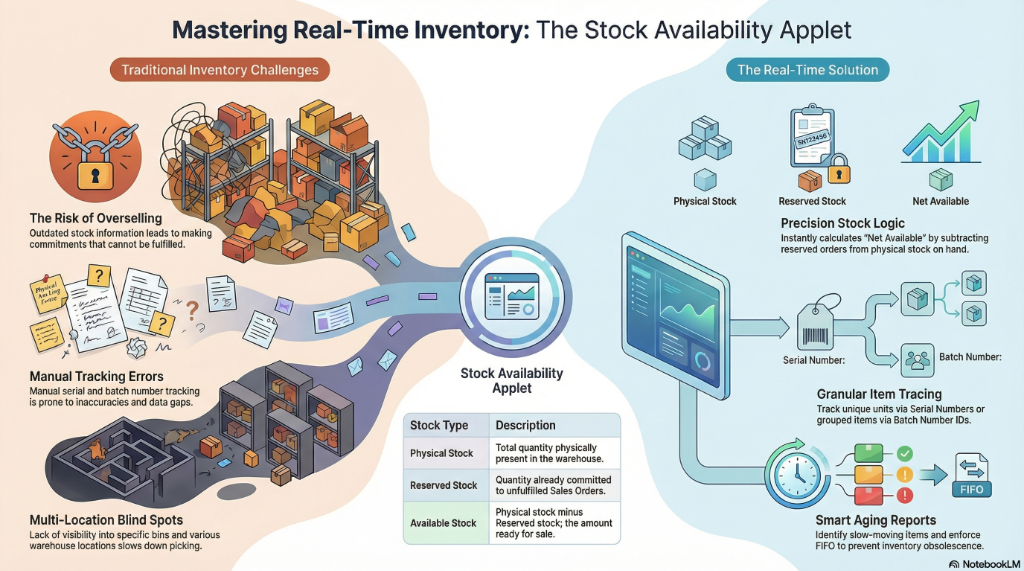
Traditional Inventory Challenges:
- No real-time visibility into actual stock levels
- Difficulty tracking items across multiple locations
- Manual serial and batch number tracking prone to errors
- Overselling due to outdated stock information
The Stock Availability Solution:
- Real-time stock visibility - See current inventory instantly
- Multi-location tracking - Monitor stock across all warehouses and bins
- Serial/Batch tracing - Complete history of tracked items
- SO/PO integration - View committed vs available stock
- Aging reports - Prevent obsolete inventory
Key Features Overview
Key Concepts
Stock Availability vs Physical Stock
| Concept | Description | Example |
|---|---|---|
| Physical Stock | Total quantity physically in warehouse | 100 units |
| Reserved Stock | Quantity committed to Sales Orders | 30 units |
| Available Stock | Physical minus Reserved | 70 units |
| Incoming Stock | Expected from Purchase Orders | 50 units |
Stock Tracking Methods
Item Tracking Options:
├── No Tracking (basic items)
├── Serial Number Tracking (unique per unit)
│   └── Each unit has unique identifier
└── Batch Number Tracking (grouped items)
    └── Multiple units share same batch ID
Quick Start Guide
For Warehouse: Check Stock Levels
Goal: View current stock availability across locations
- Navigate: Go to Stock Availability from the sidebar
- Search: Enter item code or description
- View: See quantity breakdown by location
- Drill Down: Click on a location for bin-level details
For Sales: Check Before Promising
Goal: Confirm stock before committing to customer
- Navigate: Go to Stock Availability SO/PO
- Search: Find the item in question
- Review:
- Available: Can be sold immediately
- Reserved (SO): Already committed
- Incoming (PO): Expected arrivals
- Decide: Make commitment based on availability
For Operations: Trace Serial Number
Goal: Find the history of a serialized item
- Navigate: Go to Trace Serial No Listing
- Enter: Input the serial number
- View History: See all transactions involving this serial
- Verify: Confirm current location and status
Stock Availability
Main Stock Listing
View stock levels with filters for:
- Location - Warehouse/store selection
- Item Category - Filter by product categories
- Stock Status - In stock, Low stock, Out of stock
Key Columns
| Column | Description |
|---|---|
| Item Code | Product identifier |
| Description | Product name |
| Location | Warehouse/store |
| On Hand | Physical quantity |
| Reserved | Committed to orders |
| Available | On Hand minus Reserved |
| UOM | Unit of measure |
Bin Availability
Warehouse Bin Tracking
For warehouses using bin locations:
- View stock by specific bin location
- Track bin utilization
- Optimize picking routes
- Manage bin replenishment
Stock Availability Details
Detailed Stock View
Drill down to see:
- Transaction history for an item
- Stock movement details
- Document references (GRN, DO, etc.)
- Quantity changes over time
Stock Aging Report
Inventory Age Analysis
Track how long stock has been in inventory:
- 0-30 days - Fresh stock
- 31-60 days - Moderate age
- 61-90 days - Aging stock
- 90+ days - At risk of obsolescence
Use for:
- FIFO enforcement
- Slow-moving item identification
- Write-off decisions
SO/PO Availability
Sales Order & Purchase Order View
See the complete picture:
- Current Stock - What you have now
- Reserved (SO) - Committed to sales
- Expected (PO) - Incoming from purchases
- Net Available - What you can actually sell
Serial Number Tracing
Trace Serial No Listing
Track individual serialized items:
- Complete movement history
- Current location
- Associated documents
- Warranty tracking
Serial Number Balance
View all serial numbers for an item:
- Available serial numbers
- Reserved serial numbers
- Serial number locations
Batch Number Tracing
Trace Batch No Listing
Track batched items:
- Batch origin and date
- Expiry tracking
- Batch location distribution
- Quality status
Stock Transfer Queue
View pending stock transfers:
- Transfers awaiting processing
- Inter-location movements
- Transfer status tracking
Configuration & Settings
Application Settings
Configure applet behavior and defaults.
Default Settings
Set default filters and views for users.
Field Configuration
Customize visible fields and column order.
Webhook Configuration
Integrate with external systems for stock updates.
Permissions
Control access to stock data:
- View - Read-only access
- Export - Allow data export
- Admin - Full configuration access
Release Notes
View applet version history and updates.
Applet Log
Audit trail of user actions within the applet.
Personalization
Personal Default Settings
Save your preferred filters and default location.
Sidebar Customization
Arrange menu items to match your workflow.
FAQ
Q: Why does Available Stock differ from On Hand? A: Available Stock = On Hand - Reserved. Reserved quantity is committed to unfulfilled Sales Orders.
Q: How do I find expired batch items? A: Use the Trace Batch No Listing and filter by expiry date to find items nearing or past expiration.
Q: Can I export stock data to Excel? A: Yes, use the Export function in the stock listing toolbar.
Q: How real-time is the stock data? A: Stock updates immediately when transactions are processed. Refresh the page to see latest data.
Q: How do I track warranty for serialized items? A: Use Serial Number Tracing to view purchase date and calculate warranty period.