Voucher Management Applet
Purpose and Overview
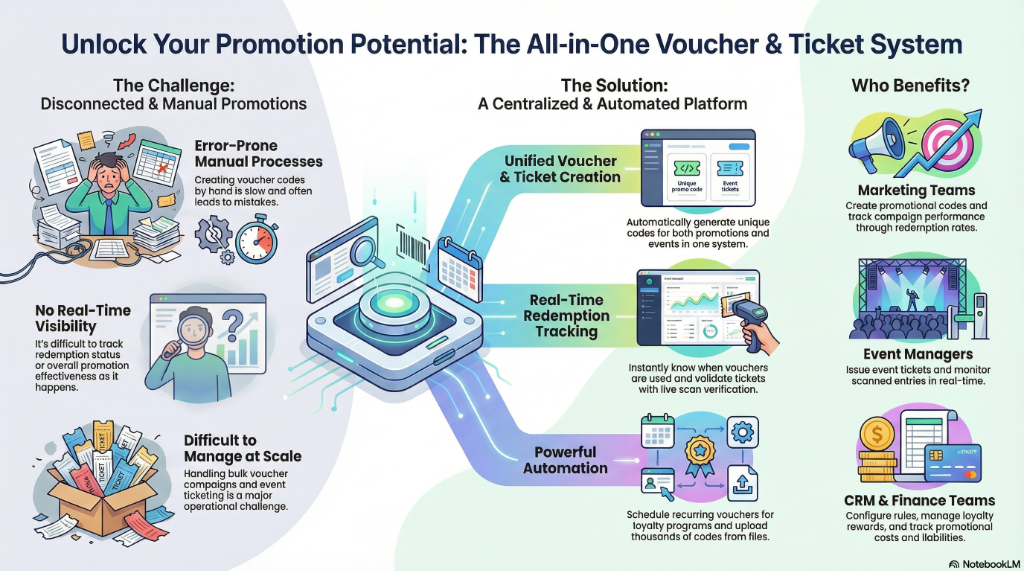
Who Benefits from This Applet?
Marketing Teams:
- Create promotional vouchers and discount codes
- Track campaign performance through redemption rates
- Manage recurring promotional programs
Event Managers:
- Issue and track event tickets
- Monitor scanned entries in real-time
- Handle bulk ticket imports
CRM Administrators:
- Configure voucher rules and restrictions
- Manage customer loyalty rewards
- Set up automated recurring voucher issuance
Finance Teams:
- Track voucher liabilities and redemptions
- Generate reports on promotional costs
- Monitor discounts applied across channels
What Problems Does This Solve?
Traditional Voucher Management Challenges:
- Manual voucher code generation prone to errors
- No real-time tracking of redemption status
- Difficulty managing bulk voucher campaigns
- Limited visibility into promotion effectiveness
The Voucher Management V2 Solution:
- Centralized voucher creation - Generate unique codes automatically
- Real-time redemption tracking - Know instantly when vouchers are used
- Event ticket integration - Manage tickets with scan verification
- Recurring voucher automation - Schedule periodic voucher issuance
- Bulk import capabilities - Upload thousands of vouchers from files
Key Features Overview
Key Concepts
Understanding Vouchers vs Tickets
| Concept | Description | Use Case |
|---|---|---|
| Voucher | A redeemable code for discounts, credits, or gifts | Promotional campaigns, loyalty rewards |
| Ticket | An entry pass or access token | Events, concerts, conferences |
| Recurring Voucher | Auto-generated vouchers on a schedule | Monthly loyalty rewards, subscription perks |
| Scanned Event | Record of when a ticket/voucher was verified | Entry tracking, redemption proof |
Voucher Lifecycle
Created → Issued → Active → Redeemed/Expired
   │         │        │          │
   │         │        │          └── End states
   │         │        └── Ready for use
   │         └── Assigned to customer
   └── Draft voucher definition
Quick Start Guide
For Marketing: Create Your First Voucher
Goal: Create a promotional voucher code for a campaign
- Navigate: Go to Vouchers from the sidebar
- Create: Click "+" or “New Voucher”
- Configure:
- Enter Voucher Code (e.g., “SUMMER2024”)
- Set Discount Type (Percentage or Fixed Amount)
- Set Discount Value (e.g., 10% or RM 50)
- Define Validity Period (Start and End dates)
- Set Usage Limits (One-time or multiple uses)
- Save: Click Create to activate the voucher
For Event Managers: Issue Event Tickets
Goal: Create tickets for an upcoming event
- Navigate: Go to Tickets from the sidebar
- Create Event: Click "+" to create new ticket batch
- Configure:
- Enter Event Name and Date
- Set Ticket Quantity
- Define Ticket Types (VIP, Standard, etc.)
- Issue: Generate and distribute ticket codes
For Admins: Set Up Recurring Vouchers
Goal: Automate monthly loyalty rewards
- Navigate: Go to Recurring Vouchers
- Create Rule: Click "+" to set up automation
- Configure:
- Set Schedule (Daily, Weekly, Monthly)
- Define Voucher Template
- Select Target Recipients
- Activate: Enable the recurring schedule
Voucher Management
Creating Vouchers
The main Voucher section allows you to:
- Create single vouchers - For specific promotions
- Generate batch codes - Multiple unique codes for campaigns
- Set restrictions - Minimum purchase, product categories, customer segments
- Track usage - Real-time redemption monitoring
Key Fields
| Field | Purpose | Example |
|---|---|---|
| Voucher Code | Unique identifier customers enter | WELCOME20 |
| Discount Type | Percentage or Fixed Amount | 20% off |
| Minimum Purchase | Required spend to use voucher | RM 100 |
| Valid From/To | Promotional period | Jan 1 - Jan 31 |
| Usage Limit | Max times voucher can be used | 100 redemptions |
| Per-Customer Limit | Max uses per customer | 1 per customer |
Ticket Management
Managing Event Tickets
The Ticket module provides:
- Ticket generation - Create unique ticket codes
- Assignment tracking - Know who holds each ticket
- Scan verification - Validate tickets at entry points
- Capacity management - Track available vs sold tickets
Scanned Events
Real-Time Scan Tracking
The Scanned Events section shows:
- Scan history - When and where tickets/vouchers were scanned
- Verification status - Valid, Already Used, Expired
- Location tracking - Which entry point processed the scan
- Timestamp logs - Detailed audit trail
Recurring Vouchers
Automated Voucher Issuance
Set up recurring voucher programs for:
- Birthday rewards - Auto-issue on customer birthdays
- Loyalty milestones - Reward after X purchases
- Monthly perks - Subscription member benefits
- Anniversary rewards - Celebrate customer anniversaries
Import Vouchers
Bulk Voucher Upload
The Import Vouchers feature allows:
- CSV/Excel upload - Import thousands of codes at once
- Validation checks - Verify format before import
- Duplicate detection - Prevent code conflicts
- Batch assignment - Assign to campaigns in bulk
Configuration & Settings
Settings Menu Overview
Access settings via Settings in the sidebar:
Default Settings
Configure default values for new vouchers:
- Default validity period
- Default discount type
- Default usage limits
Field Configuration
Customize visible fields and required inputs for voucher creation.
Webhook Configuration
Set up integrations to notify external systems when vouchers are:
- Created
- Redeemed
- Expired
Feature Visibility
Control which features are visible to different user roles.
Permissions
Manage access control:
- Permission Sets - Define role-based access
- User Permissions - Individual user access
- Team Permissions - Team-level access
- Role Permissions - Role-based access control
Personalization
Personal Settings
Personal Default Selection
Set your preferred defaults when creating new vouchers.
Sidebar Customization
Arrange sidebar menu items to match your workflow.
FAQ
Q: Can I create vouchers that work across multiple stores? A: Yes, voucher scope can be configured to work globally or limited to specific locations.
Q: How do I prevent voucher fraud? A: Set per-customer usage limits, require minimum purchase amounts, and enable one-time use restrictions.
Q: Can vouchers be combined with other discounts? A: This is configurable per voucher - you can allow or prevent stacking.
Q: How do I track which marketing campaign a voucher belongs to? A: Use voucher codes with campaign prefixes (e.g., “SUMMER2024-001”) and filter reports accordingly.
Q: What happens to unused vouchers after expiry? A: Expired vouchers automatically become inactive and cannot be redeemed. They remain in the system for reporting purposes.