Warranty Admin Applet
Purpose and Overview
The Warranty Admin Applet is a comprehensive solution designed to manage the lifecycle of product warranties. It enables businesses to track product registrations, issue warranty certificates, and manage customer claims efficiently.
Key Features Overview
Who Benefits from This Applet?
Sales & Retail Teams:
- Quick Registration: Link products to customers at the point of sale.
- Proof of Purchase: Instant generation of warranty certificates.
- Trade-in Verification: Confirm warranty status for upgrades or returns.
Customer Service & Support:
- Lookup Efficiency: Find registration details via Serial Number or IMEI in seconds.
- Coverage Validation: Verify if a repair is covered before initiating service.
- Communication Hub: Centralized data for all warranty-related interactions.
Quality & Production Teams:
- Failure Analysis: Track defect rates across specific product batches.
- Product Improvement: Identify recurring issues through warranty data.
- Traceability: Full audit trail from manufacturing (SN) to end-user.
Business Owners & Management:
- Liability Insight: Monitor total warranty obligations and costs.
- Customer Loyalty: Provide premium post-sales support that encourages repeat purchases.
- Reliability Data: Make data-driven decisions on product quality and warranty terms.
What Problems Does This Solve?
The Manual Warranty Tracking Problem: Traditional or fragmented systems often lead to operational friction:
- Lost Paperwork: Disputes over purchase dates and coverage periods.
- Verification Delays: Slowing down the support process for frustrated customers.
- Fraud Risk: Difficulty identifying counterfeit or parallel-imported goods.
- Fragmented Data: No unified view of product reliability across the organization.
The Warranty Admin Applet Solution:
- Digital Single Source of Truth: All registrations stored in one searchable database.
- Automated Calculations: Expiry dates are computed instantly based on predefined terms.
- Instant Communication: Automated email delivery of certificates.
- Lifecycle Management: Track a registration from “Draft” to “Expired” with clear statuses.
- Integrated Ecosystem: Seamlessly connects with Sales and CRM modules.
Key Features Visual Overview

Key Concepts
Understanding the Warranty Framework
Every record in the system relies on the “Golden Triangle” of Warranty Administration:
| Pillar | Component | Analogy | Definition |
|---|---|---|---|
| Product | Serial Number / SN | The “Identity” | The unique hardware identifier of the unit. |
| Owner | Customer Profile | The “Payee” | The person or entity authorized to claim the warranty. |
| Coverage | Warranty Terms | The “Contract” | The rules defining what is covered and for how long. |
Registration Lifecycle Statuses
Understanding the current status of a registration is critical for operational flow:
| Status | Meaning | Action Required |
|---|---|---|
| Draft | Data entry in progress | Complete missing details and submit. |
| Submitted | Pending review | Admin must verify the purchase proof. |
| Verified | Active Coverage | No action; warranty is valid for claims. |
| Expired | Coverage period ended | Offer extended warranty or paid repairs. |
| Void/Cancelled | Protection revoked | Investigate cause (e.g., unauthorized repair). |
Quick Start Guide
Get your team up and running with these standard operating procedures.
For Sales Staff: Register a New Sale
Goal: Activate warranty coverage at the point of sale in under 2 minutes.
- New Registration: Go to Product Registration > Click "+" (Add New).
- Identify Product: Enter or scan the Serial Number/IMEI.
- System Check: If the SN is found, it will auto-populate product details.
- Assign Owner: Search for an existing customer via phone/email or click “Create New”.
- Apply Terms: Select the appropriate Warranty Template (e.g., “12-Month Standard”).
- Finalize: Click “Verify” to activate or “Save as Draft” for later review.
Pro Tip: Always capture a clear photo of the physical invoice and attach it to the registration for audit purposes.
For Support Teams: Verify & Validate
Goal: Confirm if a customer is eligible for warranty service.
- Global Search: Enter the Serial Number in the top search bar.
- Validate Coverage:
- Check the Status (Must be “Verified”).
- Check the Expiry Date (System highlights red if expired).
- Check the Registered Owner (Does it match the customer in front of you?).
- Process: If valid, click “Initiate Service” (if integrated) or advise the customer on the next steps.
For Admins: System Configuration
Goal: Define the rules and templates for your business.
Step 1: Define Warranty Terms (Settings > Default Selection)
- Create templates with duration (Months/Days) and specific inclusion/exclusion text.
Step 2: Design Certificates (Settings > Email Template)
- Customize the automated email that sends the PDF certificate to the customer.
Step 3: Access Control (Settings > Role Permission)
- Ensure Sales can “Create” but only Managers can “Void” or “Verify” registrations.
Detailed Feature Sections
Product Registration Management
The centralized hub for tracking every unit. The listing view provides powerful filtering capabilities to find registrations by date range, dealer, or product type.
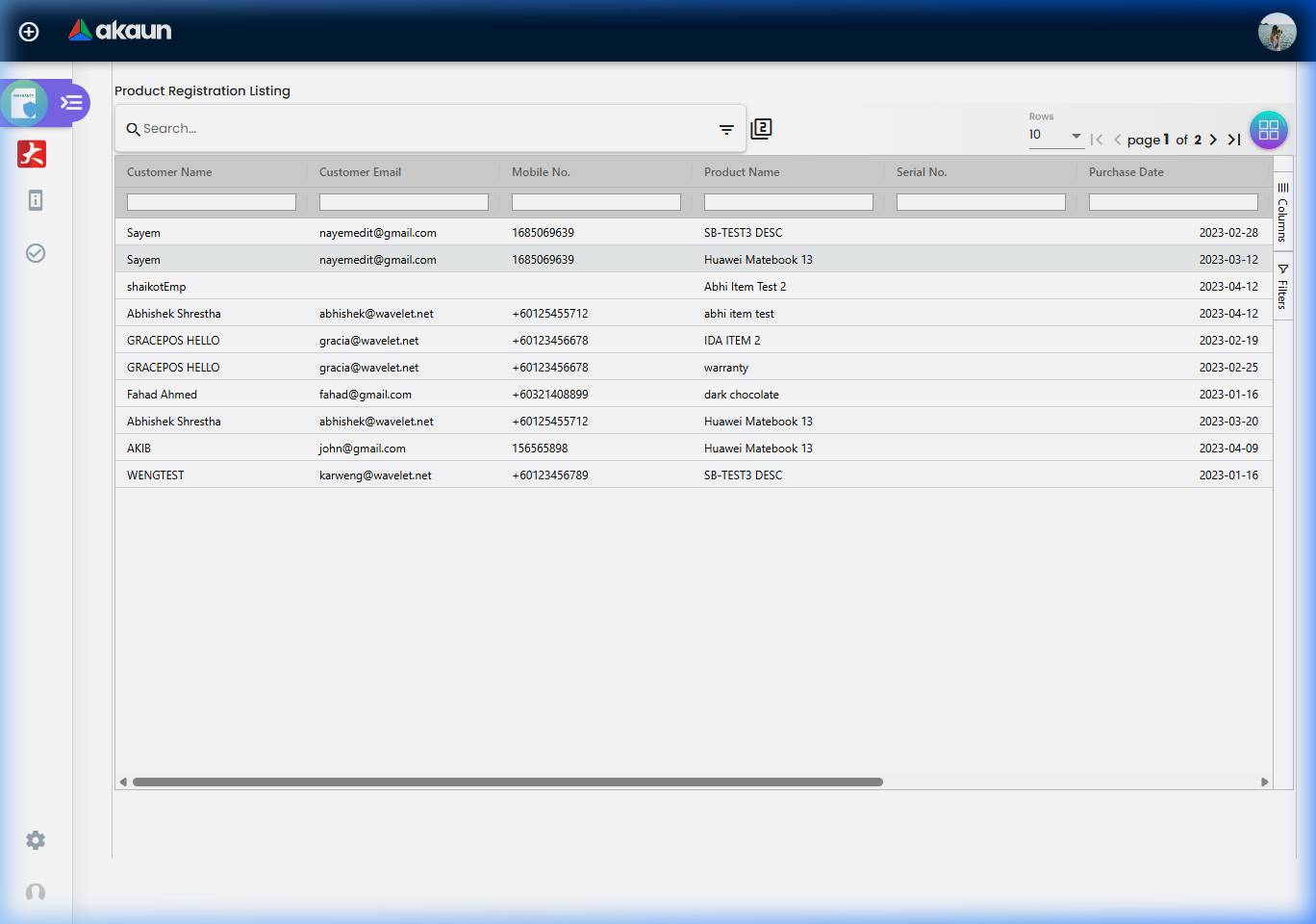
Key Fields in Registration:
- Product Model: Linked to your inventory master data.
- Serial Number: The unique ID for the unit.
- Date of Purchase: The anchor point for warranty calculations.
- Dealer/Store: Which outlet sold the unit.
- Owner Information: Contact details for the customer.
Warranty Certificates & Documentation
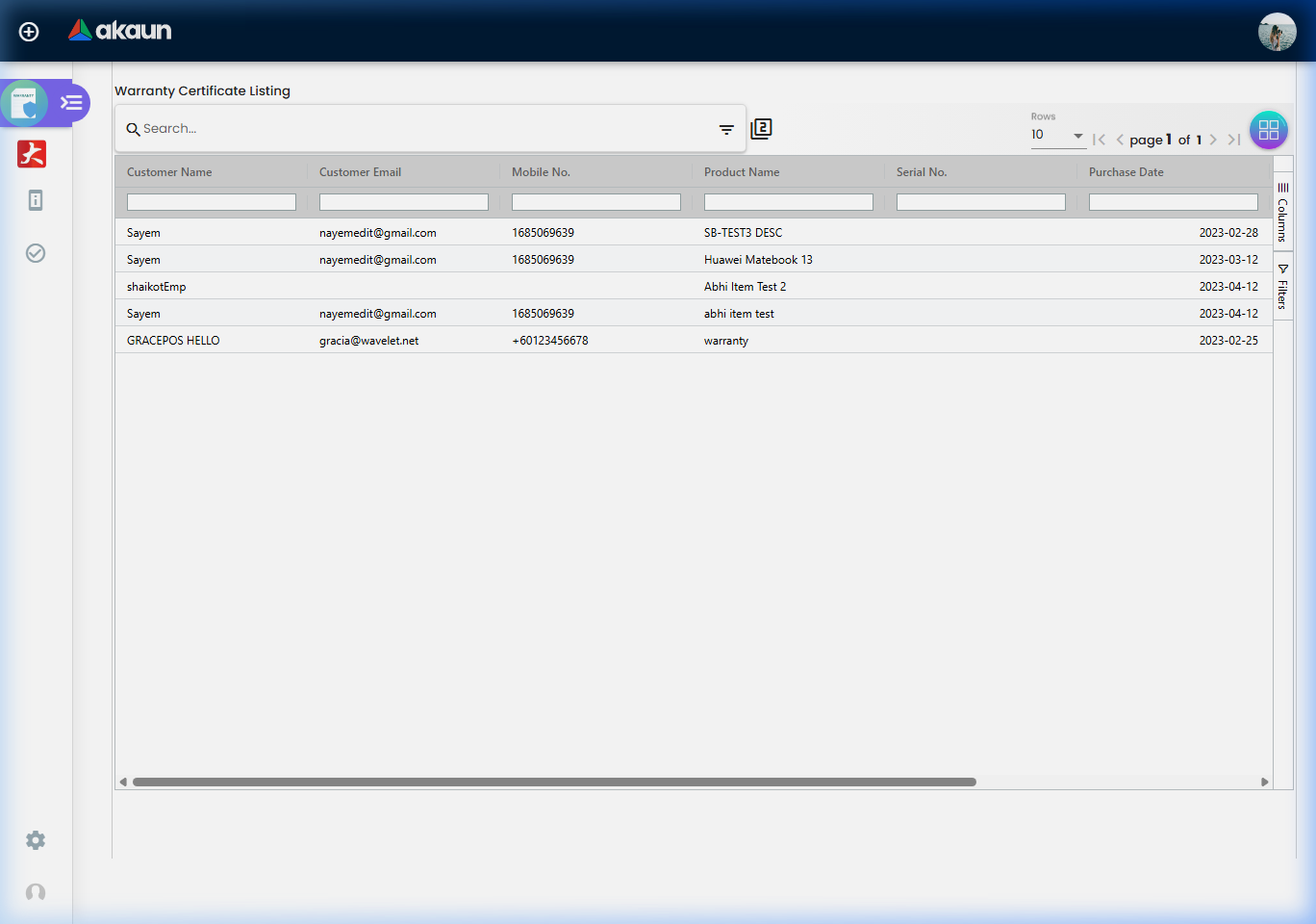
Professional certificates are generated as PDFs and can be automatically dispatched via email.
Configuration & Settings Deep-Dive
Admins have granular control over how the system behaves.
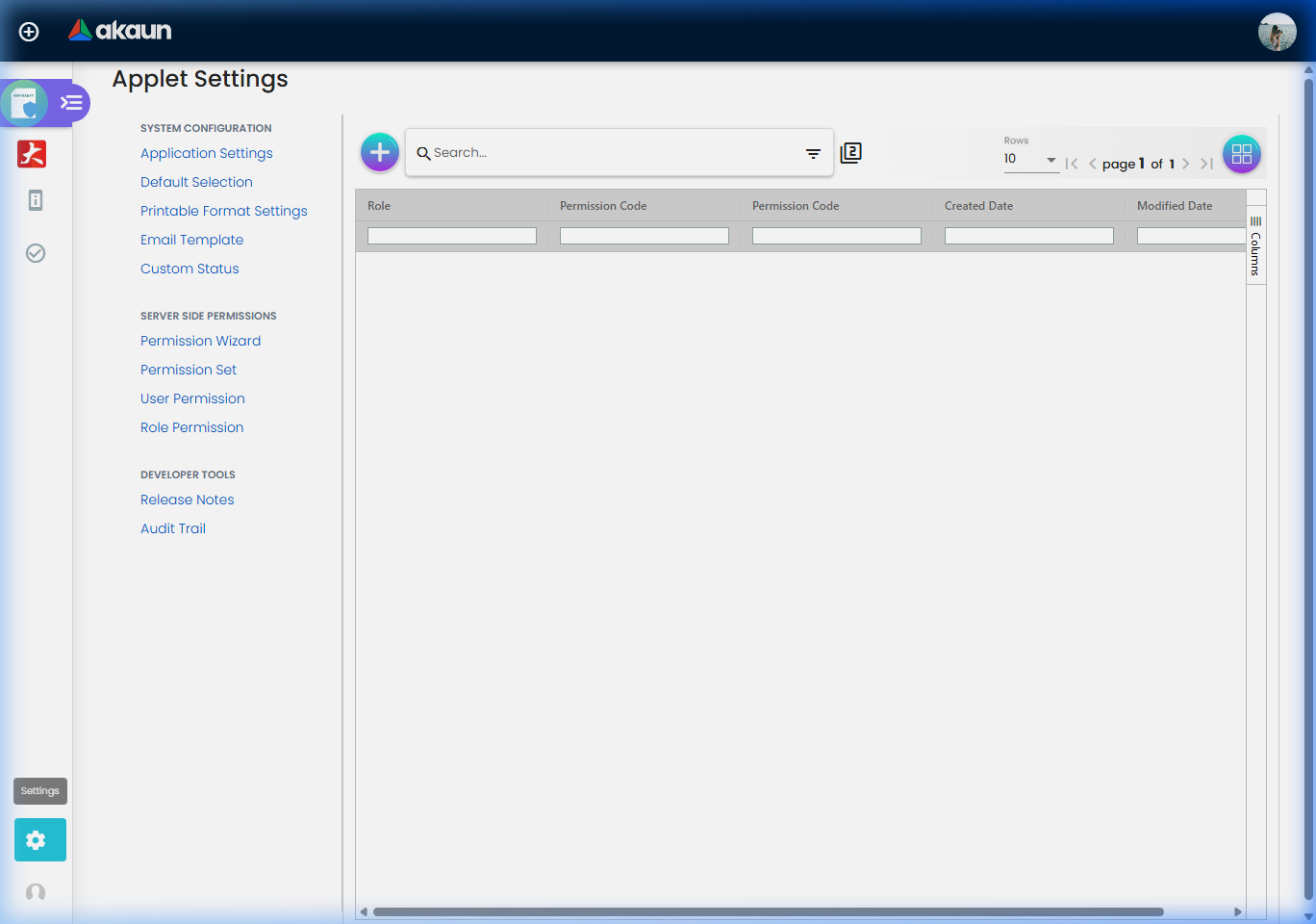
Field Configuration (Settings > Field Settings)
Define which data points are mandatory for a registration.
| Setting | Effect | Example |
|---|---|---|
| Mandatory | Prevents saving if the field is empty. | Date of Purchase |
| Visible | Toggles field display for staff. | Dealer Code |
| Read-Only | Prevents staff from changing data after creation. | Serial Number |
Custom Status Logic (Settings > Custom Status)
Tailor the registration lifecycle to your business process (e.g., adding a “Refurbished” or “Return Processed” status).
FAQ & Troubleshooting
Q: Can a warranty be transferred if the product is sold second-hand? A: Yes. An authorized admin can update the Owner details on a verified registration. The original Registration Date remains unchangeable to maintain the existing warranty period.
Q: How do I handle a product exchange (DOA)? A: You should Void the original registration (noting the serial number was defective) and create a New Registration for the replacement unit using its new Serial Number.
Q: We sold 50 units to a corporate client. Do I have to register them manually?
A: No. Use the Batch Upload feature under Product Registration. You can upload an Excel template containing all Serial Numbers and link them to the corporate owner in one action.
Q: The customer didn’t receive their certificate email. What should I do? A: Go to Warranty Certificates, find the specific certificate, and click “Resend Email”. Ensure you verify the customer’s email address in their profile first.
Q: Can I extend a warranty that is about to expire? A: Yes, if your business offers extended protection, you can apply an “Extension Template” to an existing registration to push the expiry date forward.
Best Practices for Success
✓ Check SN Early: Always search for the Serial Number before creating a new draft to prevent duplicates.
✓ Consistent Naming: Ensure customers are registered with standardized names (Last Name, First Name) to make searching easier.
✓ Verify Before Verifying: Double-check the uploaded receipt photo against the entered data before moving a registration to “Verified” status.
✓ Automate Communications: Use the Email Template feature to ensure every customer gets their certificate immediately—this reduces support calls.
✓ Regular Audits: Monthly review of “Draft” registrations to ensure the sales team completes the data entry for all sales.