The SST return month: from the period's documents to a filed SST-02
By the end of this guide the period’s documents are filed into one filing cycle, the SST-02 has passed two checks, the PDF is saved, and you know which parts of the return BigLedger leaves to a person. It is for the clerk who prepares the figures and the accountant or tax agent who submits them.
The month at a glance
- Confirm the filing cycle’s dates. They label the return; they select nothing.
- Read the Unfiled list by the right date: service tax by payment, sales tax by document.
- File, then prove it on Filed Transactions.
- Count every credit note once.
- Produce the SST-02 and run two 30-second checks.
- Export the PDF, hand over submission and payment, then lock.
Meet GadgetSphere
GadgetSphere Sdn Bhd charges 6% service tax, on tax code SRS6, on the repair and installation work its 22 branches invoice to business customers. The period is September–October 2026, one filing cycle named SST Sep–Oct 2026. Rate, code and period are this example’s; yours come from your registration with Customs.
Two ideas the screen does not show
Filing is a copy. File copies each item line of a document, with its amounts as they stand at that moment, into a filed record, and marks the document as filed. Every amount on the SST-02 is a sum of those copies, the penalty you type apart. Edit a document afterwards and the SST reports can change; the return does not (Which figures BigLedger stores).
The filing cycle is a label, not a net. Its start and end dates open the search and print on the form. What lands in the return is whatever you file while that cycle is open, with whatever dates you searched. BigLedger does not compare a document’s date with the cycle’s, so the person filing checks the range every time (Step 3).
Before you start
- Tax codes named as the SST-02 expects, on your items. A line whose code is not on the form’s fixed list files without complaint and is left out of item 11 and every item after it (Before you can use it; codes are kept in Tax Configuration).
- Only the people who file your SST hold the applet (Who can change what).
- Export the PDF before you lock. A locked cycle no longer exports, and the applet has no unlock (Step 6).
Step 1: Confirm the cycle’s dates
The cycle reads 1 September to 31 October 2026.
MY-SST › Tax Filing › open the cycle › Details
A person typed these dates, and saving checks neither that the end follows the start nor that two cycles overlap (Filing Cycle). The form’s due date is worked out from the end date, as the last day of the following month: 30 November 2026 here. It is not read from Customs.
The job that stays with a person: when the cycle is created, the accountant or tax agent checks both dates against the taxable period on the company’s registration, and takes the deadline from Customs, not from the form. It is right when the start follows the last return’s end, the end is the period’s last day, and the printed due date matches the deadline they hold.
Common failure: you correct Start Date on a new cycle and End Date jumps to three months later. Set End Date again by hand (Fields).
Step 2: Read the Unfiled list by the right date
You know which documents this period picks up, and why one is missing.
Tax Filing › Service (or Sales) › Unfiled Transactions
The tab opens already searched: the cycle’s dates, unfiled documents only, and your default branch. With no default branch the search is not narrowed to any branch, which suits GadgetSphere.
| Service tax | Sales tax | |
|---|---|---|
| The date the range reads | the settlement date: when another document, such as a receipt or credit note, was applied to this one | the document date |
| Document status | Final, and settled at least in part | anything not void, drafts included |
| Line | a service-tax output line with a rate above zero, or code ESS0 | a sales-tax line with a rate above zero |
So GadgetSphere’s RM 2,650 invoice (RM 2,500 plus RM 150 tax), dated 28 August and paid on 9 September, is in this period. Its RM 4,240 invoice (RM 4,000 plus RM 240) of 20 October, unpaid on 31 October, is not listed until a payment is applied. On the Service grid, read Settlement Date, not Document Date.
Part payment files the whole invoice. One instalment makes the document eligible, and filing copies its full amounts, not the part paid. Later instalments do not list it again.
This is BigLedger’s selection, not the whole of your obligation. The Service list follows payment and nothing else, and no setting changes it. Before each submission the tax agent reviews long-unpaid and part-paid service invoices, and any invoice-basis treatment agreed with Customs, and decides what the return must add or leave out.
Cash bills. The Service list is built from the link between two documents. A cash bill settled at the till, with no separate receipt applied to it, has no such link and is not listed, so FILE ALL does not file it. We have read the query, not every way a cash bill can be settled. If you charge service tax on cash bills, look for paid bills on this tab before your first return. If they are missing, ask BigLedger support how to file them; until every paid bill of the period is on Filed Transactions, the tax agent declares their tax from the sales records.
Step 3: File, then prove it
Every document that belongs to the period is filed into this cycle, once.
Unfiled Transactions › FILE ALL, or tick documents and FILE IT (Service only)
Check the date range first, and note how many documents are listed. FILE ALL runs your last search again when you confirm and files everything that qualifies then, across every branch searched, into the open cycle. Widen the dates by mistake and other periods’ documents land in this return.
What File writes. One filed row per item line: its net, tax and total, signed (a sales credit note’s are negative), with its tax code, rate and tariff code. It then marks the document as filed. It writes no journal: the tax reached your ledger when each document was finalised. A line that is not an item line, such as a charge carried as another line type, is not filed.
Do not trust the message. FILE IT shows Document Filed Successfully even when a document’s rows failed to write, and FILE ALL complains only when nothing qualified. Open Filed Transactions and search a date range covering the period’s settlement dates (document dates on Sales); as served today the tab opens on today’s date alone and can look empty. Each filed document is listed once, and the count is at the foot of the grid: GadgetSphere expects 412 invoices. The grid shows documents, not filed rows. The applet lists the filed rows themselves nowhere; you see them only as totals on the SST-02 (Step 5).
Unfile is not an undo. UNFILE IT removes one filed row and marks the whole document unfiled. For a document with one item line that is a clean removal. With three item lines, two rows stay in the cycle and still count in the return; the document leaves the Filed list, and filing it again adds three more. Do not file it again: ask BigLedger support to clear the leftover rows, and tell the tax agent the cycle is overstated until then (Unfile).
The Sales tab differs twice. Filed Transactions can list other cycles’ documents, so confirm a document’s cycle before you unfile it; and a document once filed in another cycle can appear twice on Unfiled, where FILE ALL files it twice. Look for repeated numbers first.
Nothing freezes until you lock. File and Unfile work on any unlocked cycle, last period’s included. Until Step 6 the control is one person filing.
Step 4: Count every credit note once
Each credit note for the period reduces the return exactly once.
Filing writes a sales credit note’s lines as negative amounts, and items 11 and 12 add up every filed row of the cycle for their tax codes, whatever the document. So a filed credit note on one of the form’s tax codes has already reduced the return. BigLedger leaves item 13, the deductions box, at zero.
GadgetSphere’s 412 invoices carry RM 184,000 before tax and RM 11,040 tax (184,000 × 6%). It applied a credit note of RM 1,000 plus RM 60 tax to an invoice on 14 October and filed it: 413 documents in all. Item 11c now reads RM 183,000.00 (184,000 − 1,000) and its tax RM 10,980.00 (11,040 − 60).
- Do not also enter a filed credit note in item 13, or its tax is deducted twice.
- Tick each of the period’s credit notes off by number against Filed Transactions. A service-tax credit note reaches Unfiled only after it is applied or refunded, in the period of that date, and we have not confirmed that every way of applying one creates the link the list reads. One on neither tab may or may not be in the return: ask BigLedger support, and declare nothing for it separately until they answer.
The job that stays with a person: BigLedger’s form always nets a filed credit note into item 11. If your tax agent wants it in item 13, they restate both items on the return they submit. Either way its tax appears once.
Step 5: Produce the SST-02 and run two 30-second checks
The SST-02 is computed and has passed two quick checks.
Tax Filing › Service › SST-02 (or Version 2, Version 3) › SEARCH
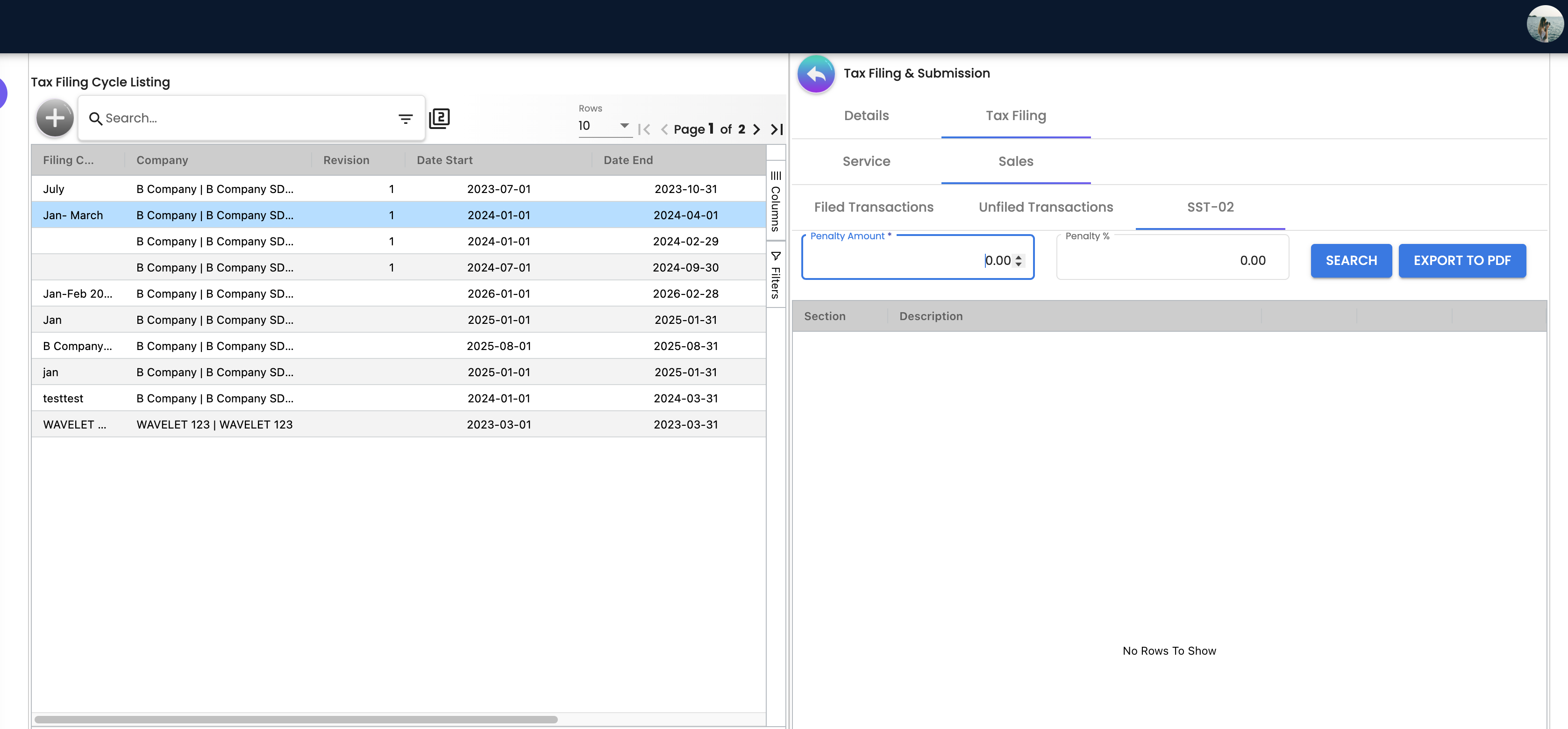
Choose the Service variant whose tax codes match the rates you charged; the box table owns every box’s source and filter. GadgetSphere reads item 11c RM 183,000.00, tax RM 10,980.00 (183,000 × 6%).
Check 1, the count. Filed Transactions, searched as in Step 3, lists the 413 documents you meant to file.
Check 2, the second opinion. Open SST Tax Code Summary, choose the company and this filing cycle, and clear Branch. Add the output tax of the codes your variant adds up (for GadgetSphere, SRS6 alone). It should equal item 11c’s tax: RM 10,980.00. The summary reads today’s amounts on each document line, once for every filed row the line ever had, removed rows included.
Agreement is a consistency check: it catches most unfiles, voids and edits made after filing. It does not show that the right documents were filed: a missing document is missing from both figures, and a wrong-period one is in both. Steps 2 to 4 and the count cover that.
| You see | It means | Do |
|---|---|---|
| The two differ | A document was unfiled, voided or edited after filing. The size of the gap does not say which | Find the document. A single-line document you unfiled on purpose explains it: note it. Do not unfile and refile to investigate (Step 3) |
| Item 11c is zero and the summary is not | The tax code is not one this variant adds up | Check the variant, then the code’s exact name |
| Item 10 and item 11c differ | Item 10 selects lines by tariff code, item 11c by tax code | SST applet › Troubleshooting |
Tying the return to the ledger is a separate check: Reviewing a Set of Books › Step 2.
Step 6: Export, hand over, then lock
The return is with Customs, the tax is paid, and the period is closed.
Press SEARCH, then EXPORT TO PDF. The export works the form out again from the cycle and penalty you last searched, so open the PDF and check its period and figures against the screen before anyone uses it. On a locked cycle the export produces nothing and shows no error.
BigLedger prepares the figures. It sends nothing to Customs and pays nothing. These jobs belong to people:
| The job | Who | When | They know it is right when |
|---|---|---|---|
| Submit the return | Whoever holds the company’s Customs login, usually the accountant or tax agent | By the deadline Customs gives you | The acknowledgement is filed beside the PDF and its figures match |
| Decide what the form works out differently | The tax agent | Before submission | Item 13, any penalty, and on a Sales return item 12 (it adds taxable amounts, not tax) are each reviewed |
| Pay the tax | Whoever your company authorises to pay Customs | By the same deadline | The payment confirmation is kept with the return, and the payment is recorded in the books against the output tax balance, LIAB-SST-OUTPUT. Filing and Lock, as the applet runs them, write no journal |
| Lock the cycle | The accountant | After the acknowledgement | The cycle shows as locked on the Tax Filing list |
| A document found late | The tax agent | When it is found | Amend, or declare next period: decided and noted |
Lock greys out FILE ALL, FILE IT and UNFILE IT for that cycle. Earlier cycles must be locked first, so export their PDFs too, and the applet has no unlock (Lock). A filed document voided later has at most one filed line taken back, in the cycle it was filed in (VOID of a filed document).
What success looks like
In thirty seconds:
- Unfiled Transactions, on the cycle’s dates, lists only documents you mean to leave out.
- Filed Transactions lists the number of documents you filed.
- The Tax Code Summary’s output tax for your codes equals the SST-02’s tax.
- The checked PDF, the Customs acknowledgement and the payment confirmation are saved together, and the cycle is locked.
Common mistakes
| Symptom | Cause | Fix |
|---|---|---|
| A paid service invoice is missing from the return | You searched by its invoice date; the Service list follows the settlement date | Search the period in which it was paid |
| The return includes another period’s documents | The date range was widened before FILE ALL | Unfile single-line documents; for the rest, BigLedger support (Step 3) |
| Filed Transactions looks empty | The tab opened on today’s date | Search the period’s settlement dates (document dates on Sales) |
| EXPORT TO PDF does nothing | Not searched first, or the cycle is locked | Press SEARCH first; for a locked cycle, BigLedger support |
Related documentation
- MY-SST applet: every screen and box.