Month-end e-invoicing: check the Batch Pool and run the consolidation
Steps 2 and 3 of the month-end e-invoice cycle: make sure every Batch Pool row for last month that should be consolidated will be swept, then let the consolidation run, or run it yourself. It follows Step 1, clearing the Individual Pool. One thing has to happen before the run fires for last month: work the Invalid list in Step 5, because since 13 October 2026 an Invalid row under RM 10,000 that you have left alone is swept into the consolidated e-invoice under the General Public buyer, which is the wrong result for a business customer who asked for an e-invoice of their own.
GadgetSphere’s counters rang up roughly 38,000 receipts last month, almost all walk-in sales under RM 10,000 with no buyer details, and those are what the run consolidates. On a company that consolidates by branch, look at the Batch Pool before the run, and key a passport buyer individually: Step 3 says why.
- Step 2: check the Batch Pool for rows that will not be swept.
- Step 3: let the consolidation run, or trigger it yourself.
Step 2: Check the Batch Pool for rows that will not be swept
Outcome: you know that every Batch Pool row for last month is genuinely waiting to be consolidated, not stuck.
My E-Invoice Admin Applet → Batch Pool
Most Batch Pool rows need nothing from you — they are unprocessed, and the monthly consolidation sweeps them up. But there is one row state that looks harmless and is not:
- Unprocessed — will be consolidated. Leave it alone. This is true even when the row is red. A receipt lands in the Batch Pool precisely because it could not have been an individual e-invoice, so most unprocessed rows carry a failed queue status and a Validation Error listing the buyer fields you do not have. The consolidation run never looks at that column. A wall of red unprocessed rows is what a healthy Batch Pool looks like at month end.
- Processed / Failed — somebody pressed Process or Save and Resubmit on it, the data still wasn’t good enough, and the row was marked processed with the reason in Validation Error. Those two buttons mark a row processed whether they succeed or fail. It is the processed, not the failed, that matters: the row is no longer waiting for anything, the monthly consolidation will not pick it up, and it is invisible on any “unprocessed” filter.
Open a failed row and read the Validation Error panel — it names exactly which fields are missing.
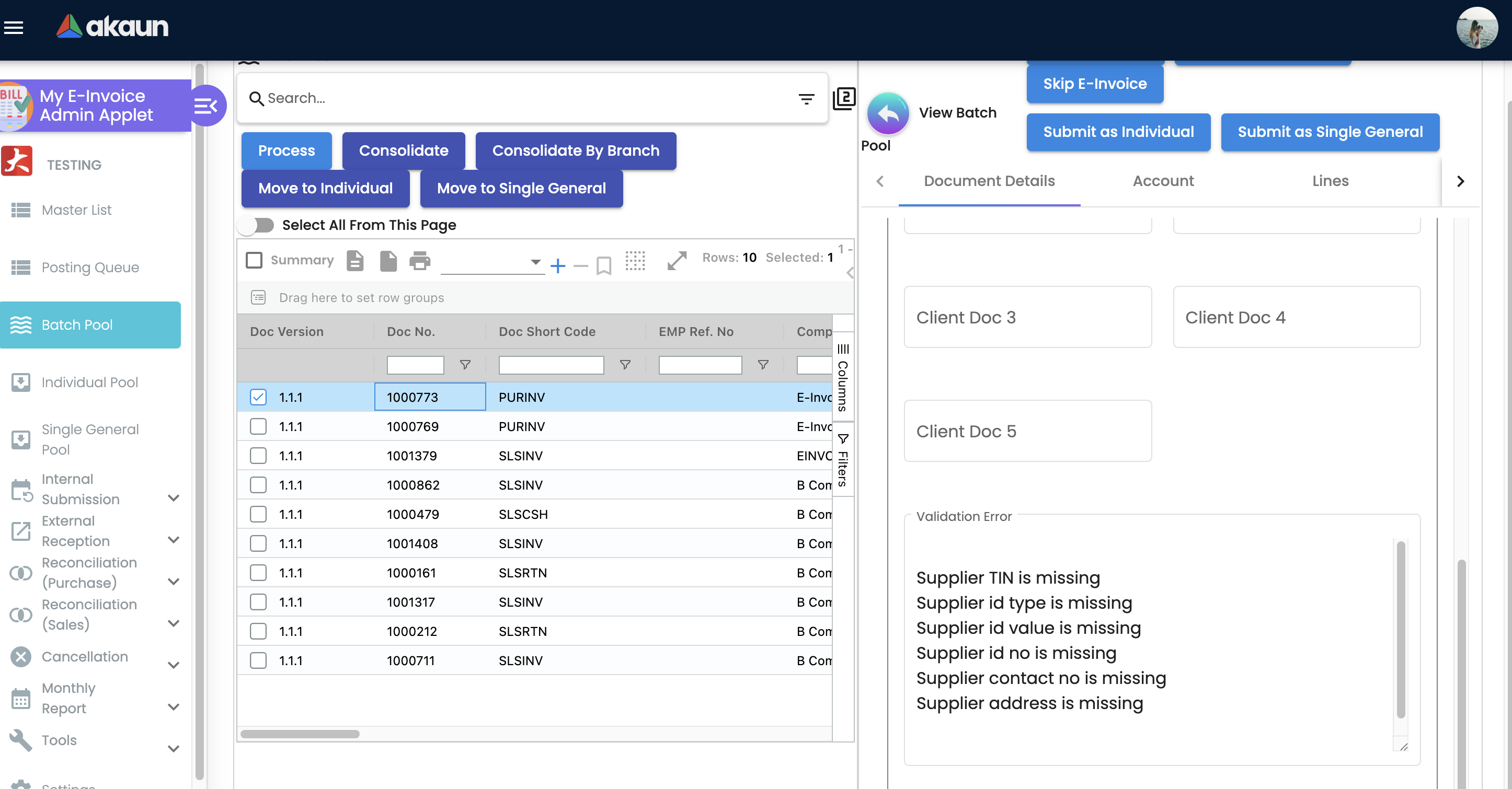
Fix the underlying customer record, then use Save and Resubmit again — if it passes this time the receipt goes out as an individual e-invoice. If you cannot complete the buyer’s details and you just want the receipt back in the monthly batch, there is no “unprocess” button and nothing resets the row: use Move to Individual, then Move To Batch Pool from the Individual Pool. That pair replaces the stranded row with a fresh unprocessed one, and the run can see it again. Either way it has to be dealt with by hand.
And the mistake that creates the problem: do not press Process on a batch of red unprocessed rows to “clear” them. They were going to be consolidated. Pressing Process runs the individual check, the check fails for the same reason it failed the first time, and the row is marked processed — you have taken it out of the run. Fleet-wide, genuinely stranded rows are a handful per tenant against tens of thousands that are simply waiting, and every one of them was made by a button.
The most common way this goes wrong: a clerk works the pool on the 2nd, fixes a batch of rows, half of them fail the check again, and nobody looks at the result. Those receipts never reach LHDN and turn up as the gap in Step 5.
Step 3: Let the consolidation run — or trigger it yourself
Outcome: last month’s Batch Pool has become consolidated e-invoices sitting in the submission queue, and then at LHDN.
My E-Invoice Admin Applet → Batch Pool → Consolidate (or Consolidate By Branch), then Internal Submission → Consolidated Submission → Submit
For most companies you do not press anything. Consolidation starts on its own from the 1st: by default the run fires every half hour, takes up to 100 of last month’s unprocessed Batch Pool rows each time, and the consolidated submission sends the results on to LHDN every 20 minutes. There is no one consolidation day — last month is worked through in batches, and the 7th is the deadline the batches must beat. At the default that is up to 4,800 rows a day, so a month of a few thousand receipts is through on the 1st; a high-volume tenant on the default batch can need several days, which eats into the time you have to fix rejections, so if yours is large, check how far the Batch Pool has got by the 2nd. The run is one clock for the whole tenant, so every company in a group is consolidated by the same runs. The manual buttons above are the fallback, and they are what support uses when a run has to be repeated.
Two things worth knowing about the result:
- The automatic run looks at one month, and it is last month. It takes unprocessed Batch Pool rows whose transaction date falls in the previous calendar month — nothing from this month, which is right, and nothing older, which is the part that catches people. A receipt still sitting in the pool from two months ago is not late, it is out of the window, and no number of runs will pick it up. That is what Step 2’s old-row check is for. The fix is yours, not support’s: select those rows and press Consolidate, which has no date window and dates the resulting e-invoice to the last day of the receipt’s own month. Expect it to be reported late — that month’s deadline was the 7th of the month after it.
- If your company consolidates by branch, every unprocessed row it reaches is consolidated, whatever tax number it carried. Before it groups, that run gives a sales row whose buyer’s tax number is not the General Public, foreign-buyer or government one — and a purchase row whose supplier’s tax number is not the General Public, foreign-supplier or government one — the General Public number
EI00000000010, overwriting what was there, and nothing tells you it did. So on a by-branch company, look at the Batch Pool before your run and take out any row whose buyer needs an e-invoice of their own, and come back the day after and look at what is still unprocessed for the month that was just consolidated: check the run finished and the rows have a branch, then select them and press Consolidate. Companies on the by-document run read no tax number at all, so their rows go out as General Public too. (Why, and how to tell which you are on.) - A passport buyer is not a consolidation problem you can defer. If a tourist bought a laptop at the Penang branch and gave you a passport, that sale must be keyed with identity type Passport and submitted individually, with their real tax number. There is no General TIN substitution for a passport, so leaving it to the monthly run never produces the e-invoice they wanted: a receipt keyed Individual, or of RM 10,000 or more, waits unreported in the Individual Pool; a smaller one left blank or marked Consolidated is either skipped by a by-branch run or swept into the General Public consolidation by a by-document one. Ask for the tax number at the counter.
Next: Steps 4 to 7, work the Invalid list and reconcile.
What success looks like for this part
Once the run has worked through last month, the Batch Pool filtered to last month shows no unprocessed rows and no processed-but-failed rows either: each processed row was resubmitted with the buyer’s details, or replaced with Move to Individual and then Move To Batch Pool and swept. Rows older than last month have been selected and consolidated with Consolidate. On a by-branch company you looked at the Batch Pool before the run and again the day after. No consolidated e-invoice for last month is still sitting in the consolidated queue. When the month is done, run the whole cycle’s success check.
Common mistakes in this part
| Mistake | What you see | Fix |
|---|---|---|
| Assuming a processed / failed Batch Pool row will be picked up | The tally is short by exactly those receipts | Filter on process status = processed together with a failed queue status — filtering on failed alone returns the whole healthy pool, because an unprocessed row waiting to be consolidated is normally failed too |
The mistakes that span the whole cycle are on the front page.
Related documentation
- The Month-End E-Invoice Cycle: the whole cycle, with its success check.
- Pools & Submission Routing: why a document went to the pool it went to, and how to move it.
- My E-Invoice Admin Applet: what each pool button does.