E-Invoice Pools: The Monthly Consolidation Cycle and Backdated Documents
Part 4 of Pools and E-Invoice Submission Routing: how last month’s Batch Pool rows become consolidated e-invoices, what each number in that cycle is and who can change it, and what happens to documents dated in the past. It follows Working each pool. Most of GadgetSphere’s month — its walk-in counter receipts, marked Consolidated at the till — ends up here.
Check the Batch Pool before the 7th: rows dated before last month are outside the automatic run’s window, and only Consolidate, pressed by you, takes them.
The monthly consolidation cycle
Unprocessed Batch Pool documents from a month are grouped into consolidated e-invoices, which LHDN requires to be submitted within seven calendar days after the month end — by the 7th (e-Invoice Specific Guideline 4.9, §3.6.2). Every receipt inside one is traceable back to the e-invoice that reported it.
You do not normally press anything — and there is no single “consolidation day”. Consolidation and submission are two clocks on your tenant’s scheduler, and by default both tick all day, every day: the consolidation run every half hour, the consolidated submission every 20 minutes. From the first firing on the 1st, each consolidation run takes a batch of last month’s unprocessed Batch Pool rows (100 by default) and builds them into consolidated e-invoices, and the submission clock sends whatever has been built for last month on to LHDN. So last month is consolidated in batches from the morning of the 1st onward, and the 7th is the deadline those batches have to beat, not the day they run. A small month is done within the first hours; a high-volume tenant on the default batch can need days of runs — the interval and the batch size are set per tenant on the clock’s row in the Scheduler applet, which is where to look (or ask support) if your month is large (Pools and queues works the arithmetic). The clocks belong to the tenant, not the company — one consolidation clock serves every company in your BigLedger tenant, so in a group of three companies all three are consolidated by the same runs, and switching that clock off stops it for all three at once. The buttons in the Batch Pool and on Internal Submission → Consolidated Submission are the manual fallback, used when a run has to be repeated or a row has fallen outside its window. The full week-by-week routine is in The Month-End E-Invoice Cycle.
Where each number in this section comes from. Some are clocks on your tenant, some are written into the program, and one is LHDN’s:
| Figure | What it is | Where you see it, and who can change it |
|---|---|---|
| Consolidation every 30 minutes | A clock: the default timetable BigLedger installs, switched on, when a tenant is created | The E_INVOICE_BATCH_PROCESSING_CYCLE_RUN_PROCESSOR row in the Scheduler applet; whoever administers your scheduler can change the timetable or switch it off |
| 100 Batch Pool rows per run | A program default, used whenever the clock carries no limit property — and a default clock is installed with none | The clock’s Json tab in the Scheduler; a limit there replaces the 100 |
| Last month only | A program rule, counted on the Malaysian calendar; the run refuses the current month | The same Json tab can name an earlier month in month; nothing makes it take this month |
| Up to 4,800 rows a day | Arithmetic: 100 rows × 48 runs a day at the defaults | Changes with either of the two above |
| One run at a time | A program rule: a run holds a lock for up to six hours, and a firing that finds it held does nothing | Nowhere on screen |
| Consolidated submission every 20 minutes | A clock, installed the same way | The CONSOLIDATED_E_INVOICE_PROCESSOR row in the Scheduler |
| Up to 49 consolidated e-invoices sent per firing, dated before the 1st | A program default (a maxIterations property on that clock replaces it) and a program rule | The clock’s Json tab, for the first; nowhere, for the second |
| 200 lines per by-branch e-invoice | A program constant | Nowhere; see By document or by branch |
| The 7th | LHDN’s rule, not BigLedger’s: no clock or field holds it, and the run does not stop on it | The guideline; LHDN guideline versions records the copy we checked |
Which processors are running is a per-tenant answer from support — but three switches are yours, per company. On each company’s E-Invoice tab: Disable Consolidated Submission and Disable Single-General Submission take those two values out of the Submission Type drop-down on every sales and purchase document for that company, so nobody can mark a new document for them; and Send Email To Buyer decides whether the validated PDF is e-mailed to the buyer at all. In a group of three companies they are three separate answers, and the first two explain a submission type that has gone missing from a drop-down rather than a processor that has stopped.
Backdated documents
Two rules matter when handling documents dated in the past:
- Issue time is always “now”. LHDN requires the e-invoice issue date-time to be the actual submission time. BigLedger does not copy it from the document: it writes the clock time, in UTC, at the time of submission — the moment the run builds what it sends — so a document finalised on the 30th and sent on the 1st carries the 1st. The document’s original transaction date is preserved separately — you don’t lose it. A consolidated e-invoice is the exception you will notice: its own date is set to the last day of the month it reports.
- The automatic run looks at one month, and older rows are left where they are. Since 2026-09-18 it selects only unprocessed Batch Pool rows whose transaction date falls in the previous calendar month. A receipt dated this month waits for next month’s runs, which is right; a receipt dated two months ago is outside the window and will never be picked up, however long you wait. Sort the Batch Pool by date every cycle. When you find old rows, select them and press Consolidate yourself — the button has no date window, and the e-invoice it builds is dated the last day of that receipt’s own month. It will be submitted, and it will be late, because that month’s deadline was the 7th of the month after it.
What success looks like for this part
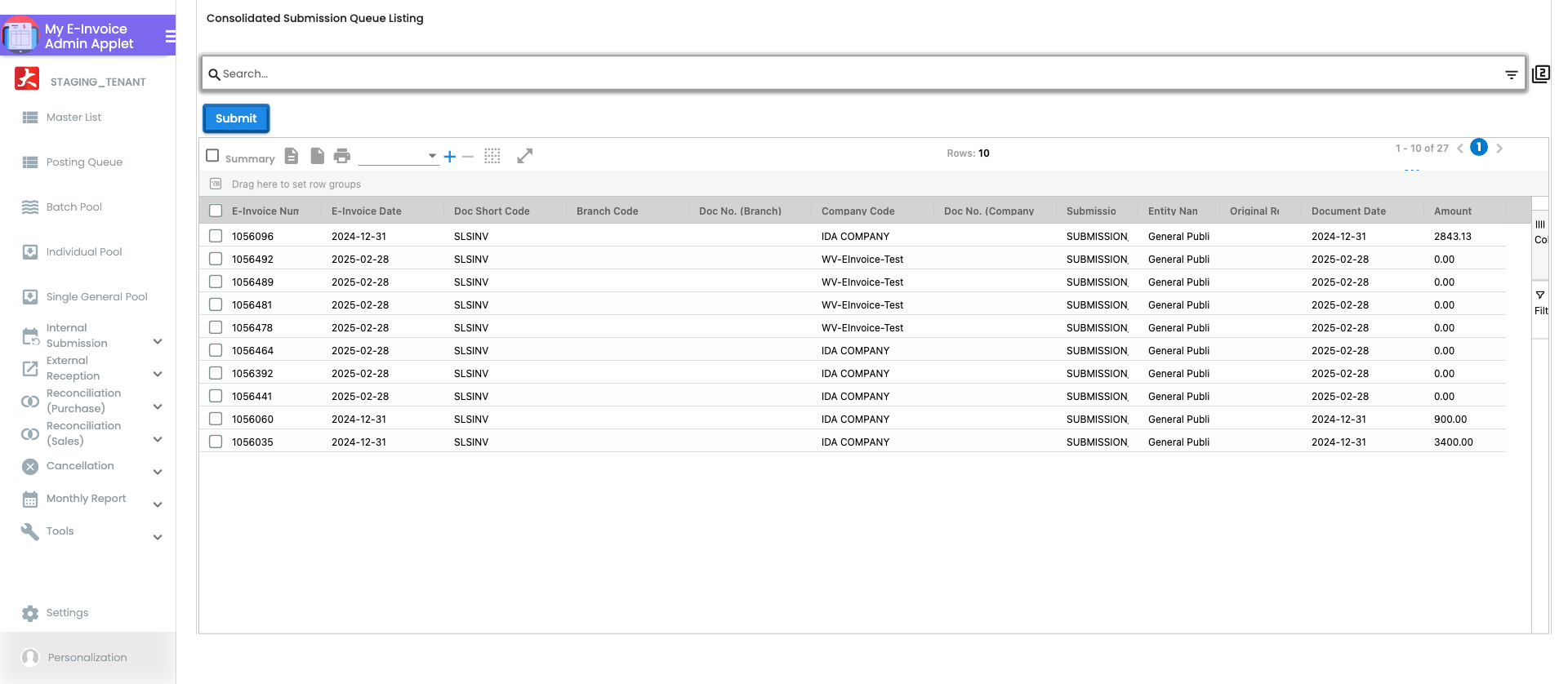
Sorted by date, with process status unprocessed, the Batch Pool shows only this month’s and last month’s rows; and by the 7th no row for last month is left unprocessed and last month’s consolidated e-invoices show as submitted on Internal Submission → Consolidated Submission. When you are done, run the whole page’s success check.
Common mistakes in this part
- Moving a document to the Batch Pool months after the fact. The row keeps the document’s own date, and the automatic run only selects last month’s. Move it late enough and nothing will ever pick it up — you will have to select it and press Consolidate yourself.