Understanding E-Invoice Statuses
You finalised a sales invoice this morning. It is mid-afternoon, the e-invoice still says In Queue, and there is no error anywhere — no red text, no warning, no message in any log you can reach. Nothing has happened, and nothing has complained.
That is the second commonest question customers ask us about e-invoicing, and the honest answer surprises people: in most cases nothing has failed. Ten minutes here and you will be able to look at any e-invoice status and say three things about it — whether LHDN has ever seen the document, whether anything is actually wrong, and whether the right move is to wait or to act.
Meet GadgetSphere
GadgetSphere Sdn Bhd runs 22 consumer-electronics branches across three companies. On a normal Saturday its tills finalise several thousand documents, every one of which becomes an e-invoice obligation. Nobody at GadgetSphere watches individual e-invoices go out — they look at statuses, and only when something looks wrong. Knowing which statuses mean “wrong” is the whole job.
Nothing has happened and there is no error message
This is the situation where a document has been finalised, its e-invoice shows In Queue or nothing at all, and no error appears anywhere. Almost always, nothing has failed. Here is why the absence of an error is the normal case rather than a symptom.
Finalising a document does not send anything to LHDN. Finalise is a separate operation from saving, and all it does is put work on a queue. The work is then carried out by a chain of scheduled background jobs, each of which does one step and hands on to the next:
- Finalise queues the document’s primary processor and returns immediately. Your cashier’s screen is already free.
- A secondary processor decides where this document belongs: straight into the pipeline, or held in one of the three pools because something required is missing. If it goes into the pipeline it becomes a posting-queue row, still entirely inside BigLedger.
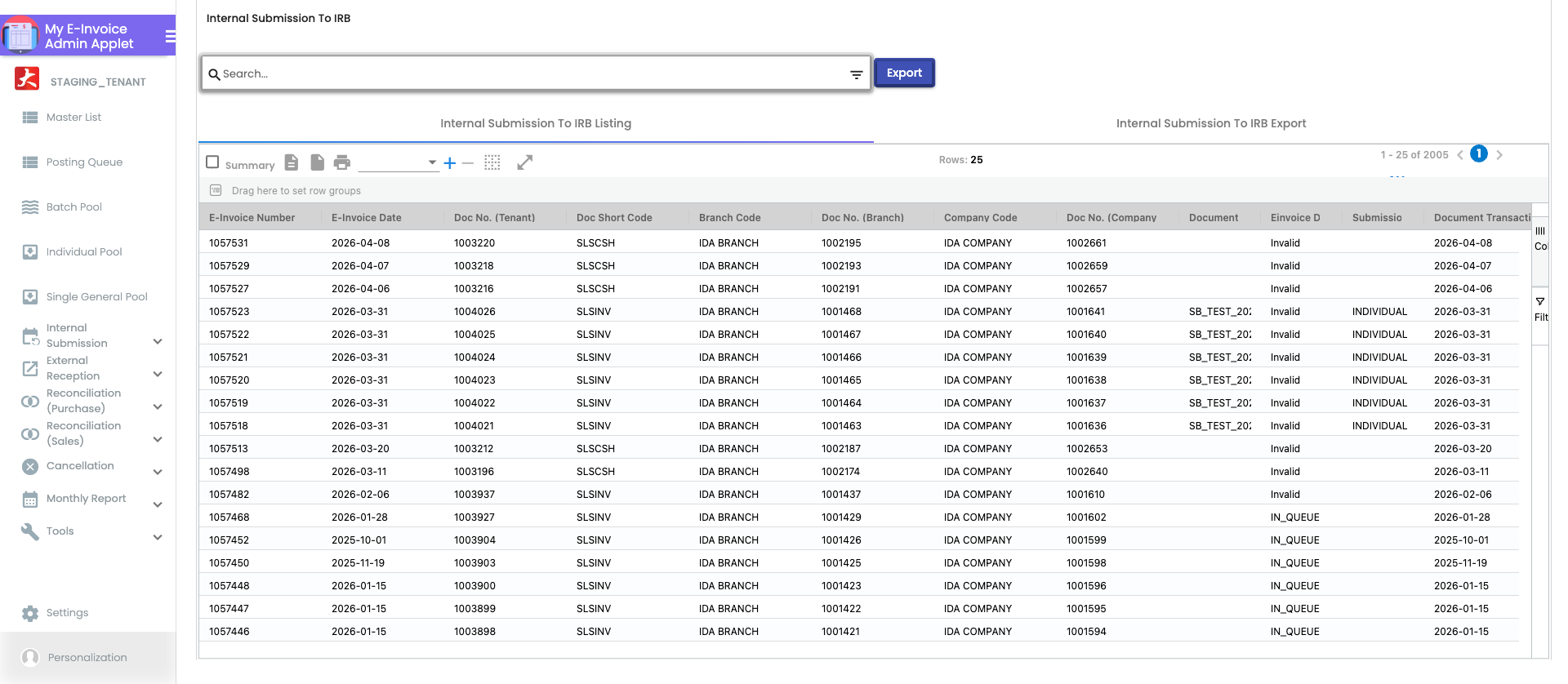
- A scheduled job turns that posting-queue row into an e-invoice record — the row you can finally see on Internal Submission → To IRB E-Invoice.
- A second scheduled job puts that record on the submission queue.
- A third scheduled job takes it off the submission queue and calls LHDN.
- A fourth scheduled job asks LHDN for the verdict and writes it back.
Six steps, four of them on timers. And here is the part that explains the silence: every one of those jobs selects its work by status, every time it runs. No job holds a document in flight. A run that achieves nothing simply ends, and the next run picks up the same rows and tries again. There is no failed operation to report, because nothing was ever attempted and lost — it was queued, and queued is where it still is.
So when a document has not moved, there is usually no error to show you. There is only a row that is still waiting for its next cycle.
What each status means, and which ones mean LHDN has never seen your document
Statuses on the e-invoice record fall into three families, and the single most expensive mistake is reading a status from the first family as though it belonged to the second. Every status name below is what BigLedger stores and what the listing shows you.
“In Queue” and “Not Submitted” — LHDN has not accepted this document
Not Submitted means the e-invoice record has just been created and has not yet been put on the submission queue. In Queue means it is on the submission queue, waiting for the job that makes the call.
Both mean the same thing in the only sense that matters to you: LHDN has no record of this document. If your customer scans the QR code on the receipt, or follows a “track your request” link, they will get nothing — not because the link is broken, but because there is nothing at the other end yet.
One wrinkle worth knowing, because it is invisible: In Queue also covers “we tried and were refused”. When a submission is attempted and LHDN rejects the call itself — a bad credential, an unreachable service — the record stays at In Queue and the reason is written onto the submission-queue row, not onto the record you are looking at. So In Queue reads as “waiting” whether it has been waiting quietly or failing loudly.
Consolidated e-invoices carry their own version of this, In Consolidated Queue, and it means something different: this document is deliberately waiting for the monthly consolidation run, and it is meant to sit there. That is not stuck. See The Month-End E-Invoice Cycle.
“Submitted” — LHDN has the document and has not ruled on it yet
Submitted is written only when LHDN has accepted the payload and handed back a document identifier, which BigLedger stores on the record. That identifier is your proof the submission landed.
Submitted is not the finish line. It means the authority is validating and has not yet said Valid or Invalid. It is normally a state a document passes through in minutes, not one it sits in.
“Valid”, “Invalid” and “Cancelled” — the authority has answered
Valid is the finish line: LHDN validated the document, and BigLedger writes back the validation timestamp, the QR code and the validation URL. This is the state in which the e-invoice is legally your tax document.
Invalid means LHDN rejected it, and the reasons are written back onto the record for you to read and fix. Invalid is a working state, not a disaster — see Validation Rules & Troubleshooting.
Cancelled means a Valid e-invoice was cancelled inside LHDN’s 72-hour window. After that window the only correction is a credit note: Cancelling and Correcting.
“Failed Submission” — a send was attempted and refused
This is the one status that is unambiguously a problem needing a person. It means a submission was built and refused, and the reason sits on the queue row behind it.
The vocabulary, side by side
| What you are looking at | What it actually means | Has LHDN seen it? |
|---|---|---|
| Not Submitted | The e-invoice record exists; it is not yet queued to send | No |
| In Queue | Queued to send — or sent and refused, with the reason on the queue row | No |
| In Consolidated Queue | Deliberately held for the monthly consolidation run | No, and not yet meant to be |
| Submitted | LHDN accepted the payload and returned a document identifier; awaiting the verdict | Yes, verdict pending |
| Valid | LHDN validated it. QR code and validation URL written back | Yes, accepted |
| Invalid | LHDN rejected it, with reasons written back onto the record | Yes, rejected |
| Cancelled | A Valid e-invoice cancelled inside the 72-hour window | Yes, then withdrawn |
| Failed Submission | The submission was built and refused; the reason is on the queue row | No |
How long is normal, and what changes it
Each of the four scheduled stages runs on its own timer, set per tenant. Measured across 90 of 90 production tenant databases on 2026-09-17, the common configuration is every 10 minutes for each stage, with a minority running the earlier stages every minute and the verdict poll every 5 minutes.
Four stages at ten minutes each gives you the honest expectation: under an hour, end to end, on a normal day, and the usual case is well inside that. Of roughly 900,000 e-invoice records across those tenants, 610,000 reached LHDN within an hour of the record being created, and 140,000 more within a day.
What legitimately makes it longer:
- Consolidated submission. A retail receipt marked for consolidation is supposed to wait until the monthly run. It will show In Consolidated Queue for most of a month, and that is correct. Most of the long tail in the numbers above is this.
- Volume. A Saturday at 22 branches puts a lot of rows through a ten-minute cycle. The queue drains in order; it does not lose anything.
- A slower timer on your tenant. Some tenants run the submission stage every 25, 30 or 35 minutes.
- A missing detail. A document with no buyer tax number never enters this pipeline at all — it goes to a pool and waits for a person. That is a different problem with a different page: Pools & Submission Routing.
A worked example. On a Saturday afternoon a walk-in buys a flagship smartphone at branch GS-KV-03 and asks for an e-invoice in his employer’s name, so the cash bill is marked for individual submission with the company’s tax number. He finalises at 14:20. The e-invoice record appears by about 14:30, reaches the submission queue by 14:40, is accepted by LHDN by 14:50, and shows Valid by 15:00 — the QR code on his copy now resolves. If he had scanned it at 14:35 it would have shown nothing, and nothing would have been wrong.
And what should make you suspicious: a document still at In Queue the next morning is not waiting, it is stuck. Across those same 90 tenants, 14,000 records stand at In Queue — and all but 21 of them are more than 24 hours old. Fresh rows move through so fast that they are almost never the ones you find sitting there. If it has been overnight, treat it as stuck rather than slow.
Everyone’s e-invoices stopped at the same time, and nothing here is wrong
This is the case where several companies — or every company in your group, or every company on the platform — stop getting e-invoices through on the same day, all of them sitting at In Queue, and nothing in any of your documents is wrong.
BigLedger submits to LHDN on your behalf using an authorisation obtained from the authority. That authorisation is shared infrastructure, not per-company. When it stops being accepted — the authority rotating or withdrawing a credential, or its identity service being unavailable — every submission from every company fails the same way at the same moment. Nothing about your invoice, your customer or your configuration has changed.
And you will see no error, for a specific reason. The job that renews the authorisation catches every failure and writes it to a log file that customers cannot see. It then carries on running on its schedule, being refused each cycle, with no alert, no e-mail and no marker on any document. The only outward sign is that documents stop leaving In Queue.
The good news is the part nobody expects: this class of outage self-heals. Because every stage re-selects its work by status on every run, your documents are still sitting there as valid, unsent work. The moment the authorisation is restored, the next cycle picks them up and sends them, in order, with nobody pressing anything. You do not need to resubmit, and you should not: a manual resubmission during an outage is the main way a document ends up filed twice.
How to tell this apart from a problem of your own, in under a minute:
- Is it more than one company, or more than one branch, or documents that have nothing in common? Shared-infrastructure problems are indiscriminate; your own configuration problems are specific.
- Are the affected documents all at In Queue with a clean record and no validation errors? A problem of your own usually shows up as Invalid or as a pool row with a stated missing field.
- Did it start abruptly, with documents from before that moment all Valid? Configuration problems start when somebody changes something; this starts when nobody did.
If all three are true, it is not yours to fix. Raise it with support with the time it started and the number of documents affected, and let the queue do its job.
Should I wait, or should I act?
Read the status first, then the clock. The decision is almost entirely determined by the two together.
| What you see | Wait or act | What to do |
|---|---|---|
| In Queue, less than an hour old | Wait | It is inside the normal cycle. Check again after lunch |
| In Queue, since yesterday | Act | Open Internal Submission → To IRB E-Invoice, select the rows and press Submit. If they stall again, raise it with support — nothing will retry them for you |
| In Queue across several companies at once | Wait, and report | Shared-infrastructure outage. Do not resubmit; it will drain on its own. Tell support when it started |
| In Consolidated Queue, any age inside the month | Wait | This is the monthly consolidation working as intended |
| Submitted, less than a day old | Wait | LHDN is validating. BigLedger refuses a resubmission in this state on purpose — “already submitted and pending LHDN validation” |
| Submitted, more than a day old | Act | The verdict never arrived and nothing is still asking for it. Take this one to support with the document number — see the limit below |
| Invalid | Act | Read the reasons on the record, fix the underlying customer or item data, and resubmit |
| Failed Submission | Act | Read the reason on the queue row. Nothing will re-drive it |
| Valid | Nothing to do | Done. If you need to change it, you have 72 hours to cancel, then it is a credit note |
| No e-invoice row at all against a finalised document | Act | The document never entered the pipeline. Check the pools first, then raise it — nothing sweeps for this |
What recovers on its own, and what nothing re-drives
The honest split, because knowing which side of it you are on is the difference between a wasted afternoon and a five-minute fix.
Recovers on its own. Every stage of the pipeline is a sweeper, not a one-shot job. Unprocessed posting-queue rows, e-invoice records that have not been queued, records queued but not sent, and submitted records without a verdict are all re-selected by status on every single run. This is why a backlog drains by itself once whatever was blocking it clears, and why the right response to a platform-wide outage is patience.
Does not recover on its own. Four things, and none of them will tell you:
- A refused submission. When a submission is built and rejected, the record is stamped Failed Submission and the queue row keeps the reason. Nothing re-drives that row. The queue row carries a “remaining retries: 5” value that is written once and then never decremented and never read by any code — a failed row showing five retries remaining is not going to be retried. There are two background jobs in the platform that could rescue such rows; measured across all 90 tenant databases, one is scheduled on fewer than three tenants and the other on three. Assume they are not running for you.
- A verdict that never came. BigLedger polls LHDN for the verdict, but the poll gives up: after ten unsuccessful checks, or once LHDN’s own received-timestamp is three days old, the poll instruction is deleted outright and no final status is written. The record keeps saying Submitted for ever, and nothing is asking any more. Across 90 tenants this accounts for a small but permanent population — 530 records more than a day old sitting at Submitted, a median of 2 per tenant. Small, quiet, and never self-correcting.
- A document that never entered the pipeline at all. The platform contains a detector for exactly this — finalised, e-invoice-eligible documents with no pipeline row anywhere — and measured across 90 of 90 tenant databases it is scheduled on none of them. If a document falls out before it becomes an e-invoice record, the only thing that will find it is your own month-end reconciliation, through the Discrepancies Report.
- A pool row. The Individual and Single General pools wait indefinitely. That is a deliberate design — a pool never submits a document that is not ready — but it means nobody is coming. Pools & Submission Routing covers this in full.
What you cannot tell from the screen
Six things the listing does not show you, which is most of the reason this page exists:
- Whether a queued row is waiting or failing. In Queue looks identical either way. The reason for a refused attempt lives on the submission-queue row behind the record, not on the record.
- Whether anything is still polling for the verdict. A record at Submitted looks the same whether the poll is due in nine minutes or was deleted three days ago. Nothing on screen distinguishes a live wait from an abandoned one.
- That three status values exist on one record, and they can disagree. A refused submission updates only one of them. Because the on-screen listing and the CSV export do not read the same one, the same document can show one status in the list and another in the export. If they disagree, the export is the stale one.
- What the retry count means. It means nothing. See above.
- Whether Submission History is current. It is not — it is a snapshot of what each attempt looked like at the moment it was sent, kept as history on purpose. The live status lives on To IRB E-Invoice. Never build your Invalid work list from Submission History.
- Which processors your own tenant is actually running, and how often. The cadence is configured per tenant. The figures on this page are what most tenants do, not a promise about yours — ask your BigLedger contact if you need to plan against an exact number.
Where this sits in the rest of BigLedger
A status is the visible end of a chain that starts three modules away, and most “wrong status” questions are really questions about one of these links.
What must exist before any of this works. A document only enters the pipeline when e-invoicing is switched on for its company — the switch lives on the company’s E-Invoice tab in the Organisation applet, and it depends on the MyInvois authorisation being in place first. Finalise a document while the company switch is off and there is no e-invoice record to have a status at all: nothing fails, nothing warns, and the gap only surfaces in the month-end Discrepancies Report. The document itself must also be finalised rather than saved — saving is not a trigger, and a draft sitting in the Sales Invoice applet will never acquire a status.
What becomes possible once a document is Valid. Only then does the QR code on the printed receipt resolve, only then can the validated PDF be e-mailed to the buyer, and only then does the 72-hour cancellation window open. Everything downstream of e-invoicing hangs off that one state.
Its sibling, and when you are looking at the wrong one. A queue and a pool both look like “waiting”, and they are opposites. A queue is work the system will carry out by itself on a timer; a pool is work it has deliberately set aside for a person, because something required is missing. Use this page when the document has a status; use Pools & Submission Routing when it has none. The quickest test: if you can see a row on To IRB E-Invoice, it is in the pipeline.
What breaks elsewhere when this is wrong. A status that is wrong is rarely only a status. A document stranded at In Queue is a sale reported to nobody, so your month-end tally to LHDN is short; the buyer’s own purchase records have no matching e-invoice, so their reconciliation fails too; and if the shortfall is only noticed after the 7th, the correction is a backdated consolidation rather than a resubmission. Nothing in sales, inventory or the general ledger is affected — the sale itself posted correctly at Finalise, and e-invoicing is a reporting layer over the top of it. That separation is deliberate, and it is why an e-invoice problem never costs you your books.
What it pairs with in practice. In the daily routine this page is used alongside the Discrepancies Report, and the two answer different halves of the same question: this page tells you what happened to a document you can see, and the report tells you which documents you cannot see because they never produced an e-invoice at all. Checking one without the other leaves a blind spot on each side.
What this page will not tell you
Stated plainly, because guessing here is worse than not knowing:
- It will not tell you why a specific document is stuck. The reason lives on the submission-queue row or the validation response, and reading it needs the document number in front of you.
- It cannot give you a guaranteed time to LHDN. The timings here are measured across tenants, not a service level. Your own cadence may differ and LHDN’s response time is not ours to promise.
- It does not cover incoming supplier e-invoices. Documents arriving from your suppliers run through a different pipeline with a different vocabulary: Incoming Supplier E-Invoices.
- It does not cover PEPPOL delivery statuses. PEPPOL is a separate channel with its own queue and its own states: PEPPOL Configuration.
- It is not an incident status page. It can tell you what a platform-wide outage looks like from your screen; it cannot tell you whether one is happening right now.
- It will not tell you it is safe to resubmit a Submitted document. BigLedger refuses that on purpose, and so should you — the guard exists because the direct-submit path does not check for an already-accepted document, and a document filed twice at LHDN is a 72-hour cancellation problem or a credit note.
What success looks like
Thirty seconds on Internal Submission → To IRB E-Invoice in the My E-Invoice Admin Applet, filtered to yesterday and earlier:
- No rows at In Queue. Anything from today is fine; anything from yesterday is stuck.
- No rows at Submitted older than a day. Submitted is a state documents pass through, not one they live in.
- No rows at Failed Submission. Every one is a person’s job.
- Everything else is Valid, Invalid or Cancelled — an answered state, whether or not you like the answer.
If all four hold, your pipeline is healthy, whatever today’s rows are doing.
Common mistakes
- Reading In Queue as “submitted”. It is the opposite: LHDN has no record of the document. Counting In Queue rows as filed is how a month-end tally comes out wrong.
- Resubmitting during an outage. Every queued document is still queued and will go out by itself. Resubmitting by hand while the pipeline is blocked is the commonest way to end up with the same sale at LHDN twice — which then costs you a cancellation inside 72 hours, or a credit note after.
- Waiting on a stalled row because it shows retries remaining. That number is decorative. Nothing re-drives a failed submission-queue row; select it and press Submit.
- Trusting a record at Submitted to resolve itself eventually. It usually does, in minutes. If it has not by the next day, nothing is polling for it any more and it never will.
- Building the Invalid work list from Submission History. That screen is a snapshot at send time, not a live status. Use To IRB E-Invoice.
- Assuming a finalised document produced an e-invoice at all. If e-invoicing was not enabled on the company when the document was finalised, or the document fell out before a record was made, there is nothing to find a status for. The monthly Discrepancies Report is the only thing that will catch it.