Fix a counter mistake and close the day
Steps 5 and 6 of the cash sales workflow: put a counter mistake right, then close the day so the cash you count can be explained. It follows Steps 2 to 4, where you rang the sale, took the payment and pressed FINAL. Before you fix anything, read Which corrections wait at the end of Step 5: a Settlement Adjustment restates a day finance may already have reconciled, so it is not a fix for the middle of a rush. If your till has no Session menu, your tenant has session and float control switched off (Step 1): there is no session to close in Step 6, and no opening or closing float figures to use.
Step 5: Fix a mistake without panicking
Three things go wrong at a counter, and each has its own repair.
Wrong payment method — the customer paid by card and you keyed cash. Do not void. Use Settlement Adjustment: open the bill, remove the wrong payment line, add the right one, and click Adjust Settlement. The cashbook side re-posts. This needs both the setting and the permission, so it is usually a supervisor’s job. One caution if the bill is in a month finance has already reconciled: the adjustment deletes the old cashbook line and writes a new one, which undoes any bank-reconciliation match on it, and nothing stops you. Tell finance, or have them unreconcile that line first — see Payment Aggregators and Branch Settlement Methods.
Wrong serial number scanned — you sold unit A and handed over unit B. Use Swap Serial Number on the sold line. It corrects both stock records without touching the bill.
Wrong everything — void it. Open the bill from Cash Bill Listing, click VOID, give a reason. The stock comes back, the journal and cashbook lines reverse, and the void is counted separately on the Z Report so the day still balances.
The customer wants to return something they bought earlier. That is not a void — the original sale was correct. For a small counter return, add return lines to a new bill. For anything with a refund to arrange or goods to inspect, use Sales Return (Internal) and read the Returns and Exchanges guide.
And two things to know before you fix anything at all.
Which corrections wait. A Swap Serial Number is safe to do now — no money moves. A Settlement Adjustment is not: it deletes and reposts the journal and the cashbook on the bill’s original date, restating a day finance may already have reconciled. Do it with three people in the queue and a RM 20 correction becomes a bank-reconciliation break. Note the bill number, tell your supervisor, and let them do it after the rush. The till gives you nowhere to write that note, so it goes on the shift’s paperwork.
What to do when you are not allowed. If the button you need is not there, that is usually deliberate — and sometimes it is a permission that was never granted, and the two look identical from the counter. The shape to watch for is a list that renders empty instead of refusing. Either way the answer is the same and it takes ten seconds: name the screen, the time and what you expected, and hand it to a supervisor. Do not work around it, and never borrow a supervisor’s login to get past it.
Step 6: Close the day
POS General > Z Report, then Session > close
Run the Z Report for your branch and today’s date. It gives you, in one screen:
- what you took, per payment method, with a total;
- the same, broken out per cashier;
- gross sales, discount, rounding, net sales and tax;
- sales per item category;
- counts — transactions, discounted transactions, items sold — and the void and draft counts.
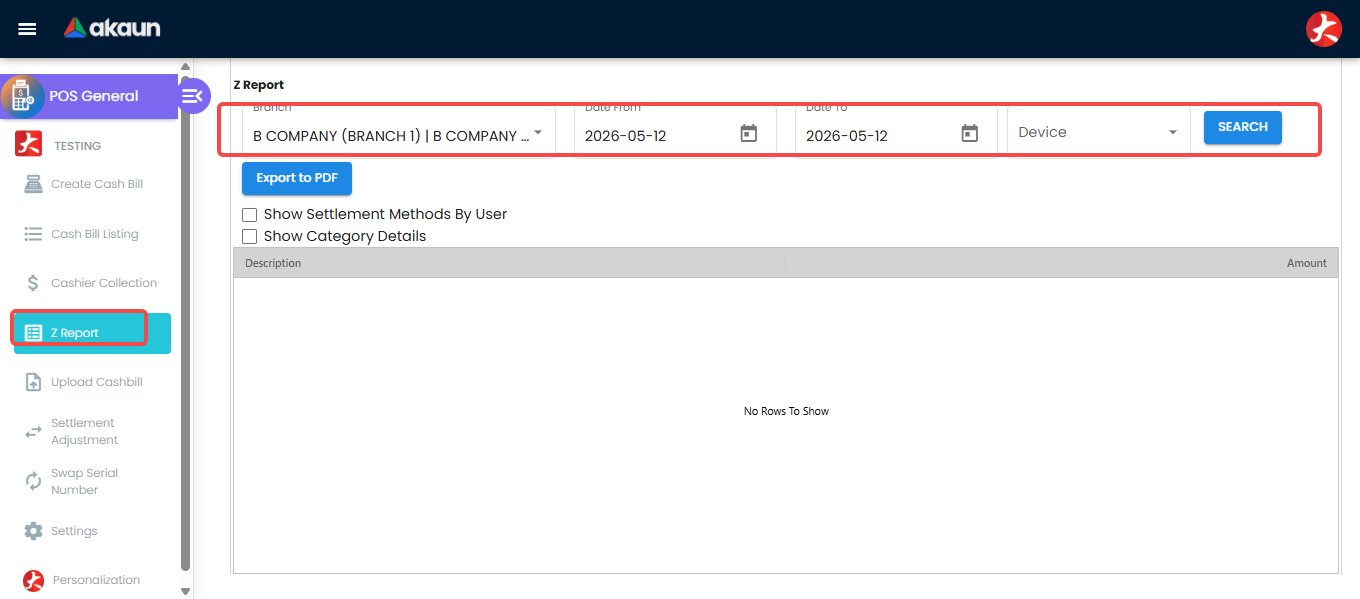
Count the drawer first, then look at the report — not the other way round. The closing screen shows you no expected figure on purpose, and a count you make while looking at the answer can only ever confirm it. Close the session with the Closing Amount you actually counted, and export the Z Report to PDF for the day’s file.
Then do the arithmetic yourself, because nothing in BigLedger does it for you:
  Opening float  +  cash takings (the Z Report's Cash row)  +  cash in  −  cash out
= what should be in the drawer
Three things about that line are worth knowing before you rely on it, and all three are on Balancing the Drawer in full:
- Your cash in and cash out are not on the report. The till records them against the session and not against the drawer, and the report’s float block needs the drawer. Your paper slip is the record.
- Ignore the printed Variance line. It subtracts every sale — cards and e-wallets included — from a cash-only movement, so it is negative at any counter that takes a card, by design of the arithmetic and not because money is missing.
- Run it with Device set to All. A bill rung up on a terminal that is not registered drops out of any device-specific run.
What success looks like for this part
Where your till has sessions, the session is closed with the Closing Amount you counted; the Z Report is exported to PDF for the day’s file, and your arithmetic — opening float, plus the Z Report’s Cash row, plus cash in, less cash out — agrees with what you counted, or the difference is reported with your count slip and the exported Z Report. Then run the whole task’s success check.
Common mistakes in this part
Closing the shift without running the Z Report. It is the only record that ties the drawer to the ledger for that day. Once tomorrow’s bills start, reconstructing today is an afternoon’s work.
Related documentation
- Banking the Day’s Takings — what happens to the cash after it leaves the drawer
- Daily Cashier Reports — the Z Report and Cashier Collection for managers who do not have a till