Modules Documentation
Work in Progress — This section is currently being updated to standardize module layouts, roles, and workflows. We will be updating this content from time to time.
BigLedger Module Documentation
BigLedger is organized into functional modules — each module is a business-focused collection of applets that work together to deliver specific operational capabilities. This documentation standardizes every module page to include business workflows, role mappings, and applet cross-references.
Module–Applet Architecture
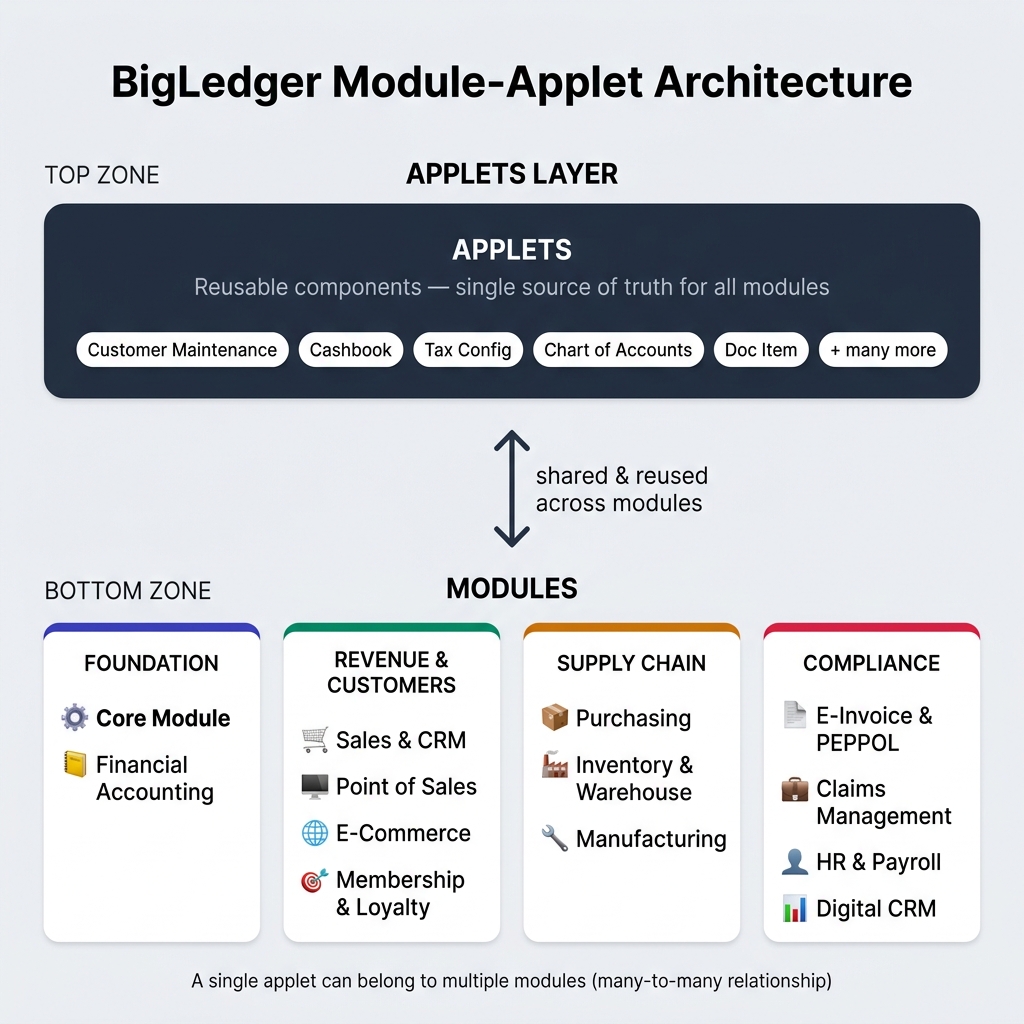
All Modules
Foundation
13 master data applets — the foundation for all operations
Ledger, journals, vouchers, bank reconciliation, and budgetary controls
Revenue & Customer Operations
Quote-to-Cash lifecycle, commission tracking, and cashier operations
Retail counter operations, POS terminals, and end-of-day reconciliation
Multi-channel online selling with marketplace integration
Customer loyalty programs, points currency, and voucher management
Supply Chain & Operations
Purchase-to-Pay lifecycle from requisition to invoice matching
Stock tracking, transfers, warehouse bin management, and replenishment
Production planning, shop floor execution, and job order management
Compliance & Specialized
MyInvois and PEPPOL electronic invoicing compliance
Employee expense claims and reimbursement cycles
Employee records, attendance, payroll processing, and leave management
AI-powered customer analytics, engagement, and events management
Standard Structure
Every module page follows the same 7-section format:
- Module Overview — Business value and core function
- Key Concepts & Terminology — Domain glossary
- Included Applets — Every applet linked with a one-sentence summary
- Standard Business Workflows — Cross-applet flows showing real processes
- Roles & Permissions — Who uses what
- Prerequisites / Initial Setup — Go-live checklist
- FAQs & Troubleshooting — Common real-world issues