Digital CRM Module
The Digital CRM Module is BigLedger’s customer engagement and omnichannel communication engine. It unifies multi-channel customer interactions across WhatsApp, email, social messaging, live chat, and telephony via the Unified Contact Center (UCC), automating marketing drip campaigns, event management, and AI-driven customer sentiment analytics.
Architecture & Data Flow
Digital CRM operates on top of core customer master data. It captures every customer touchpoint across sales, support tickets, webstore visits, and event registrations, feeding behavioral insights into AI analytics to trigger automated engagement workflows.
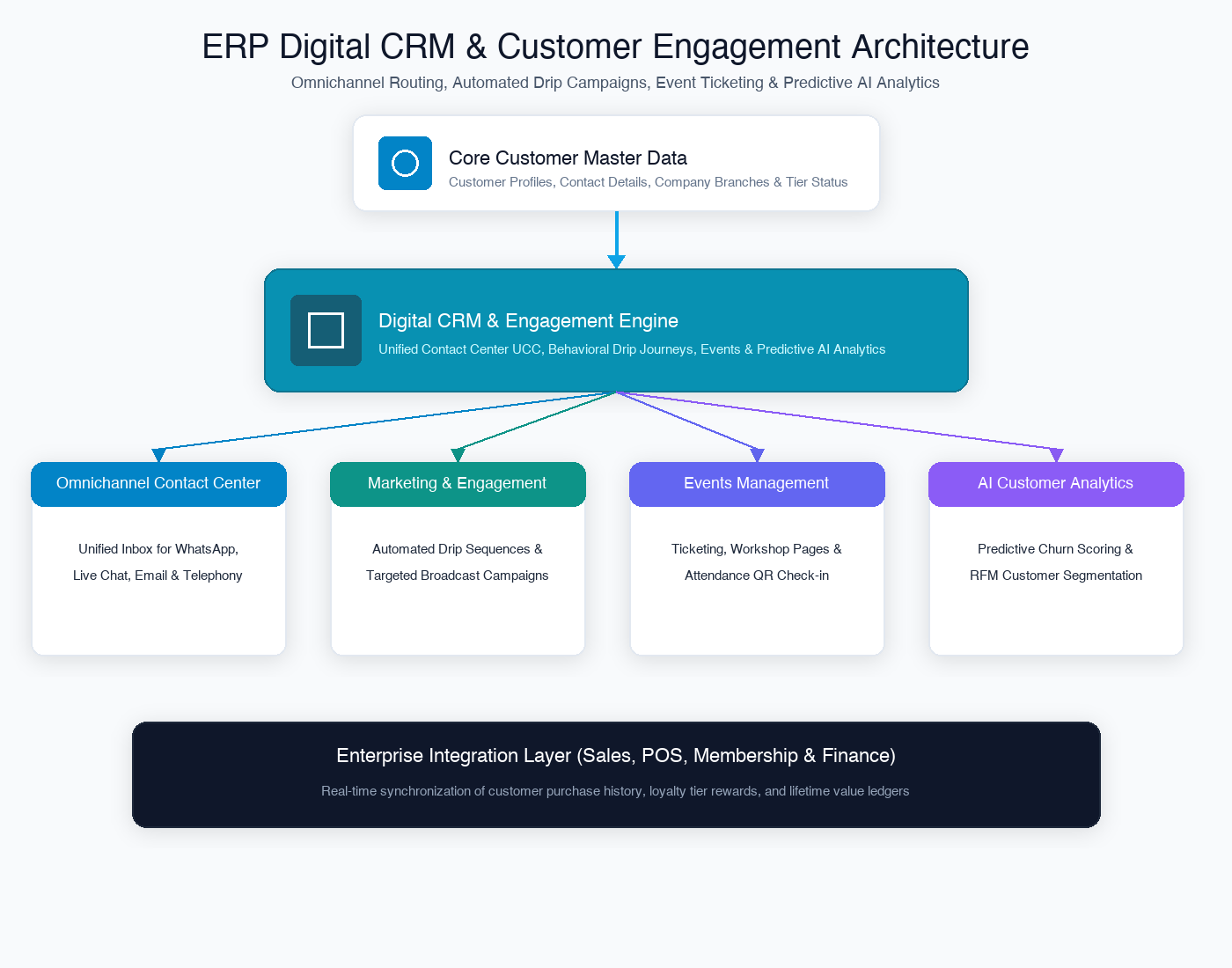
| Architecture Layer | System Component | Primary Role in CRM Operations |
|---|---|---|
| Omnichannel Contact Center | Unified Contact Center UCC Applet | Unified inbox for WhatsApp, Live Chat, Email, and VoIP support ticket management. |
| Marketing & Engagement | Engagement Applet | Automated customer journeys, broadcast messaging campaigns, and lead nurturing sequences. |
| Event Management | Events Management Applet | Workshop and webinar registrations, ticketing, attendance QR scanning, and feedback loops. |
| AI Customer Intelligence | AI Customer Analytics Applet | Predictive churn modeling, customer sentiment analysis, and RFM segmentation. |
Who Uses This Module
| Role | Primary Responsibilities | Core Applets Used |
|---|---|---|
| Customer Support Agent | Respond to multi-channel customer inquiries, manage support tickets, update interaction logs | Unified Contact Center UCC Applet |
| Digital Marketing Specialist | Design automated broadcast campaigns, segment customer lists, track open/click rates | Engagement Applet |
| Event Coordinator | Organize corporate events, publish registration pages, manage attendee check-ins | Events Management Applet |
| CRM Data Analyst | Analyze customer churn risks, track Net Promoter Scores (NPS), build RFM customer segments | AI Customer Analytics Applet |
Four Digital CRM Channels Every Team Must Differentiate
Confusing customer engagement channels leads to message spamming and fragmented support histories:
| CRM Channel | Primary Business Purpose | Automation Capability | ERP Integration Point |
|---|---|---|---|
| Unified Inbox (UCC) | Real-time 1-on-1 customer support across WhatsApp, Live Chat & Email | Chatbot auto-responders & canned replies | Customer Master Profile & Sales Order history |
| Drip Engagement | Automated behavioral marketing sequences based on customer actions | Triggered drip emails and SMS broadcasts | E-Commerce checkout & Membership tier upgrades |
| Events Ticketing | Managing physical or virtual event registrations and ticket validation | Automated QR ticket issuing and reminder SMS | Membership points earning on attendance |
| AI Sentiment Analytics | Analyzing customer feedback and conversation sentiment | Machine learning churn prediction & scoring | Sales retention alerts & support escalation |
Applet Map
| Applet | What it does in this module |
|---|---|
| Unified Contact Center UCC Applet | Omnichannel contact center hub — WhatsApp, Live Chat, Email ticketing, and agent collision control |
| Engagement Applet | Automated customer journey builder, broadcast messaging campaigns, and lead scoring |
| Events Management Applet | Event landing page builder, ticketing, QR check-in scanning, and post-event surveys |
| AI Customer Analytics Applet | Predictive AI analytics, sentiment scoring, RFM segmentation, and customer lifetime value (CLV) models |
ERP Dependency Table
| Connected Module | What Digital CRM needs from it |
|---|---|
| Core | Customer master records, contact information, company branch structures |
| Sales & POS | Purchase history, recent order statuses, customer spending totals |
| Membership | Loyalty tier status, points balances, active promotional voucher codes |
| E-Commerce | Abandoned cart triggers, webstore browsing history, digital product interest |
Go-Live Checklist
- Customer master records and contact email/mobile profiles synchronized in Core
- WhatsApp Business API, Email SMTP gateways, and Live Chat widgets connected in UCC
- Support ticket routing rules and agent assignment queues configured
- Customer engagement broadcast templates approved by compliance
- Event registration landing pages and QR check-in hardware verified
- AI sentiment analysis models trained on historical customer conversation logs
Module Learning Roadmap
Follow the documentation in this sequence to master the Digital CRM Module:
- Core Concepts (Next Step) — Understand omnichannel contact routing, behavioral engagement triggers, and AI sentiment analysis.
- Configuration — Step-by-step setup guides for UCC messaging gateways, engagement campaigns, and event pages.
- Use Cases — Real-world reference architectures for omnichannel support centers, automated lead nurturing, and corporate events.
- API Reference — Direct reference link to official developer CRM APIs.
- Best Practices — Operational recommendations for first-response SLA tracking, message frequency capping, and data privacy.
- Reports & Analytics — Scenario guide for choosing the best contact center SLA and campaign conversion reports.
- Related Applets — Complete guide to native applet dependencies across the BigLedger ecosystem.
Proceed to Core Concepts → to understand omnichannel contact centers and AI analytics.