E-Invoice & PEPPOL Module
The E-Invoice & PEPPOL Module is BigLedger’s tax compliance and global electronic invoicing engine. It automates real-time clearance validation with government tax authorities (e.g., LHDN in Malaysia), embeds QR code validation stamps into commercial billing, and exchanges structured e-invoices across the global PEPPOL network.
Architecture & Data Flow
E-Invoice operates directly on top of commercial sales billing and accounts payable. When a Sales Invoice or Credit Note is generated, BigLedger transforms commercial billing into validated JSON/XML payloads, signs them digitally, and submits them to tax authorities for instant clearance before customer delivery.
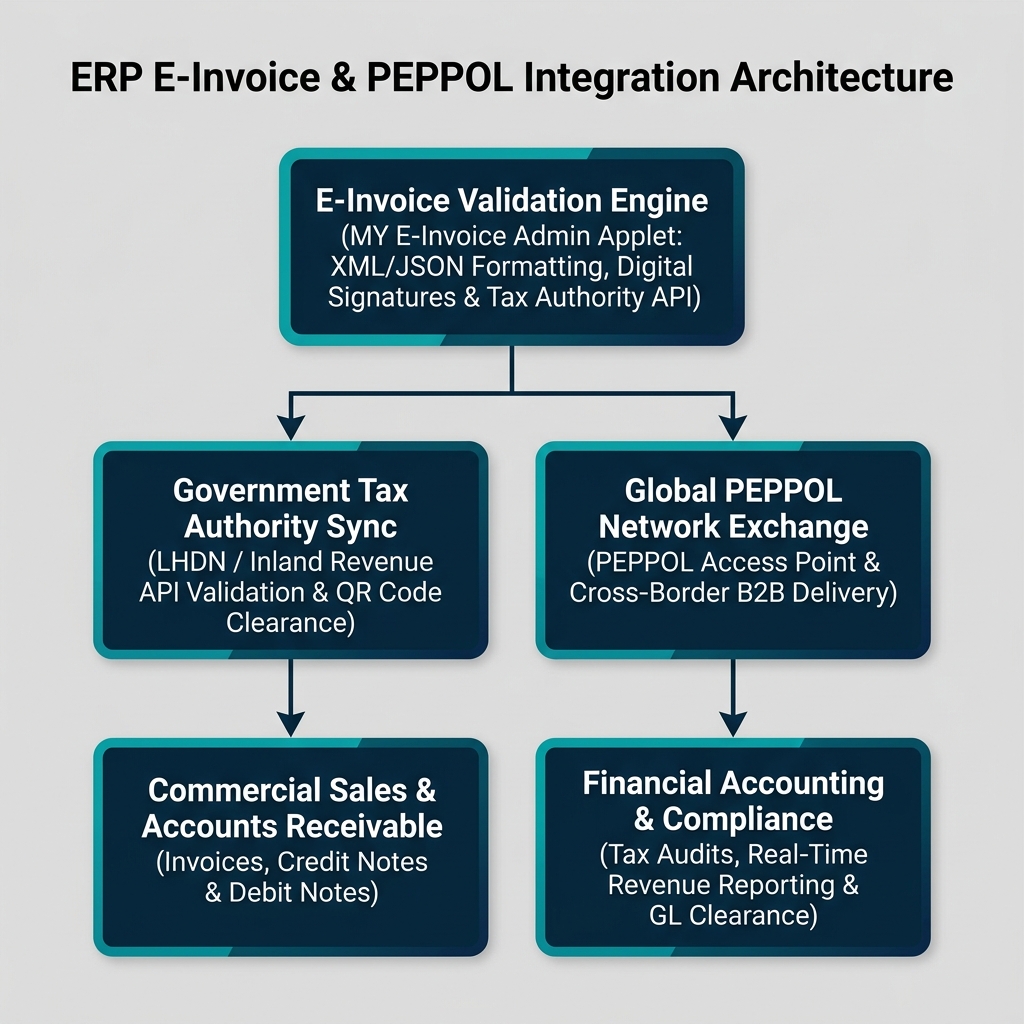
| Architecture Layer | System Component | Primary Role in Compliance Operations |
|---|---|---|
| Validation Engine | MY E-Invoice Admin Applet | Central management of digital signing certificates, tax classification mapping, and submission queues. |
| Tax Authority API | Government Tax Gateway (LHDN API) | Real-time validation checking, cryptographic hashing, and clearance UUID / QR code stamping. |
| Global PEPPOL Exchange | MY PEPPOL Admin Applet | PEPPOL Access Point routing for automated cross-border B2B document exchange. |
| Commercial Billing | Sales & Financial Accounting | Commercial invoice trigger, consolidated monthly billing, and audit compliance logging. |
Who Uses This Module
| Role | Primary Responsibilities | Core Applets Used |
|---|---|---|
| Tax Compliance Officer | Manage digital signing certificates, map MSIC codes, monitor LHDN clearance submission queues | MY E-Invoice Admin Applet |
| Accounts Receivable Clerk | Issue validated e-invoices, manage rejected tax submissions, monitor buyer clearance status | MY E-Invoice Portal Applet |
| Global Trade Manager | Configure PEPPOL Participant IDs, manage cross-border B2B electronic document exchanges | MY PEPPOL Admin Applet |
| B2B Customer / Supplier | View validated tax invoices, verify clearance QR codes, submit self-billed e-invoices | MY E-Invoice for Customer & Supplier Applet |
Four E-Invoice Document Types Every Team Must Differentiate
Confusing e-invoice submission types leads to tax audit penalties and clearance rejections:
| E-Invoice Document | When it is used | Tax Authority Requirement | Financial Accounting Impact |
|---|---|---|---|
| Standard B2B E-Invoice | Commercial sales between registered business entities | Individual real-time clearance UUID mandatory within 72 hours | Revenue recognized, Accounts Receivable debited |
| Consolidated E-Invoice | High-volume B2C retail POS sales to end-consumers | Aggregated monthly submission within 7 days of month-end | POS Cash revenue posted, summary tax liability cleared |
| Self-Billed E-Invoice | Import of foreign services, e-commerce commissions, or agricultural payouts | Buyer issues tax invoice on behalf of supplier | Accounts Payable credited, Input Tax GL debited |
| E-Credit / Debit Note | Post-billing commercial adjustments, price corrections, or returns | Must reference original validated E-Invoice UUID | Revenue adjusted, AR / AP ledgers modified |
Applet Map
| Applet | What it does in this module |
|---|---|
| MY E-Invoice Admin Applet | Central compliance control hub — tax mapping, digital certs, API credentials, and queue monitoring |
| MY E-Invoice Portal Applet | Billing clerk portal for manual tax invoice submission, clearance status checks, and PDF QR printing |
| MY E-Invoice for Customer & Supplier Applet | External portal for trading partners to view validated tax documents and upload self-billed e-invoices |
| MY PEPPOL Admin Applet | International PEPPOL network access point configuration and global document exchange logs |
ERP Dependency Table
| Connected Module | What E-Invoice needs from it |
|---|---|
| Core | Tax Identification Numbers (TIN), Business Registration Numbers (BRN), MSIC codes, UOM mappings |
| Sales & POS | Commercial Sales Invoices, POS counter retail sales receipts, Credit Notes, Debit Notes |
| Purchasing | Foreign supplier invoices requiring self-billed e-invoices, vendor TIN master profiles |
| Financial Accounting | Tax GL ledgers (Output SST / Input SST), General Ledger audit trails |
Go-Live Checklist
- Company Tax Identification Number (TIN) and BRN registered in Core
- Digital signing certificate uploaded in MY E-Invoice Admin Applet
- Tax classification codes and MSIC industry codes mapped to item master data
- LHDN / PEPPOL production API access keys configured and verified
- Consolidated monthly B2C retail workflow rules established for POS counters
- Finance and AR staff trained on resolving submission rejection codes
Module Learning Roadmap
Follow the documentation in this sequence to master the E-Invoice & PEPPOL Module:
- Core Concepts (Next Step) — Understand real-time API clearance, QR cryptographic stamps, and PEPPOL network routing.
- Configuration — Step-by-step setup guides for tax registrations, digital certificates, and classification mapping.
- Use Cases — Real-world reference architectures for B2B commercial billing, consolidated retail POS, and foreign self-billing.
- API Reference — Direct reference link to official developer e-invoice APIs.
- Best Practices — Operational recommendations for rejection handling, digital certificate renewals, and audit archival.
- Reports & Analytics — Scenario guide for choosing the best tax clearance and audit submission reports.
- Related Applets — Complete guide to native applet dependencies across the BigLedger ecosystem.
Proceed to Core Concepts → to understand e-invoice clearance lifecycles and cryptographic validation.