E-Commerce Module
The E-Commerce Module is BigLedger’s omnichannel digital commerce engine. It powers customer-facing web portals, online shopping carts, multi-channel marketplace sync (Shopee, Lazada, TikTok Shop), and automated order injection directly into Sales, Inventory, and Financial Accounting.
Architecture & Data Flow
E-Commerce connects digital buyer touchpoints directly into core ERP fulfillment pipelines. When an online customer places an order, payment gateways authorize funds while BigLedger allocates stock and schedules packing fulfillment automatically.
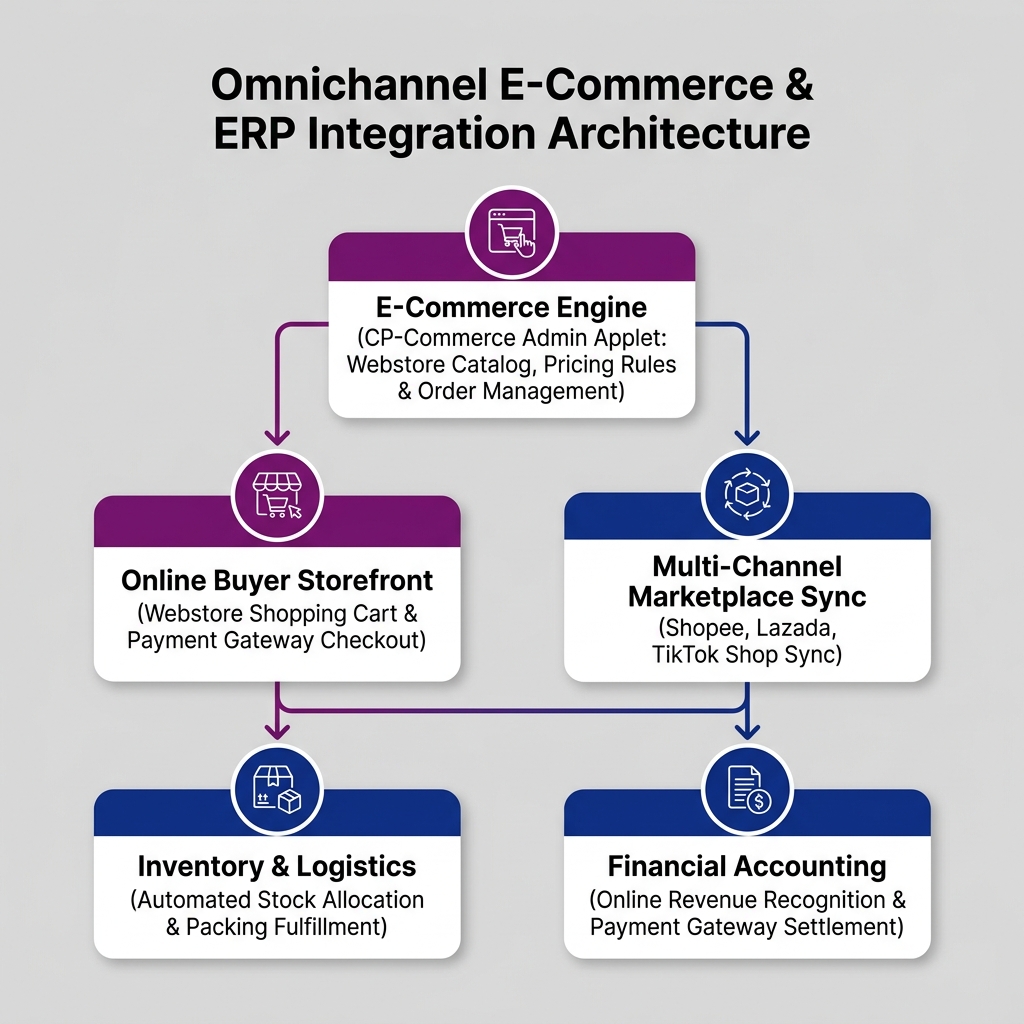
| Architecture Layer | System Component | Primary Role in E-Commerce Operations |
|---|---|---|
| E-Commerce Engine | CP-Commerce Admin Applet | Central management of digital product catalogs, webstore pricing rules, and online buyer accounts. |
| Buyer Storefront | Shopping Cart Applet | Customer browsing, online product search, shopping cart management, and payment gateway checkout. |
| Multi-Channel Sync | Seller Admin Applet | Synchronizing product inventory and sales orders across external marketplaces and B2B portals. |
| Fulfillment & Accounting | Sales, Inventory & Finance | Automated sales order creation, stock reservation, courier dispatch, and gateway settlement posting. |
Who Uses This Module
| Role | Primary Responsibilities | Core Applets Used |
|---|---|---|
| E-Commerce Manager | Maintain online product catalogs, configure promotional banners, set webstore pricing schemes | CP-Commerce Admin Applet |
| Marketplace Specialist | Synchronize inventory stock balances across external marketplaces (Shopee, Lazada, TikTok Shop) | Seller Admin Applet, Seller Applet |
| Online Buyer / Client | Browse product catalogs, manage shopping cart items, complete credit card or FPX checkout | Shopping Cart Applet |
| Order Fulfillment Clerk | Monitor incoming webstore orders, generate shipping labels, track courier dispatches | Internal Packing Order Applet |
Four E-Commerce Touchpoints Every Team Must Differentiate
Confusing online touchpoints leads to catalog sync errors and payment reconciliation discrepancies:
| Touchpoint Component | Business Purpose | Inventory Impact | Financial Accounting Impact |
|---|---|---|---|
| Digital Catalog | Online product listing showcasing SKUs, images, and public web prices | None | None |
| Shopping Cart Checkout | Online customer basket authorization and payment gateway capture | Soft Stock Allocation | Payment Gateway Holding Accrual |
| ERP Order Injection | Converting webstore checkout into an official ERP Sales Order | Hard Stock Reservation | None (Unbilled Order recorded) |
| Gateway Settlement | Reconciling online payment processor net payouts into company bank ledgers | None | Bank Debited, Gateway Holding Cleared, Merchant Fees Expensed |
Applet Map
| Applet | What it does in this module |
|---|---|
| CP-Commerce Admin Applet | Central e-commerce control hub — webstore settings, product catalog publishing, and buyer access |
| Shopping Cart Applet | Customer-facing web shopping cart, shipping rate calculator, and payment gateway integration |
| Seller Admin Applet | Multi-vendor seller management, B2B supplier portal configuration, and marketplace sync |
| Seller Applet | Vendor portal dashboard for third-party marketplace merchants to process orders and track payouts |
ERP Dependency Table
| Connected Module | What E-Commerce needs from it |
|---|---|
| Core | Customer master records, organization branch entities, currency conversion rates |
| Sales & POS | Sales Order generation pipeline, commercial pricing schemes, tax invoice rules |
| Inventory | Real-time stock availability, multi-warehouse allocation, packing dispatch verification |
| Financial Accounting | Chart of accounts mapping, payment gateway clearing accounts, merchant fee GLs |
Go-Live Checklist
- Webstore domain and SSL certificates configured in CP-Commerce Admin Applet
- Product master SKUs, images, and digital descriptions published from Inventory
- Payment gateway merchant accounts (Stripe, FPX, PayPal) connected and tested
- Shipping carrier API integrations and shipping rate calculation matrices verified
- Automated webstore sales order injection mapped to ERP Sales & POS
- Payment gateway fee reconciliation GL accounts established in Finance
Module Learning Roadmap
Follow the documentation in this sequence to master the E-Commerce Module:
- Core Concepts (Next Step) — Understand digital order injection, inventory stock sync, and payment gateway clearing mechanics.
- Configuration — Step-by-step setup guides for webstore themes, payment gateways, and shipping rules.
- Use Cases — Real-world reference architectures for B2C webstores, B2B portal ordering, and multi-channel marketplace sync.
- API Reference — Direct reference link to official developer e-commerce APIs.
- Best Practices — Operational recommendations for cart abandonment, inventory buffers, and gateway reconciliation.
- Reports & Analytics — Scenario guide for choosing the best online sales and conversion reports.
- Related Applets — Complete guide to native applet dependencies across the BigLedger ecosystem.
Ready to explore digital commerce architecture?
Proceed to Core Concepts → to understand webstore order lifecycles and stock sync.
Proceed to Core Concepts → to understand webstore order lifecycles and stock sync.