HR & Payroll Module
The HR & Payroll Module is BigLedger’s workforce management and payroll computation engine. It manages employee master files, biometric time attendance, shift rosters, overtime calculations, statutory tax deductions (EPF, SOCSO, EIS, PCB), and automated direct bank salary disbursements integrated with Financial Accounting.
Architecture & Data Flow
HR & Payroll operates as the central workforce administration hub. Attendance logs and employee claims feed directly into monthly payroll computations, which calculate net salaries, compute government statutory liabilities, and generate General Ledger expense entries automatically.
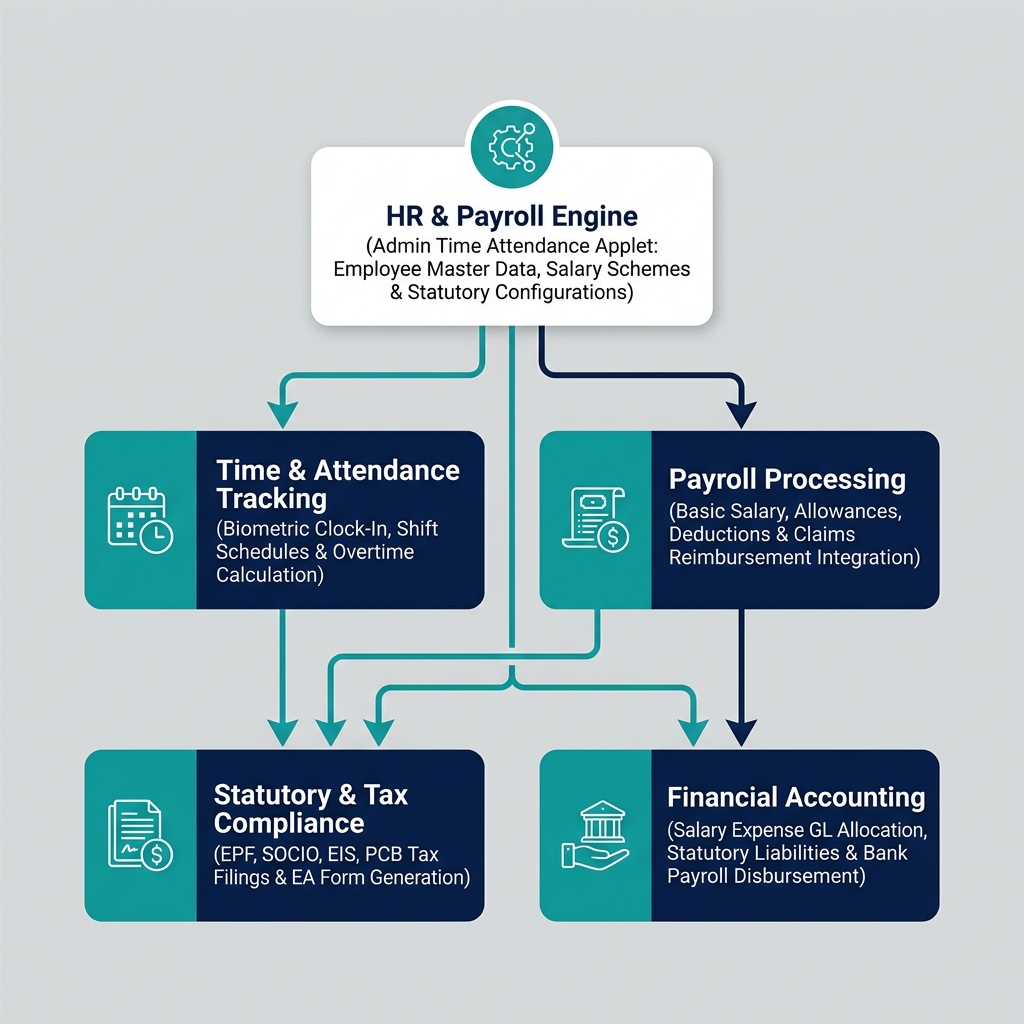
| Architecture Layer | System Component | Primary Role in HR Operations |
|---|---|---|
| HR & Time Engine | Admin Time Attendance Applet | Central management of employee master data, biometric clock-in logs, and shift schedules. |
| Payroll Computation | Payroll Processing Engine | Gross-to-net salary calculation, overtime multiplier calculation, and monthly pay slip generation. |
| Statutory Compliance | Government Tax & Social Security Sync | Automated calculation and statutory report generation for EPF, SOCSO, EIS, and PCB income tax. |
| Financial Accounting | Accounts Payable & Bank Disbursement | Salary expense GL posting, statutory liability accruals, and electronic bank direct-debit GIRO files. |
Who Uses This Module
| Role | Primary Responsibilities | Core Applets Used |
|---|---|---|
| HR Manager | Maintain employee master records, manage employment contracts, configure leave policies | Admin Time Attendance Applet |
| Payroll Officer | Audit monthly time logs, run gross-to-net payroll, generate statutory deduction filings | Admin Time Attendance Applet |
| Department Supervisor | Verify team biometric clock-in logs, approve shift roster swaps, authorize overtime hours | Admin Time Attendance Applet |
| Employee / Staff Member | Clock in/out via mobile or biometric devices, view monthly salary payslips, check leave balances | Employee Self-Service (ESS) |
Four Payroll Components Every Team Must Differentiate
Confusing payroll compensation components leads to statutory non-compliance and tax audit penalties:
| Compensation Element | Business Purpose | Statutory Impact (EPF/SOCSO) | Financial Accounting Impact |
|---|---|---|---|
| Basic Salary | Fixed contractual monthly remuneration | Subject to full statutory EPF & SOCSO deductions | Debits Basic Salary Expense GL |
| Overtime (OT) Pay | Compensation for hours worked beyond standard shift rosters | Subject to statutory deductions based on country labor laws | Debits Overtime Expense GL |
| Fixed Allowances | Monthly transport, housing, or mobile allowances | Specific tax exemptions apply depending on allowance type | Debits Staff Allowance Expense GL |
| Statutory Contributions | Employer-mandated contributions to state welfare and pension funds | Employer contribution added on top of gross salary | Debits Employer Statutory Expense GL, Credits Statutory Payable GL |
Applet Map
| Applet | What it does in this module |
|---|---|
| Admin Time Attendance Applet | Central workforce control hub — employee profiles, biometric time logs, shift rosters, and leave management |
ERP Dependency Table
| Connected Module | What HR & Payroll needs from it |
|---|---|
| Core | Organization branch structures, company bank accounts, entity master profiles |
| Claims Management | Approved employee expense reimbursements for monthly payroll inclusion |
| Financial Accounting | Salary expense GL accounts, statutory liability clearing accounts, bank payment ledgers |
Go-Live Checklist
- Employee master records, NRIC/Passport numbers, and bank account details uploaded in Core
- Statutory tax numbers (EPF, SOCSO, EIS, Tax PCB) configured in HR settings
- Biometric clock-in devices or mobile GPS attendance tracking connected
- Shift rosters, work schedules, and public holiday calendars established
- Monthly payroll calculation formulas and salary grade bands verified
- Bank GIRO electronic salary disbursement formats tested with corporate banking portals
Module Learning Roadmap
Follow the documentation in this sequence to master the HR & Payroll Module:
- Core Concepts (Next Step) — Understand time attendance tracking, gross-to-net payroll, and statutory compliance rules.
- Configuration — Step-by-step setup guides for employee master data, shift rosters, and salary schemes.
- Use Cases — Real-world reference architectures for multi-shift manufacturing, retail hourly staff, and corporate monthly payroll.
- API Reference — Direct reference link to official developer HR APIs.
- Best Practices — Operational recommendations for time card auditing, statutory filing deadlines, and payslip security.
- Reports & Analytics — Scenario guide for choosing the best payroll summary and statutory compliance reports.
- Related Applets — Complete guide to native applet dependencies across the BigLedger ecosystem.
Proceed to Core Concepts → to understand time attendance tracking and payroll computation.