Manufacturing Module
The Manufacturing Module is BigLedger’s shop floor execution and cost absorption engine. It manages multi-level Bills of Materials (BOM), production scheduling, work center routing, raw material issuance, Work-in-Progress (WIP) tracking, and finished goods inventory stock-ins integrated with Inventory and Financial Accounting.
Architecture & Data Flow
Manufacturing bridges operational production schedules with financial cost accounting. Raw materials issued to production exit inventory asset ledgers and enter Work-in-Progress (WIP). Upon production order completion, direct labor and machine overhead absorb into final finished goods asset valuations.
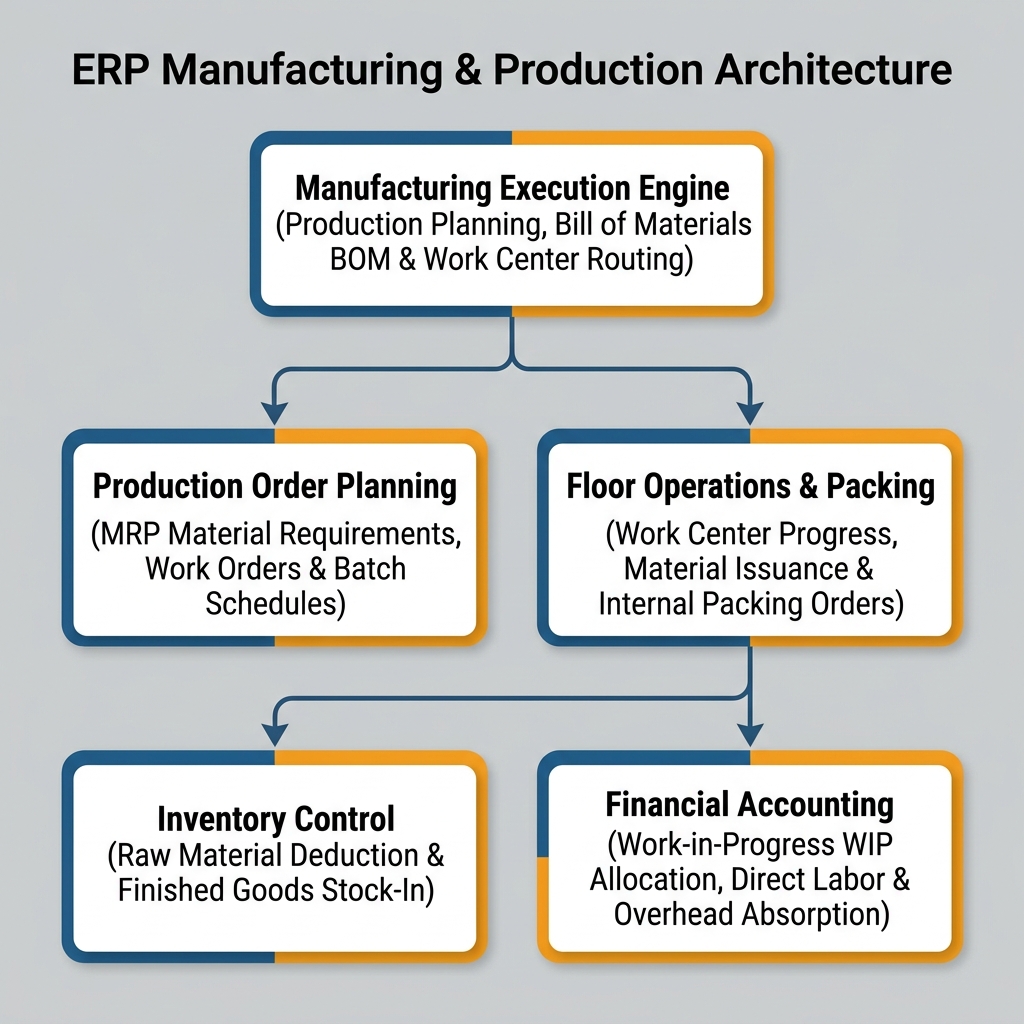
| Architecture Layer | System Component | Primary Role in Production Operations |
|---|---|---|
| Execution Engine | Production Planning and Monitoring Applet | Central production scheduling, master work order release, and batch tracking. |
| Process Routing | Process Maintenance Applet | Defining work centers, machine operations, labor rates, and routing sequences. |
| Shop Floor Operations | Manufacturing Operation Applet | Real-time work center execution, material issuance logging, and quality inspection. |
| Packing & Storage | Internal Packing Order Applet | Finished goods secondary packaging, batch labeling, and warehouse stock-in. |
Who Uses This Module
| Role | Primary Responsibilities | Core Applets Used |
|---|---|---|
| Production Planner | Schedule work orders, analyze material requirements (MRP), monitor batch completion deadlines | Production Planning and Monitoring Applet |
| Process Engineer | Configure multi-level Bill of Materials (BOM), setup work centers, establish machine cycle times | Process Maintenance Applet |
| Shop Floor Supervisor | Log raw material issues to WIP, track machine downtime, record completed stage output | Manufacturing Operation Applet |
| Packaging Coordinator | Generate internal packing orders, assign finished goods batch numbers, execute stock-in | Internal Packing Order Applet |
Four Production Milestone Concepts Every Team Must Differentiate
Confusing manufacturing milestones creates inventory valuation inaccuracies and absorption variance errors:
| Production Concept | Business Purpose | Inventory Impact | Financial Accounting Impact |
|---|---|---|---|
| Bill of Materials (BOM) | Master recipe defining exact component quantities for 1 finished unit | None | Standard Cost Baseline established |
| Material Issue to WIP | Releasing raw materials from warehouse to the factory floor | Raw Material Inventory Decreases | Work-in-Progress (WIP) Asset Increases |
| Overhead Absorption | Adding direct machine and labor operating costs to active work orders | None | Direct Labor & Overhead Applied to WIP Asset |
| Finished Goods Receipt | Completing production and transferring finished units to warehouse | Finished Goods Inventory Increases | WIP Asset Cleared, Finished Goods Asset Debited |
Applet Map
| Applet | What it does in this module |
|---|---|
| Production Planning and Monitoring Applet | Master production scheduling, MRP material availability tracking, and work order release |
| Process Maintenance Applet | Work center definitions, machine operations setup, labor rate matrices, and routing workflows |
| Manufacturing Operation Applet | Shop floor execution tracking, raw material issue logging, scrap reporting, and output entry |
| Internal Packing Order Applet | Secondary packaging execution, finished product batch assignment, and warehouse stock-in |
ERP Dependency Table
| Connected Module | What Manufacturing needs from it |
|---|---|
| Core | Finished goods SKUs, raw material SKUs, units of measure (UOM), branch locations |
| Inventory | Raw material stock availability, warehouse bin locations, finished goods stock-in posting |
| Purchasing | Material Requirements Planning (MRP) triggers to purchase raw material shortages |
| Financial Accounting | WIP asset accounts, Direct Labor absorption GLs, Overhead variance accounts |
Go-Live Checklist
- Raw material and finished product master SKUs established in Core
- Multi-level Bills of Materials (BOM) configured and verified for all manufactured items
- Work centers, machine labor rates, and operational routings defined in Process Maintenance
- Work-in-Progress (WIP) GL asset accounts mapped in Financial Accounting
- Shop floor material issuance and finished goods receiving workflows verified
- Production cost absorption and variance analysis rules reconciled with Finance
Module Learning Roadmap
Follow the documentation in this sequence to master the Manufacturing Module:
- Core Concepts (Next Step) — Understand BOM hierarchies, WIP cost absorption, and shop floor routings.
- Configuration — Step-by-step setup guides for work centers, process routings, and BOM recipes.
- Use Cases — Real-world reference architectures for discrete manufacturing, process batching, and custom job shops.
- API Reference — Direct reference link to official developer manufacturing APIs.
- Best Practices — Operational recommendations for scrap reporting, machine utilization, and WIP variance audits.
- Reports & Analytics — Scenario guide for choosing the best production yield and costing reports.
- Related Applets — Complete guide to native applet dependencies across the BigLedger ecosystem.
Proceed to Core Concepts → to understand work order lifecycles and cost absorption.