Membership Module
The Membership Module enables businesses to identify customers, reward repeat behavior, apply member-specific benefits, and manage loyalty liabilities in a controlled, auditable way.
Architecture & Data Flow
Membership sits between your customer master data in Core and your transaction channels (POS, Sales Workflow, E-Commerce). It does not create physical stock or post directly to GL by itself — it attaches a reward layer on top of your existing business processes.
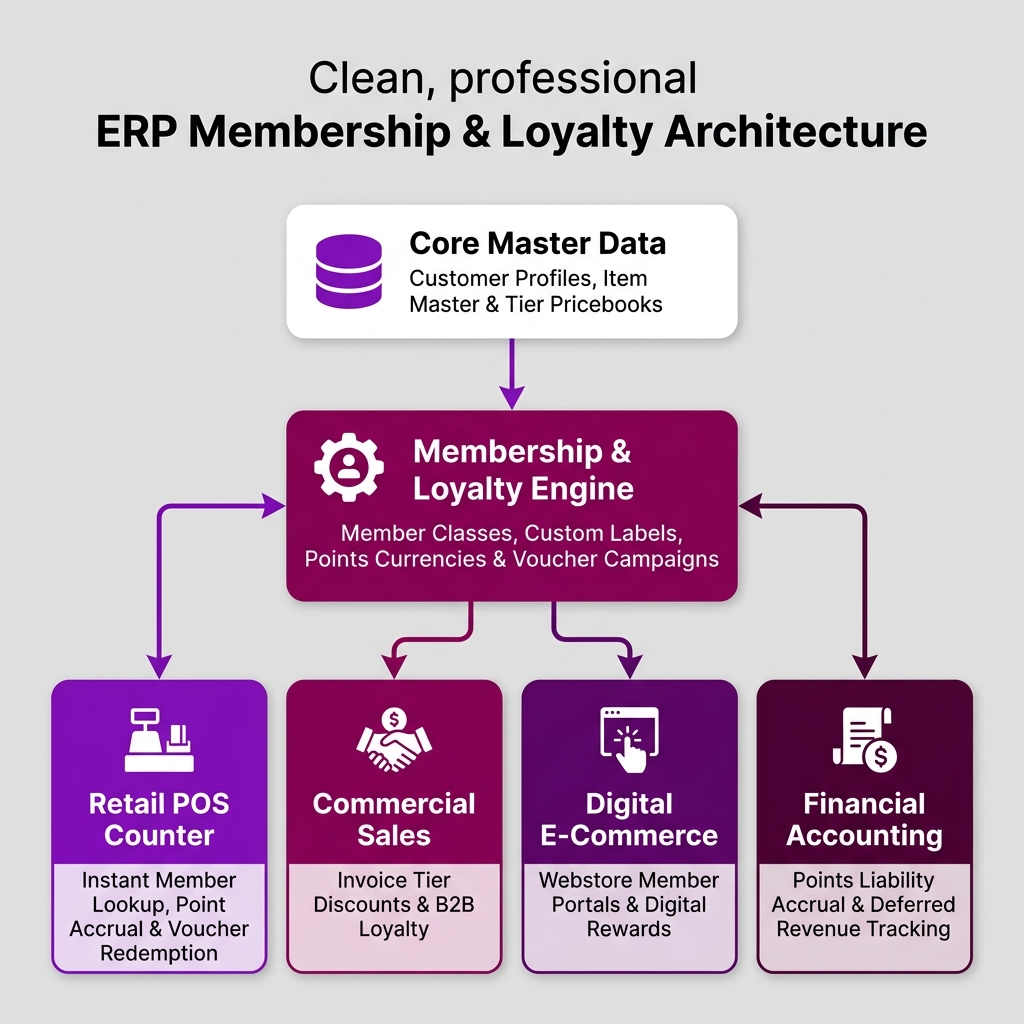
| Architecture Layer | System Component | Primary Role in Loyalty Operations |
|---|---|---|
| Core Master Data | Customer & Pricebooks | Customer master profiles, shipping addresses, and member tier pricebooks. |
| Membership Engine | Membership Admin Applet | Central management of member classes, custom tags, points currencies, and conversion rates. |
| Retail Checkout | POS General Applet | Fast-paced counter member lookup, automated point accruals, and instant voucher redemptions. |
| Campaign Vouchers | Voucher Management Applet | Promotional ticket serial generation, discount campaigns, and redemption validation logs. |
| Financial Accounting | General Ledger Integration | Real-time tracking of unredeemed points monetary liabilities and deferred revenue allocations. |
Core Membership Applets
| Applet | What it does |
|---|---|
| Membership Admin Applet | Central control hub — manage profiles, tier classes, labels, point currencies, conversion rates, manual adjustments, and reports. |
| Voucher Management Applet | Campaign management — discount vouchers, serial ticket tracking, scanned redemption events, and recurring reward cycles. |
| OCR Cash Bill Applet | Receipt claims — AI-assisted scanning and automated point posting for offline receipt submissions. |
Three Concepts Every Team Must Understand
Confusing these three outcomes causes most operational issues at checkout:
| Concept | System Action | Configured By |
|---|---|---|
| Member Pricing | Item unit price changes automatically at checkout | Marketing via Pricebook setup |
| Points Earning | Member’s balance increases after sale completion | Marketing via earning rules |
| Points Redemption | Member’s existing points balance reduces the bill | Member request at checkout |
Quick Implementation Guide (5-Step Launch)
Follow these steps to get your first loyalty program running smoothly:
Step 1: Create One Points Currency
In Membership Admin Applet, create a single starter currency (e.g. Code: PTS, Name: Reward Points). Keep it active and simple.
Step 2: Set Up Tiers & Labels
Define one default member class (e.g., STANDARD) and one label for testing (e.g., NEWSLETTER).
Tip
Keep the first launch simple. Complex multi-tier structures and point expiration rules can be added once counter operations are stable.
Step 3: Configure Conversion Rate
Set a simple points-to-money rule (e.g., 100 points = RM 1.00) in PTS to CCY Config.
Warning
If store staff cannot explain the redemption rule in one sentence, it is too complex for a first rollout.
Step 4: Test Counter Operations
Open the POS General Applet, identify a test member, process a sale, and verify points post to the transaction history.
Step 5: Establish Support & Reversal Procedures
Train support teams to handle adjustments in Membership Admin Applet. Reversals should always use opposite-value entries (e.g. -50 points) to maintain a complete audit trail.
Module Learning Roadmap
Follow the documentation in this sequence to design and deploy an enterprise loyalty program:
- Core Concepts (Next Step) — Understand the multi-dimensional architecture, customer vs. member models, and redemption paths.
- Configuration — Step-by-step setup guides for classes, points, conversion rates, and vouchers.
- Use Cases — Real-world reference architectures for retail and F&B programs.
- API Reference — Direct reference link to official developer membership APIs.
- Best Practices — Operational recommendations for tier retention and points expiration rules.
- Reports & Analytics — Scenario guide for choosing the best loyalty and points liability reports.
- Related Applets — Complete guide to native applet dependencies across the BigLedger ecosystem.
Proceed to Core Concepts → to understand how BigLedger structures member identity and reward economics.