Configuration
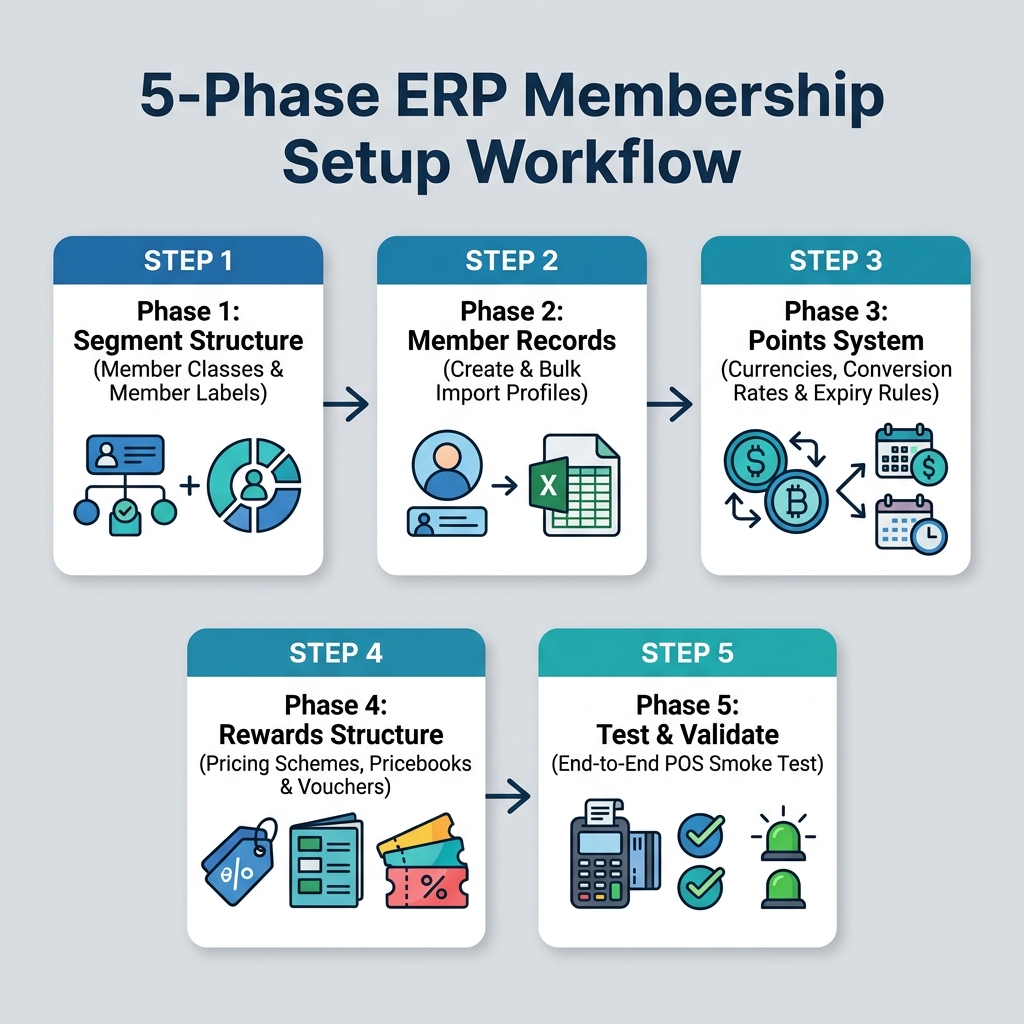
This section walks through the configuration of the Membership Module in the correct order. Each phase depends on the previous one. Skipping ahead causes errors that are hard to reverse.
Configuration Dependency Chain
Warning
Member Classes must exist before you create member records. Points Currencies must exist before you set conversion rates. Always follow the phase order.
Phase 1: Segment Structure
What you are doing: Defining the tier and tagging system before any members are enrolled.
Use: Membership Admin Applet → Member Class and Member Label sections.
| Task | What to decide |
|---|---|
| Create Member Classes | How many tiers? (e.g., Standard, Gold, Platinum). What are the benefits of each? |
| Create Member Labels | What tags will you use for segmentation? (e.g., Newsletter, VIP, High-Value) |
Sub-sections:
Phase 2: Member Records
What you are doing: Enrolling customers as members and linking them to a class.
Use: Membership Admin Applet → Member Listing.
| Task | Dependency |
|---|---|
| Create individual members manually | Customer Maintenance Applet record must exist first |
| Bulk import members from CSV | Customer records and Member Classes must exist |
| Assign members to classes | Member Class must already be created (Phase 1) |
Phase 3: Points System
What you are doing: Creating the currencies that members earn and redeem.
Use: Membership Admin Applet → PTS CCY Module and PTS to CCY Config.
| Task | Sequence |
|---|---|
| Create at least one Points Currency | First |
| Set the Points-to-Money conversion rate | After currency exists |
| Configure Points-to-Points cross-conversion (if needed) | After currencies exist |
| Set expiry rules | After currencies are active |
Phase 4: Rewards Structure
What you are doing: Connecting the membership program to pricing and campaign tools.
| Reward type | What to configure | Applet to use |
|---|---|---|
| Member-specific item pricing | Pricing schemes on items | Doc Item Maintenance Applet |
| Tier-based pricebooks | Pricebook linked to Member Class | Pricebook Applet |
| Voucher-based campaigns | Voucher headers, ticket serials, redemption rules | Voucher Management Applet |
Phase 5: Test and Validate
Before going live, complete these tests. Each one validates a different layer of the configuration:
| Test | What it validates |
|---|---|
| Create a test member and assign to a class | Member record creation and class assignment work |
| Post +100 points manually | Point currency and adjustment flow works |
| Post -50 points as a simulated redemption | Redemption logic works, balance updates correctly |
| Run a test POS sale with member identified | Earning fires correctly after sale completes |
| Check transaction history in Membership Admin | Audit trail is accurate |