Configuration
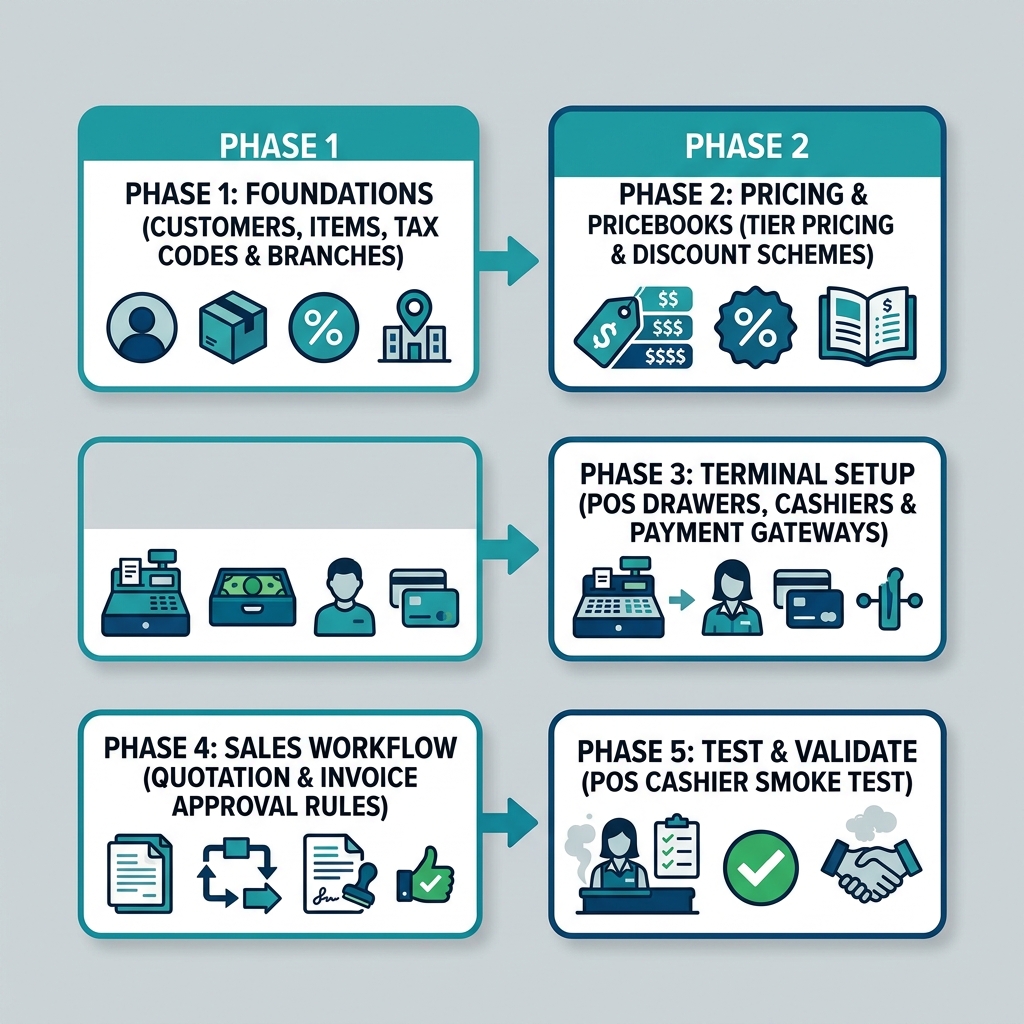
Configuring the Sales & POS Module follows a strict 5-phase dependency chain. Master data and pricing foundations must be set up before terminal operations or commercial approval rules are enabled.
Configuration Dependency Chain
Warning
Customer master profiles and inventory items must exist in Core before creating pricebooks or opening POS cashier registers. Always complete setup phases in order.
Phase 1: Master Foundations
What you are doing: Verifying company entity structures, branch locations, customer master records, and tax codes.
| Setup Task | Required Applet |
|---|---|
| Branch & Store Location Setup | Organisation Applet |
| Customer Master Records | Customer Maintenance Applet |
| Tax Code (GST/SST/VAT) Mapping | Tax / Financial Accounting Configuration |
Phase 2: Pricing & Pricebooks
What you are doing: Configuring customer-specific pricing, volume discount matrices, and retail pricebooks.
| Setup Task | Required Applet |
|---|---|
| Item Pricing & Unit Conversions | Doc Item Maintenance Applet |
| Retail & Tier Pricebooks | Pricebook Applet |
| Promotional Discounts | Pricing & Discount Configuration |
Phase 3: Terminal & Payment Setup
What you are doing: Configuring cashier registers, cash drawers, receipt templates, and payment gateways for retail stores.
| Setup Task | Required Applet |
|---|---|
| POS Terminal & Cash Drawer Mapping | POS General Applet |
| Payment Methods (Cash, Card, E-Wallet) | Financial Accounting / POS Settings |
| Cashier Shift Balancing Rules | Daily Cashier Report Applet |
Phase 4: Commercial Sales Workflow Rules
What you are doing: Defining approval rules for commercial quotations, customer credit limits, and invoicing controls.
| Setup Task | Required Applet |
|---|---|
| Quotation Templates & Approvals | Sales Quotation Applet |
| Order Credit Limit Enforcement | Sales Order Applet |
| Tax Invoice & AR Rules | Sales Invoice Applet |
Phase 5: Test & Validate (Smoke Test)
Before going live, complete these mandatory verification tests:
- POS Counter Test: Cashier logs in, scans 3 items, applies payment, and prints a test receipt.
- B2B Order Test: Create a Sales Quotation, convert to Sales Order, issue a Delivery Order, and finalize a Sales Invoice.
- Inventory Sync: Confirm stock quantities decrease accurately upon sale finalization.
- GL Reconciliation: Verify revenue and tax accounts receive appropriate credit entries in Financial Accounting.