Purchasing Module
The Purchasing Module is BigLedger’s Procurement-to-Pay (P2P) engine. It manages supplier relationships, internal departmental requisitions, formal commercial purchase orders, goods receiving, 3-way invoice matching, and Accounts Payable ledger postings.
Architecture & Data Flow
Purchasing operates between your operational procurement requirements and your core vendor financial ledgers. It ensures that every stock-in or service purchase is authorized, priced accurately, and matched before payment disbursement.
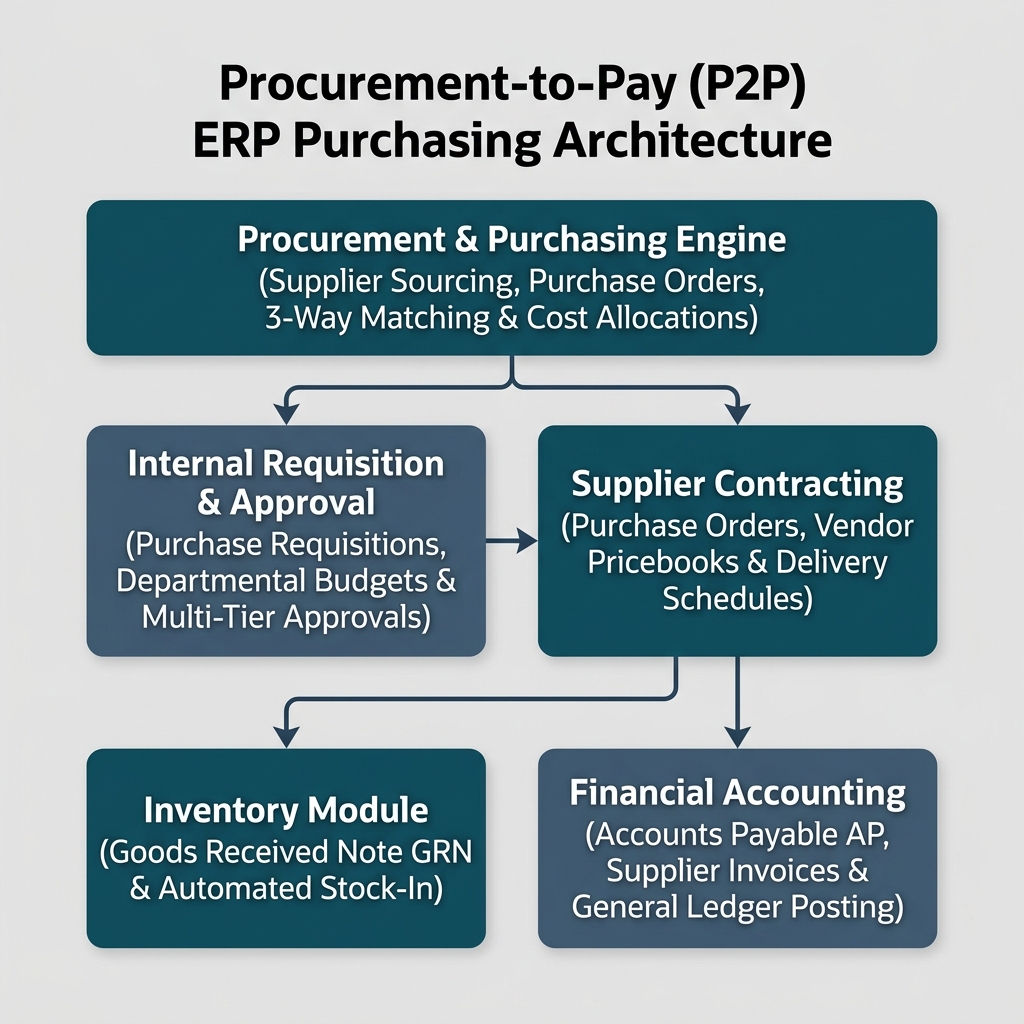
| Architecture Layer | System Component | Primary Role in Procurement |
|---|---|---|
| Procurement Engine | P2P Contract & Sourcing Engine | Central management of vendor pricebooks, purchase requisitions, approval matrices, and order commitments. |
| Warehouse Receiving | Goods Received Note GRN Applet | Physical goods receipt, quality inspection, and automated inventory stock-in. |
| Accounts Payable (AP) | Purchase Invoice Applet | Supplier billing verification, 3-way invoice matching (PO vs GRN vs Invoice), and GL liability posting. |
| Vendor Management | Supplier Maintenance Applet (Core) | Central master records for vendor profiles, payment terms, currency settings, and credit ratings. |
Who Uses This Module
| Role | Primary Responsibilities | Core Applets Used |
|---|---|---|
| Department Manager | Submit internal purchase requisitions for goods or services within operational budgets | Purchase Requisition Applet |
| Procurement Officer | Negotiate vendor pricing, issue binding purchase orders, manage supplier contracts | Purchase Order Applet |
| Warehouse Receiver | Inspect incoming supplier shipments, count physical stock, issue Goods Received Notes (GRN) | Goods Received Note GRN Applet |
| Accounts Payable Clerk | Verify vendor invoices against POs and GRNs (3-Way Matching), approve supplier payments | Purchase Invoice Applet |
| Finance Controller | Review supplier credit balances, monitor departmental budget compliance, approve disbursements | Purchase Report Applet |
Four Procurement Documents Every Team Must Differentiate
Confusing procurement document types creates inventory discrepancies and unauthorized vendor payments:
| Procurement Document | When it is used | Stock Impact | Financial Accounting Impact |
|---|---|---|---|
| Purchase Requisition | Internal departmental request asking procurement to buy goods | None | None |
| Purchase Order (PO) | Legally binding contract sent to vendor specifying items & prices | Stock Expected (Incoming P.O. quantity) | None (Commitment recorded) |
| Goods Received Note (GRN) | Receiving slip issued upon physical arrival of goods | Stock Increased (Physical stock-in) | Goods Received Not Invoiced (GRNI) Accrual |
| Purchase Invoice | Supplier’s commercial billing document demanding payment | None (if GRN already executed) | Accounts Payable Credited, GRNI Cleared / Expense Debited |
Applet Map
| Applet | What it does in this module |
|---|---|
| Purchase Requisition Applet | Internal departmental buying requests, budget checks, and pre-order approval workflows |
| Purchase Order Applet | Vendor contracting, item price enforcement, delivery scheduling, and formal PO generation |
| Goods Received Note GRN Applet | Physical warehouse stock receiving, batch/serial assignment, inspection logs, and stock-in posting |
| Purchase Credit Note Applet | Supplier billing adjustments, vendor price corrections, and accounts payable reductions |
| Purchase Return Applet | Processing rejected goods returned to suppliers, dispatch notes, and vendor debit note requests |
| Purchase Report Applet | Comprehensive procurement analytics, vendor spend tracking, delivery performance, and AP aging reports |
ERP Dependency Table
| Connected Module | What Purchasing needs from it |
|---|---|
| Core | Supplier master profiles, organization branches, chart of accounts, currency exchange rates |
| Inventory | Item SKUs, reorder point thresholds, warehouse stock locations, unit of measure conversions |
| Financial Accounting | Accounts Payable ledgers, GRNI accrual accounts, tax GL mapping (Input SST/VAT) |
| Sales & POS | Sales order back-to-back procurement demands and customer drop-ship requisitions |
Go-Live Checklist
- Supplier master records and payment terms configured in Core
- Item master data and purchasing units of measure (UOM) verified in Inventory
- Tax codes for supplier invoices (Input SST/VAT/GST) mapped to GL accounts
- Departmental Purchase Requisition approval hierarchies established
- Warehouse receiving locations and inspection workflows configured
- Accounts Payable 3-way matching tolerance thresholds defined
- Finance team aligned on Goods Received Not Invoiced (GRNI) month-end accruals
Module Learning Roadmap
Follow the documentation in this sequence to master the Purchasing Module:
- Core Concepts (Next Step) — Understand the P2P document lifecycle, 3-way matching mechanics, and GRNI accounting.
- Configuration — Step-by-step setup guides for vendor pricebooks, approval hierarchies, and receiving rules.
- Use Cases
- [Reports 3. Use Cases Analytics](reports/) — Scenario guide for choosing the best procurement and vendor reports. — Real-world reference architectures for raw material procurement, trading stock reordering, and consignment purchases.
- API Reference — Direct reference link to official developer procurement APIs.
- Related Applets — Complete guide to native applet dependencies across the BigLedger ecosystem.
Ready to explore procurement architecture?
Proceed to Core Concepts → to understand 3-way invoice matching and procurement lifecycles.
Proceed to Core Concepts → to understand 3-way invoice matching and procurement lifecycles.